Security Attributes - Web PKI
-
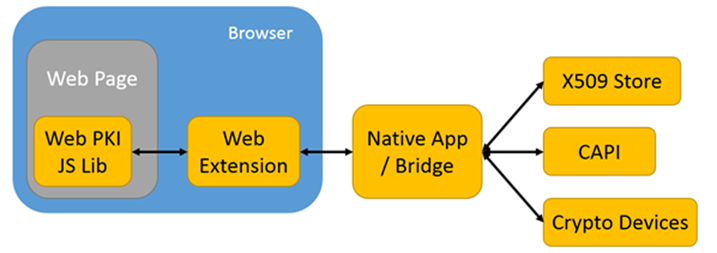
The components of the Web PKI plugin are installed only from a single, centralized location (https://get.webpkiplugin.com), served over strict HTTPS and rated "A" by SSL Labs.
-
The "Web Extension" components are submitted to the official store of each supported browser, where they are reviewed and digitally signed:
- Chrome Web Store;
- Firefox Add-ons;
- Edge Add-ons;
- Safari App Store.
-
The main source code of the "Web Extension" components is JavaScript in its original form, neither obfuscated nor minified, so that every operation can be evaluated or audited by third parties.
-
The Web PKI plugin ecosystem is developed following programming best practices, in compliance with the requirements of the official Microsoft and Apple platforms.
-
The "Native App" components installed on the user's machine are downloaded from the centralized domain and are digitally signed with an EV code signing certificate and a DigiCert timestamp valid for 10 years. As a result, the operating systems trust and authenticate the installation without any security warning.
-
The "Native App" components do not need administrator privileges to run.
-
The "Native App" components preferably access the user's certificates and keys through the operating system's standard API and certificate store, so PINs and authentication passwords do not pass through the "Native App": they are handled directly between the "Crypto Devices" and the operating system.
Extension permissions
The "Web Extension" components request the smallest set of browser permissions that lets Web PKI do its job. Every permission below is declared in the extension manifest, which ships inside the package published on each store and can be inspected by anyone.
Runtime permissions
| Permission | Why Web PKI needs it |
|---|---|
nativeMessaging | Communicate with the "Native App", the component that reaches the operating system's certificate store to list certificates and produce signatures. Without it the extension has no access to certificates at all. |
storage | Persist the user's preferences and settings, including the websites already authorized to access certificates and the PKCS#11 modules the user configured. |
downloads | Download the "Native App" installer from the extension popup and open it straight from there, so the user does not have to go looking for the file. |
tabs | Used only while the extension and the "Native App" are being installed: the extension looks for the installation page already open in the browser, so that it can be reloaded once the installation finishes. |
content_scripts.matches (http://*/*, https://*/*, with all_frames) | Run the content script on the customer web pages that use Web PKI. The page reaches the extension through this script, and the pattern cannot be narrowed because every customer serves Web PKI from their own domain. The browser stores classify this match pattern as a host permission. |
On Safari the extension does not request downloads: it is distributed as a macOS app on the App Store, which installs the "Web Extension" and the "Native App" together.
Certificate access authorization
Before a web page can list the user's certificates or read one (listCertificates, readCertificate), the extension asks the user for authorization, per website, in a dialog with the options Allow, Always allow and Deny. Always allow is stored for that domain, so the user is not asked again for that website. See the web extension 2.18.0 entry of the changelog.
Data collection declared on Firefox
Mozilla requires an extension to declare in its manifest the categories of user data it handles, and Firefox shows that declaration to the user when the extension is installed. The Web PKI extension declares the four categories below as required, under browser_specific_settings.gecko.data_collection_permissions:
| Category | What it covers |
|---|---|
browsingActivity | The hostname of the page making the request. It goes to the "Native App" together with the license, so that the license can be checked against the page's domain, and it is what identifies the website in the certificate access authorization. |
personallyIdentifyingInfo | The contents of the digital certificate handed to the page once the user authorizes that website: the holder's name, e-mail address and tax IDs (CPF, CNPJ, codice fiscale). |
locationInfo | The location fields of the certificate subject -- country, state and city -- returned with the certificate once the user authorizes that website. |
websiteContent | The data or the hash the page supplies to be signed, encrypted or sent: documents, pre-computed digests and the requests themselves. |
What the extension does not do
The "Web Extension" components perform no tracking, profiling or analytics, request no access to browsing history, cookies, bookmarks or the clipboard, and do not intercept network requests. They also load no remote code: every script that runs is the one shipped in the package reviewed and signed by the store.