Logs - Web PKI
The Web PKI is able to write logs on both browser component and native app.
Enable browser console logs
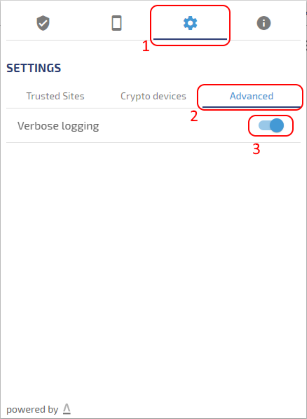
In order to write verbose logging to the Web page console on the browser and to the native app, click the web-extension button and then select
Settings > Advanced > Verbose logging
Native app logs
Windows
On Windows, the log file is placed on:
%LOCALAPPDATA%\Lacuna Software\WebPKIForChrome.log
Note: %LOCALAPPDATA% is a shortcut for the current user app data directotry.
Mac
On Mac, the log file is placed on:
~/.lacuna-webpki/WebPkiCore.log
Note: ~ is a terminal shortcut for the current user home directory.
Linux
On Linux, the log file is placed on:
~/.lacuna-webpki/WebPkiCore.log
Note: ~ is a terminal shortcut for the current user home directory.