# Lacuna Software documentation: Web PKI
> Lacuna Web PKI lets web applications use digital certificates through JavaScript: list certificates, read their properties and encoding, and sign data.
Index: https://docs.lacunasoftware.com/en-us/articles/web-pki/llms.txt
# [Web PKI quick reference](https://docs.lacunasoftware.com/en-us/articles/web-pki/quick-reference)
The essentials of Web PKI on one page, with links to the full articles.
## What it is for
Web PKI lets web applications use the certificates on the user's computer through JavaScript: list them, read their properties and binary encoding, and sign data or a pre-computed digest with them.
Its main job is the client-side part of a signature: a server-side SDK prepares the bytes to sign and assembles the signed file, because `signData` and `signHash` return only the raw output of the signature algorithm. If you already have a crypto SDK or write the backend yourself, Web PKI alone covers the frontend part.
| Choose instead | When it fits better |
| --- | --- |
| [Rest PKI](https://docs.lacunasoftware.com/en-us/articles/rest-pki/quick-reference) (legacy) | Your backend already uses Rest PKI at pki.rest: its documentation shows Rest PKI and Web PKI integrated. |
| [Rest PKI Core](https://docs.lacunasoftware.com/en-us/articles/rest-pki/core/quick-reference) | The PKI guide recommends Rest PKI Core with Web PKI for web remote signatures from any language: Web PKI signs on your own page, or your application creates a signature session and Rest PKI Core hosts the signing page, where users sign through Web PKI or with cloud certificates. |
| [PKI SDK](https://docs.lacunasoftware.com/en-us/articles/pki-sdk/quick-reference) | Your backend is .NET: PKI SDK does the server side of web remote signatures, with Web PKI in the browser. |
| [PKI Express](https://docs.lacunasoftware.com/en-us/articles/pki-express/quick-reference) | Your backend runs on Windows or Linux in virtually any language: PKI Express signs on the server, and its samples use Web PKI in the browser. |
| [Signer](https://docs.lacunasoftware.com/en-us/articles/signer/quick-reference) | You need a complete document and signature manager rather than a component; its embedded signature widget needs a Web PKI license for your page's domain. |
## Install
| Language | Package | Current major | Registry |
| --- | --- | --- | --- |
| JavaScript / TypeScript (npm) | `web-pki` | 2 (latest 2.19.0) | https://www.npmjs.com/package/web-pki |
| Script tag (CDN) | `lacuna-web-pki-2.19.0.min.js` | 2 | https://cdn.lacunasoftware.com/libs/web-pki/lacuna-web-pki-2.19.0.min.js |
```html
```
```bash
npm install web-pki --save
```
With npm, import the class as the Angular sample does:
```javascript
import LacunaWebPKI from 'web-pki';
```
Web PKI also needs its components on the user's computer: when they are missing or outdated, or the browser is not supported, `init()` sends the user to the installation page, which returns to your page when done.
The components update themselves; update the JavaScript library in your application regularly, as updates are backward compatible.
See [Browser support](https://docs.lacunasoftware.com/en-us/articles/web-pki/browser-support) and, for Windows networks, [distribution through GPO](https://docs.lacunasoftware.com/en-us/articles/web-pki/installation-webpki-gpo).
## Configuration and authentication
Web PKI runs in the user's browser: there is no API key. Outside localhost, your page needs a **license** bound to its domains, passed to the `LacunaWebPKI` constructor in binary or JSON format.
```javascript
var webPkiLicense = 'ASYAanNma...Q==';
var pki = new LacunaWebPKI(webPkiLicense);
```
- No license is needed on localhost (any port), nor with Rest PKI on cloud, even in production.
- The JSON license lists `allowedDomains` and `homologDomains` (staging); the latter include the private IP ranges 10.x, 127.x, 172.16–172.31 and 192.168.x. Use the whole license: the `signature` field alone is not a license. See [Licensing](https://docs.lacunasoftware.com/en-us/articles/web-pki/licensing).
- To get a license, [contact Lacuna](https://www.lacunasoftware.com/en/home/purchase); PKI SDK licenses usually come with a Web PKI license.
The `init()` arguments a client sets:
| Argument | Purpose | Article |
| --- | --- | --- |
| `ready` | Callback run when the component is ready | [Get started](https://docs.lacunasoftware.com/en-us/articles/web-pki/get-started) |
| `license` | The license, when not passed to the constructor | [Licensing](https://docs.lacunasoftware.com/en-us/articles/web-pki/licensing) |
| `defaultFail` | Fail callback for every call without its own | [Default fail callback](https://docs.lacunasoftware.com/en-us/articles/web-pki/default-error-callback) |
| `notInstalled` | Replaces the redirect to the installation page | [Not installed](https://docs.lacunasoftware.com/en-us/articles/web-pki/customizing-not-installed) |
| `restPkiUrl` | Your Rest PKI instance, when it is not the standard https://pki.rest | [Custom Rest PKI URL](https://docs.lacunasoftware.com/en-us/articles/web-pki/customizing-restpki-url) |
| `requiredApiVersion` | API feature set the page needs (default API 1.3), avoiding needless updates | [API versions](https://docs.lacunasoftware.com/en-us/articles/web-pki/api-reference/versions) |
| `brand` | Customized installation page | [Customized installation page](https://docs.lacunasoftware.com/en-us/articles/web-pki/brand) |
| `angularScope`, `ngZone` | Runs callbacks inside AngularJS or Angular cycles | [Callbacks and Angular](https://docs.lacunasoftware.com/en-us/articles/web-pki/angularjs) |
With Rest PKI, Web PKI talks to the Rest PKI instance directly, by default through `https://restpki.lacunasoftware.com/`, an alternative URL of the cloud service at https://pki.rest that firewalls are less likely to block.
## Core operations
All methods are asynchronous: they return a `Promise` on which you register `success()` and `fail()` callbacks ([Asynchronous calls](https://docs.lacunasoftware.com/en-us/articles/web-pki/async)). The [API reference](https://docs.lacunasoftware.com/en-us/articles/web-pki/api-reference) has every method, including those not shown here, such as `sendAuthenticatedRequest()` for [authenticated requests](https://docs.lacunasoftware.com/en-us/articles/web-pki/auth-request) with the user's certificate over mutual SSL/TLS.
### Initialize the component
Create a `LacunaWebPKI` and call `init()` before any other method; your `ready` callback runs once the component is ready. See [Get started](https://docs.lacunasoftware.com/en-us/articles/web-pki/get-started).
```javascript
var pki = new LacunaWebPKI();
pki.init({
ready: onWebPkiReady,
defaultFail: onWebPkiFail
});
```
### List the user's certificates
`listCertificates()` returns the certificates sorted by `subjectName`, each with properties such as `thumbprint`, `subjectName`, `issuerName` and `validityEnd`; with `selectId` it fills a select element. See [Customizing certificate selection](https://docs.lacunasoftware.com/en-us/articles/web-pki/cert-select) and [Certificate properties](https://docs.lacunasoftware.com/en-us/articles/web-pki/cert-properties).
Show all certificates and [pre-validate the selected one](https://docs.lacunasoftware.com/en-us/articles/web-pki/cert-validation) rather than using [filters](https://docs.lacunasoftware.com/en-us/articles/web-pki/filters), which the docs advise against.
```javascript
pki.listCertificates({
selectId: 'certificateSelect',
selectOptionFormatter: getCertText
});
function getCertText(cert) {
return cert.subjectName + ' (issued by ' + cert.issuerName + ')';
}
```
### Read a certificate
`readCertificate()` returns the certificate's encoding in Base64, which you send to your backend when it starts a remote signature. See [Get started](https://docs.lacunasoftware.com/en-us/articles/web-pki/get-started).
Pass `{ thumbprint }`: the library also accepts the thumbprint string, as the Java sample does, but the TypeScript typings (`lacuna-web-pki.d.ts`) accept only the object.
```javascript
pki.readCertificate({ thumbprint: selectedCertThumbprint }).success(function (certEncoding) {
// certEncoding contains the certificate's encoding (in Base64)
});
```
### Sign data
`signData()` signs Base64-encoded bytes with the selected certificate's private key and returns the signature in Base64. See [signData and signHash](https://docs.lacunasoftware.com/en-us/articles/web-pki/faq/sign-data-vs-hash).
```javascript
pki.signData({
thumbprint: '...', // as returned by the listCertificates method
data: '...', // bytes encoded in Base64 (typically given by server)
digestAlgorithm: '...' // for instance 'SHA-256' (typically given by server)
}).success(function (signature) {
// signature contains the result of the signature operation (encoded in Base64)
});
```
### Sign a hash from your backend
`signHash()` signs the digest that your server-side SDK returns when it starts a remote signature (PKI Express, PKI SDK, Rest PKI Core); your backend then completes the signature with the result. See [Web remote signatures](https://docs.lacunasoftware.com/en-us/articles/pki-guide/web-signatures/remote).
```javascript
pki.signHash({
thumbprint: formElements.certThumbField.val(),
hash: formElements.toSignHashField.val(),
digestAlgorithm: formElements.digestAlgorithmField.val()
}).success(function (signature) {
// Fill the "signature" field, needed on server-side to complete the signature.
formElements.signatureField.val(signature);
formElements.form.submit();
});
```
### Sign with Rest PKI
`signWithRestPki()` takes the token your backend got from Rest PKI and the certificate thumbprint; Web PKI exchanges the signature data with Rest PKI directly, and your backend then finishes the signature. See [Rest PKI](https://docs.lacunasoftware.com/en-us/articles/rest-pki/quick-reference).
```javascript
pki.signWithRestPki({
token: formElements.token,
thumbprint: selectedCertThumbprint
}).success(function () {
// Once the operation is completed, we submit the form.
formElements.form.submit();
});
```
### Sign a local PDF
`signPdf()` signs a PDF on the user's computer, with nothing sent to a server; pick the file with `showFileBrowser()`. Local signatures need the local signature extension ([contact Lacuna](https://www.lacunasoftware.com/en/home/purchase)) and run only on Windows. See [Web local signatures](https://docs.lacunasoftware.com/en-us/articles/pki-guide/web-signatures/local).
```javascript
pki.signPdf({
fileId: file.id,
output: { mode: 'autoSave', fileNameSuffix: '-signed' },
certificateThumbprint: $('#certificateSelect').val(),
policy: 'basic',
trustArbitrators: [pki.standardTrustArbitrators.pkiBrazil]
}).success(function (result) {
// result.isValid, result.signatureInfo
});
```
## Errors
A failed call runs its `fail()` callback, or the `defaultFail` set in `init()`; with neither, an exception is thrown. The callback receives an `ExceptionModel` with `userMessage` (for the user), `code`, `error`, `origin` and `message`. See [Default fail callback](https://docs.lacunasoftware.com/en-us/articles/web-pki/default-error-callback).
- **Component missing or outdated, or browser not supported**: not an error code. `init()` redirects to the installation page, or calls your `notInstalled(status, message)` with `NOT_INSTALLED`, `OUTDATED` or `BROWSER_NOT_SUPPORTED`. See [Not installed](https://docs.lacunasoftware.com/en-us/articles/web-pki/customizing-not-installed).
- **Error codes**: `code` tells which error occurred, and [Default fail callback](https://docs.lacunasoftware.com/en-us/articles/web-pki/default-error-callback#error-codes) describes each one. On `license_not_set`, `license_invalid`, `license_expired`, `license_domain_not_allowed` and `license_restricted`, check the license against [Licensing](https://docs.lacunasoftware.com/en-us/articles/web-pki/licensing); other common codes are `user_cancelled` (the user cancelled the operation) and `certificate_not_found` (the certificate is not in the user's store or crypto device).
- **"Could not get pending signature"** with `signWithRestPki()`: Web PKI cannot talk to the Rest PKI instance, which is common with on-premises instances; first check that the user's computer can access it. See [the troubleshooting article](https://docs.lacunasoftware.com/en-us/articles/rest-pki/troubleshoot/could-not-get-pending-sig).
TODO(docs): 13 error codes have no description, in the docs or in the library's typings: `algorithm_not_supported`, `signed_pdf_to_mark`, `json_error`, `io_error`, `keychain_error`, `keychain_sign_error`, `decode_error`, `csp_invalid_algorithm`, `csp_invalid_provider_type`, `mobile_not_authorized`, `command_decrypt_error`, `blocked_domain` and `invalid_operation`.
## Test certificates and credentials
- Use the Lacuna Test PKI certificates from [Test certificates](https://docs.lacunasoftware.com/en-us/articles/pki-guide/test-certs#web-pki); never trust that PKI in production.
- To try Web PKI on Windows, you need a certificate in the Windows certificate store: `certmgr.msc` should show one under **Personal** with its private key. To use a test certificate, import its PKCS #12 file (password `1234`) into that store.
- No license is needed on localhost, and staging hosts on private IPs are covered by the license's `homologDomains`.
- With Rest PKI, trust the test PKI through the security context ID given on the Test certificates page; for local signatures, add the test root, Lacuna Root Test v3, as a `trustedRoot` trust arbitrator (development only). The .NET sample does this with an older root, Lacuna Root Test v1, which expired in January 2025 and does not accept the current test certificates.
TODO(docs): how to install the test PKCS #12 files so that Web PKI lists them on Linux and macOS.
## Try it
Run the Web PKI demos, or the samples in your language:
**Demos and samples**
- Live demo: [Your certificates in the browser](https://try.lacunasoftware.com/en/web-pki/certificates-in-the-browser)
- Live demo: [Sign a file with your certificate](https://try.lacunasoftware.com/en/pki-suite/sign-a-file)
- Sign a local PDF in the browser with Web PKI: [.NET](https://github.com/LacunaSoftware/PkiSuiteSamples/blob/master/dotnet/mvc/PkiSuiteAspNetMvcSample/Controllers/PadesSignatureWebController.cs)
- Sign a local file with CAdES in the browser using Web PKI: [.NET](https://github.com/LacunaSoftware/PkiSuiteSamples/blob/master/dotnet/mvc/PkiSuiteAspNetMvcSample/Controllers/CadesSignatureWebController.cs)
- List the user's certificates with Web PKI: [.NET](https://github.com/LacunaSoftware/PkiSuiteSamples/blob/master/dotnet/mvc/PkiSuiteAspNetMvcSample/Controllers/ListCertJQueryController.cs) · [Java](https://github.com/LacunaSoftware/PkiSuiteSamples/blob/master/java/springmvc/src/main/java/com/lacunasoftware/pkisuite/controller/ListCertJQueryController.java) · [Node.js](https://github.com/LacunaSoftware/PkiSuiteSamples/blob/master/nodejs/expressmvc/routes/list-cert-jquery.js) · [Python](https://github.com/LacunaSoftware/PkiSuiteSamples/blob/master/python/flask/sample/views/list_cert_jquery.py) · [Ruby](https://github.com/LacunaSoftware/PkiSuiteSamples/blob/master/ruby/rails/app/controllers/list_cert_jquery_controller.rb)
- Read a certificate's details with Web PKI: [.NET](https://github.com/LacunaSoftware/PkiSuiteSamples/blob/master/dotnet/mvc/PkiSuiteAspNetMvcSample/Controllers/ReadCertJQueryController.cs) · [Java](https://github.com/LacunaSoftware/PkiSuiteSamples/blob/master/java/springmvc/src/main/java/com/lacunasoftware/pkisuite/controller/ReadCertJQueryController.java) · [Node.js](https://github.com/LacunaSoftware/PkiSuiteSamples/blob/master/nodejs/expressmvc/routes/read-cert-jquery.js) · [Python](https://github.com/LacunaSoftware/PkiSuiteSamples/blob/master/python/flask/sample/views/read_cert_jquery.py) · [Ruby](https://github.com/LacunaSoftware/PkiSuiteSamples/blob/master/ruby/rails/app/controllers/read_cert_jquery_controller.rb)
- Sign data with RSA in the browser using Web PKI: [.NET](https://github.com/LacunaSoftware/PkiSuiteSamples/blob/master/dotnet/mvc/PkiSuiteAspNetMvcSample/Controllers/RSAWebController.cs) · [Java](https://github.com/LacunaSoftware/PkiSuiteSamples/blob/master/java/springmvc/src/main/java/com/lacunasoftware/pkisuite/controller/RSAWebController.java) · [Node.js](https://github.com/LacunaSoftware/PkiSuiteSamples/blob/master/nodejs/expressmvc/routes/rsa-web.js) · [Python](https://github.com/LacunaSoftware/PkiSuiteSamples/blob/master/python/flask/sample/views/rsa_web.py) · [Ruby](https://github.com/LacunaSoftware/PkiSuiteSamples/blob/master/ruby/rails/app/controllers/rsa_web_controller.rb)
# [Lacuna Web PKI](https://docs.lacunasoftware.com/en-us/articles/web-pki)
The Lacuna Web PKI component enables web applications to interact with digital certificates through javascript.
> **Tip**
>
> Web PKI is part of our line of public key infrastructure (PKI) solutions. We encourage you to check out the
> [PKI Solutions Guide](https://docs.lacunasoftware.com/en-us/articles/pki-guide) to make sure this is the right product for your case.
The main features are:
* Displaying available certificates (either software- or hardware-based)
* Obtaining public properties of certificates (name, email address, etc.)
* Reading a certificate's binary encoding
* Signing data (or a pre-computed digest) with a certificate
The Web PKI component's main goal is to perform the client-side processing necessary for operations with digital certificates. An example would be performing digital signatures in a
[web remote signature](https://docs.lacunasoftware.com/en-us/articles/pki-guide/web-signatures/remote) using a server-side SDK (*Software Development Kit*):
| | Client-side (Lacuna Web PKI) | Server-side (SDK on server) |
| - | -------------------------------------------------------------------------------------- | ----------------------------------------------------------------------------------------------------------------------------------------------- |
| 1 | Retrieve the certificate's binary encoding and submit to the server | Prepare the signature, preparing the actual bytes that will serve as input to the signature algorithm ("to-sign-bytes" or "signed attributes") |
| 2 | Sign the "to-sign-bytes" using a signature algorithm and send the output to the server | Assemble the signature package -- either a signed PDF, a CMS envelope (PKCS#7) or a XmlDSig node, depending on the kind of signature being done |
> **Note**
>
> If you don't have a server-side SDK to perform the server-side processing, you can use the [Lacuna PKI SDK](https://docs.lacunasoftware.com/en-us/articles/pki-sdk).
> [Contact us](https://www.lacunasoftware.com/en/home/purchase) for licensing information.
See the article [Get started](https://docs.lacunasoftware.com/en-us/articles/web-pki/get-started) to start using Web PKI.
# [Web PKI - Frequently Asked Questions](https://docs.lacunasoftware.com/en-us/articles/web-pki/faq)
Here you'll find answers to the most common questions on how to use the [Web PKI](https://docs.lacunasoftware.com/en-us/articles/web-pki) component.
> **Tip**
>
> This FAQ is targeted for **software developers**. If you are an end-user having trouble using
> one of our products, please go to our [Support Center](http://lacuna.help/) instead.
Questions:
* [What is the difference between the functions signData and signHash?](https://docs.lacunasoftware.com/en-us/articles/web-pki/faq/sign-data-vs-hash)
* [What is the signature format outputted by the functions signData and signHash?](https://docs.lacunasoftware.com/en-us/articles/web-pki/faq/sign-data-output)
* [How can I perform a digital signature with Web PKI?](https://docs.lacunasoftware.com/en-us/articles/web-pki/faq/digital-signature)
* [Does Web PKI support establishing SSL connections with the user's certificate?](https://docs.lacunasoftware.com/en-us/articles/web-pki/faq/ssl)
# [How can I perform a digital signature with Web PKI?](https://docs.lacunasoftware.com/en-us/articles/web-pki/faq/digital-signature)
See article [Web signatures](https://docs.lacunasoftware.com/en-us/articles/pki-guide/web-signatures).
**Demos and samples**
- Live demo: [Sign a file with your certificate](https://try.lacunasoftware.com/en/pki-suite/sign-a-file)
- Sign a local PDF in the browser with Web PKI: [.NET](https://github.com/LacunaSoftware/PkiSuiteSamples/blob/master/dotnet/mvc/PkiSuiteAspNetMvcSample/Controllers/PadesSignatureWebController.cs)
- Sign a local file with CAdES in the browser using Web PKI: [.NET](https://github.com/LacunaSoftware/PkiSuiteSamples/blob/master/dotnet/mvc/PkiSuiteAspNetMvcSample/Controllers/CadesSignatureWebController.cs)
# [What is the signature format outputted by the functions signData and signHash?](https://docs.lacunasoftware.com/en-us/articles/web-pki/faq/sign-data-output)
The functions `signData` and `signHash` perform a *digital signature* ***algorithm*** using the private key of one of the
user's certificates. Therefore, their output is the raw output of the algorithm, encoded in Base64. In the most common case
of an RSA algorithm using a 2048-bit key, the output is 256 bytes long (344 characters in Base64).
This question normally arises from the confusion between a *digital signature*, such as CMS/CAdES, XmlDSig/XAdES and PAdES,
and a *digital signature* ***algorithm***, such as RSA. Usually, digital signature algorithms are a small part of the
implementation of digital signatures. The `signData` and `signHash` perform only the algorithm, not the entire digital
signature.
Please see the FAQ [How can I perform a digital signature with Web PKI?](https://docs.lacunasoftware.com/en-us/articles/web-pki/faq/digital-signature) for information on how to use
Web PKI to perform digital signatures.
# [What is the difference between the functions signData and signHash?](https://docs.lacunasoftware.com/en-us/articles/web-pki/faq/sign-data-vs-hash)
Both functions -- `signData` and `signHash` -- run a digital signature algorithm with the private key of
one of the certificates on the user's computer. To understand the difference between the two functions, we need to talk
briefly about the details of a signature algorithm.
> **Note**
>
> The term *digital signature* ***algorithm*** should not be confused with *digital signature*. Read more about
> this subject in the article [Digital signatures](https://docs.lacunasoftware.com/en-us/articles/pki-guide/signatures).
The RSA algorithm, broadly speaking, has 4 steps:
1. Computing the hash of the bytes to be signed
1. Encoding the [DigestInfo](https://tools.ietf.org/html/rfc2313#section-10.1.2) structure, which contains the hash and the OID of the hash algorithm used to produce it
1. *Padding* the encoded DigestInfo
1. A mathematical operation on the encoded and *padded* DigestInfo
> **Note**
>
> The hash computed in the first step is usually **not the hash of the document being signed**. In the CMS/CAdES, PAdES and XmlDSig/XAdES signature schemes,
> the bytes used as input to the signature algorithm are the encoding of the "signed attributes", a
> structure that contains various data, among them the document hash.
The `signData` function takes the *to-sign-data* as input and performs all the steps on it, while the `signHash` function takes the *to-sign-hash*, that is, the precomputed hash of the *to-sign-data*, and performs on it
only the second step onwards.
Both functions can be used to implement [web remote signatures](https://docs.lacunasoftware.com/en-us/articles/pki-guide/web-signatures/remote)
regardless of the signature scheme (CAdES, PAdES, etc.) being used. Which function to use
depends on the *output* of the backend code at the end of the remote signature "preparation". If it produces a *to-sign-data*, use the `signData` function. If it produces a *to-sign-hash*, use the `signHash` function.
**Demos and samples**
- Sign data with RSA in the browser using Web PKI: [.NET](https://github.com/LacunaSoftware/PkiSuiteSamples/blob/master/dotnet/mvc/PkiSuiteAspNetMvcSample/Controllers/RSAWebController.cs) · [Java](https://github.com/LacunaSoftware/PkiSuiteSamples/blob/master/java/springmvc/src/main/java/com/lacunasoftware/pkisuite/controller/RSAWebController.java) · [Node.js](https://github.com/LacunaSoftware/PkiSuiteSamples/blob/master/nodejs/expressmvc/routes/rsa-web.js) · [Python](https://github.com/LacunaSoftware/PkiSuiteSamples/blob/master/python/flask/sample/views/rsa_web.py) · [Ruby](https://github.com/LacunaSoftware/PkiSuiteSamples/blob/master/ruby/rails/app/controllers/rsa_web_controller.rb)
# [Does Web PKI support establishing SSL connections with the user's certificate?](https://docs.lacunasoftware.com/en-us/articles/web-pki/faq/ssl)
Yes. Since [API 1.4](https://docs.lacunasoftware.com/en-us/articles/web-pki/api-reference/versions#v1-4), the `sendAuthenticatedRequest()` method sends web requests authenticated
with the user's certificate through mutual SSL/TLS, from the user's computer. See [Authenticated request](https://docs.lacunasoftware.com/en-us/articles/web-pki/auth-request).
To transmit an NFe, however, you usually do not need the user's certificate, as explained below.
## (or How do I to transmit a NFe to Receita/SEFAZ/prefeitura?)
Currently, it is common to use the same certificate to issue an electronic invoice and transmit it to the competent agency
(transmission is via SSL with mutual authentication). The predominance of this architecture comes from the fact
that the first electronic invoice signature products were mostly desktop applications. In a web system, you have to deal with
the problem that the client certificate is not available on the backend.
To solve the problem of signing NFe in the browser, the Web PKI component fits perfectly (see the
[online example](https://www.lacunasoftware.com/en/DemoRestPKI/nfeSignature)). In the case of transmission, it is not
necessary to use the same certificate used to issue the electronic invoice. The national standard allows a certificate issued
to a company other than the company that issued the electronic invoice to be used for transmission.
This enables **the transmission to be done on the backend using an A1 certificate issued on behalf of the company offering the electronic invoice web signing service (your company), rather than using the NFe issuing company certificate (your client)**. This avoids the problem of transmitting the electronic invoice with a certificate available only on the frontend.
# [Web PKI API](https://docs.lacunasoftware.com/en-us/articles/web-pki/api-reference)
## API Reference
See the [API Reference](https://docs.lacunasoftware.com/content/typedocs/web-pki/classes/_lacuna_web_pki_d_.lacunawebpki.html) for detailed documentation about each method.
## See also
[Api Versions](https://docs.lacunasoftware.com/en-us/articles/web-pki/api-reference/versions)
# [API Versions](https://docs.lacunasoftware.com/en-us/articles/web-pki/api-reference/versions)
The Web PKI provides an API version requirement parameter, in case the developer intends to use a specific feature set and avoid any unnecessary update on the user Web PKI components.
In order to do so, use the `requiredApiVersion` parameter on [`init()`](https://docs.lacunasoftware.com/content/typedocs/web-pki/classes/_lacuna_web_pki_d_.lacunawebpki.html#init) method, e.g.:
```js
pki.init({
ready: onWebPkiReady,
requiredApiVersion: pki.apiVersions.v1_2
});
```
In the example above, we defined that we are going to use the feature set of [API 1.2](https://docs.lacunasoftware.com/en-us/articles/web-pki/api-reference/versions#v1-2) (and lower), thus any Web PKI component update will only be required for users with lower versions than the ones defined by [API 1.2](https://docs.lacunasoftware.com/en-us/articles/web-pki/api-reference/versions#v1-2).
No unnecessary update will be required for users with satisfying versions, even though it is not the latest one.
If the parameter is not set, the default requested version is [API 1.3](https://docs.lacunasoftware.com/en-us/articles/web-pki/api-reference/versions#v1-3).
## API changelog
### 1.8.2 (2023-11-23)
Since lib [2.16.3](https://docs.lacunasoftware.com/en-us/articles/web-pki/update)
- Improve method [`importCertificate`](https://docs.lacunasoftware.com/content/typedocs/web-pki/classes/_lacuna_web_pki_d_.lacunawebpki.html#importcertificate) supporting multiple calls
### 1.8.1 (2022-12-17)
- Add methods [encrypt](https://docs.lacunasoftware.com/content/typedocs/web-pki/classes/_lacuna_web_pki_d_.lacunawebpki.html#encrypt) and [decrypt](https://docs.lacunasoftware.com/content/typedocs/web-pki/classes/_lacuna_web_pki_d_.lacunawebpki.html#decrypt)
- Add Extended Key Usage info to [CertificateModel](https://docs.lacunasoftware.com/content/typedocs/web-pki/interfaces/_lacuna_web_pki_d_.certificatemodel.html)
- Add parameter `nonExportableKey` on method [generateSoftwareRsaKeyPair](https://docs.lacunasoftware.com/content/typedocs/web-pki/classes/_lacuna_web_pki_d_.lacunawebpki.html#generatesoftwarersakeypair)
### 1.7.2 (2022-07-03)
- Add support to unrestricted size native responses
- Add [CertificateModel](https://docs.lacunasoftware.com/content/typedocs/web-pki/interfaces/_lacuna_web_pki_d_.certificatemodel.html) international PKI fields: [`PkiArgentinaModel`](https://docs.lacunasoftware.com/content/typedocs/web-pki/interfaces/_lacuna_web_pki_d_.pkiargentinamodel.html), [`PkiEcuadorModel`](https://docs.lacunasoftware.com/content/typedocs/web-pki/interfaces/_lacuna_web_pki_d_.pkiecuadormodel.html), [`PkiParaguayModel`](https://docs.lacunasoftware.com/content/typedocs/web-pki/interfaces/_lacuna_web_pki_d_.pkiparaguaymodel.html), [`PkiPeruModel`](https://docs.lacunasoftware.com/content/typedocs/web-pki/interfaces/_lacuna_web_pki_d_.pkiperumodel.html)
- Add [CertificateModel](https://docs.lacunasoftware.com/content/typedocs/web-pki/interfaces/_lacuna_web_pki_d_.certificatemodel.html) fields: `certificatePolicies`, `subjectDN`, `issuerDN`
### 1.6.1 (2020-05-23)
- Add [`downloadToFolder`](https://docs.lacunasoftware.com/content/typedocs/web-pki/classes/_lacuna_web_pki_d_.lacunawebpki.html#downloadtofolder)* command with TLS 1.2 forced support
### 1.6 (2019-10-13)
- Add methods [`keySignData`](https://docs.lacunasoftware.com/content/typedocs/web-pki/classes/_lacuna_web_pki_d_.lacunawebpki.html#keysigndata) and [`keySignHash`](https://docs.lacunasoftware.com/content/typedocs/web-pki/classes/_lacuna_web_pki_d_.lacunawebpki.html#keysignhash) for signing with a generated private key Id.
- Add `privateKeyId` parameter to the generate key pair response: [`GenerateKeyPairResponse`](https://docs.lacunasoftware.com/content/typedocs/web-pki/interfaces/_lacuna_web_pki_d_.generatekeypairresponse.html)
- Fix bug on [`sendAuthenticatedRequest`](https://docs.lacunasoftware.com/content/typedocs/web-pki/classes/_lacuna_web_pki_d_.lacunawebpki.html#sendauthenticatedrequest) response payload when it comes without content length header property.
### 1.5.2 (2019-07-19)
- Add option for returning the signed document content on local signature commands without the 1MB size limit: [`returnContent`](https://docs.lacunasoftware.com/content/typedocs/web-pki/enums/_lacuna_web_pki_d_.lacunawebpki.outputmodes.html#returncontent)
- Add certificate validation levels on local signature commands: [`CertificateValidationLevels`](https://docs.lacunasoftware.com/content/typedocs/web-pki/enums/_lacuna_web_pki_d_.lacunawebpki.certificatevalidationlevels.html)
- Add vertical and horizontal direction control on PAdES (PDF) visual representation: [`PadesVisualAutoPositioning`](https://docs.lacunasoftware.com/content/typedocs/web-pki/interfaces/_lacuna_web_pki_d_.padesvisualautopositioning.html)
- Add native app life cycle control on `init` method: [`useDomainNativePool`](https://docs.lacunasoftware.com/content/typedocs/web-pki/classes/_lacuna_web_pki_d_.lacunawebpki.html#init)
### 1.5 (2018-11-27)
- Add more efficient batch signature command: [`signHashBatch`](https://docs.lacunasoftware.com/content/typedocs/web-pki/classes/_lacuna_web_pki_d_.lacunawebpki.html#signhashbatch)
- Add license v3
- Add mobile integration
### 1.4.1 (2018-06-15)
- Fix [`sendAuthenticatedRequest`](https://docs.lacunasoftware.com/content/typedocs/web-pki/classes/_lacuna_web_pki_d_.lacunawebpki.html#sendauthenticatedrequest)* empty buffer bug
### 1.4 (2018-02-23)
- Add XML local signature features:
- [`signFullXml`](https://docs.lacunasoftware.com/content/typedocs/web-pki/classes/_lacuna_web_pki_d_.lacunawebpki.html#signfullxml)*
- [`signXmlElement`](https://docs.lacunasoftware.com/content/typedocs/web-pki/classes/_lacuna_web_pki_d_.lacunawebpki.html#signxmlelement)*
- [`openXmlSignature`](https://docs.lacunasoftware.com/content/typedocs/web-pki/classes/_lacuna_web_pki_d_.lacunawebpki.html#openxmlsignature)*
- Add authenticated request feature:
- [`sendAuthenticatedRequest`](https://docs.lacunasoftware.com/content/typedocs/web-pki/classes/_lacuna_web_pki_d_.lacunawebpki.html#sendauthenticatedrequest)*
- Add user error message field on exception object:
- [`userMessage`](https://docs.lacunasoftware.com/content/typedocs/web-pki/interfaces/_lacuna_web_pki_d_.exceptionmodel.html#usermessage)
### 1.3 (2017-11-10)
- Add improved error handler with exception model
- [`fail`](https://docs.lacunasoftware.com/content/typedocs/web-pki/interfaces/_lacuna_web_pki_d_.promise.html#fail)
### 1.2 (2017-06-19)
- Add local store and PKCS#11 certificate generation features:
- [`generateSoftwareRsaKeyPair`](https://docs.lacunasoftware.com/content/typedocs/web-pki/classes/_lacuna_web_pki_d_.lacunawebpki.html#generatesoftwarersakeypair)
- [`importCertificate`](https://docs.lacunasoftware.com/content/typedocs/web-pki/classes/_lacuna_web_pki_d_.lacunawebpki.html#importcertificate)
- [`listTokens`](https://docs.lacunasoftware.com/content/typedocs/web-pki/classes/_lacuna_web_pki_d_.lacunawebpki.html#listtokens)
- [`generateTokenRsaKeyPair`](https://docs.lacunasoftware.com/content/typedocs/web-pki/classes/_lacuna_web_pki_d_.lacunawebpki.html#generatetokenrsakeypair)
- [`importTokenCertificate`](https://docs.lacunasoftware.com/content/typedocs/web-pki/classes/_lacuna_web_pki_d_.lacunawebpki.html#importtokencertificate)
### 1.1 (2016-08-19)
- Add license v2
- Add local signature features:
- [`showFileBrowser`](https://docs.lacunasoftware.com/content/typedocs/web-pki/classes/_lacuna_web_pki_d_.lacunawebpki.html#showfilebrowser)*
- [`openFile`](https://docs.lacunasoftware.com/content/typedocs/web-pki/classes/_lacuna_web_pki_d_.lacunawebpki.html#openfile)*
- Add PAdES local signature features:
- [`signPdf`](https://docs.lacunasoftware.com/content/typedocs/web-pki/classes/_lacuna_web_pki_d_.lacunawebpki.html#signpdf)*
- [`openPades`](https://docs.lacunasoftware.com/content/typedocs/web-pki/classes/_lacuna_web_pki_d_.lacunawebpki.html#openpades)*
- Add CAdES local signature features:
- [`signCades`](https://docs.lacunasoftware.com/content/typedocs/web-pki/classes/_lacuna_web_pki_d_.lacunawebpki.html#signcades)*
- [`openCades`](https://docs.lacunasoftware.com/content/typedocs/web-pki/classes/_lacuna_web_pki_d_.lacunawebpki.html#opencades)*
### 1.0 (2015-04-28)
- Add basic features:
- [`init`](https://docs.lacunasoftware.com/content/typedocs/web-pki/classes/_lacuna_web_pki_d_.lacunawebpki.html#init)
- [`listCertificates`](https://docs.lacunasoftware.com/content/typedocs/web-pki/classes/_lacuna_web_pki_d_.lacunawebpki.html#listcertificates)
- [`readCertificate`](https://docs.lacunasoftware.com/content/typedocs/web-pki/classes/_lacuna_web_pki_d_.lacunawebpki.html#readcertificate)
- [`signHash`](https://docs.lacunasoftware.com/content/typedocs/web-pki/classes/_lacuna_web_pki_d_.lacunawebpki.html#signhash)
- [`signData`](https://docs.lacunasoftware.com/content/typedocs/web-pki/classes/_lacuna_web_pki_d_.lacunawebpki.html#signdata)
- [`redirectToInstallPage`](https://docs.lacunasoftware.com/content/typedocs/web-pki/classes/_lacuna_web_pki_d_.lacunawebpki.html#redirecttoinstallpage)
- Add sign batch feature:
- [`preauthorizeSignatures`](https://docs.lacunasoftware.com/content/typedocs/web-pki/classes/_lacuna_web_pki_d_.lacunawebpki.html#preauthorizesignatures)
- Add download and directory selection features:
- [`showFolderBrowser`](https://docs.lacunasoftware.com/content/typedocs/web-pki/classes/_lacuna_web_pki_d_.lacunawebpki.html#showfolderbrowser)
- [`downloadToFolder`](https://docs.lacunasoftware.com/content/typedocs/web-pki/classes/_lacuna_web_pki_d_.lacunawebpki.html#downloadtofolder)
- [`openFolder`](https://docs.lacunasoftware.com/content/typedocs/web-pki/classes/_lacuna_web_pki_d_.lacunawebpki.html#openfolder)
- Add RestPKI sign integration:
- [`signWithRestPki`](https://docs.lacunasoftware.com/content/typedocs/web-pki/classes/_lacuna_web_pki_d_.lacunawebpki.html#signwithrestpki)
* Methods supported only on Windows. For more information see [Web signatures](https://docs.lacunasoftware.com/en-us/articles/pki-guide/web-signatures) article.
# [Web PKI changelog](https://docs.lacunasoftware.com/en-us/articles/web-pki/changelog)
| Component | Latest version | Date |
|---|---|---|
| [JavaScript library](https://docs.lacunasoftware.com/en-us/articles/web-pki/changelog#javascript-library) | 2.19.0 | 2026-10-17 |
| [Web extension](https://docs.lacunasoftware.com/en-us/articles/web-pki/changelog#web-extension) | 2.19.1 | 2026-10-17 |
| [Native component for Windows](https://docs.lacunasoftware.com/en-us/articles/web-pki/changelog#native-windows) | 2.16.0 | 2026-07-27 |
| [Native component for macOS](https://docs.lacunasoftware.com/en-us/articles/web-pki/changelog#native-macos) | 2.16.2 | 2026-10-18 |
| [Native component for Linux](https://docs.lacunasoftware.com/en-us/articles/web-pki/changelog#native-linux) | 2.16.1 | 2026-10-17 |
| [Mobile app](https://docs.lacunasoftware.com/en-us/articles/web-pki/changelog#mobile-app) | 5.0.6 | 2026-10-13 |
| [IE add-on (legacy)](https://docs.lacunasoftware.com/en-us/articles/web-pki/changelog#ie-addon) | 2.9.2 | 2024-04-05 |
## JavaScript library
The Web PKI JavaScript library, distributed on the CDN as `lacuna-web-pki.js` and on npm as the `web-pki` package (same version).
### 2.19.0 (2026-10-17)
- Add support for Safari on macOS through the Web PKI Safari extension.
- Add API version 1.8.7 (native components 2.15.0 for Windows, macOS and Linux).
- \[WPG-70\] Require native components 2.15.0 for Windows, macOS and Linux.
- \[WPG-70\] Require web extension 2.16.0.
**Older versions**
### 2.18.0 (2026-02-03)
- \[WPG-67\] Return the system user name and machine name (`userName`, `machineName`) in the `generateSoftwareRsaKeyPair` and `generateTokenRsaKeyPair` responses.
- \[WPG-67\] Add API version 1.8.6 (native components 2.14.0 for Windows, macOS and Linux).
- \[WPG-67\] Require native components 2.14.0 for Windows, macOS and Linux.
- Add the missing `pkcs11ModuleUsed` field to the `GenerateTokenKeyPairResponse` TypeScript definition.
### 2.17.0 (2026-01-26)
- \[WPG-66\] Add the `caCertificates` option to `importCertificate` and `importTokenCertificate` to also import the CA certificate chain into the system CA store and into the token or PFX file (Windows only).
- \[WPG-66\] Add API version 1.8.5 (Windows native component 2.13.2).
- \[WPG-66\] Require Windows native component 2.13.2.
### 2.16.5 (2025-11-10)
- Add API version 1.8.4 (Windows native component 2.12.7).
- Require Windows native component 2.12.7.
### 2.16.4 (2025-10-02)
- Add API version 1.8.3 (Windows native component 2.12.6, macOS native component 2.13.5).
- Require Windows native component 2.12.6 and macOS native component 2.13.5.
## Web extension
The Web PKI browser extension for Chrome, Edge, Firefox and Safari.
### 2.19.1 (2026-10-17)
- Add Safari support (Safari 14 or later on macOS), distributed as a macOS app on the App Store.
- Declare in Firefox that the extension transmits personal information, location information and website content (certificate contents and the data to sign or encrypt), as required by Mozilla.
**Older versions**
### 2.18.3 (2026-08-08)
- \[WPG-80\] Bundle the popup fonts in the extension instead of loading them from external servers.
### 2.18.2 (2026-08-06)
- \[WPG-73\] Reject commands from web pages that the extension does not handle explicitly (error code `command_unknown`) instead of forwarding them to the native component.
- Shorten the waiting time after the user denies certificate access: the first denials block new requests for about 2 seconds, later ones up to 5 minutes, and the count resets after 10 minutes without requests.
- Disable usage analytics in the popup on all browsers, and in the Edge extension.
### 2.18.0 (2026-07-20)
- \[WPG-73\] Ask for certificate access authorization, per website, before a page can list the user's certificates or read a certificate (`listCertificates`, `readCertificate`), with an option to not ask again for that website. Repeated denials are answered automatically for a while, so a page cannot flood the user with dialogs. Older native components without the dialog keep working without asking.
- \[WPG-73\] Ignore PKCS#11 module paths supplied by web pages unless they are a library file name or a library under a system or program directory. Modules configured by the user are not affected.
- \[WPG-73\] Fix the detection of the website hostname for some URL formats.
- \[WPG-70\] Fix commands sent with a different letter case bypassing the extension's own command handling.
- \[WPG-71\] Fix an unchecked browser error when the native component disconnects after the page is closed.
- \[WPG-76\] Require Firefox 140 or later, and declare the extension's data collection in Firefox.
- Update the Edge extension to Manifest V3.
- Return the complete native response from `generateTokenRsaKeyPair` and `importTokenCertificate`.
### 2.17.3 (2025-07-16)
- \[WPG-53\] Require Firefox 58 or later.
### 2.17.1 (2024-07-21)
- Fix the setup site not being refreshed after the extension is installed from the store.
### 2.17.0 (2024-07-04)
- Update the Chrome extension to Manifest V3.
- Add the `signHashes` command, which signs several hashes in a single call.
- Add support for decrypting with a certificate on a paired mobile device.
- Add the `enableUsedPkcs11Module` option to `generateTokenRsaKeyPair` and `importTokenCertificate`, to not save the PKCS#11 module used in the user's settings.
- Add support for the new signature options: PDF reason, location, signer name, custom signature field name and metadata; CAdES co-signing from content and signing description; XML signing description; timestamp requester; and returning the encapsulated content when opening a CAdES signature.
- Fix the PKI Paraguay "Responsable" field being shown for certificates that are not issued to a legal entity.
- Fix the popup staying blocked after removing a mobile device.
## Native component for Windows
The Windows application that the Web PKI browser extension uses to access certificates, tokens and local files.
### 2.16.0 (2026-07-27)
- \[WPG-73\] Add the certificate access authorization dialog (Allow, Always allow, Deny) that the web extension shows before a website can list or read the user's certificates.
- \[WPG-73\] `importPkcs12` now opens the certificate import wizard only when invoked from the extension popup (or localhost); requests from other websites return `false` without showing it.
**Older versions**
### 2.15.0 (2026-06-16)
- \[WPG-75\] Fix `downloadToFolder` not saving to the requested folder, a regression in 2.14.2.
### 2.14.2 (2026-05-18)
- \[WPG-70\] Require a valid license (outside localhost) for `showFolderBrowser`, `showFileBrowser`, `downloadToFolder`, `openFile`, `openFolder`, `listTokens` and `encrypt`.
- \[WPG-70\] Sanitize file names given by websites in `downloadToFolder` and when saving signed files and PKCS#12 (PFX) backups: path traversal, invalid characters, Windows reserved names and overlong names are neutralized.
- \[WPG-70\] Save files downloaded with `downloadToFolder` that have an executable, script or installer extension (such as `.exe`, `.bat`, `.ps1`, `.msi`, `.lnk`) with a `.bin` extension instead.
### 2.14.0 (2026-02-03)
- \[WPG-67\] Add `userName` and `machineName` to the responses of `generateKeyPair` and `generateTokenKeyPair`.
- \[WPG-67\] Fix the PKCS#12 (PFX) password dialog opening behind other windows.
### 2.13.3 (2026-01-27)
- Fix the PKCS#12 (PFX) password dialog rejecting an empty password when the website sets no password requirements (regression in 2.13.2).
### 2.13.2 (2026-01-26)
- \[WPG-66\] Add the `caCertificates` parameter to `importCertificate` and `importTokenCertificate`: the CA chain is added to the Windows CA store and to the PKCS#12 (PFX) backup or the token.
- Improve the PKCS#12 (PFX) password dialog: each password requirement is listed and checked as the user types, and the password can be shown or hidden.
### 2.12.7 (2025-11-10)
- \[WPG-65\] Require .NET Framework 4.6 or later (previously 4.0).
### 2.12.6 (2025-10-02)
- \[WPG-59\] \[WPG-60\] Treat `*.localhost` domains (RFC 6761) as localhost, so they can use Web PKI without a license.
- \[WPG-61\] Fix `importCertificate` failing when an unrelated key container could not be opened while searching for the certificate's private key.
- Fix saving the PKCS#12 (PFX) backup in `importCertificate`, and report `imported` as `false` when the certificate could not be added to the Windows store.
## Native component for macOS
The native application that the Web PKI extension uses on macOS to access certificates, tokens and local files.
### 2.16.2 (2026-10-18)
- \[WPG-72\] Fix the native component taking the focus from the browser when it starts, which made Firefox close the Web PKI extension popup.
- \[WPG-77\] Fix `signXml` ignoring the offline certificate validation level when completing the signature.
**Older versions**
### 2.16.0 (2026-07-27)
- \[WPG-73\] Add certificate access authorization: the user is asked before a website lists or reads their certificates, with a "don't ask again for this website" option.
- \[WPG-73\] Restrict importing PKCS#12 files and removing certificates to the Web PKI extension popup.
- \[WPG-79\] Improve the look of all dialogs.
- \[WPG-79\] Require macOS 10.15 (Catalina) or later on Intel Macs.
### 2.15.0 (2026-06-16)
- Add native support for Apple Silicon (arm64) Macs, with a dedicated installer.
- \[WPG-72\] Hide the app from the Dock while it runs in the background; it appears only while a dialog is open.
- \[WPG-75\] Fix `downloadToFolder` failing for some folder paths (regression in 2.14.2).
### 2.14.2 (2026-05-18)
- \[WPG-70\] Require a license for the commands that access local files and folders (file and folder browsers, `downloadToFolder`, `openFile`, `openFolder`), and for `listTokens` and `encrypt`.
- \[WPG-70\] Improve the safety of `downloadToFolder`: the file name is sanitized against path traversal and invalid characters, and files with an unsafe extension are saved as `.bin`.
### 2.14.0 (2026-02-03)
- \[WPG-67\] Add the user name and machine name to the `generateKeyPair` and `generateTokenKeyPair` responses.
- \[WPG-67\] Add support for importing the CA certificates of the chain together with the user certificate in `importCertificate` and `importTokenCertificate`.
- Improve the protection of private keys generated by `generateKeyPair` while they wait for the certificate to be imported.
### 2.13.5 (2025-10-02)
- \[WPG-59\] \[WPG-60\] Improve the detection of localhost domains, which can use Web PKI without a license.
- Fix `listCertificates` failing entirely when a PKCS#11 token cannot be read.
- Fix `importCertificate` offering to save the PKCS#12 backup without a password when the user cancels the password dialog.
## Native component for Linux
The native application that the Web PKI extension uses on Linux to access certificates, tokens and local files, distributed as .deb and .rpm packages.
### 2.16.1 (2026-10-17)
- \[WPG-82\] Fix the package failing to install on Ubuntu 26.04 and Debian 12/13 (newer libicu versions).
- \[WPG-85\] Fix the .rpm package not registering the browser integration on systems without `sudo` (such as minimal Fedora, RHEL and Rocky Linux installs), and not removing it on uninstall.
**Older versions**
### 2.16.0 (2026-07-27)
- \[WPG-73\] Add certificate access authorization: the user is asked before a website lists or reads their certificates, with a "don't ask again for this website" option.
- \[WPG-73\] Restrict importing PKCS#12 files and removing certificates to the Web PKI extension popup.
- \[WPG-73\] Fix the app crashing when opening a file or folder dialog on Ubuntu 24.04 and newer.
- \[WPG-73\] Fix the .deb package not registering the browser integration on systems without `sudo`.
- \[WPG-73\] Declare the required system libraries (ICU, OpenSSL, X11, fontconfig) as dependencies of the .deb and .rpm packages, so they are installed with the package.
- \[WPG-79\] Improve the look of all dialogs.
### 2.15.0 (2026-06-16)
- \[WPG-75\] Fix `downloadToFolder` failing for some folder paths (regression in 2.14.2).
### 2.14.2 (2026-05-18)
- \[WPG-70\] Require a license for the commands that access local files and folders (file and folder browsers, `downloadToFolder`, `openFile`, `openFolder`), and for `listTokens` and `encrypt`.
- \[WPG-70\] Improve the safety of `downloadToFolder`: the file name is sanitized against path traversal and invalid characters, and files with an unsafe extension are saved as `.bin`.
### 2.14.0 (2026-02-03)
- \[WPG-67\] Add the user name and machine name to the `generateKeyPair` and `generateTokenKeyPair` responses.
- \[WPG-67\] Add support for importing the CA certificates of the chain together with the user certificate in `importCertificate` and `importTokenCertificate`.
- Improve the protection of private keys generated by `generateKeyPair` while they wait for the certificate to be imported; the key files are now readable only by the user.
- \[WPG-59\] \[WPG-60\] Improve the detection of localhost domains, which can use Web PKI without a license.
- Fix `listCertificates` failing entirely when a PKCS#11 token cannot be read.
- Fix `importCertificate` offering to save the PKCS#12 backup without a password when the user cancels the password dialog.
## Mobile app
The Web PKI app for Android and iOS, which lets web pages sign with the certificates on the phone, by QR code, deep link or a paired computer.
### 5.0.6 (2026-10-13)
- \[WPG-78\] Rewrite the app in Flutter for Android and iOS, replacing the previous app. Upgrading keeps your certificates, paired computers and favorite signer.
- \[WPG-78\] Add dark mode.
- \[WPG-78\] Improve biometric authentication: a successful prompt now covers further signatures for 2 minutes only for the same site and paired computer, and only while the app is open on screen.
- \[WPG-78\] Ask for notification permission on first launch and on every computer pairing, and offer to open the app settings when it was denied, so signature requests from paired computers are not missed.
- \[WPG-78\] Allow unpinning the favorite signer (the star button is now a toggle).
- \[WPG-78\] Fix the QR code scanner possibly failing without showing an error.
## IE add-on (legacy)
The legacy Web PKI add-on for Internet Explorer on Windows.
### 2.9.2 (2024-04-05)
- Maintenance release.
Earlier releases are not documented in this changelog.
# [privacy-policy](https://docs.lacunasoftware.com/en-us/articles/web-pki/privacy-policy)
> **Note**
>
> We have reviewed our policies in order to make sure we are in compliance with the European Union's General Data Protection Regulation
# Privacy Policy - Web PKI
* Last amended: June 16, 2020
* Effective Date: June 16, 2020
This Privacy Policy applies to the Plugin [Web PKI](https://get.webpkiPlugin.com/Help?brand=&jslib=&returnUrl=#) (the "Plugin", the "Extension") owned and operated by Lacuna Software Ltda (collectively, "Lacuna", "we", "us", or "our"). This Privacy Policy describes how Lacuna collects, uses, shares and secures the personal information you provide, as well as the information about our customers' end users that we process on behalf of our customers. It also describes your choices regarding use, access, correction and deletion of your personal information.
## How we Collect Information
We collect the following personal information from you:
### Information that you provide to us about yourself
When you sign up for the Services, we ask you for information such as
* Contact Information, such as name, email address, mailing address, or phone number;
* Unique Identifiers, such as username, account number or password;
* IP address.
If you do not provide this information, we will not be able to provide the Services to you.
### Information you provide to us about your end users and contacts
For the provision of our Services to you, you provide us with information which may identify your end users or employees. Such information includes:
* Digital certificate;
* IP addresses;
* Document Hash.
You may also provide us personal information about your employees such as Name and email address where we can send receipts of your purchases. When you provide us with personal information about your employees will only use this information for the specific reason for which it is provided. If you believe that one of your employees has provided us with your personal information and you would like to request that it be removed from our database, please contact us at the contact information below.
### Information collected automatically
When you use our Services, we use cookies and similar technologies to collect information about your location, and your activities on our Plugin, information about your device and log information. This is described in more detail below. These cookies and similar technologies collect anonymized Internet protocol (IP) addresses, browser type, Internet service provider (ISP), referring/exit pages, operating system, date/time stamp, and/or clickstream data.
Lacuna allows Google Analytics and Snowplow Analytics to use these technologies to analyze trends, administer the Plugin, track users' movements on the Plugin, and to gather demographic information about our user base as a whole for the purpose of analytics.
You can control the use of cookies at the individual browser level, but if you choose to disable cookies, it may limit your use of certain features or functions on our Plugin or service. We do not use or allow the use of cookies or similar technologies in connection with your customers' data.
*Google Analytics:*
We use a tool called "Google Analytics" to collect some information we listed above about your use of the Services. We use the information we get from Google Analytics to improve the Services. In order to collect this information, Google Analytics may set cookies on your browser or mobile device, or read cookies that are already there. Google Analytics may also receive information about you from apps you have downloaded, that partner with Google. We do not combine the information collected through the use of Google Analytics with personally identifiable information. Google's ability to use and share information collected by Google Analytics about your visits to the Services to another application which partners with Google, is restricted by the Google Analytics Terms of Use and the Google Privacy Policy. Please review those and see [https://policies.google.com/technologies/partner-sites](https://policies.google.com/technologies/partner-sites) for information about how Google uses the information provided to Google Analytics and how you can control the information provided to Google. To prevent your data from being used by Google Analytics, you can download the Google Analytics opt-out browser add-on for Google Analytics which can be found here.
## Purpose and Legal basis of the Processing
We use the information about you in order to provide the services to you and in order to improve them. We use information about your customers or end users only in order to provide you the services. To the extent EU data protection law applies to these uses of your information, we act as the "data controller". To the extent EU data protection law applies to our processing of your customer or end user data, you serve as the "data controller" and we serve as the "data processor".
*To perform the Services:* We use your information to identify you, process your payment, provide you with technical support and assistance; and communicate with you about the Services via email. For example, we will contact you to notify you of any issues with the Services or any suspicious activity in your account. The legal basis for these uses in the performance of the contract with you.
*To Optimize or improve the Services:* We use your information to authenticate you, prevent fraud and abuse of our Services and perform research. The legal basis for these uses is our legitimate interest in the improvement and optimization of our service offerings and in ensuring the security of our services and we apply appropriate safeguards to protect your information (see [section Security](https://docs.lacunasoftware.com/en-us/articles/web-pki/privacy-policy#security)).
## How we Share your Information
We share information with service providers, as required by law, and in connection with the protection and enforcement of our legal and contractual rights.
*With Service Providers:* We share your information with third parties who provide services on our behalf to help with our business activities. This includes: payment processing, providing customer service, sending marketing communications (this does not include information about your customers), conducting research and analysis and providing cloud computing infrastructure. The legal basis for sharing this information is our legitimate interest in providing our Services efficiently and we implement measure to safeguard your information.
*With Public Authorities or Law Enforcement:* In certain situations, Lacuna may be required to disclose personal data in response to lawful requests by public authorities, including to meet national security or law enforcement requirements. We may also disclose your personal information as required by law, such as to comply with a subpoena or other legal process, when we believe in good faith that disclosure is necessary to protect our rights, when we believe there is a violation to our Terms of Service (see RestPKI Terms of Service, Beanstalk Terms of Service), protect your safety or the safety of others, investigate fraud, or respond to a government request. If Lacuna is involved in a merger, acquisition, or sale of all or a portion of its assets, you will be notified via email and/or a prominent notice on our website, of any change in ownership, uses of your personal information, and choices you may have regarding your personal information. We do not sell, rent or share personal information with third parties without your prior consent. The legal basis for this is our legitimate interest in protecting our legal rights and those of others, compliance with legal obligations and our legitimate interest in fulfilling legal obligations imposed by legal authorities outside of the EU.
*Prevent fraud and abuse of the Services:* We will share information to prevent or detect fraud or to address technical issues and if we believe it is necessary to investigate, prevent, or take action regarding situations that involve abuse of the Services infrastructure. The legal basis for this is our legitimate interest in the maintaining the security of our Services.
We also process and share information in an aggregated, de-identified manner, where the information is shared as part of a statistical report and does not contain personal information.
## Security
The security of your personal information is important to us. We implement adequate measures to protect the personal information submitted to us, both during transmission and once it is received. Lacuna Software Ltda takes steps to ensure that all source code, files and data remain private and confidential. Due to the sensitive nature of source code we take this very seriously and make it our primary concern for all customers. We restrict access to personal information to Lacuna employees, contractors and agents who need to know that information in order to operate, develop or improve our service. These individuals are bound by confidentiality obligations and may be subject to discipline, including termination and criminal prosecution, if they fail to meet these obligations. If you have any questions about the security of your personal information, you can contact us at the contact information below.
## Rights with respect to your information
Upon request Lacuna will provide you with information about whether we hold any of your personal information. You may access, correct, obtain a copy of or request deletion of your personal information by logging into your account or by contacting us at the contact information below. We will respond to your request within a reasonable timeframe. In certain circumstances we may be required by law to retain your personal information, or may need to retain your personal information in order to continue providing a service.
Lacuna Software Ltda acknowledges that you have the right to access your personal information. Lacuna has no direct relationship with your end users whose personal data it processes. An individual who seeks access, or who seeks to correct, amend, or delete inaccurate data should direct their query to the Lacuna Software Ltda's Client (the data controller). If requested to remove data we will respond within a reasonable timeframe. In certain circumstances we may be required by law to retain your personal information, or may need to retain your personal information in order to continue providing a service.
## Your Choices with respect to the information
Promotional Email communication: You may sign-up to receive email or newsletter or other communications from us. If you would like to discontinue receiving this information, you may update your email preferences by using the "Unsubscribe" link found in emails we send to you or by contacting us at the contact information below.
Google Analytics: see [https://policies.google.com/technologies/partner-sites](https://policies.google.com/technologies/partner-sites) for information about how Google uses the information provided to Google Analytics and how you can control the information provided to Google. To prevent your data from being used by Google Analytics, you can download the Google Analytics opt-out browser add-on for Google Analytics which can be found [here](https://tools.google.com/dlpage/gaoptout/).
## Data Retention
We may retain your information for as long as your account is active or as needed to provide you services, comply with our legal obligations, resolve disputes and enforce our agreements. In certain circumstances we may be required by law to retain your personal information, or may need to retain your personal information in order to continue providing a service.
Even if you delete your account, keep in mind that the deletion by our third party providers may not be immediate and that the deleted information may persist in backup copies for a reasonable period of time.
## Policy Regarding Children
The Services are not directed to children under the age of 16. We do not knowingly collect Personal Information from children under 16. If you are under 16, please do not use the Services and do not provide any personal information to us. If you become aware that a child under 16 has provided us with personal information without your consent, please contact us at [support@lacunasoftware.com](mailto:support@lacunasoftware.com). If you are a California resident under the age of 18 and you wish to remove publicly available content, please contact us at [support@lacunasoftware.com](mailto:support@lacunasoftware.com) with the subject line "California Eraser".
## Transfers of information not from the EEA
To the extent that personal information is transferred to the United States from countries other than countries within the European Economic Area and Switzerland, including personal information that is transferred from Canada, we employ similar safeguards such as selecting third party vendors carefully, ensuring personal information will be used and disclosed only as set out in this privacy policy and that it is protected by appropriate security safeguards.
However, in connection with these transfers of personal information, your personal information may be subject to privacy laws that may not provide the same protection as your country of residence. For example, government entities in such other countries may have certain rights to access your personal information. By using this Plugin or using our Service that this privacy notice relates to you are consenting to this transfer of your personal information.
## Browser Do Not Track
The Services honor and enforce Do Not Track preferences. Do Not Track (DNT) is a privacy preference you can set in your web browser to indicate that you do not want certain information about your web activity collected across websites when you have not interacted with that service on the page. For all the details, including how to turn on Do Not Track, visit [donottrack.us](http://donottrack.us/).
## Changes to This Privacy Policy
We may update this Privacy Policy to reflect changes to our information practices. If we make any material changes we will notify you by email (sent to the e-mail address specified in your account) or by means of a notice on this website prior to the change becoming effective. We encourage you to periodically review this page for the latest information on our privacy practices.
## Privacy Questions / Feedback
If you have questions or concerns about Lacuna's Privacy Policy please contact us at [suporte@lacunasoftware.com](mailto:suporte@lacunasoftware.com) or EQN 102/103, Ed. Avenida 102, 2º Andar - Asa Norte, Brasília - DF, Brazil. Phone: +55 61 3030-5700.
# [Callbacks and AngularJS](https://docs.lacunasoftware.com/en-us/articles/web-pki/angularjs)
If your web application uses AngularJS, you should pass a reference to your controller's or service's `$scope` when calling the `init()` method:
```javascript
pki.init({
ready: onWebPkiReady,
angularScope: $scope,
...
});
```
If you fail to do so, your callbacks will be called outside AngularJS's "cycles", which might cause changes to the `$scope` not to be reflected on the view.
# Angular2+
If your web application uses Angular2+, you should pass a reference to your component's or service's `NgZone` when calling the `init()` method:
```javascript
pki.init({
ready: onWebPkiReady,
ngZone: this.ngZone,
...
});
```
# [Asynchronous calls](https://docs.lacunasoftware.com/en-us/articles/web-pki/async)
Let's have another look at our sample for listing the available certificates:
```javascript
pki.listCertificates().success(function (certs) {
// do something with the "certs" array
});
```
This is an example of an **asynchronous call**. The [`listCertificates()`](https://docs.lacunasoftware.com/content/typedocs/web-pki/classes/_lacuna_web_pki_d_.lacunawebpki.html#listcertificates) method cannot immediately do all the processing that it needs to do and return the result.
It needs some time to do its magic. We could block the execution until the result is available, but that is poor javascript design and can lead to very nasty things
such your web page freezing up and the browser suggesting to the user that the page should be closed because of the freeze. Instead of that, the method immediately
returns a [`Promise`](https://docs.lacunasoftware.com/content/typedocs/web-pki/interfaces/_lacuna_web_pki_d_.promise.html).
A promise is an object through which you can register callbacks that will be called once the promise is fulfilled -- that is, once the operation is completed. You
should always register a callback for when the operation is completed successfully and, optionally, another for when an error occurs during the operation. The methods
on the [`Promise`](https://docs.lacunasoftware.com/content/typedocs/web-pki/interfaces/_lacuna_web_pki_d_.promise.html) class are chainable, meaning you can do this:
```javascript
pki.listCertificates().success(function (certs) {
// do something with the "certs" array
}).fail(function (ex) {
alert('An error has occurred while retrieving the certificates: ' + ex.userMessage);
});
```
The success callback always receive a single argument representing the operation's result. However, its type (either string, array or object) and meaning depend on
the method that returned the promise. You must check on each method's documentation for such information.
For more information about each of the exception object parameters, please refer to the [Promise.fail()](https://docs.lacunasoftware.com/content/typedocs/web-pki/interfaces/_lacuna_web_pki_d_.promise.html#fail) method documentation and [ExceptionModel](https://docs.lacunasoftware.com/content/typedocs/web-pki/interfaces/_lacuna_web_pki_d_.exceptionmodel.html).
> **Note**
>
> All methods of the [`LacunaWebPKI`](https://docs.lacunasoftware.com/content/typedocs/web-pki/classes/_lacuna_web_pki_d_.lacunawebpki.html) class are asynchronous, with rare exceptions.
# [Authenticated Request](https://docs.lacunasoftware.com/en-us/articles/web-pki/auth-request)
Web PKI can send web requests authenticated with the user's digital certificate through mutual SSL/TLS.
This is very useful when communicating with services from Receita Federal (the Brazilian federal revenue service), SEFAZ (the state revenue offices) or city governments.
## NFe - Electronic invoices
Services involving electronic invoices (NFe) are another area that requires authenticated requests.
When an NFe is transmitted, the national standard allows authentication with a certificate from a company other than the one that issued the NFe.
This lets the transmission be done on the *backend*, for example with an A1 certificate issued to the company that offers the web NFe signing service.
However, other services, such as queries and recipient manifestations (manifestação do destinatário), require authentication with the certificate of the company that issued the NFe.
In those cases, authenticated requests with Web PKI let you implement the communication from the user's computer while following good security practices: they allow certificates stored on cryptographic devices (A3) to be used, and they avoid sending A1 certificates to be kept by third parties.
## Examples
The example below shows a simple authenticated request that checks the operational *status* of the SEFAZ-RS service in the staging (homologação) environment.
```js
// Request parameters
var request = {
// Service URL
url: 'https://nfe-homologacao.svrs.rs.gov.br/ws/NfeStatusServico/NfeStatusServico4.asmx',
method: 'post',
headers: {
'Content-Type': 'application/soap+xml; charset=utf-8'
},
// SOAP envelope of the request
body: '253STATUS'
};
// Sets the user's certificate used to authenticate the request
request.certificateThumbprint = $('#certificateSelect').val();
// Sends the request
pki.sendAuthenticatedRequest(request).success(function (response) {
// Use the response
});
```
## See also
* Working example on JSFiddle: [Sending an authenticated request](https://jsfiddle.net/LacunaSoftware/3cv5xjov/)
* [Documentation of the `sendAuthenticatedRequest()` method](https://docs.lacunasoftware.com/content/typedocs/web-pki/classes/_lacuna_web_pki_d_.lacunawebpki.html#sendauthenticatedrequest) (available since [API version 1.4](https://docs.lacunasoftware.com/en-us/articles/web-pki/api-reference/versions#v1-4))
# [Using a customized installation page](https://docs.lacunasoftware.com/en-us/articles/web-pki/brand)
```javascript
pki.init({
ready: onWebPkiReady,
brand: 'YourBrand'
});
```
# [Browser support](https://docs.lacunasoftware.com/en-us/articles/web-pki/browser-support)
## Browsers
| | Browser | Version | Operating systems |
|:-:|---|---|---|
|  | Google Chrome | 44+ | Windows, macOS and Linux |
|  | Mozilla Firefox | 140+ | Windows, macOS and Linux |
|  | Microsoft Edge | 79+ | Windows, macOS and Linux |
|  | Safari | 14+ | macOS |
|  | Brave | 1.2+ | Windows |
|  | Internet Explorer (legacy) | 11 | Windows |
> **Note**
>
> Microsoft retired Internet Explorer in June 2022. Web PKI still supports Internet Explorer 11 as a legacy browser, but new integrations should target the other browsers.
## Operating systems
* Windows 10 and 11\*
* macOS 10.15 (Catalina) or later, on Intel and Apple silicon Macs
* Linux, 64-bit (x64):
* Ubuntu 18.04 or later and Debian 12 or later (`.deb` package)
* Red Hat Enterprise Linux 8 or later and compatible distributions (Rocky Linux, AlmaLinux), and Fedora 40 or later (`.rpm` package)
> **Note**
>
> \*Windows 7 SP1 and Windows 8.1: **no official support, USE AT YOUR OWN RISK**, since the systems were discontinued by Microsoft. In order to run, the system must be in the latest possible version.
# [Certificate properties](https://docs.lacunasoftware.com/en-us/articles/web-pki/cert-properties)
When you call the function `listCertificates()`, your callback receives an array with the available certificates on
the user's machine. Each item on that array is an object of type
[CertificateModel](https://docs.lacunasoftware.com/content/typedocs/web-pki/interfaces/_lacuna_web_pki_d_.certificatemodel.html)
having several properties with information about the certificate:
```javascript
pki.listCertificates().success(function (certs) {
for (var i = 0; i < certs.length; i++) {
var cert = certs[i];
console.log(cert.subjectName);
console.log(cert.email);
console.log(cert.validityEnd);
console.log(cert.pkiBrazil.cpf);
console.log(cert.pkiItaly.codiceFiscale);
}
});
```
The same object is received on the `selectOptionFormatter` callback which may be passed when calling `listCertificates()`:
```javascript
pki.listCertificates({
selectId: 'certificateSelect',
selectOptionFormatter: function (cert) {
var text = cert.subjectName + ' ('
+ 'issued by ' + cert.issuerName
+ ' on ' + cert.validityEnd.toLocaleDateString()
+ ')';
if (new Date() > cert.validityEnd) {
text = '[EXPIRED] ' + text;
}
return text;
}
});
```
Some of the properties available are:
* `subjectName`: The Common Name (CN) part of the certificate's subject name field
* `email`: The subject's e-mail address
* `validityEnd`: The *not after* field of the certificate (JavaScript type `Date`)
* `pkiBrazil`: Object with Brazil-specific fields
* `pkiBrazil.cpf`: Certificate holder's CPF (*CPF do titular/responsável*)
* `pkiBrazil.cnpj`: Company's CNPJ
* `pkiBrazil.responsavel`: Name of the certificate's holder (*nome do titular/responsável*)
* `pkiItaly`: Object with Italy-specific fields
* `pkiItaly.codiceFiscale`: The subject's *codice fiscale*
> **Note**
>
> The properties `pkiBrazil` and `pkiItaly` are guaranteed to be not-null, even if the certificate is not a Brazilian or Italian certificate.
> Therefore, statements such as `if (cert.pkiBrazil.cpf) { ... }` are safe from exceptions. The sub-properties themselves (`pkiBrazil.*` /
> `pkiItaly.*`) are `null` if they do not apply.
For a complete list of the properties available, see the API Reference for the type
[CertificateModel](https://docs.lacunasoftware.com/content/typedocs/web-pki/interfaces/_lacuna_web_pki_d_.certificatemodel.html).
# [Customizing certificate selection](https://docs.lacunasoftware.com/en-us/articles/web-pki/cert-select)
You can customize the text that will be displayed for each certificate using any of the [Certificate properties](https://docs.lacunasoftware.com/en-us/articles/web-pki/cert-properties)
returned by Web PKI for each certificate:
```js
function onWebPkiReady() {
pki.listCertificates({
selectId: 'certificateSelect',
selectOptionFormatter: getCertText
});
}
function getCertText(cert) {
return cert.subjectName + ' (issued by ' + cert.issuerName + ')';
}
```
The same applies if you are manually processing the certificates array instead of using `selectId` and `selectOptionFormatter`:
```js
function onWebPkiReady() {
pki.listCertificates().success(function (certs) {
var select = $('#certificateSelect');
for (var i = 0; i < certs.length; i++) {
var cert = certs[i];
select.append(
$('').val(cert.thumbprint).text(getCertText(cert))
);
}
});
}
function getCertText(cert) {
return cert.subjectName + ' (issued by ' + cert.issuerName + ')';
}
```
For instance, to show the **expiration date** along with the subject name:
```js
function getCertText(cert) {
return cert.subjectName + ' (expires on ' + cert.validityEnd.toLocaleDateString() + ')';
}
```
We can also show the subject and issuer plus an `[EXPIRED]` prefix on the certificates that are expired:
```js
function getCertText(cert) {
var text = cert.subjectName;
if (new Date() > cert.validityEnd) {
text = '[EXPIRED] ' + text;
}
return text;
}
```
> **Tip**
>
> We recommend always using at least one additional property besides the subject name in order to help users that have
> two or more certificates with the same subject name (in other words, don't just do `return cert.subjectName;`)
## Validating the selected certificate
This section has been moved to a separate article: [Certificate pre-validation](https://docs.lacunasoftware.com/en-us/articles/web-pki/cert-validation)
## Sorting the certificates
This section was removed because Web PKI now automatically returns the certificates sorted by `subjectName`.
> **Note**
>
> If this is not happening on your web application, update the Web PKI JavaScript library
**Demos and samples**
- Live demo: [Your certificates in the browser](https://try.lacunasoftware.com/en/web-pki/certificates-in-the-browser)
- List the user's certificates with Web PKI: [.NET](https://github.com/LacunaSoftware/PkiSuiteSamples/blob/master/dotnet/mvc/PkiSuiteAspNetMvcSample/Controllers/ListCertJQueryController.cs) · [Java](https://github.com/LacunaSoftware/PkiSuiteSamples/blob/master/java/springmvc/src/main/java/com/lacunasoftware/pkisuite/controller/ListCertJQueryController.java) · [Node.js](https://github.com/LacunaSoftware/PkiSuiteSamples/blob/master/nodejs/expressmvc/routes/list-cert-jquery.js) · [Python](https://github.com/LacunaSoftware/PkiSuiteSamples/blob/master/python/flask/sample/views/list_cert_jquery.py) · [Ruby](https://github.com/LacunaSoftware/PkiSuiteSamples/blob/master/ruby/rails/app/controllers/list_cert_jquery_controller.rb)
- Read a certificate's details with Web PKI: [.NET](https://github.com/LacunaSoftware/PkiSuiteSamples/blob/master/dotnet/mvc/PkiSuiteAspNetMvcSample/Controllers/ReadCertJQueryController.cs) · [Java](https://github.com/LacunaSoftware/PkiSuiteSamples/blob/master/java/springmvc/src/main/java/com/lacunasoftware/pkisuite/controller/ReadCertJQueryController.java) · [Node.js](https://github.com/LacunaSoftware/PkiSuiteSamples/blob/master/nodejs/expressmvc/routes/read-cert-jquery.js) · [Python](https://github.com/LacunaSoftware/PkiSuiteSamples/blob/master/python/flask/sample/views/read_cert_jquery.py) · [Ruby](https://github.com/LacunaSoftware/PkiSuiteSamples/blob/master/ruby/rails/app/controllers/read_cert_jquery_controller.rb)
# [Certificate pre-validation](https://docs.lacunasoftware.com/en-us/articles/web-pki/cert-validation)
It is a good approach to list all the available certificates and, once the user makes his decision and clicks on the *sign* or *log in*
button, validate the selected certificate based on its properties.
> **Note**
>
> This validation is merely a "pre-check" based on information contained on the certificate, done to avoid obvious selection errors by
> the user. This is not the actual certificate validation that typically needs to be performed during a
> [certificate authentication](https://docs.lacunasoftware.com/en-us/articles/pki-guide/cert-auth) or [digital signature](https://docs.lacunasoftware.com/en-us/articles/pki-guide/signatures) process.
```js
var certificates = null;
function onWebPkiReady () {
pki.listCertificates({
selectId: 'certificateSelect'
// omit the "filter" argument to display all certificates
}).success(function (certs) {
// NOTE: we need to keep the "certs" array for later!
certificates = certs;
});
}
function getSelectedCert() {
var selectedCertThumb = $('#certificateSelect').val();
for (var i = 0; i < certificates.length; i++) {
var cert = certificates[i];
if (cert.thumbprint == selectedCertThumb) {
return cert;
}
}
return null;
}
function sign() {
// get the selected certificate
var selectedCert = getSelectedCert();
// perform a pre-check of the certificate
if (new Date() > selectedCert.validityEnd) {
alert('The chosen certificate has expired on ' + selectedCert.validityEnd.toLocaleDateString());
return;
}
// proceed with the signature process with the argument "selectedCert.thumbprint"
}
```
> **Tip**
>
> Don't really use `alert()` to show messages, we're using it merely to keep things simple
> **Note**
>
> Unfortunately, Web PKI currently does not support retrieving a given certificate's properties. Therefore, we have to store the array of
> certificates yielded by the `listCertificates()` function to later recover the selected certificate's properties. This will be addressed
> on a future release of the component.
# [Customizing the behavior when the component is not installed](https://docs.lacunasoftware.com/en-us/articles/web-pki/customizing-not-installed)
On the article [Get started](https://docs.lacunasoftware.com/en-us/articles/web-pki/get-started), we saw that the `init()` code must be called before any other method is called:
```javascript
pki.init({ ready: onWebPkiReady });
```
This method checks that the following conditions hold:
1. The client is using a browser that is supported ([click here](https://docs.lacunasoftware.com/en-us/articles/web-pki/browser-support) for a list of supported browsers);
1. All the necessary components are installed;
1. The components are up-to-date.
If everything looks good, the `ready` callback is called. However, if one of the above conditions is not held, the user is redirected to the installation page in a
specific way so that, once the installation is completed, the user is redirected to the original page.
It is however possible to customize that behavior. For instance, you might want to display a message to the user explaining the problem and informing him that he
will be redirected to the installation page before actually doing so. In order to do that, you must also pass to the `init()` method (refer to the
[method's documentation](https://docs.lacunasoftware.com/content/typedocs/web-pki/classes/_lacuna_web_pki_d_.lacunawebpki.html#init) for further details) a callback on the `notInstalled`
argument.
```javascript
pki.init({
ready: onWebPkiReady,
notInstalled: onWebPkiNotInstalled
});
function onWebPkiNotInstalled (status, message) {
alert(message + '\n\nYou will be redirected to the installation page.');
pki.redirectToInstallPage();
}
```
> **Note**
>
> Although the argument is called *notInstalled*, the given callback is called whenever any of the 3 checked conditions are not held (the component is not
> installed, outdated or the user is using an unsupported browser).
At some point you should redirect the user to the installation page. In order to do that, call the `redirectToInstallPage()` method, as shown above. For
more information about the arguments passed to the `notInstalled` callback, please refer to the
[method's documentation](https://docs.lacunasoftware.com/content/typedocs/web-pki/classes/_lacuna_web_pki_d_.lacunawebpki.html#init).
# [Custom RestPKI configuration](https://docs.lacunasoftware.com/en-us/articles/web-pki/customizing-restpki-url)
On the article [Get started](https://docs.lacunasoftware.com/en-us/articles/web-pki/get-started), we saw that the [`init()`](https://docs.lacunasoftware.com/content/typedocs/web-pki/classes/_lacuna_web_pki_d_.lacunawebpki.html#init) code must be called before any other method is called:
```javascript
pki.init({ ready: onWebPkiReady });
```
If you use a Rest PKI instance other than the standard one at https://pki.rest, you must set the URL of your Rest PKI instance in the `init()` call.
```javascript
pki.init({
restPkiUrl: 'https://YourRestPKI.com/',
ready: onWebPkiReady,
});
```
> **Note**
>
> If WebPKI is not being used in conjunction with RestPKI, this setting is unnecessary.
Without `restPkiUrl`, Web PKI calls the standard instance through `https://restpki.lacunasoftware.com/`, an alternative
address of https://pki.rest that, being more conventional, is less likely to be blocked by the firewalls of the users' networks.
If a network blocks it, its administrator must allow the domain `restpki.lacunasoftware.com` over HTTPS. See
[Error "Could not get pending signature"](https://docs.lacunasoftware.com/en-us/articles/rest-pki/troubleshoot/could-not-get-pending-sig).
For more information about the arguments passed to the [`init()`](https://docs.lacunasoftware.com/content/typedocs/web-pki/classes/_lacuna_web_pki_d_.lacunawebpki.html#init), please refer to the
[method's documentation](https://docs.lacunasoftware.com/content/typedocs/web-pki/classes/_lacuna_web_pki_d_.lacunawebpki.html#init).
# [Default fail callback](https://docs.lacunasoftware.com/en-us/articles/web-pki/default-error-callback)
Although you can register specific fail callbacks on each asynchronous call, if you're always going to apply the same logic when an error occurs, it's better
to register a **default fail callback** when calling the [`init()`](https://docs.lacunasoftware.com/content/typedocs/web-pki/classes/_lacuna_web_pki_d_.lacunawebpki.html#init) method:
```javascript
pki.init({
ready: onWebPkiReady,
defaultFail: onWebPkiFail
});
function onWebPkiFail(ex) {
alert(ex.userMessage + ' (' + ex.code + ')');
console.log('Web PKI error originated at ' + ex.origin + ': (' + ex.code + ') ' + ex.error);
}
```
From then on you can register the success callback only on each asynchronous call.
> **Note**
>
> When an error occurs and no fail callback is registered for that specific operation, the default fail callback is called. If no default fail callback is
> registered, an exception is thrown.
## Error codes
The `code` field of the exception passed to the fail callback tells which error occurred:
| Code | Meaning |
| --- | --- |
| `undefined` | Undefined error. |
| `internal` | Internal error. |
| `user_cancelled` | The user cancelled the operation. |
| `os_not_supported` | The user's operating system is not supported. |
| `addon_timeout` | The Internet Explorer add-on did not respond. |
| `addon_not_detected` | The Internet Explorer add-on was not detected: it is not installed or not working well. |
| `addon_send_command_failure` | The Internet Explorer add-on failed to send the command to the native component. |
| `certificate_not_found` | The selected certificate was not found in the user's store or crypto device. If a crypto device is used, check that its drivers or PKCS #11 configuration are set up properly. |
| `command_unknown` | The requested command is unknown. |
| `command_not_supported` | The requested command is not supported on the user's operating system. |
| `command_parameter_not_set` | A mandatory command parameter is missing in the request. |
| `command_invalid_parameter` | A command parameter is not valid. |
| `command_parameter_not_supported` | A command parameter is not supported on this platform. |
| `native_connect_failure` | The browser extension failed to connect to the native component. |
| `native_disconnected` | The native component disconnected from the browser extension. |
| `native_no_response` | The browser extension did not receive a response from the native component. |
| `rest_pki_get_pending_signature` | Error while getting the pending signature in `signWithRestPki()`. See [Error "Could not get pending signature"](https://docs.lacunasoftware.com/en-us/articles/rest-pki/troubleshoot/could-not-get-pending-sig). |
| `rest_pki_post_signature` | Error while sending the signature in `signWithRestPki()`. |
| `rest_pki_invalid_certificate` | Rest PKI did not accept the selected certificate. |
| `license_not_set` | A license is required and was not set. See [Licensing](https://docs.lacunasoftware.com/en-us/articles/web-pki/licensing). |
| `license_invalid` | The license passed is not valid. |
| `license_restricted` | The license passed does not allow the requested command. |
| `license_expired` | The license passed has expired. |
| `license_domain_not_allowed` | The license passed does not allow the domain being used. |
| `validation_error` | Validation error. |
| `p11_error` | Error in PKCS #11 communication. |
| `p11_token_not_found` | The selected device was not found: it is disconnected or its PKCS #11 module is not recognized. |
| `p11_not_supported` | The device does not support the requested PKCS #11 operation. |
| `keyset_not_found` | The private key of the selected certificate was not found. |
| `csp_keyset_not_defined` | Certificate key not found: check that the smart card or USB token of the selected certificate is connected to the computer, or remove it and insert it again. |
| `mobile_send_message` | With mobile integration, the library could not send the command to the mobile device. |
| `mobile_timeout` | With mobile integration, the mobile device did not respond in time. |
The library also defines these codes, not described yet: `algorithm_not_supported`, `signed_pdf_to_mark`, `json_error`,
`io_error`, `keychain_error`, `keychain_sign_error`, `decode_error`, `csp_invalid_algorithm`, `csp_invalid_provider_type`,
`mobile_not_authorized`, `command_decrypt_error`, `blocked_domain` and `invalid_operation`.
## See also
* [`userMessage` parameter documentation](https://docs.lacunasoftware.com/content/typedocs/web-pki/interfaces/_lacuna_web_pki_d_.exceptionmodel.html#usermessage) (available since [API version 1.4](https://docs.lacunasoftware.com/en-us/articles/web-pki/api-reference/versions#v1-4))
* [FailCallback documentation](https://docs.lacunasoftware.com/content/typedocs/web-pki/interfaces/_lacuna_web_pki_d_.failcallback.html) (available since [API version 1.3](https://docs.lacunasoftware.com/en-us/articles/web-pki/api-reference/versions#v1-3))
* [Promise class documentation](https://docs.lacunasoftware.com/content/typedocs/web-pki/interfaces/_lacuna_web_pki_d_.promise.html)
* [ErrorCodes documentation](https://docs.lacunasoftware.com/content/typedocs/web-pki/enums/_lacuna_web_pki_d_.lacunawebpki.errorcodes.html)
# [Certificate filters](https://docs.lacunasoftware.com/en-us/articles/web-pki/filters)
It is possible to filter the certificates that are shown on your page's certificate selection by passing a filter to the `listCertificates()` function.
> **Warning**
>
> Filtering certificates can cause unwanted user support. Users might expect to see certain certificates that are being filtered
> out and wrongly assume they're not being shown due to a bug and therefore reach out for support. This is specially true when applying a filter based on the
> expiration date, since a certificate might be shown on one day but "disappear" on the next. Because of this, we
> **HIGHLY RECOMMEND** that you **DO NOT USE THIS FEATURE**. Instead, display all certificates and [validate the selected certificate](https://docs.lacunasoftware.com/en-us/articles/web-pki/cert-validation).
If for some reason you still want to use this feature despite the warning above, read on.
To show only certificates that are within their validity period:
```js
pki.listCertificates({
filter: pki.isWithinValidity
}).success(...);
```
To show only certificates that have a Brazilian CPF:
```js
pki.listCertificates({
filter: pki.hasPkiBrazilCpf
}).success(...);
```
> **Tip**
>
> This is loosely equivalent to "showing only ICP-Brasil certificates", since every ICP-Brasil certificate has a CPF (even company certificates).
> **Note**
>
> Please note that the fact that a certificate has a CPF does not actually mean it can be trusted to be a valid certificate issued under the
> ICP-Brasil public key infrastructure, since there are a number of validations that need to be performed
> (see [Certificate authentication](https://docs.lacunasoftware.com/en-us/articles/pki-guide/cert-auth) for more details).
To show only certificates that have a certain Brazilian CPF:
```js
pki.listCertificates({
filter: pki.pkiBrazilCpfEquals('11111111111')
}).success(...);
```
You can also combine filters, requiring certificates to match **all** given criteria:
```js
pki.listCertificates({
filter: pki.filters.all(pki.isWithinValidity, pki.hasPkiBrazilCpf)
}).success(...);
```
Or **any** of the given criteria:
```js
pki.listCertificates({
filter: pki.filters.any(pki.hasPkiBrazilCpf, pki.hasPkiItalyCodiceFiscale)
}).success(...);
```
You can also write your own filter:
```js
pki.listCertificates({
filter: function (cert) {
var now = new Date();
return (cert.validityStart <= now && now <= cert.validityEnd);
}
}).success(...);
```
As stated above, we **highly recommend that you do not use this feature** to avoid generating unnecessary user support.
Instead, we recommend that you display all certificates and [validate the selected certificate](https://docs.lacunasoftware.com/en-us/articles/web-pki/cert-select#validation).
# [Get started](https://docs.lacunasoftware.com/en-us/articles/web-pki/get-started)
## Prerequisites
Before you start, you will need a valid digital certificate registered on the Windows certificate repository (this is done automatically when you use a digital certificate in Windows). In order to check if you indeed have a registered digital certificate, follow the steps below:
1. **Start** > **Run...** > **certmgr.msc**
1. There should be at least one certificate under the Personal folder. Double-click it.
1. A window will pop-up with the certificate's information. It should say "You have a private key that corresponds to this certificate"
That's it, you're ready to start.
## Coding the first lines
First, you must include the latest [lacuna-web-pki.js](https://cdn.lacunasoftware.com/libs/web-pki/lacuna-web-pki-2.19.0.min.js) file in your web page:
```html
```
Or install the [NPM web-pki package](https://www.npmjs.com/package/web-pki):
```sh
$ npm install web-pki --save
```
> **Note**
>
> No CSS files have to be included because the component does not interfere in any way in the look and feel of your page.
Next, we'll instantiate the `LacunaWebPKI` class:
```javascript
var pki = new LacunaWebPKI();
```
Then, we'll call the `init()` method to start the component's initialization, passing, in the `ready` property, a callback for when it is ready:
```javascript
pki.init({ ready: onWebPkiReady });
function onWebPkiReady() {
// ...
}
```
Once your callback is invoked, you're ready to go. To retrieve the available certificates, use the `listCertificates()` method:
```javascript
pki.listCertificates().success(function (certs) {
for (var i = 0; i < certs.length; i++) {
var cert = certs[i];
var thumbprint = cert.thumbprint;
var subjectName = cert.subjectName;
var issuerName = cert.issuerName;
}
});
```
> **Note**
>
> If you are not familiar with asynchronous calls, [read this](https://docs.lacunasoftware.com/en-us/articles/web-pki/async).
> **Tip**
>
> To find out which properties are available for each certificate, see article [Certificate properties](https://docs.lacunasoftware.com/en-us/articles/web-pki/cert-properties)
To read a certificate's binary encoding, call the `readCertificate()` method:
```javascript
// You will need the certificate's thumbprint (as returned by the listCertificates method)
var selectedCertThumbprint = '...';
pki.readCertificate({ thumbprint: selectedCertThumbprint }).success(function (certEncoding) {
// certEncoding contains the certificate's encoding (in Base64)
});
```
In order to sign bytes use the `signData()` method, which receives 3 inputs:
* The certificate's thumbprint
* The bytes to be signed (in Base64 encoding)
* The digest algorithm to be used during the signature operation
```javascript
pki.signData({
thumbprint: '...', // as returned by the listCertificates method
data: '...', // bytes encoded in Base64 (typically given by server)
digestAlgorithm: '...' // for instance 'SHA-256' (typically given by server)
}).success(function (signature) {
// signature contains the result of the signature operation (encoded in Base64)
});
```
If your server-side SDK gives you the digest of the "to-sign-bytes" instead of the actual bytes, you should call the `signHash()` method:
```javascript
pki.signHash({
thumbprint: '...', // as returned by the listCertificates method
hash: '...', // hash encoded in Base64 (typically given by server)
digestAlgorithm: '...' // for instance 'SHA-256' (typically given by server)
}).success(function (signature) {
// signature contains the result of the signature operation (encoded in Base64)
});
```
## Live example
[Embedded content](https://jsfiddle.net/LacunaSoftware/6zkwejb9/embedded/)
In order to run the example, click the **Result** tab. If this is the first time you're using Web PKI, you'll be redirected to the installation page and will be automatically redirected back after the installation completes.
> **Note**
>
> The example above will only work on your web application if it is running on **localhost**. That means you can go ahead and experiment with it in your web application,
> as long as it is running on localhost (i.e. while in development). In order for the code to work outside of localhost (i.e. go into production), you'll need to purchase
> a license. For more information, please see the article [Licensing](https://docs.lacunasoftware.com/en-us/articles/web-pki/licensing).
> **Tip**
>
> The example above targets code simplicity. Please see the [full samples](https://docs.lacunasoftware.com/en-us/articles/web-pki/full-samples) for more real-life code samples.
## Next steps
Now that we've covered the basics ...
* Check the [supported browsers](https://docs.lacunasoftware.com/en-us/articles/web-pki/browser-support)
* See how [licensing](https://docs.lacunasoftware.com/en-us/articles/web-pki/licensing) works
* See how to [customize the behavior when the component is not installed](https://docs.lacunasoftware.com/en-us/articles/web-pki/customizing-not-installed)
* If your application uses AngularJS or Angular2+, read the section [Callbacks and Angular](https://docs.lacunasoftware.com/en-us/articles/web-pki/angularjs)
* Check out the [full samples](https://docs.lacunasoftware.com/en-us/articles/web-pki/full-samples)
* See the [API Reference](https://docs.lacunasoftware.com/en-us/articles/web-pki/api-reference) for detailed information on each method
**Demos and samples**
- Live demo: [Your certificates in the browser](https://try.lacunasoftware.com/en/web-pki/certificates-in-the-browser)
- Live demo: [Sign a file with your certificate](https://try.lacunasoftware.com/en/pki-suite/sign-a-file)
- List the user's certificates with Web PKI: [.NET](https://github.com/LacunaSoftware/PkiSuiteSamples/blob/master/dotnet/mvc/PkiSuiteAspNetMvcSample/Controllers/ListCertJQueryController.cs) · [Java](https://github.com/LacunaSoftware/PkiSuiteSamples/blob/master/java/springmvc/src/main/java/com/lacunasoftware/pkisuite/controller/ListCertJQueryController.java) · [Node.js](https://github.com/LacunaSoftware/PkiSuiteSamples/blob/master/nodejs/expressmvc/routes/list-cert-jquery.js) · [Python](https://github.com/LacunaSoftware/PkiSuiteSamples/blob/master/python/flask/sample/views/list_cert_jquery.py) · [Ruby](https://github.com/LacunaSoftware/PkiSuiteSamples/blob/master/ruby/rails/app/controllers/list_cert_jquery_controller.rb)
- Read a certificate's details with Web PKI: [.NET](https://github.com/LacunaSoftware/PkiSuiteSamples/blob/master/dotnet/mvc/PkiSuiteAspNetMvcSample/Controllers/ReadCertJQueryController.cs) · [Java](https://github.com/LacunaSoftware/PkiSuiteSamples/blob/master/java/springmvc/src/main/java/com/lacunasoftware/pkisuite/controller/ReadCertJQueryController.java) · [Node.js](https://github.com/LacunaSoftware/PkiSuiteSamples/blob/master/nodejs/expressmvc/routes/read-cert-jquery.js) · [Python](https://github.com/LacunaSoftware/PkiSuiteSamples/blob/master/python/flask/sample/views/read_cert_jquery.py) · [Ruby](https://github.com/LacunaSoftware/PkiSuiteSamples/blob/master/ruby/rails/app/controllers/read_cert_jquery_controller.rb)
- Sign a local PDF in the browser with Web PKI: [.NET](https://github.com/LacunaSoftware/PkiSuiteSamples/blob/master/dotnet/mvc/PkiSuiteAspNetMvcSample/Controllers/PadesSignatureWebController.cs)
- Sign a local file with CAdES in the browser using Web PKI: [.NET](https://github.com/LacunaSoftware/PkiSuiteSamples/blob/master/dotnet/mvc/PkiSuiteAspNetMvcSample/Controllers/CadesSignatureWebController.cs)
# [ICPBravoAccess Replacement](https://docs.lacunasoftware.com/en-us/articles/web-pki/icpbravo-replacement)
You can replace the ICPBravoAccess library with the Web PKI plugin easily,
without changing your existing JavaScript code. Just follow these steps:
1. **Remove** the `
```
1. Add the following at the end of the `` tag of your HTML:
```html
...
{/* Add the following lines */}
...
```
> **Note**
>
> **Licensing**
>
> To use [Web PKI](https://docs.lacunasoftware.com/en-us/articles/web-pki) in a production environment, you must include the license through the
> `window.lacunaWebPkiLicense` parameter above. If you don't have a license yet, request one by email at
> **[suporte@lacunasoftware.com](mailto:suporte@lacunasoftware.com)**, stating the *hostnames* or *URLs* on which the plugin will run.
That's it: Web PKI should now fully replace ICPBravoAccess, adding support for other browsers
and systems such as Mac OS X, Linux, Android and iOS.
## See also
* [Supported systems](https://docs.lacunasoftware.com/en-us/articles/web-pki/browser-support)
* [API guide](https://docs.lacunasoftware.com/content/typedocs/web-pki/classes/_lacuna_web_pki_d_.lacunawebpki.html)
# [Installation and distribution of WEB PKI components via GPO](https://docs.lacunasoftware.com/en-us/articles/web-pki/installation-webpki-gpo)
To distribute the plugins automatically, extract the files from the ZIP
([webpki-ext-2.16.0.zip](https://cdn.lacunasoftware.com/webpki/webpki-ext-2.16.0.zip)) to a **shared folder** that all users can access.
As an example, we will use the **shared folder** `C:\shared\webpki-ext`
## Automatic distribution of the Chrome plugin
Create a key with the path `HKEY_LOCAL_MACHINE\SOFTWARE\WOW6432Node\Google\Chrome\Extensions\dcngeagmmhegagicpcmpinaoklddcgon`
Add the following *String Values*:
```text
Name: update_url
Data: https://clients2.google.com/service/update2/crx
```
```text
Name: path
Data: C:\shared\webpki-ext\webpki-chrome-ext.crx
```
```text
Name: version
Data: 2.15.0
```
As shown in the image below:

Create a key with the path `HKEY_LOCAL_MACHINE\SOFTWARE\Policies\Google\Chrome\ExtensionInstallForcelist`
And add a *String Value*:
```text
Name: 1 (or the next sequential integer if there are already entries)
Data: dcngeagmmhegagicpcmpinaoklddcgon;https://clients2.google.com/service/update2/crx
```
As shown in the image below:

## Automatic distribution of the Firefox plugin
Create a key with the path `HKEY_LOCAL_MACHINE\Software\Policies\Mozilla\Firefox\Extensions\Install`
And add a *String Value*:
```text
Name: 1 (or the next sequential integer if there are already entries)
Data: C:\shared\webpki-ext\webpki-firefox-ext.xpi
```
As shown in the image below:

## Automatic distribution of the native application
Download the MSI installer from the link below and distribute it through GPO:
https://get.webpkiplugin.com/downloads/latest/setup-win-en
The installer in Portuguese is available at https://get.webpkiplugin.com/downloads/latest/setup-win-pt.
## See also
* See the [supported browsers](https://docs.lacunasoftware.com/en-us/articles/web-pki/browser-support)
* See how [licensing](https://docs.lacunasoftware.com/en-us/articles/web-pki/licensing) works
* See [how to customize the behavior when the component is not installed](https://docs.lacunasoftware.com/en-us/articles/web-pki/customizing-not-installed)
# [Licensing](https://docs.lacunasoftware.com/en-us/articles/web-pki/licensing)
In order to use [Web PKI](https://docs.lacunasoftware.com/en-us/articles/web-pki) on web pages outside of localhost, you must set the component license. To set the license,
choose one of the formats given (binary or JSON) and pass it to the constructor of the `LacunaWebPKI` class.
If you prefer the binary format:
```javascript
var webPkiLicense = 'ASYAanNma...Q==';
var pki = new LacunaWebPKI(webPkiLicense);
```
Or, if you prefer the JSON format:
```javascript
var webPkiLicense = {
"format": 1,
"allowedDomains": [
"www.patorum.com"
],
...
};
var pki = new LacunaWebPKI(webPkiLicense);
```
If you did not pass the license to the constructor, you can pass it in the `license` argument of
[`init()`](https://docs.lacunasoftware.com/content/typedocs/web-pki/classes/_lacuna_web_pki_d_.lacunawebpki.html#init) instead, in either format:
```javascript
var pki = new LacunaWebPKI();
pki.init({
license: webPkiLicense,
ready: onWebPkiReady
});
```
> **Note**
>
> A license is not required when trying out Web PKI on web applications running on localhost (whichever port)
> or when using Web PKI together with Rest PKI on cloud (in this case, even in production).
For more information on the different license formats, read the section below.
## License formats
You will receive it in two forms, such as:
```javascript
// Binary license
var webPkiLicense = 'ASYAanNma...Q==';
// JSON license
var webPkiLicense = {
"format": 1,
"allowedDomains": [
"www.patorum.com"
],
"homologDomains": [
"staging.patorum.com",
"ip4:10.0.0.0/8",
"ip4:127.0.0.0/8",
"ip4:172.16.0.0/12",
"ip4:192.168.0.0/16"
],
"productLevel": "Standard",
"expiration": null,
"signature": "LzdT1cgp...w=="
};
```
The two forms are equivalent. The difference is that the binary form hides the details of your license, while in the json form they're easily readable.
If you don't mind users who go looking into your source code to be able to see the details of your license, the json form is preferred because it makes
it easier to diagnose problems such as an expired license. However, if you'd rather hide such information, use the binary form. Please note that the
details are not encrypted in the binary form, just encoded in Base64.
> **Warning**
>
> The value of the field `signature` of the JSON license cannot be used as a licence on its own (although it looks like a binary license). Use either
> the binary license or the entire JSON license. Choosing bits and pieces will result in a validation failure be the component.
## Usage on private IPs
Licenses for Web PKI are issued including private IP ranges for staging purposes:
```javascript
...
"homologDomains": [
...,
"ip4:10.0.0.0/8",
"ip4:127.0.0.0/8",
"ip4:172.16.0.0/12",
"ip4:192.168.0.0/16"
],
...
```
This means that all IP addresses on the private IP ranges can be used to stage applications:
* 10.x.x.x
* 127.x.x.x
* 172.16.0.0 to 172.31.255.255
* 192.168.x.x
For instance, a web application hosted on `http://192.168.5.12:8000/signature/` would be acceptable.
# [Logs - Web PKI](https://docs.lacunasoftware.com/en-us/articles/web-pki/logs)
The [Web PKI](https://docs.lacunasoftware.com/en-us/articles/web-pki) is able to write logs on both browser component and native app.
## Enable browser console logs
In order to write verbose logging to the Web page console on the browser and to the native app, click the web-extension button and then select
`Settings > Advanced > Verbose logging`
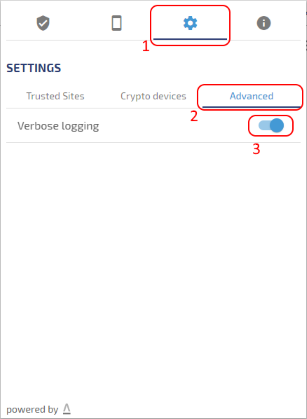
## Native app logs
### Windows
On Windows, the log file is placed on:
```text
%LOCALAPPDATA%\Lacuna Software\WebPKIForChrome.log
```
Note: `%LOCALAPPDATA%` is a shortcut for the current user app data directotry.
### Mac
On Mac, the log file is placed on:
```text
~/.lacuna-webpki/WebPkiCore.log
```
Note: `~` is a terminal shortcut for the current user home directory.
### Linux
On Linux, the log file is placed on:
```text
~/.lacuna-webpki/WebPkiCore.log
```
Note: `~` is a terminal shortcut for the current user home directory.
# [Security Attributes - Web PKI](https://docs.lacunasoftware.com/en-us/articles/web-pki/security)
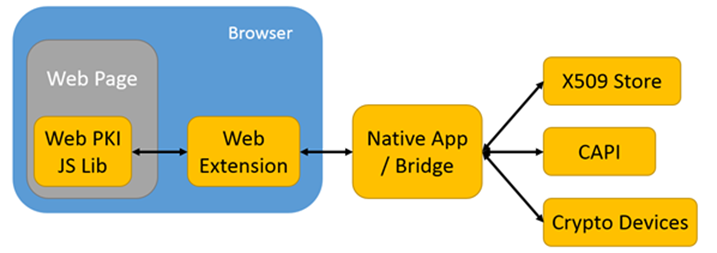
* The components of the Web PKI plugin are installed only from a single, centralized location (https://get.webpkiplugin.com), served over strict HTTPS and rated "A" by SSL Labs.
* The "Web Extension" components are submitted to the official store of each supported browser, where they are reviewed and digitally signed:
* Chrome Web Store;
* Firefox Add-ons;
* Edge Add-ons;
* Safari App Store (coming soon).
* The main source code of the "Web Extension" components is JavaScript in its original form, neither obfuscated nor minified, so that every operation can be evaluated or audited by third parties.
* The Web PKI plugin ecosystem is developed following programming best practices, in compliance with the requirements of the official Microsoft and Apple platforms.
* The "Native App" components installed on the user's machine are downloaded from the centralized domain and are digitally signed with an EV code signing certificate and a DigiCert timestamp valid for 10 years. As a result, the operating systems trust and authenticate the installation without any security warning.
* The "Native App" components do not need administrator privileges to run.
* The "Native App" components preferably access the user's certificates and keys through the operating system's standard API and certificate store, so PINs and authentication passwords do not pass through the "Native App": they are handled directly between the "Crypto Devices" and the operating system.
# [Updates - Web PKI](https://docs.lacunasoftware.com/en-us/articles/web-pki/update)
[Web PKI](https://docs.lacunasoftware.com/en-us/articles/web-pki) is automatically updated on users' computers. However, you can (and should) update the Javascript library
(`lacuna-web-pki-{version}.js`) on your web application regularly.
Updating the Javascript library:
* Fixes known issues that cannot be resolved with updates to the component installed on users' computers
* Gives your application access to new features on Web PKI
The latest version of the Javascript library is **2.19.0**. You can get it on the link below:
https://cdn.lacunasoftware.com/libs/web-pki/lacuna-web-pki-2.19.0.min.js
Or include in your Web page as:
```html
```
Or install the [NPM web-pki package](https://www.npmjs.com/package/web-pki):
```sh
$ npm install web-pki --save
```
> **Tip**
>
> All updates are guaranteed to be 100% backward compatible, so you can update the library without fear of breaking existing code