Lacuna TSA
Lacuna TSA is a time-stamping server (Time Stamping Authority, TSA). You send it the hash of some data and it returns a time-stamp token: a structure signed by the TSA that proves the data existed at a given date and time. Time-stamp tokens are what lets a digital signature be validated after the signer's certificate expires.
Lacuna Software runs Lacuna TSA as a service (SaaS), and you can also host your own instance.
Supported standards
International standards
| Standard | How Lacuna TSA uses it |
|---|---|
| RFC 3161, Time-Stamp Protocol (TSP) | Request (TimeStampReq) and response (TimeStampResp) formats, sent over HTTP with the application/timestamp-query and application/timestamp-response content types |
| RFC 5652, Cryptographic Message Syntax (CMS) | The token is a CMS SignedData whose content is the TSTInfo structure (content type id-ct-TSTInfo) |
| RFC 5816, ESSCertIDv2 update for RFC 3161 | The token identifies the TSA certificate with the signing-certificate-v2 attribute (RFC 5035), hashed with SHA-256 |
| RFC 5755, attribute certificates | Format of the optional attribute certificate added to every token, such as the ICP-Brasil alvará (see below) |
Tokens are issued under Lacuna Software's TSA policy, OID 1.3.6.1.4.1.46332.4.1 (Lacuna Software OIDs),
unless you set another policy OID on your instance, such as the one assigned to your time-stamping authority.
ICP-Brasil
In ICP-Brasil, the Brazilian public key infrastructure, time stamps are issued by accredited Time Stamping Authorities (Autoridades de Carimbo do Tempo, ACTs), on time-stamping servers (Servidores de Carimbo do Tempo, SCTs) connected to the ICP-Brasil time-stamping network. Only time stamps from an SCT that holds an alvará issued by an Audit and Synchronization System (SAS) are accepted in ICP-Brasil. The rules are set by these documents:
| Document | What it defines | In Lacuna TSA |
|---|---|---|
| DOC-ICP-11, overview of time stamping in ICP-Brasil | The participants: ACT, SCT, the Time Audit Entity (EAT), its SASs and the Trusted Time Source (FCT). Requests and responses follow RFC 3161 | RFC 3161 over HTTP |
| DOC-ICP-12, minimum requirements for ACT practice statements | The token profile (item 7.2): ordering false or absent, a declared accuracy, nonce and reqPolicy handled, and the current alvará. The SCT certificate carries the id-kp-timeStamping extended key usage | ordering false, accuracy of 1 second, nonce copied from the request, reqPolicy checked against Tsa:PolicyId, alvará taken from Tsa:Tac |
| DOC-ICP-12.01, profile of the time-stamp alvará | The alvará is an attribute certificate (RFC 5755) signed by the SAS | The alvará set in Tsa:Tac goes into every token, in the signer-attributes signed attribute |
| DOC-ICP-13, minimum requirements for time-stamp policies | Each ACT policy (PCT) receives an OID 2.16.76.1.6.n when the ACT is accredited | Set the PCT OID in Tsa:PolicyId |
The token format is only part of it. To issue ICP-Brasil time stamps, the ACT that operates the server must be accredited by the
ICP-Brasil root (AC Raiz), the SCT certificate must be an ICP-Brasil certificate, the SCT key must be generated and kept in a cryptographic
module, and the SCT clock must be synchronized and audited by an SAS, which only issues the alvará while the clock is within the
accuracy the policy declares. With Lacuna TSA, the key can
be kept by Amplia, which supports HSMs (set KeyStore:Type to Amplia).
The Portuguese version of this page shows the ICP-Brasil issuance flow, with the SAS and the FCT.
How a time-stamp token is issued
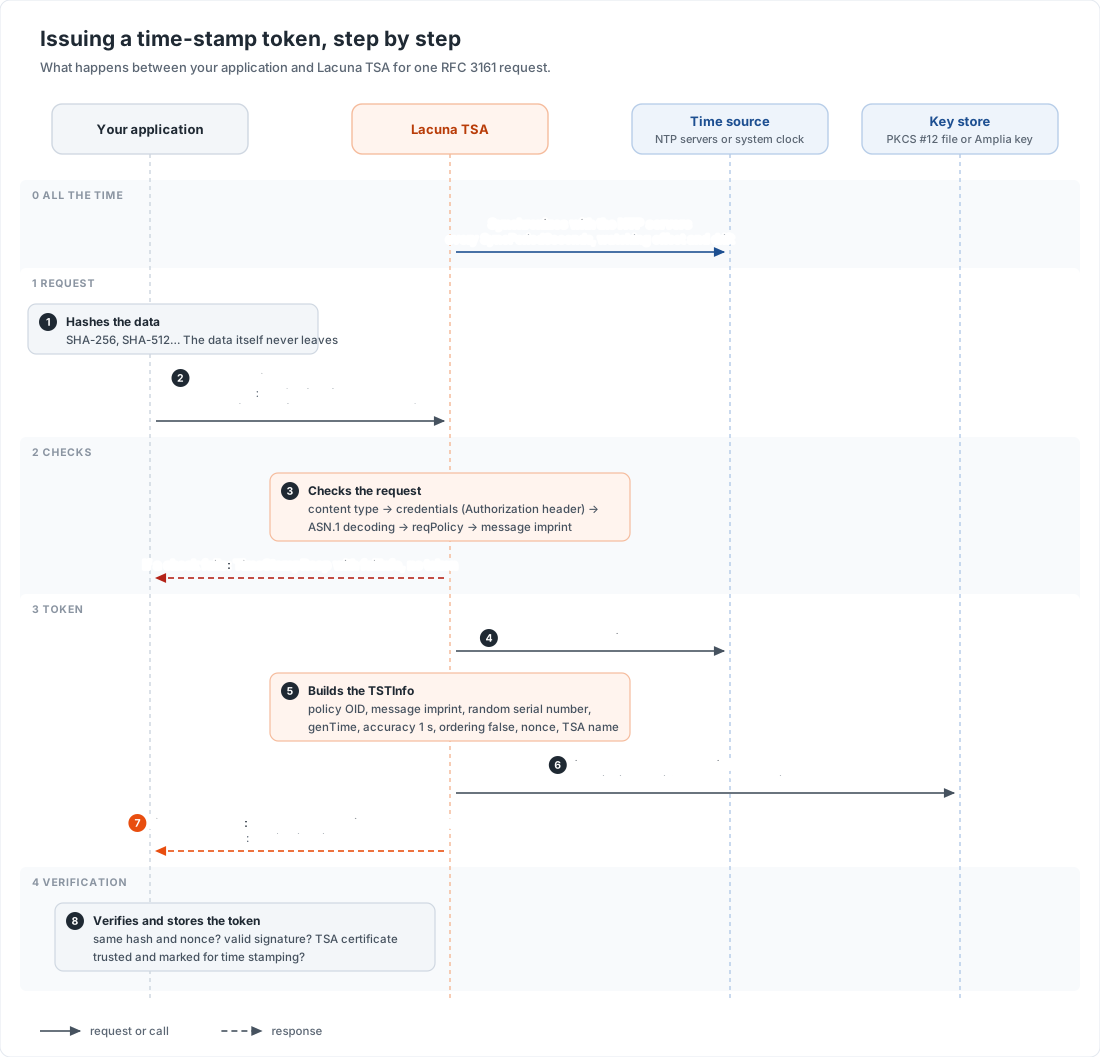
- In the background, Lacuna TSA keeps its time synchronized with the NTP servers in the
Ntpsection, or uses the system clock. See Configure NTP synchronization. - Your application hashes the data, for example with SHA-256. Only the hash is sent: the TSA never sees the data.
- Your application sends a
TimeStampReqin an HTTPPOSTto the root of the server (/), with the headerContent-Type: application/timestamp-query. If authentication is configured, the request also carries anAuthorizationheader (BasicorBearer). The legacy routes/timestampand/timestamperaccept the same request. - Lacuna TSA checks the request: the content type, the credentials, the encoding, the requested policy and the message imprint. If a check fails, it answers without a token (see the failures).
- It reads the current time, in UTC.
- It builds the
TSTInfowith the fields below. - It signs the
TSTInfowith the TSA key, which comes from a PKCS #12 file or from Amplia (KeyStoresection). - It returns a
TimeStampRespwith the status granted and the token, with the headerContent-Type: application/timestamp-response. - Your application verifies the token: the hash and the nonce are the ones it sent, the signature is valid, and the TSA certificate is
trusted and has the
id-kp-timeStampingextended key usage. Then it stores the token, or embeds it in the signature it time-stamps.
What the token contains
TSTInfo field | Value |
|---|---|
version | 1 |
policy | Tsa:PolicyId; by default, 1.3.6.1.4.1.46332.4.1 |
messageImprint | Copied from the request: the hash algorithm and the hash. Any algorithm the client chooses, such as SHA-256 or SHA-512 |
serialNumber | A random 128-bit number, unique to the token |
genTime | The time of issue, in UTC, with fractions of a second |
accuracy | 1 second |
ordering | false |
nonce | Copied from the request, when present |
tsa | The subject name of the TSA certificate |
extensions | None |
The TSTInfo is signed as a CMS SignedData, with SHA-256. The signed attributes are content-type, message-digest and
signing-certificate-v2, plus signer-attributes when an attribute certificate is set in Tsa:Tac. There is no signing-time
attribute: the time is the genTime. The SignedData always includes the TSA certificate, but not the rest of its chain.
Requesting a time stamp
Signature libraries usually build the request and read the response for you: you only give them the address of the TSA. To try a server by hand, use OpenSSL and curl:
openssl ts -query -data document.pdf -sha256 -cert -out request.tsq
curl -H "Content-Type: application/timestamp-query" --data-binary @request.tsq -o response.tsr https://your-tsa-address/
openssl ts -reply -in response.tsr -text
If the instance requires authentication, add -u USERNAME:PASSWORD (Basic) or -H "Authorization: Bearer YOUR_TOKEN" to the curl
command.
Failures
| Situation | Response |
|---|---|
The content type is not application/timestamp-query | HTTP 400. To accept other content types, set Tsa:CheckRequestType to False |
| Credentials are missing or wrong, or the user is disabled | TimeStampResp with the status rejection and failInfo notAuthorized |
| The request cannot be decoded | TimeStampResp without a token, with failInfo badRequest |
reqPolicy is not the value of Tsa:PolicyId | TimeStampResp without a token, with failInfo unacceptedPolicy |
| The message imprint is missing | TimeStampResp without a token, with failInfo badMessageCheck |
| The token could not be signed | TimeStampResp without a token, with failInfo systemFailure |
Since version 1.2.1, a request whose reqPolicy is not the value of Tsa:PolicyId is refused. If your clients send reqPolicy, set
Tsa:PolicyId, even to the default 1.3.6.1.4.1.46332.4.1, so that their requests match.
Settings
These settings shape the tokens. The format is the same as in the authentication and
NTP settings: sections in the .conf file, or environment variables such as Tsa__PolicyId.
| Setting | Description |
|---|---|
Tsa:PolicyId | Policy OID of the tokens. Default: 1.3.6.1.4.1.46332.4.1 |
Tsa:Tac | Attribute certificate added to every token, in Base64, such as the ICP-Brasil alvará. Default: none |
Tsa:CheckRequestType | Set to False to accept requests without the application/timestamp-query content type. Default: True |
KeyStore:Type | Where the TSA key is: Pkcs12 or Amplia |
KeyStore:Pkcs12Content, KeyStore:Pkcs12Password | With Pkcs12: the PKCS #12 file, in Base64, and its password |
KeyStore:KeyId, KeyStore:CertificateId | With Amplia: the ID of the key and of the TSA certificate on Amplia |
KeyStore:Certificate | With Amplia, when the TSA certificate was not issued by the same Amplia subscription that holds the key: the certificate, in Base64 |
Amplia:Endpoint, Amplia:ApiKey | With Amplia: the address of the Amplia instance and the API key of an application with the Manager role |
Example (.conf file):
[Tsa]
PolicyId=2.16.76.1.6.n
Tac=BASE64_OF_THE_ATTRIBUTE_CERTIFICATE

[KeyStore]
Type=Amplia
KeyId=00000000-0000-0000-0000-000000000000
CertificateId=00000000-0000-0000-0000-000000000000

[Amplia]
Endpoint=https://your-amplia-address/
ApiKey=YOUR_API_KEY