Desktop certificates
A desktop certificate is a certificate the Server holds in its
Certificate Vault that a person uses from their own Windows
desktop, from any program that signs through Windows: a browser signing in to gov.br or e-CAC,
Acrobat signing a PDF, Word signing a document, signtool signing code. The key never leaves the
Server. What reaches the desktop is the certificate's public part, and every signature is made on
the Server and recorded in the Audit Log.
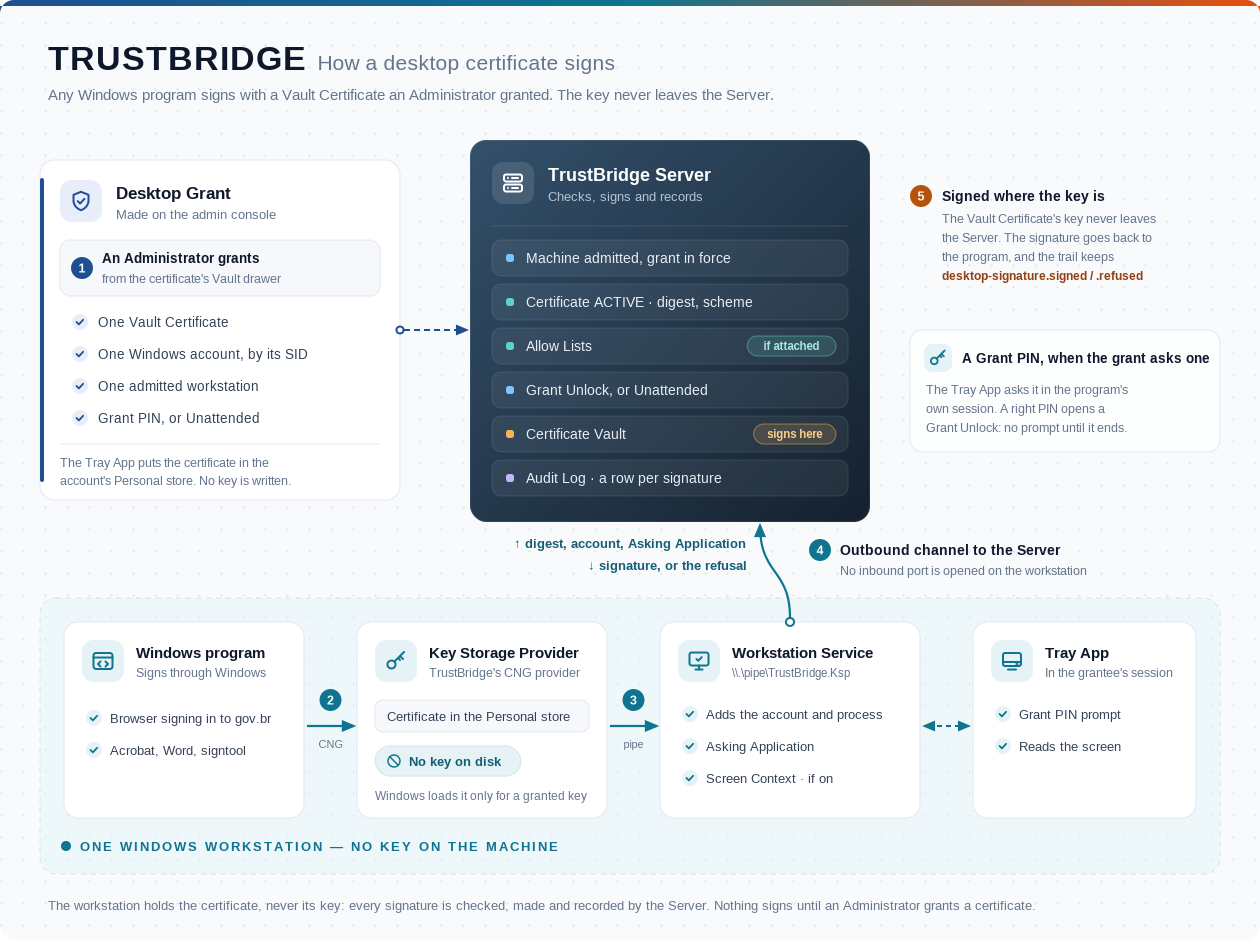
Desktop certificates need Server 1.26.0 or later and Workstation 1.12.0 or later, which speaks workstation protocol 8 and is delivered with Server 1.28.0 or later. Every workstation package from 1.12.0 installs and registers TrustBridge's Key Storage Provider, so a granted certificate signs from any program on the desktop, and nothing signs through TrustBridge on a machine until an Administrator grants a certificate there. From Server 1.28.0 every signature also records the program that asked for it and what the screen showed. From Server 1.29.0 an Administrator can restrict where an account's grants sign with Allow Lists; the grantee's side of them on the desktop comes with Workstation 1.13.0.
What a grant is
A Desktop Grant lets one Windows account, on one admitted machine, sign with one Vault Certificate. The account is the grant's grantee.
- The grantee is an account, not a person. It is identified by its Windows security identifier
(SID), and its
DOMAIN\username is only a label. A renamed account keeps its grants. - One machine per grant. A domain user who signs on three machines needs three grants.
- One certificate may be granted to many accounts, and one account may hold many grants.
- Any certificate may be granted to any account, an e-CNPJ to an employee included. The grant form says whose certificate it is and which account will sign with it, and refuses nothing on the strength of a norm: how a deployment uses its certificates is its own decision.
- A grant has no end date. It lasts until an Administrator revokes it, which deletes it. The Audit Log keeps its history.
Only an Administrator grants and revokes, from the Desktop grants section of a certificate's
drawer on the Vault certificates screen. An Auditor reads
the same section and is offered no control. Granting writes admin.desktop-grant-created to the Audit
Log and revoking writes admin.desktop-grant-revoked. Each names the Administrator, the certificate,
the machine, the SID and the account's label, and each tells that machine at once. The
Workstations screen lists each machine's grants, read-only (see
On the Workstations screen).
Making a grant needs the certificate's password, the one it was imported with. The Server opens the certificate with it and refuses the grant if it does not open. Granting what is already granted changes nothing and writes nothing.
Any certificate that has not been destroyed may be granted. The grant is served while the
certificate is in use and its verdict is ACTIVE. While the certificate is out of use, or its verdict
is anything else, the grant is kept and waits, and it is served again once that changes.
Onboarding: sign in once with the Tray App running
The Server cannot look a Windows account up: it runs in a Linux container, with no domain controller to ask. So it learns accounts from the machines. Each time a Tray App starts in somebody's session, that machine reports the account to the Server, and the Server keeps it, with its latest label and when it was last seen. Nothing ages out. The reported accounts are listed on the Windows Accounts screen.
Only an account its machine has reported can be granted. So onboarding is:
- The person signs in to Windows on that machine once, with the Tray App running. It starts with every sign-in on a machine the workstation MSI installed.
- An Administrator opens the certificate's drawer, picks that machine among the admitted ones, picks the account among the ones it has reported (most recently seen first, the SID under each name), picks the kind (and for a Grant PIN grant types the PIN twice), types the certificate's password and grants.
A machine reports accounts only from Workstation 1.12.0. Until a machine is updated, none of its accounts can be picked.
The two kinds, and what an Unattended grant means for custody
Every grant is one of two kinds, chosen per grant on the grant form and stated plainly wherever the grant is listed. No deployment setting forbids either.
- Grant PIN: the Administrator sets a PIN for the grant and gives it to the grantee out of band. The grantee types it at the Tray App to open a Grant Unlock, described below.
- Unattended: the Windows logon of the granted account on an admitted machine is the whole proof. The Server signs without anybody typing anything, and the Audit Log is the record.
For a Grant PIN grant, the Server keeps the certificate's password encrypted under the PIN first (with a key derived from the PIN by PBKDF2-HMAC-SHA256, and AES-256-GCM), and that again under the Key Ring. A stolen database cannot be brute-forced without the Key Ring Protector, and a database together with its key ring still needs the PIN. The Server keeps nothing else that checks the PIN, so a forgotten Grant PIN cannot be recovered: an Administrator sets a new one by typing the certificate's password again. A Grant PIN is held to the A1 PIN's rules: not empty, not only spaces, and at most 256 characters.
For either kind to work, the Server keeps the certificate's password, encrypted under the Certificate Vault's Key Ring. Everywhere else, a Vault Certificate's password is never written down: a database and its key ring together are a password-protected file and nothing more. For a certificate with an Unattended grant, the database together with its key ring can sign. The certificate's drawer says so wherever such a grant exists. Whoever can read both, for instance a restored backup together with the Key Ring Protector, can sign as that certificate's holder. Decide which certificates get an Unattended grant with that in mind.
The Grant Unlock: how long a Grant PIN lasts
A right Grant PIN opens a Grant Unlock, held in the Server's memory, one per grant. While it lasts, every program of that account on that machine signs with the grant without asking: that is what the grantee unlocked, and the Tray App's prompt says so.
- Each signature slides its idle window:
DesktopGrants:UnlockIdleWindow, 15 minutes by default. - A cap ends it however busy the grant is:
DesktopGrants:UnlockMaxDuration, 8 hours by default.
Both are described in Server configuration and can be overridden on the Settings screen's Desktop grants card; a change reaches the unlocks already open as well as the next ones, without a restart. A Grant Unlock ends early when the grantee locks or signs out of a Windows session on that machine (the Workstation Service tells the Server), when the grantee locks the grant from the Tray App (Lock now), when the grant is revoked or switched to Unattended, when its Grant PIN is changed or reset, when the certificate is taken out of use, or when the Server restarts; the grantee is then prompted once more. A lock that happens while the machine is offline is not reported, and that unlock ends at its idle window or its cap.
Wrong Grant PINs are counted per grant, under Sessions:MaxPinFailures and
Sessions:PinFailureWindow (see the failed-PIN budgets),
and age out with the window. While the budget is spent the grant is locked out, prompts no more,
and no PIN is tried until the oldest wrong one ages out. Neither the holder's CPF lockout nor the
vault's Failed-Proof Budget is charged, because the grantee may not be the holder. Like the
unlocks, the counts live in the Server's memory, so a restart forgets them.
The PIN crosses the channel once per unlock, and never with a signature; a change carries the current and the new PIN once. Neither is ever written to a log or to the Audit Log.
Changing, resetting and switching a grant
What a grant is protected by can change without revoking it:
- The grantee changes the Grant PIN at the Tray App, with Change Grant PIN… in the grant's detail: the current PIN, and the new one twice. Changing it locks the grant, so the next program asks for the new PIN. A wrong current PIN counts as a wrong Grant PIN, against the same budget an unlock spends, and changes nothing.
- An Administrator resets a forgotten Grant PIN from the certificate's drawer, with Reset PIN on the grant's row: the certificate's password, and the new PIN twice. The grant locks, the old PIN opens nothing, and the grant's wrong PINs are forgotten, so a grantee locked out by them gets in with the new PIN. A wrong password changes nothing.
- An Administrator switches a grant's kind from the drawer, in either direction, and needs the certificate's password both ways. Make Unattended keeps the password under the Key Ring alone, so the grant signs without a prompt, and the drawer's custody line appears. Use a Grant PIN sets a PIN, and the grant prompts until it is typed. Any Grant Unlock ends, and the machine is told at once.
Every one of these is audited, and none writes a PIN or the password anywhere.
What the Server checks before it signs
When a program on the desktop signs, the Workstation Service asks the Server, and the Server checks, in this order:
- the machine is admitted, and asked over its own connection;
- a grant names this machine, this Windows account and this certificate;
- the certificate is in use, and its verdict is
ACTIVE; - the digest is SHA-256, SHA-384 or SHA-512 and has that algorithm's length, and the scheme is RSASSA-PKCS1-v1_5;
- the Windows account has no Allow List, or one of its lists allows this signature (see Allow Lists below);
- the grant is Unattended, or it has a live Grant Unlock, which this signature then slides.
Then it signs with the certificate's key, which never leaves it. A Desktop Signature creates no Signing Session and spends no Signature Allowance. A revoked grant refuses the next signature; one already past the second check completes.
The program that asked is told only that the signature failed, so the reason is in the Audit Log.
On the workstation
The Workstation Service, running as LocalSystem, serves the Key Storage Provider on the named pipe
\\.\pipe\TrustBridge.Ksp from the moment it starts. The pipe admits interactive logons only, as the
Tray App's does: a person at the machine or over Remote Desktop. A service account, or a scheduled
task or build agent running with no user logged on, cannot open it; one that runs only while its user
is logged on carries that interactive logon, and can.
The Key Storage Provider itself, TrustBridge.Ksp.dll, is installed and registered as TrustBridge
Key Storage Provider by the workstation package on every machine, and certutil -csplist lists it.
Workstation installation covers what the package installs and what an
upgrade or an uninstall does to it.
- The Service holds its machine's grants in memory only. It asks the Server for them after every connection and each time the Server says they changed, and keeps the answer until the next one. A Service that started while the Server was unreachable holds none until the Server answers. A pull the Server answers with an error changes nothing the Service holds, and the Service asks again while the connection lasts.
- It answers a program only for the account that program runs as. A certificate granted to another account on the same machine is refused at once, and the Server is not asked.
- Every signature goes to the Server, with the account, session, process id and executable path that Windows reports for the program that asked. A machine that is not connected refuses at once. The account is the one the program's connection to the pipe carries, never the account a process id names when it is looked up, and a program whose process runs as another account than its connection is refused.
- Every signature carries its Asking Application: the chain of executables that started the program, and who published its executable, with the product and version the file gives. The Service reads them itself once the request passes its own checks, and waits at most a second for them; what is not ready is left out of that signature, and the Service never refuses it for that. For an account with an Allow List the Server may, since what was not read cannot show that an entry matches. The Audit Log shows them on the signature's entry, and the Service's log line for the signature carries them too.
- Every signature carries its Screen Context, unless an Administrator turned it off with
DesktopGrants:ReadScreenContext(on by default, on the Settings screen's Desktop grants card): whether the grantee's session was locked, and whether it was a Remote Desktop session, with the client's name and IPv4 address as the client reported them; and the window of the program that asked (its title, whether it was in front, and for a browser, which is Chrome, Edge, Firefox, Brave, Opera or Vivaldi, the address of the page in its front tab as scheme, host, a port that is not the scheme's own, and path, never the query), with the seconds since the session's last input. The Service reads the session's facts itself; the window is read by the Tray App of the caller's session, which the Service asks, since it sees no window from session 0. All within the same second, and one window reading serves the same process's signatures for five seconds. A session whose Tray App is not running is not waited on, and signs without the window, except where only a Website entry could allow it, since no Website entry matches without an address; a restricted account's Program entries still match. With the switch off nothing of the session is read nor any Tray App asked. For each signature that goes without its Screen Context or its window, the Service's log says why:switch off,older Server,no capable Tray,Tray not reading,process not opened,nothing read,budget ran outorService stopping. A window title and a page address are observed on screen, not reported: a program on the machine can make them say anything. A browser running elevated while the Tray App is not keeps its address bar from the Tray App, and is recorded with its title only. - While a Workstation release is being installed, a signature is refused, not queued, as every other signature on the machine is.
- A lock or a sign-out ends that account's Grant Unlocks. When Windows says a session was locked or signed out of, the Service tells the Server the session's account, and every Grant Unlock that account holds on the machine ends. A lock while the machine is not connected is not reported, and the unlock ends at its idle window or its cap.
- Every refusal is in the Service's log with its reason: an account the key is not granted to, no grants held, no connection, an install under way, or the code the Server answered. The program that asked sees only that the signature failed.
In the Tray App
The Tray App puts each granted certificate into its account's own Windows store, the Personal
store (CurrentUser\My) of the account the grant names. That is what makes a browser, Acrobat or
Word offer it as they would a token's. The certificate goes in bound to TrustBridge Key Storage
Provider under the certificate's thumbprint: no key is written anywhere, and nothing goes into the
machine's own store.
- The Tray App keeps the store in step with the grants: when it starts, and each time the
Workstation Service says they changed. A grant that can sign is installed. Every other certificate
bound to TrustBridge's provider comes out: a revoked grant's, another account's, and a grant's that
is waiting because its certificate is out of use or not
ACTIVE. That one goes back in when the grant can sign again. - A certificate bound to anything else is never touched, a token's copy of the same certificate included. When the store already holds the granted certificate bound to another provider, the Tray App leaves it and says so on the grant's detail.
- A machine sent back to Pending, or refused, has no grants, so its Tray Apps take every TrustBridge certificate out.
- A Workstation Service with no answer from its Server leaves the store as it is. A machine that starts while the Server is unreachable keeps the certificates its accounts had, and the Tray App reconciles once the Server answers. A machine that has just been transferred is the exception.
- A Transfer removes the old Server's certificates. From the moment the machine confirms a
Transfer to another Server until a Server answers it again, the Workstation Service tells every Tray
App it has no grants, across the restart in between. Each Tray App takes every TrustBridge
certificate out at its next refresh or sign-in, without waiting for the new Server to admit the
machine, and even while that Server is unreachable. Certificates bound to anything else stay. Once
the new Server admits the machine and answers, its own grants go in as usual. The Service keeps this
state in the file
transferredunder%ProgramData%\TrustBridge, and deletes it at that first answer. - The store is a cache of the Server's grants, and an installed certificate confers nothing by itself. A grant revoked while its account is signed out stays in that account's store until its Tray App next runs; a program may offer it meanwhile, and the Server refuses the signature.
The Desktop grants tab, second in the Tray App's rail, lists the account's grants: holder, protection (Grant PIN or No PIN), CPF or CNPJ, what happens the next time a program signs, validity, and whether it is in Windows. A waiting grant is greyed. A grant's detail says whose certificate it is, which account it is granted to, that an Unattended grant lets any program of the account sign without asking while the Server records each signature, and that the certificate signs only. From Workstation 1.13.0 it also lists the account's Allowed on entries when the account is restricted (see Allow Lists). Reinstall in Windows writes the certificate into the store again, for when somebody deleted it. A Tray App sees its own account's grants and nobody else's.
The Grant PIN prompt
When a program signs with a Grant PIN grant that has no live Grant Unlock, the Server answers that the grant is locked, and the Tray App in the session the program runs in asks the grantee for the Grant PIN. The window opens centred and on top. It names the program as Windows reports it (its description and executable, and what it said it was where that differs), the certificate and whose it is, the account, and how long an unlock lasts on this deployment. Its amber band says what the PIN does: until the unlock ends, every program of that account signs with the certificate without asking, website logins included, and TrustBridge does not see what is signed.
- The window lasts a fixed 60 seconds, with no setting. It outlasts a browser's wait on purpose: after 30 seconds it says the program may have given up, and a PIN typed then still unlocks the grant, so the program's retry signs without another prompt. Nothing is signed for a program that has already hung up.
- A wrong PIN asks again in the same window, saying how many more wrong PINs the grant takes. When the budget is spent the window closes and the Tray App says when the grant can be tried again; until then a locked-out grant raises no prompt, and every program signing with it is refused at once.
- Several programs signing with one locked grant share one prompt, and all of them sign once it is unlocked. Different locked grants queue in the session, listed down the window's left side, one shown at a time, each with its own 60 seconds from when it is shown. At most eight wait in one session, with no setting: a program asking for a ninth locked grant while eight are listed is refused at once, and the Workstation Service logs why.
- Refuse, or closing the window, tells the program the grantee cancelled. Every other ending (the window ran out, the grant is locked out, no Tray App runs in that session) tells it only that the signature failed, and the reason is in the Workstation Service's log.
- With no Tray App running in the program's session, the signature is refused at once. A grantee on Remote Desktop is prompted in the Remote Desktop session, where the program asked.
- While a prompt is open, a Workstation release waits to be installed, as it waits for a signature.
The Desktop grants tab shows each Grant PIN grant as Unlocked until its idle end, Locked, or Too many wrong PINs, until the time the lockout lifts, and changes when the Server says the grant changed. The status strip says how many of the account's grants are unlocked (Grants: 1 unlocked) while one is.
- Unlock now…, on a locked grant, raises the same prompt before any program has asked. It names no program, and the PIN typed in it unlocks the grant as any prompt's does, so the next program signs without asking. A locked-out grant raises none.
- Lock now, on an unlocked grant, ends its Grant Unlock at once. The next program to sign with it is prompted.
The trail: one row per signature and per refusal
Every Desktop Signature writes one desktop-signature.signed row to the
Audit Log, and every refusal one desktop-signature.refused row with
its code:
| Code | Meaning |
|---|---|
NOT_ADMITTED | The machine is not admitted |
NOT_GRANTED | No grant names this machine, account and certificate |
OUT_OF_USE | The certificate is out of use |
NOT_ACTIVE | The certificate's verdict is not ACTIVE |
BAD_DIGEST | The digest is not SHA-256, SHA-384 or SHA-512, or has the wrong length |
BAD_SCHEME | The scheme is not RSASSA-PKCS1-v1_5 |
NOT_IN_ALLOW_LIST | The account's Allow Lists do not allow it |
GRANT_LOCKED | A Grant PIN grant with no live Grant Unlock |
FAILED | Every check passed and the Server could not sign; its log says why |
A browser signs on every full TLS handshake, so a granted certificate in daily use writes many rows. Each row holds:
- the grantee as actor: actor kind
windows-account, the account's SID as its id and itsDOMAIN\userlabel as its name; - the machine (its workstation id, and its hostname in the details) and the certificate (its thumbprint in the details, its holder's CPF and, for an e-CNPJ, its CNPJ on the row), as far as the refusal got: a refusal before the grant was found names no certificate;
- what was signed: the digest in hex and its algorithm, and the scheme;
- the program, as Windows reported it: its session, process id and executable path. Beside it, the name the program gave itself, as a label only: any program can claim any name;
- the address: the client IP the Server saw for the machine's connection. Behind NAT, that is the office's address and not the machine's; the machine is named by its workstation id.
From Server 1.28.0 each row, signed or refused, also carries:
- the Asking Application (
askingApplication): the chain of executables that started the program, the signing one first, with its Authenticode verdict, publisher, product and version, and for the window the Tray App read, its owner's (windowExecutable) where that is not the signing executable. The Server keeps 16 chain entries and 256 characters of each text whatever the machine sent, and omits what is absent; - the Screen Context (
screenContext), unless the switch is off: whether the session was locked, whether it was a Remote Desktop one with the client's name and address, the window's title (windowTitle), whether it was in front (inFront), the seconds since the last input (idleSeconds), and for a browser the page address (pageAddress) as scheme, host, port and path. The Server holds what the machine sent to scheme, host, port and path once more, so a query string, and a token in it, never lands in the record. While the switch is off the Server records no Screen Context even from a machine that sends one.
The Audit Log screen shows both above the row's details, with a line saying that the title, the page
address and the idle seconds are observed on screen, not reported. The signature itself is never
recorded. For an account with an Allow List, a signature's row also names the list and the entry that
allowed it (allowedBy), as does a refusal that came after the lists allowed it (GRANT_LOCKED,
FAILED), and a NOT_IN_ALLOW_LIST refusal names what was seen, what was missing and the lists
checked (see Allow Lists).
A Grant PIN grant's unlock writes rows of its own, each with the same actor, machine and certificate:
| Event | When |
|---|---|
desktop-grant.unlocked | A right Grant PIN opened an unlock; the row carries its idle end and its cap |
desktop-grant.wrong-pin | A wrong Grant PIN, at a prompt or as the current PIN of a change; the row carries the tries left |
desktop-grant.locked-out | The budget is spent; the row carries when it lifts |
desktop-grant.unlock-refused | A PIN that was not tried (no such grant, an Unattended one, a certificate out of use or not ACTIVE, a locked-out grant), or a right one that opened nothing because the certificate was taken out of use, the grant was revoked or locked, or the session locked while it was tried; with its code |
desktop-grant.unlock-ended | A session's lock or sign-out ended an unlock (SESSION_LOCKED, SIGNED_OUT), or the grantee's Lock now did (LOCKED_NOW) |
desktop-grant.pin-changed | The grantee changed the Grant PIN |
desktop-grant.pin-change-refused | A change refused before its current PIN was tried; with its code |
admin.desktop-grant-pin-reset | An Administrator reset the Grant PIN |
admin.desktop-grant-kind-switched | An Administrator switched the kind; with the kind before and after |
None of them holds a PIN or the password.
Allow Lists: where an account's grants may sign
Without one, a grant signs for any program on the desktop that signs through Windows, for any website. An Allow List narrows that, from Server 1.29.0: it is a named list of websites and programs, kept on the Allow Lists screen beside Windows Accounts, and attached on a Windows account's own page, on its Allow Lists tab. Administrators edit the lists and Auditors read them.
-
A list attaches to the account, by its SID, and covers every grant it holds, on every machine, including grants made later. It outlives the account dropping off the screen, and applies again when a machine reports that SID.
-
Any one list may allow. An account may carry several lists, and a signature is made when an entry of at least one of them matches. An account with no list is unrestricted, as before. An account whose lists name nothing signs nothing.
-
A Website entry is one host,
www.esocial.gov.br, which matches that host only, or a domain and every host under it,*.gov.br, which matchesgov.britself andwww.gov.branda.b.gov.br, but notgov.br.example.com. An exact IPv4 address (10.0.0.5) andlocalhostare one-host entries. Hosts are stored and compared in their ASCII (punycode) form whatever their case, so an entry typed asbücher.examplematches the page atxn--bcher-kva.exampleand a look-alike letter does not; a page address's port and scheme are ignored when it is matched. The form refuses a bare*, a*anywhere but a leading*.,*.over a single label (*.br), an IPv4 address orlocalhost, an IPv6 address (never recorded from a browser), an address written other than as its four dotted numbers, a name with no dot other thanlocalhost(never recorded either, so it could never match), and anything beside the host: a scheme, a port (even:443), a path, a query or a#. -
A Website entry matches only in a genuine browser, on the Screen Context's page address: a known browser must be among the programs that asked, and that browser's executable must be Authenticode signed by its own publisher:
Browser Publisher chrome.exeGoogle LLC msedge.exeMicrosoft Corporation firefox.exeMozilla Corporation brave.exeBrave Software, Inc. opera.exeOpera Norway AS vivaldi.exeVivaldi Technologies AS That executable is the signing one when it is the browser, and otherwise the one that owns the window the Tray App read (Chromium signs from a windowless process, and a helper such as the Web PKI native host is credited to the browser that started it), only where the Workstation Service places that window's owner among the programs that asked, at or above the browser. A program drawing a window that shows the site, a copy of a browser that is unsigned or signed by someone else, and a program merely named like a browser whose window is a genuine browser's elsewhere on the screen match no Website entry. A Workstation before 1.13.0 does not say where the owner sits, so on it a helper such as the Web PKI native host matches no Website entry until the machine is upgraded: a deployment that restricts accounts to websites should have its fleet on Workstation 1.13.0 first. The window does not have to be in front, and the session does not have to be unlocked. The last three publishers are the names public sources give for those browsers' signatures, not yet read off a signed build, so a genuine Brave, Opera or Vivaldi may be refused until they are; it is never matched more widely.
-
A Program entry is an executable's file name,
AcroRd32.exe, matched exactly whatever its case, never by its folder, never by a wildcard, and never ending in a dot (Windows drops it from every file name, so such an entry would match nothing). It is matched against the signing executable only, never a program that started it. It may name the publisher of its Authenticode signature too, as Windows shows it; then only a file of that name signed by that publisher matches. Without one, any file of that name passes, signed or not, and the form says so. An entry naming a browser (chrome.exe,msedge.exe,firefox.exe,brave.exe,opera.exe,vivaldi.exe) allows every website in it, and the form warns of that. -
Missing evidence refuses. For a restricted account, a signature from a Workstation that sends no Asking Application, or whose program's name was not read, is refused, and so is one matching a publisher-pinned entry before the Authenticode verdict has been read (a cold catalog check fills the cache for the next signature). A Website entry cannot match without a page address, which the Workstation does not have for a browser's first reading after it starts, an elevated browser, a locked session, a machine with no Tray App or one that does not read the screen, or a reading that ran out of time: a browser's first handshake may be refused once, and its retry passes.
-
Turning the Screen Context off stops every Website entry. With
DesktopGrants:ReadScreenContextoff no address is read, so no Website entry matches, and a website signature only a Website entry could allow is refused asscreen context off. Program entries still match, a Program entry naming a browser among them. The Settings screen says how many restricted accounts have a Website entry before it turns the switch off. -
The Server decides, before any Grant PIN prompt. The check is the fifth in What the Server checks, so a signature no list allows is refused without asking the grantee for a PIN, and a live Grant Unlock does not skip it. The lists are read at every signature, so attaching, detaching or editing one takes effect at the next.
-
The grantee can read them, from Workstation 1.13.0. A machine's pull of its grants says, for each account with a grant there, whether it is restricted and its lists' entries merged, and the Tray App shows a restricted account's under Allowed on on each grant's detail; an unrestricted account sees nothing new. Attaching, detaching or editing a list nudges every machine where an affected account holds a grant, so the Tray App follows at once. This is for reading only: the Server's check is the only one, and a Workstation Service never refuses on a list. An older Workstation shows nothing, and its signatures are checked all the same.
-
A restriction is never lifted silently. A list attached to any account cannot be deleted until it is detached everywhere, and detaching an account's last list asks first, saying the account will be unrestricted, whether from the account's tab or from the list's own page. The Server refuses that detachment unconfirmed whatever sent it. A list is saved only as its form opened it: when another Administrator changed it in the meantime, the save is refused and the form shows the list as it now stands, so an entry one removed is never written back by the other.
-
Who is restricted is shown wherever an Administrator looks. A list's own page, opened from its name on the Allow Lists screen, names every account it is attached to, each linking to the account's page, with a detach beside each. The Windows Accounts list reads Restricted or Unrestricted for each account. The grant form, from a Vault Certificate's drawer and from the account's page, says when the account it grants to is restricted, naming its lists.
-
The grantee is told why, from Workstation 1.13.0. The program that asked is told only that the signature failed, but the Tray App in the session it runs in, when that Tray App runs as the same account, and in no other session, shows a Signature refused notification: notepad.exe is not on any of your account's Allow Lists., or what could not be read, with Try again where a retry passes. A burst of the same refusal from one running program within five seconds notifies once. Nothing changes in the Grant PIN prompt. The refusal is in the Workstation Service's log either way, and an older Workstation shows nothing on the desktop.
-
The trail.
admin.allow-list-created,admin.allow-list-changed(with the entries before and after),admin.allow-list-deleted, andadmin.allow-list-attachedandadmin.allow-list-detached, the last two on the account's trail. A restricted account'sdesktop-signature.signedrow names the list and entry that allowed it (allowedBy: the first match, lists in name order), as does a refusal that came after the lists allowed it (GRANT_LOCKED,FAILED). ItsNOT_IN_ALLOW_LISTrefusal names what wasseen(the program, its verdict and publisher, and the page'shost), what wasmissing(asking application,program name,authenticode verdict,program publisherfor a listed program whose pinned publisher its signature does not show, and for a list with a Website entryscreen context off,browser,browser publisherorpage address) and thelistsChecked. An unrestricted account's rows are written as before.
What it protects, and what it does not. The program, the programs that started it and the publisher come from Windows and Authenticode, so a renamed or re-signed executable does not pass a publisher-pinned entry, and a fake browser does not pass a Website entry. The website is what the screen showed: the address in the browser's front tab, observed by the Tray App and never reported by the site or the browser. So a signature from a background tab is credited to the tab in front, and a program injected into a genuine browser, or one running as the grantee that the browser started without a window of its own, signs as the page in front. The Server sees no window, and credits a Website entry to any known browser the chain names, at any depth, provided the window's owner is that chain's browser process; the Tray App reads a page address only from a browser's own window, so a program with a window of its own that a browser started carries no address and matches no Website entry. Allow Lists stop a granted certificate being used by a program or for a website outside the account's lists. They are a security boundary with a stated limit, not proof against a determined attacker: a program running as the grantee can still have an allowed program sign for it, for instance by injecting code into it. No configuration option is involved.
A desktop certificate signs and nothing else
A granted certificate signs. It cannot decrypt, so mail or a file encrypted to the certificate cannot be opened through the grant. An ICP-Brasil e-CPF or e-CNPJ carries the uses for encryption too, so Outlook may offer a granted certificate as the grantee's encryption certificate, and correspondents may then encrypt mail that never opens on that desktop. The grantee needs the certificate's own PFX or token for that, outside TrustBridge. The grant form says this, and so does the Tray App's detail for the grant.
Sites that ask for a client certificate over TLS 1.3 do not work
A desktop signature is always RSASSA-PKCS1-v1_5, and TLS 1.3 requires RSA-PSS for a client
certificate's signature. So a site that asks for a client certificate over TLS 1.3 cannot be
reached with a granted certificate: the browser shows ERR_SSL_CLIENT_AUTH_SIGNATURE_FAILED and
does not fall back to TLS 1.2.
The sites the feature exists for ask for one over TLS 1.2 and work: gov.br's certificate login (which
e-CAC uses), eSocial, NF-e, EFD-Reinf, NFS-e emission, Conectividade Social and Projudi, as checked in
October 2026. The exception found then is adn.nfse.gov.br, the national NFS-e data API, which asks
inside TLS 1.3; its callers are programs, and a program calling an API can pin TLS 1.2. The grant
form says this too.
What happens to a grant when its certificate or its machine changes
A grant follows its certificate and its machine:
| What happens | Its grants |
|---|---|
| The certificate is taken out of use | Kept, and waiting, and every Grant Unlock ends; served again when it is put back, and a Grant PIN grant then needs its PIN again |
Its verdict is not ACTIVE (expired, revoked, untrusted, stale) | Kept, and waiting; served again when a revalidation finds it ACTIVE |
| The certificate is destroyed | Deleted, one admin.desktop-grant-revoked row each, naming the Administrator who destroyed it, with cause certificate-destroyed; each Grant Unlock ends |
| The machine is sent back to Pending | Kept; the machine cannot connect, so nothing is served, and its Tray Apps take the certificates out of Windows, until it is admitted again |
| The machine is revoked | Deleted, one admin.desktop-grant-revoked row each, naming the Administrator who revoked it, with cause workstation-revoked |
| The machine is removed | Deleted as for a revoked machine, with cause workstation-removed |
| The machine is transferred to another Server (from Server 1.28.0) | Deleted as for a removed machine, naming the Administrator who transferred it, with cause workstation-transferred |
| An Administrator revokes the grant | Deleted, and audited; its Grant Unlock ends |
Every machine a change reaches is told at once: taking a certificate out of use, putting it back, destroying it, and a revalidation that turns its verdict each tell every machine holding a grant of it. The Workstation Service asks for its grants again, and the Tray App takes a waiting or deleted grant's certificate out of the account's store and puts a servable one back. A revalidation that finds the same verdict again tells nobody. A machine that is not connected at that moment catches up the next time it connects.
A grant's admin.desktop-grant-revoked row has a cause only when its certificate or its machine
took it. A row without one is an Administrator revoking that grant from the certificate's drawer.
One narrow window is left. A grant made in the instant between the moment a destruction or a
removal reads the grants and the moment it deletes the certificate or the machine goes with them and
writes no row of its own; its admin.desktop-grant-created row then stands beside the certificate's
or the machine's own end. Nothing that can sign is left behind.
On the Workstations screen
A machine's panel on the Workstations screen lists its grants on its Desktop grants tab, read-only for Administrators and Auditors alike: each grant's certificate, the account's label and SID, and the kind. Each certificate links to the Vault certificates screen with that certificate's drawer open, which is where a grant is made and revoked. A machine sent back to Pending still lists its grants.
The Windows Accounts screen shows the same grants from the account's side: each reported account, whether it is Restricted or Unrestricted, and on its own page its grants, the machines it was seen on, its Allow Lists and its trail.