Lacuna TrustBridge
Lacuna TrustBridge is a remote digital-signature platform for ICP-Brasil certificates held by people. It lets a client application sign PDF documents with a user's certificate through a REST API, while the certificate's private key stays exactly where it lives: on a smart card or USB token plugged into the holder's Windows workstation, in that workstation's Windows certificate store, or, when a deployment opts in, in a server-side vault the platform administers. The certificate can be the person's own e-CPF or a Company's e-CNPJ held by that person.
TrustBridge implements the SignSession Contract, an existing API contract that client applications already integrate against. The contract's current specification was written from TrustBridge's implementation and adopted by the contract's author, so the REST API page describes the contract as a client application should expect it.
The three components
| Component | Runs on | What it does |
|---|---|---|
| Server | A Linux container: Docker on a Linux host, with SQL Server or PostgreSQL, or Azure App Service, with Azure SQL | The central web application. Serves the SignSession Contract to client applications, coordinates the fleet of workstations, holds the Certificate Registry, the Audit Log and the optional Certificate Vault, and hosts the admin console and its Dashboard. |
| Workstation Service | A Windows Service on each user's machine | The only path to the certificates on that machine and to their private keys, through PKCS#11 and the Lacuna PKI SDK. Connects outbound to the Server over SignalR/WebSockets, announces the certificates it sees, validates them, signs hashes when a session authorizes it, and reports its own condition. |
| Tray App | The same Windows machine, in the user's session | The holder's window onto the service: certificate status, the certificate list, the tokens and readers the machine sees, PIN entry (including the PIN asked for when a token is inserted) and the A1 PIN. It never talks to the Server directly. |
The Workstation Service and the Tray App ship together in one signed MSI. The Server ships as a container image. The two lines release on their own schedules, and each workstation release speaks a workstation protocol version. A Server accepts its own protocol version and the one before it, so as a rule a fleet is upgraded after its Server and within one release of it.
The current pair is Server 1.24.0 (protocols 5–6) and Workstation 1.10.0 (protocol 6). Workstation 1.10.0 is delivered with Server 1.20.0 or later, and with Server 1.23.0 or later for the admin console to show who is at each machine's console. Server 1.22.0 to 1.24.0 work with any Workstation release the window admits. Server 1.15.0 and later refuse Workstation 1.4.x, so a fleet still on 1.4.x is moved to 1.5.0 before the Server is upgraded, and to 1.10.0 after it. A machine on 1.5.0 keeps serving every session except one that asks for the PIN on every signing call. The Changelog says which Server and Workstation releases work together.
Features
- Two custodies for a certificate, one API. A Workstation Certificate is on a token or in the Windows store of a machine, and its key never leaves that machine. A Vault Certificate is an A1 file an Administrator imported into the Server's Certificate Vault. A client application calls the same endpoints either way and never learns which custody answered.
- CPF-bound Signing Sessions. A client supplies a CPF and the holder's PIN once. TrustBridge confirms the PIN against a certificate for that CPF, either by opening a Vault Certificate or through a PIN Proof from the holder's workstation, and answers an opaque session id. Every later call names the session by that id.
- Sessions for a Company, signed with its e-CNPJ. A client that also sends a
cnpjgets a session that signs only with that Company's e-CNPJ held by that person. A session without one never signs with an e-CNPJ, so an integration that never sends one sees nothing new. - The PIN never leaves the Server. No workstation is sent the PIN a client application supplied. The Server challenges each candidate machine with a nonce, and the machine answers with a PIN Proof, an HMAC keyed by the PIN its holder typed at the Tray App. The Server decides whether the proof matches. A wrong value from a client cannot burn the token's retry counter.
- Failed attempts are budgeted. Wrong PINs lock a CPF out of session creation for a while. Separately, each workstation may give only so many PIN Proofs for one holder that do not check, and the Certificate Vault may try only so many passwords for one holder that open nothing, before that machine or the vault is passed over for that holder until its failures age out.
- An A1 on a workstation can sign. The holder sets an A1 PIN for the certificate at the Tray App, and a client application's PIN is checked against it the way a token's PIN is.
- Synchronous document signing, single or batch.
POST /v1/signaturessigns one PDF inside the request.POST /v1/signatures/batchsigns up to 50 in one call. Documents are held only in transit: TrustBridge signs hashes and never stores documents. - Per-Transaction PIN, per Client Application. An Administrator can make a Client Application ask for the holder's PIN on every signing call: the holder authorizes each call at the Tray App, which names the application and what it signs, or, for a Vault Certificate, the application sends the PIN with each call. Such an application can also be allowed to create its sessions without a PIN, so that the holder types it at the Tray App and nowhere else.
- A Signature Allowance per Client Application. An Administrator can bound how many signing calls each session an application creates may make; an allowance of 1 gives single-use sessions.
- Hash Signing for integrators that build their own signatures. A Client Application an
Administrator granted it can have the holder's key sign digests it computed itself, with
POST /v1/signatures/hashes, around the certificate and chain a session answers. - A Test Signature from a browser. An Administrator can sign a one-page document end to end from the admin console to prove a deployment works, and a deployment can offer the same form on its Landing Page. From Server 1.23.0 one run can sign up to 50 copies in a single batch call, the way an integrator would, and the form keeps what was typed so that the next run is one press.
- Lacuna Signer or REST PKI Core does the document work. Hash computation, PDF assembly and download of the signed document are delegated to Lacuna Signer, or, for a Client Application an Administrator switches to it, to REST PKI Core, which keeps the signed documents. The API is the same either way.
- Real certificate validation. Trust chain, validity period and revocation are checked, with a
configurable grace window when a certification authority cannot be reached. Only an
ACTIVEcertificate can open a session or sign. - Administered trust. An Administrator adds a Trusted CA from a screen. It takes effect on the running Server with no restart and is pushed to every admitted workstation.
- Machine admission with no shared secret. A workstation mints its own key, ideally in the TPM, announces itself and waits in a queue. An Administrator admits it, and can later revoke it or remove it from the fleet. Nothing an installer writes to a machine can join the fleet by itself.
- Workstations that report their own condition. From Workstation 1.8.0 each machine tells the Server about its tokens and how close each PIN is to locking, its middleware, readers Windows could not start and the errors it logged, and the admin console shows it to support. The Workstation Service also restarts a USB smart-card reader Windows failed to start. From Workstation 1.10.0 the report also names the Console Account, the Windows account signed in at the machine, and says whether its Tray App is running.
- A Workstation's problems, spotted on the admin console. From Server 1.23.0 the Workstations screen shows who is at each machine's console and picks out the machines where somebody is signed in with no Tray App running, before anyone's signing call fails. It counts each machine's refusals of the last 24 hours, and its panel says each one in words, with what to ask the holder. The Signing Sessions and Signing Operations screens name the holder, the Client Application and the machine, and say why a run failed. From Server 1.24.0 the Audit Log shows the error code each API call was answered with.
- The Tray App reopened from the Start menu. From Workstation 1.9.0 a TrustBridge shortcut in the Start menu opens the Tray App's window, and replaces a Tray App that stopped answering, so a holder whose Tray App was closed no longer waits for their next sign-in.
- The PIN asked for when a token is inserted. From Workstation 1.7.0 the Tray App can take a token's PIN as it is inserted, so the signatures that follow need no prompt.
- One PKI licence, held by the Server. The Lacuna PKI SDK licence is a Server setting. The Server hands it to every admitted machine each time the machine connects, so renewing it is a change on the Server and a visit to no machine.
- Server-delivered Workstation updates. An Administrator uploads a signed Workstation Release on the Workstation Releases screen and offers it to the machines they choose. A machine on Workstation 1.4.0 or later downloads it, checks its signature against the signer list compiled into the Service it already runs, and installs it at its first idle moment. Group Policy can turn this off.
- A signed installer. The MSI and every TrustBridge executable in it carry Lacuna Software's timestamped Authenticode signature, so Windows names the publisher and a policy that requires one accepts it.
- Admin console in English or Brazilian Portuguese. A Dashboard of Signing Activity and of what needs an Administrator, fleet, admission queue, Workstation Reports, Workstation Releases, Certificate Registry, Signing Sessions, Signing Operations, Client Applications and API keys, Vault Certificates, Trusted CAs, Settings, Test Signature, the Audit Log and the Server log.
- Local admin accounts with a mandatory second factor. Two roles, Administrator and Auditor, TOTP enrollment, recovery codes stored hashed, and a deployment-level break-glass.
- Optional Certificate Sign-In for administrators. Where a deployment turns it on, an Administrator or Auditor signs in with an ICP-Brasil e-CPF read through Lacuna Web PKI, matched against the Bound CPF another Administrator set on the account. A deployment can then switch password sign-in off.
- An append-only Audit Log of API access, session and signing lifecycle, workstation and PIN events and every administrative action, with a configurable retention.
- No writable state on local disk. Both of the Server's key rings live in its own database, SQL Server or, on Docker, PostgreSQL 16 or later, sealed under a certificate you supply. A deployment is an image, a connection string, a Key Ring Protector and a PKI licence; an upgrade is a new image tag, and the Server applies its own schema migrations at start.
- Group Policy support for the fleet. An ADMX template publishes the Server URL to every machine and can turn Server-delivered updates, the PIN asked for at insertion, reader restarts and the machine's report off.
How it works
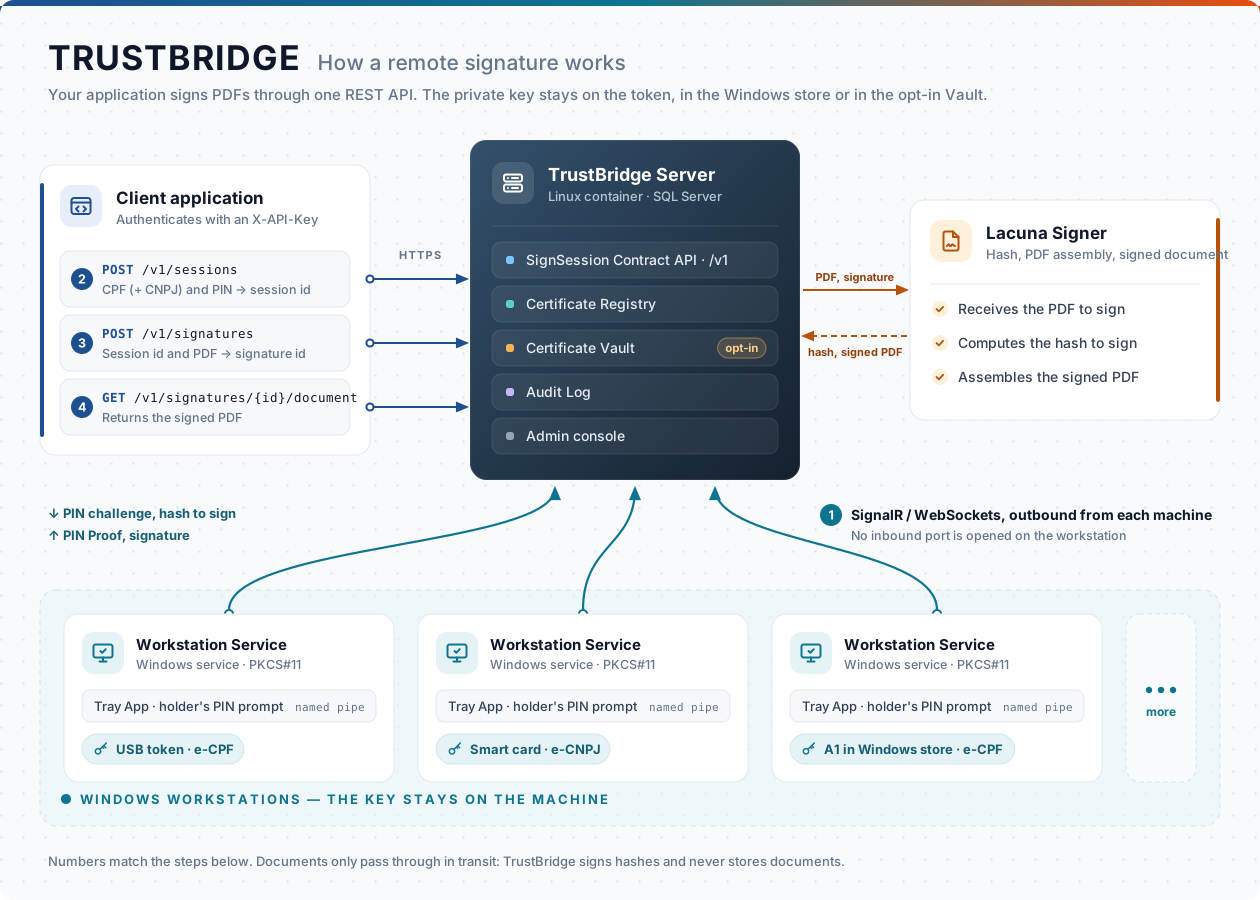
- A Workstation Service connects outbound to the Server, announces the certificates on its machine and their validation verdicts, and keeps the connection open.
- A client application calls
POST /v1/sessionswith a CPF (and, for a Company, a CNPJ) and a PIN. The Server tries the Vault Certificates for it first. Failing that, it challenges every workstation that holds a matching certificate, all at once, and each answers with a PIN Proof over the PIN it has cached, or says it has none. If no cached PIN proves a match and a machine had none to prove with, the holder is prompted at the Tray App, and the machine answers with a proof over what they type. The PIN itself stays on the Server, which checks every proof. The certificate whose proof matches binds the Signing Session. - The client calls
POST /v1/signatureswith the session id and a PDF. The Server uploads the document to Lacuna Signer, gets the hash to sign, has it signed where the key lives, completes the signature at Signer, and answers the signature id. For a Client Application switched to REST PKI Core, REST PKI Core validates the certificate, prepares the PDF and completes it around the same one signature, and keeps the signed document. - The client fetches the signed PDF with
GET /v1/signatures/{signatureId}/document.
Every step lands in the Audit Log, and the admin console reads the same records.
Quickstart: the Server on Docker
Using the deployment package and image provided by Lacuna Software:
sudo mkdir -p /etc/trustbridge/tls /opt/trustbridge
sudo cp your-certificate.pfx /etc/trustbridge/tls/server.pfx     # TLS, trusted by every workstation
sudo chown 1654:1654 /etc/trustbridge/tls/server.pfx && sudo chmod 400 /etc/trustbridge/tls/server.pfx

cd /opt/trustbridge
cp <package>/docker-compose.yml . && cp <package>/.env.example .env && chmod 600 .env

# Mint the Key Ring Protector (required, keep the .pfx forever, off this host)
openssl req -x509 -newkey rsa:2048 -nodes -days 18250 -keyout protector.key -out protector.crt \
  -subj "/CN=TrustBridge Key Ring Protector"
openssl pkcs12 -export -inkey protector.key -in protector.crt -out protector.pfx -passout pass:
echo "KEY_RING_PROTECTOR_CERTIFICATE=$(base64 -w0 protector.pfx)" >> .env

# The Lacuna PKI SDK licence (required on every deployment; the whole fleet runs on it)
echo "PKI_LICENSE=$(base64 -w0 LacunaPkiLicense.config)" >> .env

# Edit .env: MSSQL_SA_PASSWORD, TLS_CERT_PASSWORD, SIGNER_BASEADDRESS, SIGNER_APIKEY,
#            ADMIN_BOOTSTRAP_EMAIL, ADMIN_BOOTSTRAP_PASSWORD
docker compose up -d
curl -s https://trustbridge.example.com/healthz     # Healthy
Then sign in at https://trustbridge.example.com/admin, enroll the second factor, and remove the
two bootstrap variables from .env. The full procedure, with what each step is for, is on
Server installation. That page also covers the PostgreSQL form, and the
deployment package's deploy-docker.ps1, which does the whole procedure for it and puts REST PKI Core
beside the Server.
Quickstart: a workstation
msiexec /i TrustBridge-Workstation-1.10.0-x64.msi /qn SERVER_URL=https://trustbridge.example.com
The machine appears in the admission queue at /admin/admission. An Administrator admits it, and
it connects and receives the PKI licence from the Server. Later releases can reach it from the
Server instead of by hand. See Workstation installation.
Documentation
| Topic | Page |
|---|---|
| An integration on one page: API key, sessions, signing, errors | Quick reference |
| The vocabulary: sessions, PIN Proofs, custodies, companies, registry, vault, admission and removal, key rings, trust anchors, the licence, releases, Signing Activity, Workstation Reports, Console Accounts and Workstation Refusals | Concepts |
| Deploying the Server on Docker, with SQL Server or PostgreSQL, what to back up, upgrades | Server installation |
| Deploying the Server on Azure App Service with Azure SQL | Azure App Service |
| Every Server setting, its default and an example | Server configuration |
| Installing, admitting, upgrading (including Server-delivered updates) and uninstalling workstations; Group Policy | Workstation installation |
| Every Workstation Service setting and how a fleet supplies it | Workstation configuration |
| The admin console, screen by screen | Admin console |
| The SignSession Contract: endpoints, error codes, examples | REST API |
| Key Ring Protector, API keys, second factor and certificate sign-in, PIN handling, REST PKI Core, admission and removal, what a workstation reports, audit | Security |
| Day-2 operations: health, logs, restarts, rotation, licence renewal, rollout order | Operations |
| Failure modes and how to read them | Troubleshooting |
| Release notes for the Server and Workstation lines, with compatibility | Changelog |
While the Server is running, the machine-readable contract is served at /openapi/v1.json and a
browsable reference at /scalar. Both answer without a credential.
Reading order
| If you are… | Start at |
|---|---|
| Deploying the Server for the first time | Concepts → Server installation → Server configuration |
| Deploying on Azure | Server installation → Azure App Service → Security |
| Rolling out workstations | Workstation installation → Admin console → Workstation configuration |
| Integrating a client application | Concepts → REST API → Troubleshooting |
| Turning on server-held certificates | Concepts → Security → Server configuration |
| Operating an existing deployment | Operations → Admin console → Troubleshooting |
| Upgrading the Server or the fleet | Changelog → Operations → Workstation installation |
| Trusting a private certification authority | Concepts → Admin console → Workstation configuration |