Webhooks
A webhook is a URL of your application that Signer calls when something happens to a document of your
organization. For example, Signer sends a POST to that URL when a participant signs a document or when
the flow finishes.
Use webhooks to track documents. Without them, your application has to call GET /api/documents/{id}
over and over until the state changes, which is called polling. With webhooks, Signer tells your
application right after the event.
How it works
The diagram shows the path of one event, from the participant's action to your application:
  Participant          Signer                           Your application
      |                   |                                   |
      |-- signs --------->|                                   |
      |                   |-- POST https://your-url --------->|  1. Checks the authentication header
      |                   |   { "type": ..., "data": ... }    |
      |                   |<-- 200 OK ------------------------|  2. Answers at once
      |                   |                                   |  3. Processes the event in the background
      |                   |                                   |
If your application does not answer 2xx, Signer tries to send the event again later. The
Delivery, retries and ordering section explains the delivery rules.
To integrate webhooks, follow these steps:
- Register the webhook URL in your organization.
- Choose how Signer authenticates the call.
- Create the endpoint that receives the events.
- Use the Event reference page to read the data of each event type.
Register a webhook
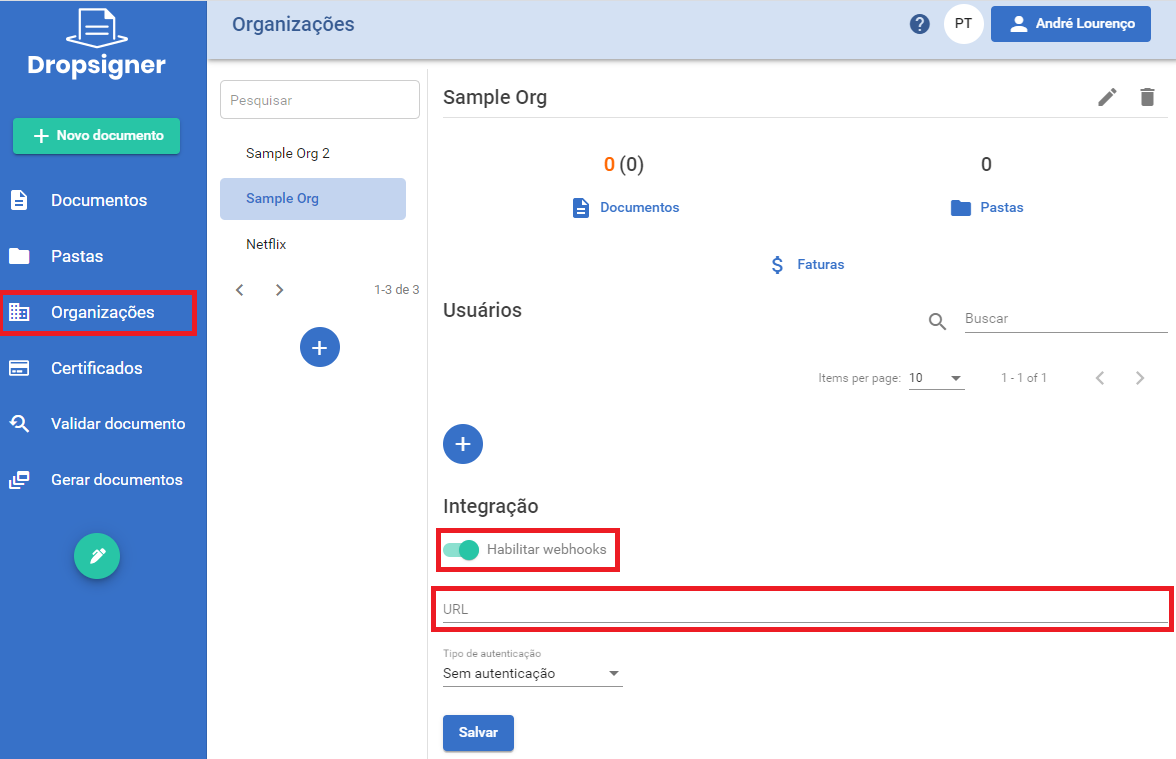
- In the side menu, click Organizations and select your organization.
- In the Integration section, turn on Enable webhooks.
- In the URL field, enter the URL that will receive the events. Use HTTPS.
- In Authentication type, choose how Signer authenticates the call. See Authenticate the call.
- If you chose a type other than No authentication, enter the secret in Authentication Token.
- Click Save.
- An organization can have several webhooks. Every webhook receives every event.
- The instance's
MaxWebhooksPerOrganizationsetting defines how many webhooks an organization can have. The default is 5. If the organization is already at the limit, Signer does not accept a new webhook. - Personal organizations have no webhooks.
Authenticate the call
Signer does not sign the request body. To show that the call comes from Signer, it sends a header with the token you registered. The Authentication type sets which header Signer sends:
| Authentication type | Header sent |
|---|---|
| No authentication | None |
| Basic | Authorization: Basic <token> |
| Bearer | Authorization: Bearer <token> |
| X-Api-Key | X-Api-Key: <token> |
Use HTTPS and an authentication type other than No authentication. Check the header on every request before you process the event. Without that check, anyone who knows your URL can send fake events.
Signer sends the token exactly as you registered it and encodes nothing. In Basic mode, register the
value already Base64-encoded, in the user:password format.
Receive webhooks in code
The samples below show a minimal endpoint in each language. Each endpoint does four things, in the same order as the numbers in the code comments:
- Checks the authentication header.
- Answers
200at once. - Ignores repeated events.
- Reads the document back before acting on it.
The samples are trimmed from the WebhookEndpointScenario of the SignerSamples repository. They use no web
framework. C# uses HttpListener, Java uses the JDK's HttpServer, Node.js uses the http module and PHP
uses its built-in server. The full scenarios also show how to test the endpoint with curl.
- C#
- Java
- Node.js
- PHP
using Lacuna.Signer.Api;
using Newtonsoft.Json.Linq;

// "Bearer <token>": the token registered with the webhook, with authType Bearer
private static readonly string ExpectedAuthorization = "Bearer " + Environment.GetEnvironmentVariable("SIGNER_WEBHOOK_TOKEN");
// Keys of the events already received; production needs durable storage, such as a table with a unique key
private readonly ConcurrentDictionary<string, bool> receivedEvents = new ConcurrentDictionary<string, bool>();

// Called for each request of an HttpListener started on http://localhost:8080/
private async Task HandleRequestAsync(HttpListenerContext context)
{
    var request = context.Request;
    var response = context.Response;

    // 1. Check the auth header: Signer does not sign the body
    if (!IsAuthorized(request.Headers["Authorization"]))
    {
        response.StatusCode = 401;
        response.Close();
        return;
    }

    // The body is { "type": "...", "data": { ... } }. Read it as JSON rather than as a WebhookModel,
    // which rejects the event types that its WebhookTypes enum doesn't list.
    string body;
    using (var reader = new StreamReader(request.InputStream, Encoding.UTF8))
    {
        body = await reader.ReadToEndAsync();
    }
    var webhook = JObject.Parse(body);

    // 3. Be idempotent. GetEventKey (in the sample) joins the type, the document id and the flowActionId.
    var isNew = receivedEvents.TryAdd(GetEventKey(webhook), true);

    // 2. Answer 200 at once (also to a repeated event, so that Signer stops sending it), then process
    response.StatusCode = 200;
    response.Close();
    if (!isNew)
    {
        return;
    }

    // 4. Don't trust the order of events: read the document before acting on it
    if ((string)webhook["type"] == nameof(WebhookTypes.DocumentConcluded))
    {
        var document = await signerClient.GetDocumentDetailsAsync((Guid)webhook["data"]["id"]);
        if (document.Status == DocumentStatus.Concluded)
        {
            // Download the signed file, update your records...
        }
    }
}

private static bool IsAuthorized(string authorization)
{
    // Compare SHA-256 hashes, so that the comparison time doesn't reveal how much of the token matched
    using (var sha256 = SHA256.Create())
    {
        var expected = sha256.ComputeHash(Encoding.UTF8.GetBytes(ExpectedAuthorization));
        var actual = sha256.ComputeHash(Encoding.UTF8.GetBytes(authorization ?? ""));
        return actual.SequenceEqual(expected);
    }
}
import com.google.gson.Gson;
import com.google.gson.JsonElement;
import com.lacunasoftware.signer.DocumentStatus;
import com.lacunasoftware.signer.WebhookTypes;
import com.lacunasoftware.signer.documents.DocumentModel;
import com.lacunasoftware.signer.webhooks.WebhookModel;
import com.sun.net.httpserver.HttpExchange;

// "Bearer <token>": the token registered with the webhook, with authType Bearer
private static final String EXPECTED_AUTHORIZATION = "Bearer " + System.getenv("SIGNER_WEBHOOK_TOKEN");
// Keys of the events already received; production needs durable storage, such as a table with a unique key
private final Set<String> receivedEvents = ConcurrentHashMap.newKeySet();
// Processes the events after they are answered, off the server's thread
private final ExecutorService processor = Executors.newSingleThreadExecutor();

// The handler of HttpServer.create(new InetSocketAddress("localhost", 8080), 0).createContext("/webhook", ...)
private void handleRequest(HttpExchange exchange) throws IOException {
    // 1. Check the auth header: Signer does not sign the body. MessageDigest.isEqual compares in constant time.
    String authorization = exchange.getRequestHeaders().getFirst("Authorization");
    if (authorization == null || !MessageDigest.isEqual(
            authorization.getBytes(StandardCharsets.UTF_8),
            EXPECTED_AUTHORIZATION.getBytes(StandardCharsets.UTF_8))) {
        exchange.sendResponseHeaders(401, -1);
        exchange.close();
        return;
    }

    // The body is { "type": "...", "data": { ... } }. signerClient.getGson() reads the API's enums and dates.
    Gson gson = signerClient.getGson();
    JsonElement body;
    try (InputStreamReader reader = new InputStreamReader(exchange.getRequestBody(), StandardCharsets.UTF_8)) {
        body = gson.fromJson(reader, JsonElement.class);
    }

    // 3. Be idempotent. getEventKey (in the sample) joins the type, the document id and the flowActionId.
    boolean isNew = receivedEvents.add(getEventKey(gson.fromJson(body, Event.class)));

    // 2. Answer 200 at once (also to a repeated event, so that Signer stops sending it), then process
    exchange.sendResponseHeaders(200, -1);
    exchange.close();
    if (isNew) {
        processor.execute(() -> processEvent(gson, body));
    }
}

private void processEvent(Gson gson, JsonElement body) {
    try {
        WebhookModel webhook = gson.fromJson(body, WebhookModel.class);
        if (webhook.getType() == WebhookTypes.DOCUMENTCONCLUDED) {
            // 4. Don't trust the order of events: read the document before acting on it
            String documentId = body.getAsJsonObject().getAsJsonObject("data").get("id").getAsString();
            DocumentModel document = signerClient.getDocumentDetails(UUID.fromString(documentId));
            if (document.getStatus() == DocumentStatus.CONCLUDED) {
                // Download the signed file, update your records...
            }
        }
    } catch (Exception e) {
        // Already answered, so Signer won't send it again: keep the event and retry it from your storage
    }
}
import * as crypto from "crypto";
import * as http from "http";
import { DocumentStatus, WebhooksWebhookModel, WebhookTypes } from "signer-node-client";

// "Bearer <token>": the token registered with the webhook, with authType Bearer
const expectedAuthorization = "Bearer " + process.env.SIGNER_WEBHOOK_TOKEN;
// Keys of the events already received; production needs durable storage, such as a table with a unique key
const receivedEvents = new Set<string>();

http.createServer((req, res) => {
  // 1. Check the auth header: Signer does not sign the body
  if (!isAuthorized(req.headers.authorization)) {
    res.writeHead(401).end();
    return;
  }

  const chunks: Buffer[] = [];
  req.on("data", (chunk: Buffer) => chunks.push(chunk));
  req.on("end", () => {
    // The body is { "type": "...", "data": { ... } }
    let webhook: WebhooksWebhookModel;
    let key: string;
    try {
      webhook = JSON.parse(Buffer.concat(chunks).toString("utf8"));
      // 3. Be idempotent. getEventKey (in the sample) joins the type, the document id and the flowActionId.
      key = getEventKey(webhook);
    } catch {
      res.writeHead(400).end();
      return;
    }
    const isNew = !receivedEvents.has(key);
    receivedEvents.add(key);

    // 2. Answer 200 at once (also to a repeated event, so that Signer stops sending it), then process
    res.writeHead(200).end();
    if (isNew) {
      processEvent(webhook).catch((err) => console.error(`Could not process ${key}: ${err.message}`));
    }
  });
}).listen(8080, "localhost");

function isAuthorized(authorization: string | undefined): boolean {
  // timingSafeEqual needs inputs of the same length, so compare SHA-256 hashes
  const hash = (value: string) => crypto.createHash("sha256").update(value).digest();
  return crypto.timingSafeEqual(hash(authorization ?? ""), hash(expectedAuthorization));
}

async function processEvent(webhook: WebhooksWebhookModel) {
  if (webhook.type === WebhookTypes.DocumentConcluded) {
    // 4. Don't trust the order of events: read the document before acting on it
    const document = (await documentsApi.apiDocumentsIdGet(webhook.data.id)).data;
    if (document.status === DocumentStatus.Concluded) {
      // Download the signed file, update your records...
    }
  }
}
// webhook.php, served with: php -S localhost:8080 webhook.php
use Lacuna\Signer\Model\DocumentsDocumentModel;
use Lacuna\Signer\Model\DocumentStatus;
use Lacuna\Signer\Model\WebhookTypes;

// 1. Check the auth header: Signer does not sign the body. hash_equals compares in constant time.
//    "Bearer <token>": the token registered with the webhook, with authType Bearer
if (!hash_equals('Bearer ' . getenv('SIGNER_WEBHOOK_TOKEN'), $_SERVER['HTTP_AUTHORIZATION'] ?? '')) {
    http_response_code(401);
    return;
}

// The body is { "type": "...", "data": { ... } }
$webhook = json_decode(file_get_contents('php://input'), true);
if (!is_array($webhook) || !is_string($webhook['type'] ?? null) || $webhook['type'] === '') {
    http_response_code(400);
    return;
}

// 3. Be idempotent. getEventKey (in the sample) joins the type, the document id and the flowActionId;
//    recordEvent returns false for a key already recorded (the sample creates one file per key;
//    production needs durable storage, such as a table with a unique key).
if (!recordEvent(getEventKey($webhook))) {
    http_response_code(200);
    return;
}

// 2. Answer 200 at once, then process the event
ignore_user_abort(true);
http_response_code(200);
header('Content-Length: 0');
header('Connection: close');
if (function_exists('fastcgi_finish_request')) {
    fastcgi_finish_request(); // PHP-FPM
} else {
    // Other servers, such as PHP's built-in one: send the headers now
    while (ob_get_level() > 0) {
        ob_end_flush();
    }
    flush();
}

// 4. Don't trust the order of events: read the document before acting on it
if ($webhook['type'] === WebhookTypes::DOCUMENT_CONCLUDED) {
    $document = new DocumentsDocumentModel($signerClient->getDocumentDetails($webhook['data']['id']));
    if ($document->getStatus() === DocumentStatus::CONCLUDED) {
        // Download the signed file, update your records...
    }
}
See the full endpoints: C# · Java · PHP · Node.js. To create the client the samples use, see Create documents.
The WebhookTypes enum of the .NET client and of the PHP client has no DocumentDeleted. This applies to
Lacuna.Signer.Api 1.67.0, which Lacuna.Signer.Client 1.24.0 installs, and to the PHP client 1.4.10. The
Java and Node.js enums have DocumentDeleted.
If the enum of your library does not list an event type, compare the type of the body as text. The C# and
PHP samples above do that.
Events
The body of every request has the { "type": ..., "data": ... } format. The type field tells the event
type, such as DocumentSigned or DocumentConcluded. The content of data depends on the type.
For the list of types, the fields of each event and body samples, see the page Event reference.
Delivery, retries and ordering
This section explains how Signer sends events. Most webhook integration problems come from these rules.
Asynchronous delivery
Signer does not send the event at the same instant as the user's action. A background process sends each event, from a low priority queue. A small delay is normal.
If the organization has more than one webhook, Signer sends the event to each webhook separately. A failure in one webhook does not affect the others.
Retries
Your application must answer with a 2xx code. If it answers with another code, or if the connection
fails, Signer marks the delivery as failed. Signer then tries to send the event again, up to 10 times. The
wait grows with each attempt:
| Retry | Wait after the previous failure |
|---|---|
| 1st | 15 to 45 seconds |
| 2nd | 15 seconds to 1 minute 15 seconds |
| 3rd | 30 seconds to 2 minutes |
| 4th | 1 minute 35 seconds to 3 minutes 30 seconds |
| 5th | 4 minutes 30 seconds to 7 minutes |
| 6th | 10 minutes 40 seconds to 13 minutes 30 seconds |
| 7th | 22 to 25 minutes |
| 8th | 40 to 44 minutes |
| 9th | 1 hour 8 minutes to 1 hour 13 minutes |
| 10th | 1 hour 50 minutes to 1 hour 55 minutes |
The 10 retries take, in total, from 4 hours 20 minutes to 4 hours 45 minutes after the first failure. Each wait has a random part, so the table shows ranges. After the 10th failure, Signer stops sending that event.
On each retry, Signer builds the event again from the current document data. The state check described in Event order also applies to each retry.
Signer logs the status code and the response body of each failure. If you investigate a delivery problem, ask the instance administrator for those records.
Repeated deliveries
Because of the retries, the same event can arrive more than once. Make your processing idempotent, that
is, safe to run more than once for the same event. To recognize an event you already processed, use the
type, the document id and, when there is one, the flowActionId.
Event order
Signer does not guarantee the order of events, because independent processes deliver them. For example,
the DocumentConcluded of a document can arrive before the DocumentSigned of the same document.
Before it sends some events, Signer checks that the document is still in the event's state. If the state
changed, Signer drops the event. For example, if someone pauses a document and resumes it right after, your
application may get only DocumentResumed, without DocumentPaused. This check applies to
DocumentConcluded, DocumentCanceled, DocumentPaused, DocumentResumed and DocumentExpired.
Best practices
- Answer
200at once and process the event later, in the background. If the endpoint is slow, the call times out and Signer retries for no reason. - Check the authentication header on every request.
- Keep the URL stable and reachable. Signer must reach the URL over the internet. In on-premises installations, Signer must reach it over the network where its server runs.
- Log the events you receive. The log helps you find differences between your system and Signer.
Troubleshooting
If you need more detail about a delivery failure, ask the instance administrator for the Signer logs. For each failure, the log shows the status code, the response body and the URL called.
If you fix the URL or the token of a webhook, the next retries of a failed event already use the new value. Signer reads the webhook settings on every attempt.
Your application gets no events
| Possible cause | How to fix |
|---|---|
| The Enable webhooks option is off. | In Organizations, Integration section, turn on Enable webhooks and click Save. |
| The webhook was registered after the action on the document. | Signer sends the event only to the webhooks that exist at the time of the action. It does not send events for actions before the webhook was registered. |
| The document is in a personal organization. | Personal organizations have no webhooks. Create the document in an organization that has the webhook registered. |
| Signer cannot connect to the URL. For example, the host name does not exist, a firewall blocks the port or the URL only works inside your network. | Check that the URL answers from a machine outside your network, for example with curl -X POST <url>. In on-premises installations, run the test from the Signer server. |
| The HTTPS certificate of the URL is not valid. For example, it is self-signed, it expired or it lacks the full chain. | Signer refuses the connection when the certificate is not valid. Use a certificate issued by a trusted certificate authority and configure the full chain on the server. |
Your application answers 401 or 403
| Possible cause | How to fix |
|---|---|
The webhook's Authentication type is not what your endpoint expects. For example, the webhook uses X-Api-Key and the endpoint reads the Authorization header. | Choose in the webhook the type your endpoint reads. See the headers of each type in Authenticate the call. |
| The token registered in the webhook differs from the token the endpoint compares. | Register the token again in the webhook and in the endpoint. Check that there is no space or line break at the start or end of the token. |
| In Basic mode, the token is not Base64-encoded. | Signer sends the token without encoding it. Register the user:password value already Base64-encoded. |
| A proxy or gateway between Signer and your application removes or replaces the authentication header. | Check the proxy or gateway settings. It must pass the Authorization or X-Api-Key header to your application. |
The same event arrives several times
| Possible cause | How to fix |
|---|---|
Your application answered with a code other than 2xx. | Answer 200 also for an event you already processed. If you answer with an error, Signer tries again. |
| Your application took more than 100 seconds to answer. | Signer cancels the call after 100 seconds and tries again. Answer 200 as soon as you get the event and process it later, in the background. |
| Retries are normal. | Make your processing idempotent. See Repeated deliveries. |
Your application gets a GET or an empty body
| Possible cause | How to fix |
|---|---|
The registered URL answers with a redirect (301 or 302). When it follows that redirect, Signer turns the POST into a GET, with no body. | Register the final URL, which answers without redirecting. Check the scheme (https), the domain (with or without www) and the trailing slash of the path. |
The URL redirects from https to http. | Signer does not follow that redirect, and the delivery fails. Register the final https URL. |
An expected event did not arrive
| Possible cause | How to fix |
|---|---|
| The document state changed before delivery. For example, someone paused a document and resumed it right after. | Signer drops the event when the document is no longer in the event's state. See Event order. |
| Someone deleted the webhook before delivery. | Signer does not send the event to a deleted webhook. |
| All 10 retries failed. | Signer stops sending that event. Fix the cause of the failure so that the next events arrive. See Retries. |
Other problems
| Problem | Cause and fix |
|---|---|
| Signer does not accept a new webhook. | The organization reached its webhook limit, set by the MaxWebhooksPerOrganization setting (5 by default). Delete a webhook, or ask the instance administrator to change the limit. |
The documents list of a DocumentDeleted event does not have every deleted document. | In organization or folder deletions, the list has at most 100 documents. See Event reference. |