Browsing the system's documents
The system administrator can open the documents of any organization or personal account on the instance, even without being a member of it.
Finding the organization or personal account
-
Open the user menu and click Admin.
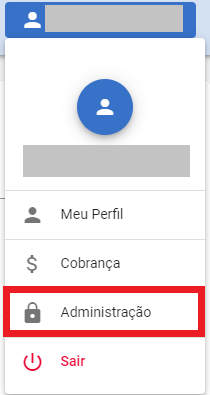
-
In the side menu, click Organizations.
-
To see a user's documents that are not in an organization, switch the selector at the top of the list from Organizations to Personal accounts. Each personal account holds the documents a user sent outside an organization.

The selector only appears on open instances, where every user gets a personal account, and when the
BlockPersonalAccountssetting is off. See Access control. -
In Search, type the name of the organization or user and pick it from the list.

The organization page shows the Pending documents and Total number of documents counters. A personal account appears with the owner's name followed by (Personal account).
Viewing the documents
On the organization page, click Documents.

The list shows every document of the organization or personal account, except deleted ones. Click Show filters to filter by Status (Pending, Completed, Refused or Paused), document type or folder, or to search by name.
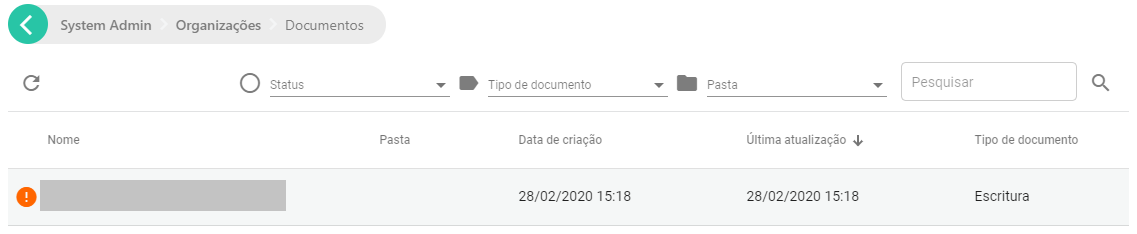
Click a document to open its details. From there you can:
- download the document, unless the organization hides the download of pending documents;
- from the ⋮ menu, edit the information, refuse, cancel, pause or resume the document, send a new version or validate it.
The Documents list doesn't delete documents. To delete, use the Folders page; see Deleting documents.
Viewing the folders
On the organization page, click Folders to browse the folders and see each one's documents. On that page you can create folders and move or delete documents.
Other actions on the organization page
On the organization page, the system administrator can also:
- generate a documents report, with Generate report;
- view the organization's Events and Settings;
- manage the organization's users, including adding an administrator when none can sign in (see The last administrator);
- edit the organization's data or delete it.
Users and integration (webhooks) don't appear for personal accounts.