Adding a user to system administration
To make someone a system administrator, give them the Administrator role in the Sys Admin organization. Only a system administrator can do this. The person doesn't need a Signer account: if they haven't signed up yet, they get an invite.
Adding a system administrator
-
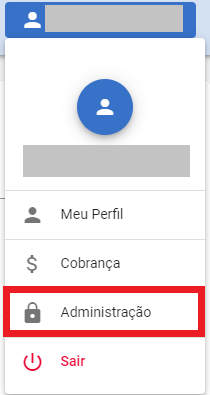
Open the user menu and click Admin.
-
In the side menu, click Users.
-
Click Add.
-
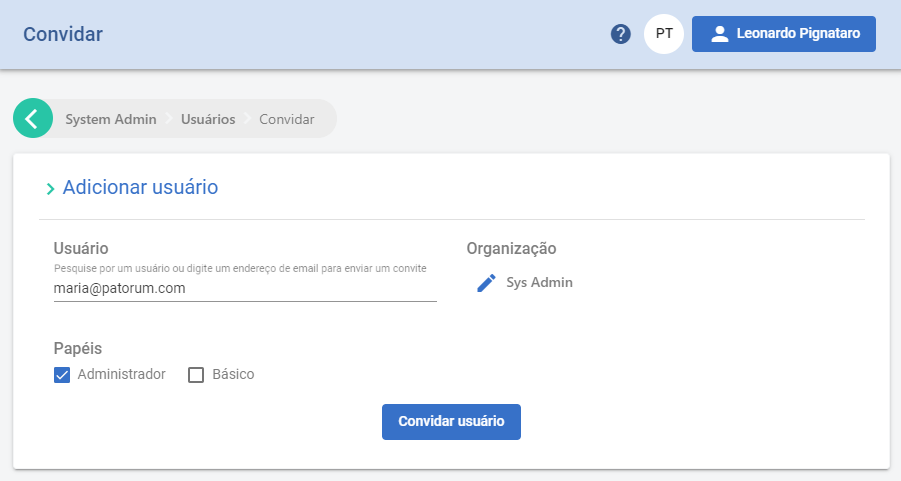
In the Add user form, in the User field, type the person's name or e-mail. If they already have an account, pick them from the suggestions, which appear from the fourth character on. If they don't have an account yet, type the full e-mail address.
-
Under Organization, choose Sys Admin. This is the step that makes the person a system administrator: if you choose another organization, they only get access to that organization.
-
Under Roles, check Administrator. The other Sys Admin roles grant partial powers and don't open the Admin area; see Who is a system administrator.
-
Click the confirmation button:
- Add user, if you picked a person who already has an account. The access applies right away.
- Invite user, if you typed an e-mail address. Signer sends an invite e-mail to the admin area, with the Accept Invite button. The person signs in or signs up and gets the role when they accept.
If e-mail sending isn't configured on the instance, Signer shows the invite link for you to copy and send to the person some other way.
Invites not yet accepted appear on the Users page, under Pending invites. From there you can resend, edit or delete an invite, or copy the access link.
Removing a system administrator
- In the Admin area, click Users and open the user.
- Click Revoke Access, choose Sys Admin and confirm. The user loses every Sys Admin role but keeps the access they have in organizations.
To remove a single role, click Edit next to Roles, choose Sys Admin and uncheck the role.
You can't revoke your own access: the button doesn't appear on your own user. Ask another system administrator.
To stop a person from signing in to Signer without removing their access, open the user and click Lock. Unlock gives the access back.