Administration APIs
Introduction
The administration APIs let you create, manage and change Signer users and organizations.
To call these APIs you need an administration API key.
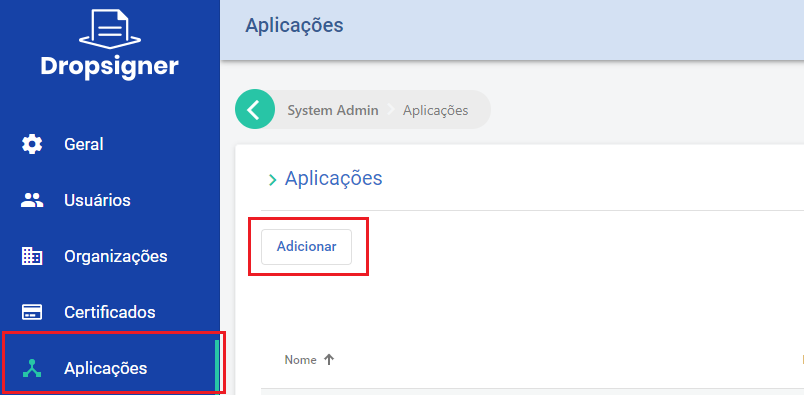
Creating an administration API key
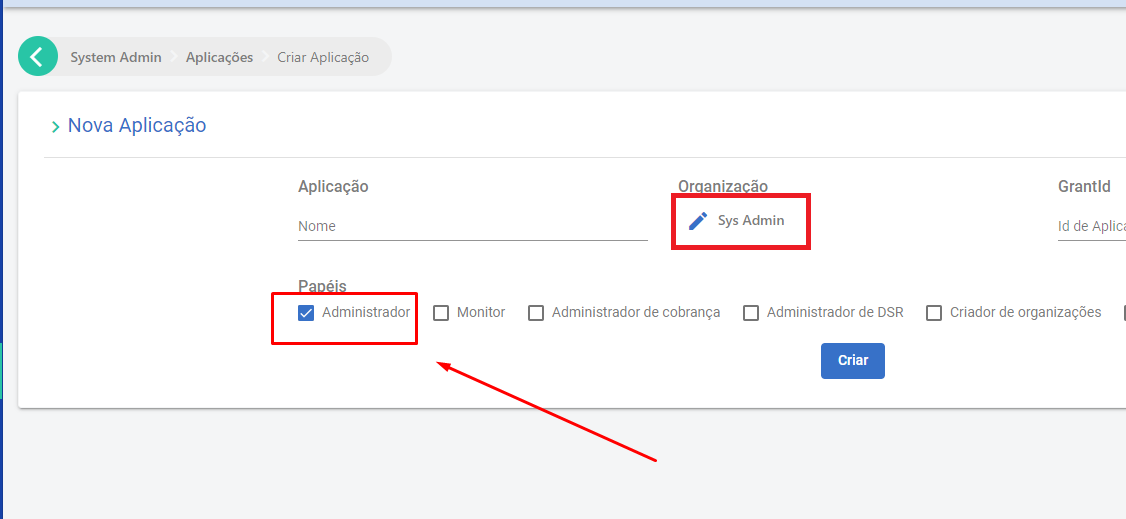
To create one, create an application and select the Sys Admin organization:
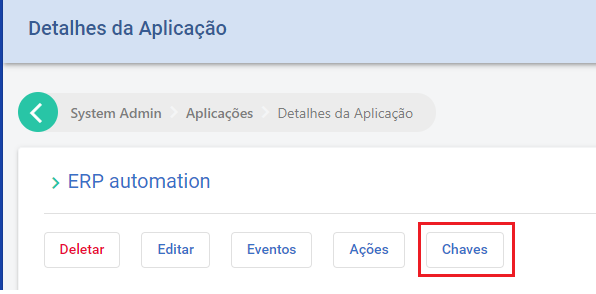
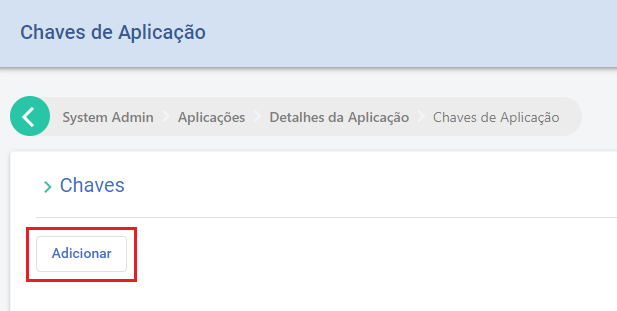
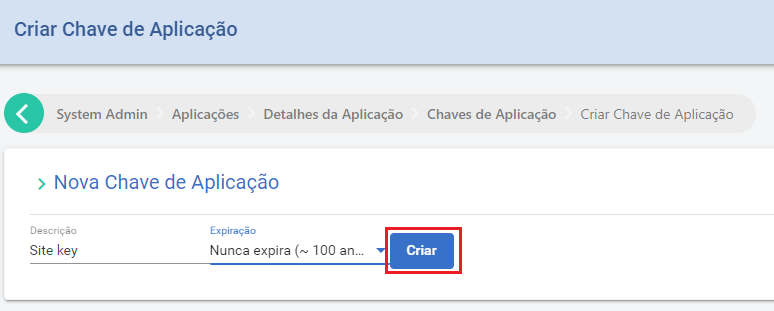
Then create the key with the "Keys" button:
Administration operations
Choose one of the use cases below:
These and other operations are shown in the following Postman collection: Signer ADM APIs.
List users
To list the users registered in the system, with their data and permissions, call GET /api/users:
GET /api/users?q=
{
    "items": [
        {
            "identifier": "99999999999",
            "phone": null,
            "id": "446e14b9-a661-446a-bb52-66b6c9f1ade9",
            "subject": "17bb43bd-1dac-46ce-95d2-62007bee2aea",
            "name": "User One",
            "emailAddress": "User.One@mailinator.com",
            "parentId": null,
            "rootRoles": [],
            "parentRootRoles": null,
            "subscriptions": [
                {
                    "agentId": "446e14b9-a661-446a-bb52-66b6c9f1ade9",
                    "subscriptionId": "28dd8bc0-ef7a-44e4-b2f8-08da757b7cf1",
                    "roles": [
                        "Admin",
                        "Manager",
                        "Basic"
                    ],
                    "parentRoles": null
                }
            ]
        },
        {
            "identifier": "11096802449",
            "phone": "+55 61 99999-9999",
            "id": "7b06a7ed-43fc-45df-96f8-cb29f4778e22",
            "subject": "ee72e66e-c150-47c3-a8fd-d4d0c6e12ef5",
            "name": "User Two",
            "emailAddress": "user.two@mailinator.com",
            "parentId": null,
            "rootRoles": [],
            "parentRootRoles": null,
            "subscriptions": [
                {
                    "agentId": "7b06a7ed-43fc-45df-96f8-cb29f4778e22",
                    "subscriptionId": "7289e60f-0c1f-4a3d-4b81-08da718c9ef3",
                    "roles": [
                        "Admin",
                        "Manager",
                        "Basic"
                    ],
                    "parentRoles": null
                }
            ]
        }
    ],
    "totalCount": 2,
    "nextCursor": null
}
- q (query -
string): filters the returned users by name, CPF or email (optional).
Update user data
To update a user's data, call PUT /api/users/{subject}:
PUT /api/users/{subject}
{
  "name": "User Name",
  "identifier": "11096802449",
  "emailAddress": "user@mailinator.com",
  "phone": "+55 (61) 99999-9999"
}
{subject}is the field of the same name returned with the user's data, as described in List users.
List organizations
To list the organizations registered in the system, call GET /api/admin/organizations:
GET /api/admin/organizations?limit=1&offset=1&personal=true&q=user

{
    "items": [
        {
            "id": "5aaa9032-1ad0-4c63-3c73-08d9d088eeac",
            "name": null,
            "identifier": null,
            "owner": {
                "id": "6f9d67cc-5cea-4672-b09e-ac04ed2e348f",
                "name": "Novo User"
            }
        }
    ],
    "totalCount": 17,
    "nextCursor": null
}
-
limit (
int): number of items per page (optional). -
offset (
int): page number (optional). -
q (query -
string): filters by organization name (optional).
Create an organization
To create an organization, call POST /api/admin/organizations:
POST /api/admin/organizations

{
  "name": "newOrg",
  "identifier": "85932577000194"
}
List the users of an organization
To list the users of an organization, call GET /api/organizations/{id}/users:
GET /api/organizations/{id}/users?limit=1&offset=0&q=
{
    "items": [
        {
            "id": "7b06a7ed-43fc-45df-96f8-cb29f4778e22",
            "name": "User Name",
            "email": "user.name@mailinator.com",
            "identifier": "11096802449",
            "role": "",
            "parentId": null,
            "accessProfile": {
                "administrator": true,
                "manager": true,
                "parentRoles": null
            },
            "showNameWarning": false
        }
    ],
    "totalCount": 3,
    "nextCursor": null
}
-
{id}: the organization ID. -
limit (
int): number of items per page (optional). -
offset (
int): page number (optional). -
q (query -
string): filters by user name (optional).
Create or update users of an organization
To create or update users, call POST /api/organizations/{id}/users:
POST /api/organizations/{id}/users
{
  "accessProfile": {
    "administrator": true,
    "manager": true
  },
  "name": "User Name",
  "identifier": "11096802449",
  "email": "user@mailinator.com"
}
{id}: the organization ID.
Remove a user from an organization
To remove a user from an organization, call DELETE /api/admin/organizations/{id}/users/{userID}:
{id}: the organization ID.{userID}: the ID of the user to remove.
Organization settings
These APIs read and change the settings that the organization administrator sees on the organization screen. They are not in the API reference (Swagger). To change settings, the key needs the permission to manage the organization's settings. The administration API key has this permission.
Three settings control document creation:
| Section | Fields | What it does |
|---|---|---|
requireFolder | enabled | If true, every new document needs a folder. Without a folder, creation fails with the FolderRequired error. null uses the instance default. |
tags | tagLabels, requireTagOnDocumentCreation, requireRegisteredTagLabels | tagLabels is the list of registered tags. If requireTagOnDocumentCreation is true, every new document needs a tag with a label and a value (TagRequired error). If requireRegisteredTagLabels is true, the tag label must be on the list (TagLabelNotRegistered error). |
signerPositioning | enabled, automaticPositioning | The organization default for signer positioning of the signature. null uses the instance default. Available from version 3.0.0. |
An integration can bypass these three requirements on a document with the overrides field.
To read a section, use GET /api/organizations/{id}/settings/require-folder, GET /api/organizations/{id}/settings/tags or GET /api/organizations/{id}/settings/signer-positioning. To reset a section to the default, send a DELETE to the same route.
To change settings, use PUT /api/organizations/{id}/settings:
PUT /api/organizations/{id}/settings
{
  ...
  "tags": {
    "tagLabels": [ "Contract", "Department" ],
    "requireTagOnDocumentCreation": true,
    "requireRegisteredTagLabels": true
  },
  "requireFolder": { "enabled": true },
  "signerPositioning": { "enabled": false, "automaticPositioning": "SignatureSheet" }
}
The PUT replaces every section of the organization settings, such as e-mail, reminders and printer-friendly version, not only the sections above. First read the settings with GET /api/organizations/{id}/settings, then send back every section with your change. A section you do not send can go back to the default or cause an error.