Track documents
After creating a document, you track its progress in two ways: polling the status actively or receiving notifications via webhook when something happens. You can also send reminders to participants who have not acted yet.
Check the status of a document
To check the status of a document you need its ID. Then call the Document Details API:
GET /api/documents/b12cb1b2-5d6e-40b2-a050-097d068c4c11

{
    "id": "b12cb1b2-5d6e-40b2-a050-097d068c4c11",
    "name": "Integration Contract",
    "status": "Concluded",
    "creationDate": "2019-08-18T16:26:03.372Z",
    "updateDate": "2019-08-18T16:26:03.372Z",
    ...
    "flowActions": [
        {
            "id": "4bf61c68-eaf1-455f-b4a1-6141554f1dae",
            "type": "Signer",
            "status": "Completed",
            "step": 1,
            ...
            "user":
            {
                "id": "4d961566-9b03-450c-b144-930e0294bac2",
                "name": "John Wick",
                "identifier": "81976153069",
                "email": "john.wick@mailinator.com"
            },
            "title": "Party",
            "allowElectronicSignature": true
        }
    ]
}
- To find out if the document is completed, check that the property
statuscorresponds toConcluded. - To find out if a participant has signed/approved, check if the property
statuscorresponds toCompletedfor the corresponding item in theflowActionslist.
Document status
The document's status property can take the following values:
| Status | Meaning |
|---|---|
Pending | Waiting for participant actions |
Paused | Flow paused: nobody can sign, approve or refuse until the document is resumed. This is not a final status. Treat it like Pending. See Pause and resume a document. Available from version 3.0.0. |
FlowConcluded | All flow actions are done (final processing in progress) |
Concluded | Document concluded |
Refused | Document refused by a participant |
Canceled | Document canceled |
Expired | Document expired |
Participant action status
Each flowActions item has its own status:
| Status | Meaning |
|---|---|
Created | Action created, not yet released to the participant (waiting for a previous step) |
Pending | Waiting for the participant's action |
Completed | Participant completed the action (signed/approved) |
Refused | Participant refused |
Examples on GitHub: C# · Java · PHP · Node.js
Send signing reminders
Once the status of a participant has been verified, you can send periodic reminders to the flow participants who have not yet completed an action, using the Reminders Sending API. Provide the document ID and the participant's action ID (flowActionId):
POST /api/notifications/flow-action-reminder

{
    "documentId": "b12cb1b2-5d6e-40b2-a050-097d068c4c11",
    "flowActionId": "4bf61c68-eaf1-455f-b4a1-6141554f1dae"
}
Examples on GitHub: C# · Java · PHP · Node.js
Webhooks
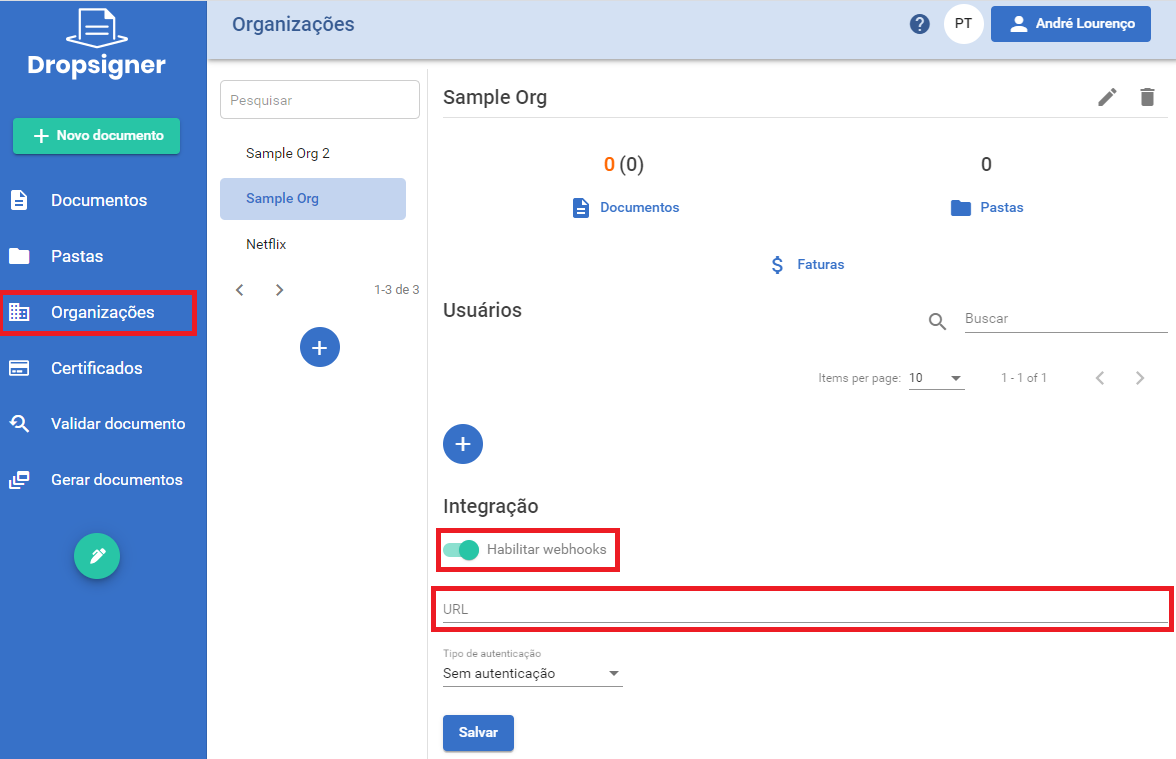
Instead of polling the status repeatedly, you can set up a Webhook that will be triggered every time a document from your organization is completed, approved, declined or signed. For that, access the Organization page and register the required URL in the Integration option:
See Webhooks for the complete list of events, the payload format of each one and the delivery behaviour (authentication, retries and ordering).
Next steps
Once the document is concluded, see how to download and list documents.