Monitoring timestamping - Rest PKI Core
To monitor timestamp issuance on your Rest PKI Core instance, follow the steps below:
- Sign in to the management interface of your instance (e.g. https://restpkicore.yourcompany.com)
- Click your name on the top right corner, then Sys Admin
- On the left menu, click Timestamping
- Click one of the timestamping Tiers
- On the tier details page, the Timestamp requests section shows the requests received for that tier, which you can filter by start and/or end date
- To see more information about a specific request, click its Show details link
- The dialog that opens lets you get:
- The request (timestamp query) in binary format, as defined in RFC 3161
- The response (timestamp reply) in binary format, as defined in RFC 3161
- The timestamp issued
- The certificate of the authority that issued the timestamp
- Which providers were used to provide the timestamp, and details on each provider's response, such as the response time and the return code
You can also get the TSP protocol messages, requests (timestamp queries) and responses (timestamp replies), directly from the system's blob storage:
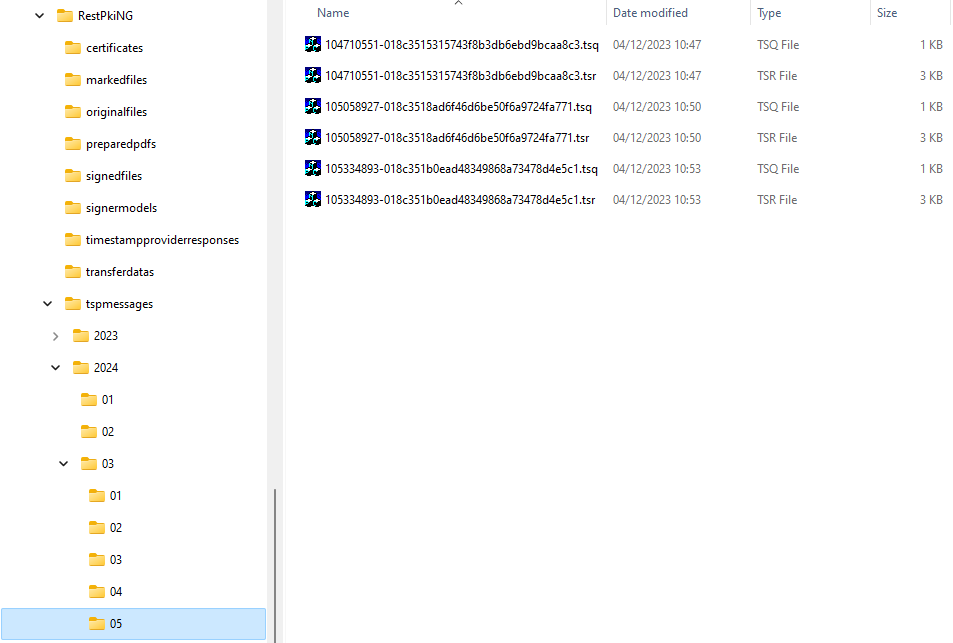
To make lookups easier, the messages are grouped in folders by year, month and day, so that you can, for instance, easily get all the messages of a given month straight from the storage. Each request has two files, as detailed below:
tspmessages/2024/03/05/104710551-018c3515315743f8b3db6ebd9bcaa8c3.tsq
            ─────┰──── ────┰────                                  ─┰─
                 │         │                                       └──── timestamp query (request)
                 │         └──────────────────────────────────────────── time (10:47:10.551)
                 └────────────────────────────────────────────────────── date (2024-03-05)

tspmessages/2024/03/05/104710551-018c3515315743f8b3db6ebd9bcaa8c3.tsr
            ─────┰──── ────┰────                                  ─┰─
                 │         │                                       └──── timestamp reply (response)
                 │         └──────────────────────────────────────────── time (10:47:10.551)
                 └────────────────────────────────────────────────────── date (2024-03-05)
note
The dates and times in the names of the TSP protocol message files are in the system's default time zone (setting General:DefaultTimeZone).