Additional integration requirements - RIB
The integration with the Assinador Web of the Registro de Imóveis do Brasil - RIB has some additional requirements not mentioned in the rest of this documentation.
Required metadata
When creating signature sessions, you must provide the following required metadata:
cartorio: name of the issuing registry office (cartório); this value is shown on the document validation pagecns: CNS (Código Nacional de Serventia, the national registry office code) of the issuing registry office
The CNS can be given in any of the forms below:
1234(digits only)001234(with leading zeros)00.123-4(fully formatted)
In .NET:
var response = await restPkiService.CreateSignatureSessionAsync(new CreateSignatureSessionRequest() {
	...
}, metadata: new NameValueCollection {
	["cartorio"] = "XXº Oficial de Registro de Imóveis do Município - UF",
	["cns"] = "123456",
});
In PHP:
$request = new CreateSignatureSessionRequest();
...
$request->documentMetadata = [
	"cartorio" => "XXº Oficial de Registro de Imóveis do Município - UF",
	"cns" => "123456"
];
In Java:
CreateSignatureSessionRequest request = new CreateSignatureSessionRequest();
...
List<String> firstElement = new ArrayList<>();
firstElement.add("XXº Oficial de Registro de Imóveis do Município - UF");
request.putDocumentMetadataItem("cartorio", firstElement);

List<String> secondElement = new ArrayList<>();
secondElement.add("123456");
request.putDocumentMetadataItem("cns", secondElement);
If you are calling the API directly:
POST {endpoint}/api/signature-sessions
{
	...,
	"documentMetadata": {
		"cartorio": ["XXº Oficial de Registro de Imóveis do Município - UF"],
		"cns": ["123456"]
	}
}
Besides the metadata above, every document on the Assinador Web also has the validade metadata, in the yyyy-mm-dd format, for instance
2021-04-01 (April 1st, 2021). This metadata is assigned to documents automatically, counting 30 days from the signature date, and cannot be
specified when creating the session.
Allocating document validation keys
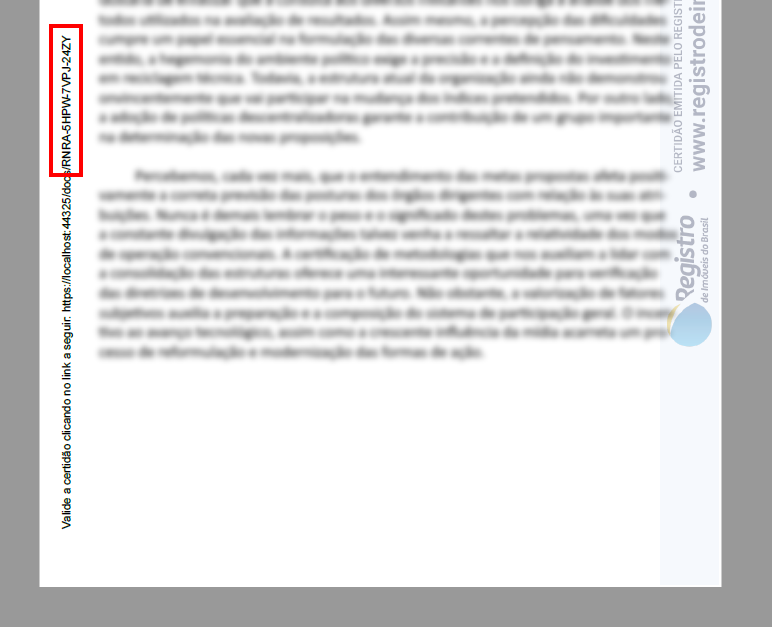
The document validation key, sometimes called "hash" in the context of RIB processes, is the alphanumeric code printed on the margin of the document that lets it be looked up later:
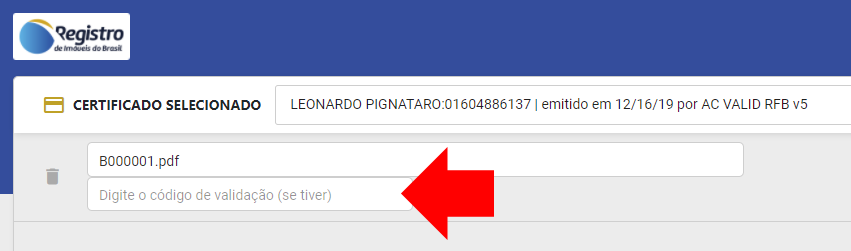
When signing the document, the user may enter the validation key that the document should have, instead of having the system generate a new random key:
Real estate registry offices must be able to allocate validation keys for later use through the service centers (centrais de serviços). To do so, your service center must call the document key allocation API. This call requires the same metadata described above:
In .NET:
// Allocate one key
var documentKey = await restPkiService.AllocateDocumentKeyAsync(new NameValueCollection {
	["cartorio"] = "XXº Oficial de Registro de Imóveis do Município - UF",
	["cns"] = "123456",
});

// Allocate N keys
var documentKeys = await restPkiService.AllocateDocumentKeysAsync(10, new NameValueCollection {
	["cartorio"] = "XXº Oficial de Registro de Imóveis do Município - UF",
	["cns"] = "123456",
});
In PHP:
$defaultDocumentMetadata = [
    "cartorio" => "XXº Oficial de Registro de Imóveis do Município - UF",
    "cns" => "123456"
];
// Allocate one key
$documentKey = $service->allocateDocumentKey($defaultDocumentMetadata);
// Allocate N keys
$documentKeys = $service->allocateDocumentKeys(10, $defaultDocumentMetadata);
In Java:
Map<String, List<String>> defaultDocumentMetadata = new HashMap<>();
List<String> firstElement = new ArrayList<>();
firstElement.add("XXº Oficial de Registro de Imóveis do Município - UF");
defaultDocumentMetadata.put("cartorio", firstElement);
List<String> secondElement = new ArrayList<>();
secondElement.add("123456");
defaultDocumentMetadata.put("cns", secondElement);

// Allocate one key
DocumentKeyModel documentKey = service.allocateDocumentKey(defaultDocumentMetadata);

// Allocate N keys
List<DocumentKeyModel> documentKeys = service.allocateDocumentKeys(10, defaultDocumentMetadata);
If you are calling the API directly:
// Allocate one key
POST {endpoint}/api/document-keys
{
	"provisionalMetadata": {
		"cartorio": ["XXº Oficial de Registro de Imóveis do Município - UF"],
		"cns": ["123456"]
	}
}

// Allocate N keys
POST {endpoint}/api/document-keys/batch
{
	"count": 10,
	"provisionalMetadata": {
		"cartorio": ["XXº Oficial de Registro de Imóveis do Município - UF"],
		"cns": ["123456"]
	}
}
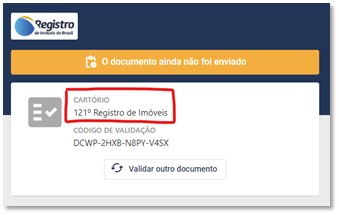
The provisionalMetadata parameter of the key allocation tells which registry office is responsible for submitting the document that will
have a given key, so that the system can show this information if the key is used to look up documents:
Generating API keys for the command-line tool
Real estate registry offices will have a command-line tool available to sign documents from their desktop applications. Using this tool requires an API key.
Real estate registry offices must be able to generate API keys for the tool through the service centers. To do so, your service center must implement logic similar to the following:
- Check in your database whether an application has already been created on the Assinador Web for the registry office in question
- If not, create an application specifying:
- roles:
Worker - defaultDocumentMetadata: CNS and name of the registry office (following the rules described above)
- roles:
- Store the resulting
applicationIdin your database, associated with the registry office - Create an application key, passing the registry office's
applicationId, and show the result to the user
Example in .NET:
var cartorio = ... // registry office entity in the service center's system
if (cartorio.AssinadorWebAppId == null) {
   var metadata = new NameValueCollection {
      ["cns"] = cartorio.Cns,
      ["cartorio"] = cartorio.Nome,
   };
   var app = await restPkiService.CreateApplicationAsync($"CENTRAL-{cartorio.Cns}", new[] { Roles.Worker }, metadata);
   cartorio.AssinadorWebAppId = app.Id;
   Save();
}
var appKey = await restPkiService.CreateApplicationKeyAsync(cartorio.AssinadorWebAppId.Value, description: $"Generated by {User.Name}");
return appKey.Key;
Some important points:
- The
$"CENTRAL-{cartorio.Cns}"parameter is the application name. These names must be unique on the Assinador Web, regardless of the service center. Hence the suggestion of using the CNS prefixed with an identifier that refers to the name of the service center (for instance,OE-for Ofício Eletrônico) - For security reasons, the Assinador Web does not store the generated API key (only its hash). Service centers should do the same: each time a registry office asks for an API key, a new key is generated (but not a new application)
- The
descriptionfield in the call toCreateApplicationKeyAsyncis optional and can be used to record the user who triggered the key generation
In PHP:
$cartorio = ... // registry office entity in the service center's system
if($cartorio->assinadorWebAppId == null){
	$name = "CENTRAL-" . $cartorio->cns;
	$roles = [Roles::WORKER];
	$metadata = [
		"cartorio" => $cartorio->nome,
		"cns" => $cartorio->cns
	];
	$app = $service->createApplication($name, $roles, $metadata);
	$cartorio->assinadorWebAppId = $app->id;
}
$appKey = $service->createApplicationKey($cartorio->assinadorWebAppId, null, "Generated by " . $user->name);
return $appKey->key;
In Java:
if(cartorio.getAssinadorWebAppId() == null){
	String name = "CENTRAL-" + cartorio.getCns();
	List<Roles> roles = new ArrayList<>();
	roles.add(Roles.fromValue("Worker"));

	Map<String, List<String>> metadata = new HashMap<>();
	List<String> firstElement = new ArrayList<>();
	firstElement.add(cartorio.getNome());
	metadata.put("cartorio", firstElement);
	List<String> secondElement = new ArrayList<>();
	secondElement.add(cartorio.getCns());
	metadata.put("cns", secondElement);

	ApplicationModel app = service.createApplication(name, roles, metadata);
	cartorio.setAssinadorWebAppId(app.getId());
}
CreateApplicationApiKeyResponse appKey = service.createApplicationKey(cartorio.getAssinadorWebAppId(), null, "Generated by " + user.getName());
return appKey.getKey();
If you are calling the API directly, the calls are:
// Create the application (once per registry office)
POST {endpoint}/api/applications
{
	"name": "CENTRAL-123456",
	"authorizationData": {
		"roles": ["Worker"]
	},
	"rootAuthorizationData": {
		"roles": []
	}
}

// Set the metadata associated with the registry office's application
PUT {endpoint}/api/applications/{id}/default-document-metadata
{
	"cartorio": ["XXº Oficial de Registro de Imóveis do Município - UF"],
	"cns": ["123456"]
}

// Create the API key
POST {endpoint}/api/applications/{id}/api-keys
{
	"description": "Generated by JOHN DOE"
}