Lacuna PSC
Lacuna PSC is the system that does the job of a Trust Service Provider (Prestador de Serviço de Confiança, PSC): it lets the holder of a cloud certificate use that certificate to sign documents in any application they authorize, with nothing to install on their computer and no cryptographic token. Lacuna PSC works together with Amplia, which issues the certificates and keeps the private keys.
Lacuna PSC is 100% compatible with DOC-ICP-17.01, which means that the service interface is implemented with the OAuth 2.0 framework (RFC 6749), with PKCE (RFC 7636). An application that already integrates with other ICP-Brasil PSCs uses Lacuna PSC the same way.
Cloud certificates in ICP-Brasil
With a regular ICP-Brasil certificate, the private key stays with the holder: in a file on their computer (A1) or on a cryptographic token or smart card (A3). With a cloud certificate, the key pair is generated and kept in an HSM at a Trust Service Provider, and the holder uses the key remotely, from any device.
To do so, the holder authenticates with the PSC and authorizes each application that will use the certificate. The resulting signature is an ICP-Brasil digital signature like any other; what changes is where the private key is kept and how the holder consents to its use:
| Certificate on the computer or a token | Cloud certificate | |
|---|---|---|
| Where the private key is | On the holder's computer, token or smart card | In the PSC's HSM, which it never leaves |
| What the holder needs | The certificate file or the connected device | An account on the PSC and the mobile app (or a phone for SMS) |
| How the application signs | In the browser, with Web PKI, or on the server, with the certificate file | Through the PSC API, with an access token the holder authorized |
| What protects the use of the key | The file password or the token PIN | The certificate PIN and a second factor (OTP or SMS) |
Components
- Amplia: issues the certificate and generates and keeps the private key in a key store such as an HSM (see cloud certificate management). Signatures are computed inside it.
- Lacuna PSC: the holder's portal, where they issue the certificate, set the PIN and PUK and manage devices and authorizations, and the OAuth 2.0 server that client applications use to get authorization and request signatures.
- Lacuna PSC mobile app: the holder's authenticator. It generates the OTP codes used as the second factor and receives notifications about the certificate and signature requests (see the app changelog).
- Client application: your system, registered with the PSC with a
client_id, aclient_secretand its allowed redirect URIs.
Cloud certificate lifecycle
- Order: the holder places an order with a Registration Authority, for instance in Amplia Reg with a certificate type whose key media is Cloud. Once the order is approved, the holder gets a cloud issuance link (see certificate issuance).
- Issuance: in Lacuna PSC, the holder enters the order number and issuance code, sets the PIN (and the PUK, which replaces the PIN if it gets locked) and pairs the mobile app. Amplia generates the key pair in the HSM and issues the certificate.
- Use: for each application that will use the certificate, the holder grants an authorization with the PIN and the second factor, as the next section shows.
- Management: in the portal, the holder changes the PIN and PUK, manages paired devices and gets notified before the certificate expires.
Signature flow with a cloud certificate
The diagram below shows a client application signing a document with a holder's cloud certificate. The application never gets the private key or the PIN: it gets an access token, sends the hash to be signed and gets the signature back.
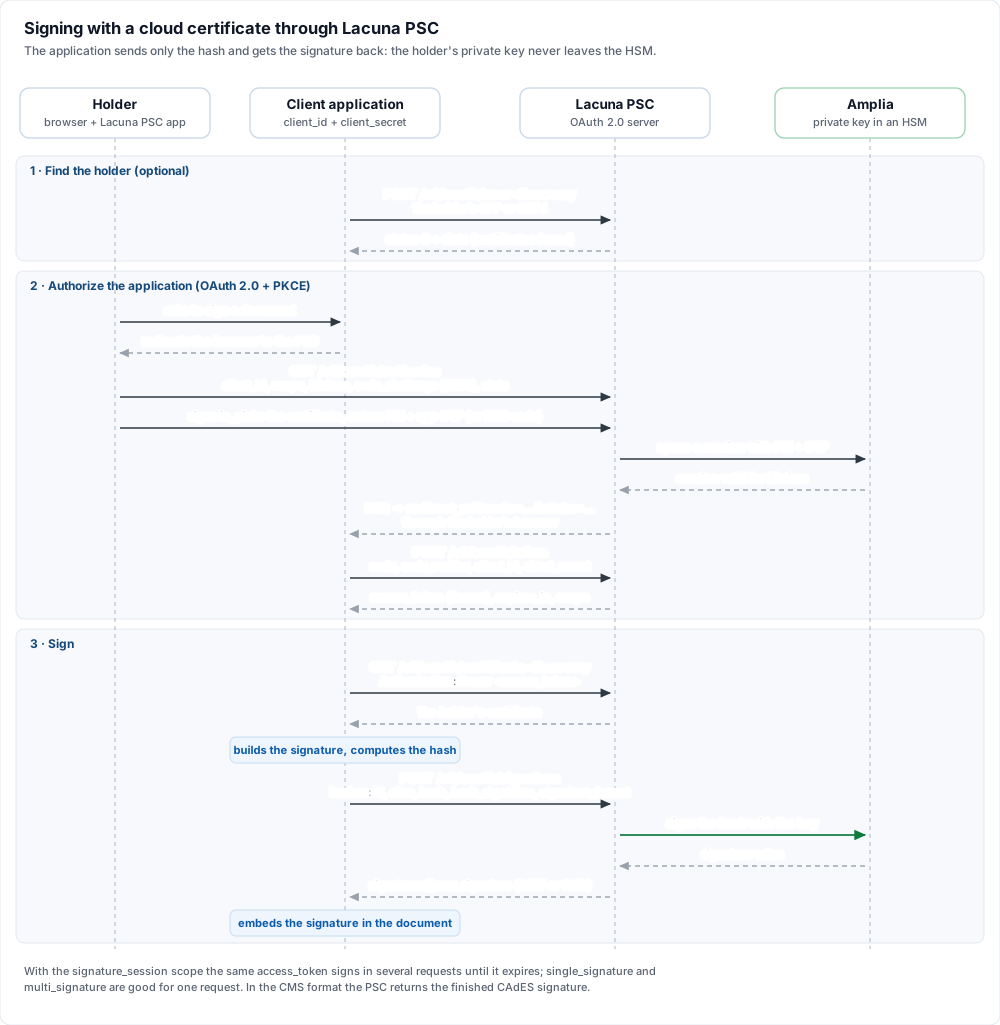
- Find the holder (optional): the application calls
POST /v0/oauth/user-discoverywith its credentials and the holder's CPF or CNPJ to find out whether they have a certificate on the PSC. The response has astatus(SorN) and, inslots, the certificates found. - Authorize the application: the application redirects the holder's browser to
GET /v0/oauth/authorize, with the requestedscope, thelifetime(in seconds) and a PKCEcode_challengewithcode_challenge_method=S256. On the PSC, the holder signs in, picks the certificate and enters the PIN and the OTP code from the app (or the code received by SMS). The PSC then opens a key usage session on Amplia and redirects the browser back to the application'sredirect_uriwith acode. - Get the access token: the application exchanges the
codefor an access token atPOST /v0/oauth/token, sending thecode_verifier, theclient_idand theclient_secret. The response has theaccess_token(a bearer token),expires_in,scopeand the identifier of the holder who authorized it (authorized_identification). - Get the certificate: with the token,
GET /v0/oauth/certificate-discoveryreturns the holder's certificate, which is needed to build signatures such as CAdES, PAdES and XAdES before computing the hash. - Sign: the application sends one or more hashes to
POST /v0/oauth/signature. The PSC asks Amplia to sign each hash with the holder's key and returns the signatures, which the application embeds in the document.
Authorization scopes
The scope requested at /v0/oauth/authorize defines what the access token allows:
| Scope | What it allows |
|---|---|
single_signature | Signing a single hash in a single request. The token is invalidated after it is used |
multi_signature | Signing several hashes in a single request. The token is invalidated after it is used |
signature_session | Signing several hashes in several requests, as long as the token has not expired or been revoked |
authentication_session | Only authenticating the holder, with no signatures. This is the scope used when none is given |
Authorization lifetime
When no lifetime is given, the access token is valid for 60 minutes. The requested value is capped by the certificate type: by default,
up to 7 days for individual certificates (CPF) and up to 30 days for company certificates (CNPJ). On an
on-premises installation, these values are set in the Lifetimes and AccessTokenLifetimeLimits configuration
sections.
Signature formats
Each hash sent to /v0/oauth/signature has an id, an alias, the hash in Base64, the OID of the hash algorithm in hash_algorithm
(for instance, 2.16.840.1.101.3.4.2.1 for SHA-256) and the signature_format:
| Format | What the PSC returns in raw_signature |
|---|---|
RAW | The signature value of the hash, in Base64, for the application to build the final signature (for instance, with the PKI SDK) |
CMS | A detached CMS (PKCS #7) signature, built by the PSC to the ICP-Brasil CAdES standard: the AD-RB policy, or AD-RT, with a timestamp, when the PSC has a timestamp server configured |
A response from /v0/oauth/signature looks like this:
{
	"certificate_alias": "c15fb4ac-9463-45ec-88c3-01891c6d1369",
	"signatures": [
		{ "id": "document-1", "raw_signature": "..." }
	]
}
Client application registration
Before using the API, the client application must be registered with the PSC, once. When registering, give the application's name, the
URIs the PSC may redirect the holder to after the authorization and a contact email. In return, the application gets a client_id,
which is public, and a client_secret, which must be stored securely and never sent to the browser. To register an application with
the Lacuna PSC cloud service, contact Lacuna.
Integrating with Lacuna products
You don't need to implement the protocol from scratch:
- Rest PKI Core accepts cloud certificates in signature sessions: your application redirects the user to a hosted page, where they sign with Web PKI or with a cloud certificate.
- In the PKI SDK, the BrazilTrustServices package accesses PSCs that follow DOC-ICP-17.01 (see signing with a cloud certificate).
On-premises
Lacuna PSC can be used as a service (SaaS) or you can host your own instance. See the article
Lacuna PSC on-premises for more information. The complete integration guide, with every API parameter and error
code, is published by the Lacuna PSC instance itself, at the /docs route.