Web remote signatures
A remote signature is a digital signature performed with a private key that is not available locally, that is, performing the signature algorithm computation remotely. Since the computation can depend on a number of factors such as network latency and user interaction, the process of performing remote signatures is inherently asynchronous, meaning that the process starts, waits for the computation, and later completes.
We call a web remote signature the special case of a remote signature on which a digital signature is being performed on a web application with the backend controlling the signature process, but using the private key from one of the user's certificates, available only on the client side.
This is the recommended way of implementing digital signatures on web applications with our products for most cases (see web signatures for exceptions).
This process is roughly outlined below:
- The backend initiates a remote signature process, yielding the bytes over which the signature algorithm computation with the user's private key must be performed (called the "to-sign-data")
- The "to-sign-data" is transferred to the client side
- The signature algorithm computation is performed on the frontend
- The result of the signature algorithm is transferred back to the server
- The backend completes the remote signature process
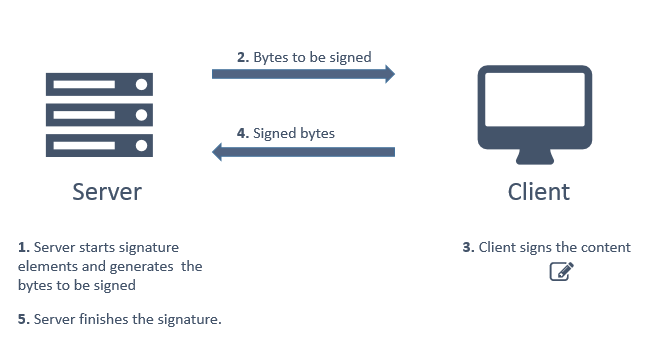
This is merely an overview. There are extra steps involved, such as reading the user certificate's encoding on the frontend and transferring it to the backend.
The recommended way of implementing web remote signatures is using Rest PKI Core together with Web PKI.
Recommended steps
- Follow Get started on the Rest PKI Core documentation: get the endpoint and an API key, and add the client library for your language
- Read Two-step signatures, which implements the process above on a page of your application, with Web PKI
- Run the PAdES signature sample with Rest PKI Core from the PkiSuiteSamples project for your language (.NET, Java, Node.js, PHP, Python or Ruby)
Although the solution involves both Rest PKI Core and Web PKI (for the back- and frontend respectively), you should focus on the Rest PKI Core documentation, which shows the usage of both products integrated. If you'd rather not build the signature page yourself, create a signature session instead: your application redirects the user to a page hosted by Rest PKI Core, where the user signs with Web PKI or with a cloud certificate.
Alternative implementations
If your application is a .NET application (C#, VB.NET, C++.NET), you can also use the PKI SDK on the backend with Web PKI on the frontend. See article Web remote signatures on the PKI SDK documentation.
If you already own a 3rd party crypto SDK or if you wish to implement the backend code yourself, you can also use Web PKI just for the frontend part.
Applications already integrated with Rest PKI, a legacy product that still receives bug and security fixes, can keep following its documentation, which shows Rest PKI and Web PKI integrated. To move one to Rest PKI Core, see Moving from Rest PKI to Rest PKI Core.