Signatures and Lacuna Signer
Digiploma collects the ICP-Brasil signatures of the MEC documents through Lacuna Signer. It creates each XML file as a document in Signer, with the signers of your signature flow; the signers sign in Signer with their certificates; and Signer tells Digiploma when each document is concluded. Digiploma then publishes the document and keeps its signatures verifiable over time (see Diploma revalidation).
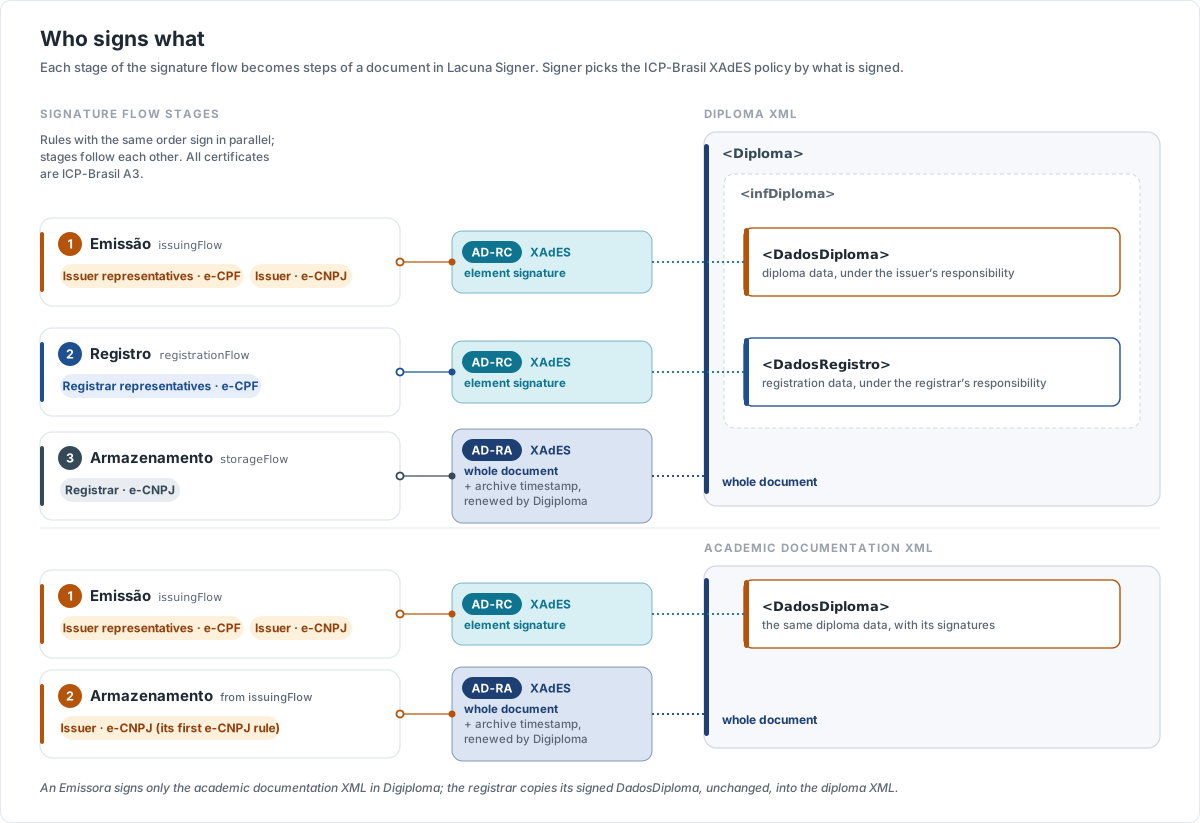
Who signs what
A signature flow has one list of signers for each stage. For every XML file, Digiploma turns the stages it needs into the steps of a
Signer document: the rules of a stage with the same order sign in parallel, the others in sequence, and the stages follow each other.
A rule of a person requires an e-CPF certificate, and a rule of the institution an e-CNPJ certificate. Certificates must be of type A3,
except on partial academic transcripts and supporting documents.
Signer chooses the ICP-Brasil XAdES signature policy by what is signed: AD-RC when a signer signs an element of the XML, such as
DadosDiploma, and AD-RA when a signer signs the whole document. The AD-RA signature carries the archive timestamp that Digiploma
renews afterwards.
| Document | Signers | What they sign |
|---|---|---|
| Diploma XML | Emissão (issuing stage): issuer representatives and the issuer | DadosDiploma (AD-RC) |
| Registro (registration stage): registrar representatives | DadosRegistro (AD-RC) | |
| Armazenamento (storage stage): the registrar | The whole document (AD-RA) | |
| Academic documentation XML | Issuing stage | DadosDiploma (AD-RC) |
| The issuer: the first e-CNPJ rule of the issuing stage | The whole document (AD-RA) | |
| Academic transcript | Representatives, then the institution | The whole document. Representatives: AD-RC. The institution: AD-RA (AD-RC on a partial transcript). |
| Curriculum | Course coordinators, then the institution | The whole document (AD-RA) |
| List of annulled diplomas, inspection file | The institution, in Signer (manual mode) | The whole document (AD-RA) |
The supporting documents (lists of annulled diplomas and inspection files) can also be signed by Digiploma itself, in automatic mode, with the institution's e-CNPJ certificate stored in Digiploma and the ICP-Brasil AD-RT policy; they then never reach Signer.
The organization type decides which files Digiploma sends to Signer:
- Emissora e Registradora (issuer and registrar): both the diploma XML and the academic documentation XML, so the issuer signers sign
DadosDiplomatwice, once in each file. - Emissora (issuer): only the academic documentation XML. Once it is signed, the emission is sent to the registrar.
- Registradora (registrar): the diploma XML, built with the
DadosDiplomaelement of the issuer's academic documentation XML, copied unchanged so that its signatures remain valid. The registrar signs only the registration and storage stages.
Signing a diploma, end to end
The diagram below follows a diploma of an Emissora e Registradora organization, from the creation request to the renewal of its archive timestamp.

- Your system creates the diploma (
POST /api/degrees, a batch or the form). Digiploma generates both XML files, validates them against the MEC schemas and uploads them to Signer, one document each, in the Signer folder of the request, if any. The diploma isCreated. - The signers sign in Signer, stage after stage.
- When a document is concluded, Signer calls Digiploma's webhook. Digiploma does not trust the body of the call: it reads the document
back from Signer, with the organization's own key, and acts only if it is concluded. The diploma becomes
Activewhen the diploma XML is signed, and is concluded when both files are signed: Digiploma then sends theDegreeConcludedwebhook to your system. - From then on, Digiploma renews the archive timestamp of both files before it expires.
Signer only reports concluded documents. If a signer refuses a document in Signer, nothing changes in Digiploma: the diploma stays
Created until you cancel it, and canceling it deletes the pending documents from Signer.
Download the signed files from Digiploma (Download the files), not from Signer. Digiploma reads them from Signer while they are unchanged; once it adds a new archive timestamp, it keeps the renewed file itself, and the copy in Signer no longer has the latest timestamp.
Connect Digiploma to Signer
Digiploma calls the Signer API with a Signer API key, saved in the organization's Configurações (Settings); without it, creation
requests fail with SignerApiKeyNotSet. Signer calls Digiploma back with a webhook, authenticated by a Digiploma API key. On premises,
Set up the Signer integration shows both sides, step by step.