Digiploma
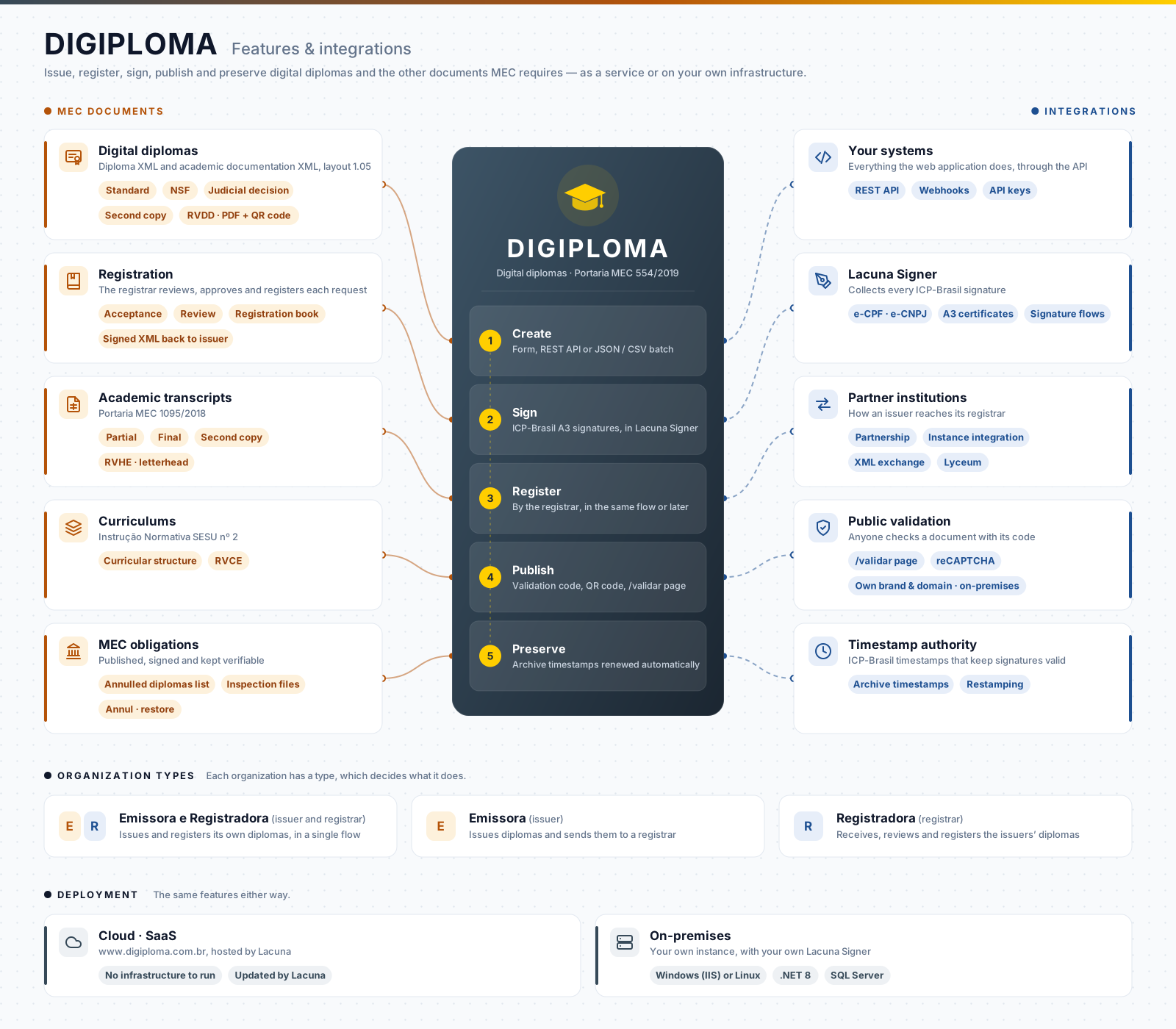
Digiploma issues, registers and publishes digital diplomas following Portaria MEC 554/2019, together with the other documents MEC requires: academic transcripts, curriculums, lists of annulled diplomas and inspection files. It generates the XML files in the MEC layout, collects the ICP-Brasil signatures through Lacuna Signer, produces the visual representations and publishes the documents for validation, one at a time or in batches of thousands.
Use it as a service at www.digiploma.com.br, or run your own instance (on-premises). The web application is in Portuguese.
Get started on integration
Everything the web application does is also available through a REST API, with webhooks to follow the documents. Start with the API overview, which points to the guide for your type of institution.
Features
Issuer, registrar, or both
Each organization in Digiploma has a type, which decides what it does:
- Emissora e Registradora (issuer and registrar): issues and registers its own diplomas in a single step.
- Emissora (issuer): issues diplomas, and sends them to be registered by a registrar.
- Registradora (registrar): receives the diplomas of issuers, reviews them and registers them.
An issuer reaches its registrar outside Digiploma, by exchanging the XML files; through a partnership with a registrar organization of the same instance (registradora credenciada); or through an integration between two Digiploma instances. A registrar can also receive requests from the Lyceum academic system. Users can belong to several organizations.
Digital diplomas
- The MEC files: the diploma XML (public data) and the academic documentation XML, in layout 1.05, validated against the MEC XML schemas. Standard diplomas, the NSF layout, diplomas issued by judicial decision, and second copies (segunda via).
- Visual representation (RVDD): a PDF filled from your own PDF form template, with the validation code and a QR code to the validation page, optionally for printing on letterhead paper. The validation address can point to your own site.
- Signature flows: the issuer's representatives and institution (e-CPF and e-CNPJ), the registrar's representatives, and the archiving signature, with A3 certificates, collected in Lacuna Signer. Save the flows you use most. See Signatures and Lacuna Signer.
- Single or batch creation: fill in a form, or send a JSON or CSV file with thousands of diplomas, validated before the batch starts. Follow the progress and download the log of each batch.
- Registration: the registrar reviews the supporting documents of each request, approves or rejects it, fills in the registration book data, and returns the signed diploma XML to the issuer. An acceptance step before the review can be enabled.
- Annulment: annul a diploma definitively or temporarily, with the MEC reasons, and restore a temporarily annulled one. Each document keeps the history of its status and the events that changed it.
Academic transcripts and curriculums
- Academic transcripts (Portaria MEC 1095/2018): partial, final and second copies. The final transcript is generated with the diploma; older partial transcripts are canceled when a new one is signed. Digiploma lays out the visual representation (RVHE) over your letterhead.
- Curriculums (Instrução Normativa SESU nº 2): the curricular structure of each course, signed and published with its visual representation (RVCE).
Validation and MEC obligations
- Public validation: anyone checks a diploma, transcript or curriculum on the
/validarpage with its validation code, protected by reCAPTCHA, with the student's CPF masked. On premises, organizations can have the validation page with their own name, logo, colors and domain. - List of annulled diplomas: generated, signed and published for each registering institution, at
/{MEC code}.xml, before the deadline in the previous list. - Inspection files: the file of diplomas issued or registered in a period, for MEC supervision, generated on request.
- Restamping (renotarização): Digiploma renews the archive timestamps of the signed files before they expire, so the signatures remain verifiable. See Diploma revalidation.
- Supporting documents signed automatically, with the institution's e-CNPJ certificate stored in Digiploma, or manually, in Signer.
Management
- Users and roles: Administrador, Gerente, Operador and Monitor.
- Reports by period or by selection, in spreadsheet or PDF; the instance administrator also has a monthly report of the documents of all organizations.
- Bulk download of signed documents, and export of each document's data.
- Events of the organization and of each document.