Lacuna CloudHub
Lacuna CloudHub connects your application to the cloud certificate providers of ICP-Brasil through a single REST API. A cloud certificate (certificado em nuvem) keeps its private key in the provider's HSM; the holder authorizes each use in the provider's own app or web page, with a PIN, a push notification or a QR code. CloudHub lets your application find which providers hold a certificate for a given CPF or CNPJ, send the user to authorize, and then read the certificate and sign hashes with it.
The providers are the Prestadores de Serviço de Confiança (PSCs) accredited by ITI, such as BirdID, SafeID and VIDaaS. CloudHub calls them trust service providers.
Why CloudHub
Every provider is an OAuth 2.0 authorization server with its own endpoint, its own client registration and its own departures from the common specification. Integrating with providers one by one means a client ID and secret at each of them, one redirect URI registered with each, and code for each provider's quirks.
CloudHub holds those registrations and absorbs those differences. Your application needs:
- One API key, sent in the
X-Api-Keyheader. - One integration: the same calls, whichever provider the user chooses.
- No change when Lacuna adds a provider: it shows up in the list CloudHub returns.
What CloudHub does, and what it leaves to you
CloudHub does three things: it discovers the providers that hold a certificate for a signer, it brokers the authorization at the provider, and it signs a hash with the authorized certificate.
It does not build signed documents. Your signature library computes the hash to sign and assembles the signed PDF, CMS or XML afterwards. Any Lacuna signature product works with CloudHub: PKI SDK, Rest PKI, Rest PKI Core or PKI Express. CloudHub never receives the document, only its hash, and the private key never leaves the provider.
CloudHub does not validate the certificate either. Validate it with your signature library, which does so when it completes the signature or the authentication.
Supported providers
The providers available to your application are the ones CloudHub returns when you create a session; the list below is what the CloudHub home page shows today.
| Provider | Operated by |
|---|---|
| BirdID | SOLUTI |
| DSCloud | DigitalSign |
| NeoID | SERPRO |
| RemoteID | Certisign |
| SafeID | Safeweb |
| Syngular | Syngular |
| VIDaaS | VALID |
How a signature flows
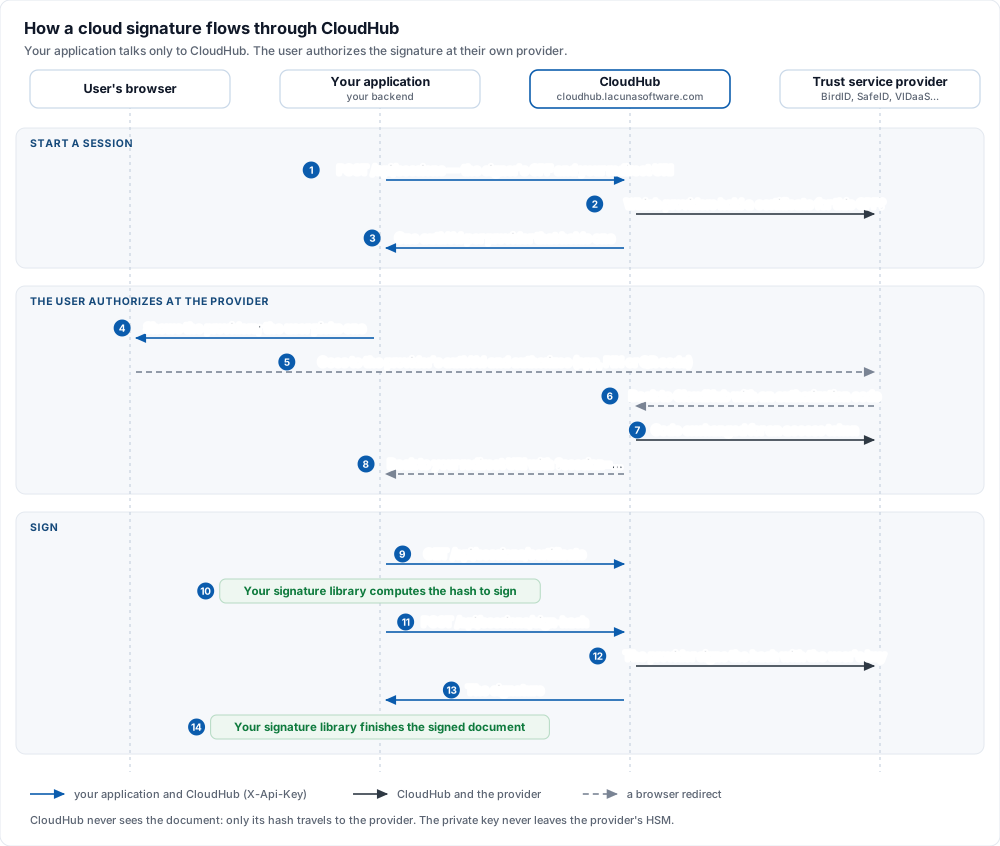
- Your backend creates a session with the signer's CPF and the URL CloudHub should send the user back to. CloudHub answers with one authorization URL per provider that holds a certificate for that CPF.
- The user picks a provider, is redirected to it and authorizes. The provider sends the user back to
CloudHub, and CloudHub sends them back to your application with a
sessionparameter. - Your backend uses that session to read the certificate, has its signature library compute the hash to sign, asks CloudHub to sign the hash, and finishes the signed document.
How it works goes through each step, the session types and the rules for redirect URIs.
What you need
- A CloudHub API key. Request one from Lacuna Software support (suporte@lacunasoftware.com) and tell them the redirect URIs your application will use; CloudHub only sends users back to URIs registered for your key (see Redirect URIs).
- A signature library to compute the hash to sign and to finish the signature: PKI SDK, Rest PKI, Rest PKI Core or PKI Express.
- The CloudHub address:
https://cloudhub.lacunasoftware.com.
Keep the API key on your server. It authorizes every call, including signing, so it must never reach a browser or a mobile app.
Client libraries
| Language | Package | Install |
|---|---|---|
| .NET | Lacuna.Cloudhub.Client (NuGet) | dotnet add package Lacuna.Cloudhub.Client |
| PHP | lacuna/cloudhub-client (Packagist) | composer require lacuna/cloudhub-client |
| Node.js | cloudhub-client (npm) | npm install cloudhub-client |
| Java | com.lacunasoftware.cloudhub:cloudhub-client (Maven Central) | implementation 'com.lacunasoftware.cloudhub:cloudhub-client:1.0.5' |
| Python | none needed | pip install requests; the examples call the REST API directly |
The API has eight operations and one header, so any HTTP client works just as well. The REST API reference documents the wire format.
Samples
The PKI Suite Samples repository has complete applications that sign with CloudHub:
| Language | Sample |
|---|---|
| .NET (PKI SDK) | PadesCloudHubSdkController.cs, AuthenticationCloudHubSdkController.cs |
| PHP (Rest PKI) | pades-signature-cloudhub-rest, xml-signature-cloudhub-rest |
| Node.js (Rest PKI) | pades-signature-cloudhub-restpki.js, authentication-cloudhub.js |
| Java (Rest PKI) | PadesSignatureCloudhubRestController.java |
In this documentation
- How it works: sessions, session types, discovery, redirect URIs and security.
- Get started: install a client, create a session and sign a hash.
- Signing a PDF: a complete PAdES signature in C#, PHP, Python, Node.js and Java.
- Authentication: sign users in with their cloud certificate.
- REST API: every operation, model and error code.