Operations
Day-2 operations for Lacuna Bulk Signer. How to start, stop, restart, observe, pause, and reason about the signing pipeline.
Lifecycle commands per target
| Target | Start | Stop | Restart | Status |
|---|---|---|---|---|
| Linux (systemd) | sudo systemctl start bulksigner | sudo systemctl stop bulksigner | sudo systemctl restart bulksigner | systemctl status bulksigner |
| Windows | Start-Service LacunaBulkSigner | Stop-Service LacunaBulkSigner | Restart-Service LacunaBulkSigner | Get-Service LacunaBulkSigner |
| Docker | docker compose up -d | docker compose stop | docker compose restart | docker compose ps |
| Console | run the published executable | Ctrl+C | rerun | /api/health |
The systemd unit uses Type=notify — systemctl status bulksigner reports active (running) only
after the full bootstrap (license load + migrations + pipeline recovery) succeeds. The same is
true on Windows: the service is marked "Started" only after the ready-summary banner has been
printed.
Where logs live
| Target | Path |
|---|---|
| Linux | /var/log/bulksigner/bulksigner-yyyyMMdd.log |
| Windows | C:\ProgramData\Lacuna\BulkSigner\logs\bulksigner-yyyyMMdd.log |
| Docker | /var/log/bulksigner/ inside the container — bind-mounted to deploy/docker/logs/ on the host |
| Console | data/logs/bulksigner-yyyyMMdd.log (relative to the working directory) |
Logs roll daily, 50 MB per file (configurable), 14 files retained by default. Each line is plain text with structured properties at the end:
2026-05-26T15:42:11.1234567+00:00 [INF] Worker started job 9b62… {JobId: "9b62…", Format: "Pades"}
This format is tail -f-friendly for operators and structurally parseable for forensic tooling.
Service-level events go to:
| Target | Where |
|---|---|
| Linux | journalctl -u bulksigner (lifecycle + stdout) |
| Windows | Event Viewer → Windows Logs → Application (service lifecycle only — app-level logs are in the file sink) |
| Docker | docker compose logs -f bulksigner |
| Console | The terminal |
Both file and console output pass through the secret-redaction pipeline. See Security.
The job state machine
Eight states: one terminal "good" outcome (Completed), two terminal "bad" outcomes (Failed,
Canceled). Two of the eight are waits, and both are opt-in: AwaitingSigner is only visited by
jobs whose profile uses Method = LacunaSigner (see
Lacuna Signer integration), and AwaitingApproval only by jobs whose profile
carries an Approval block.
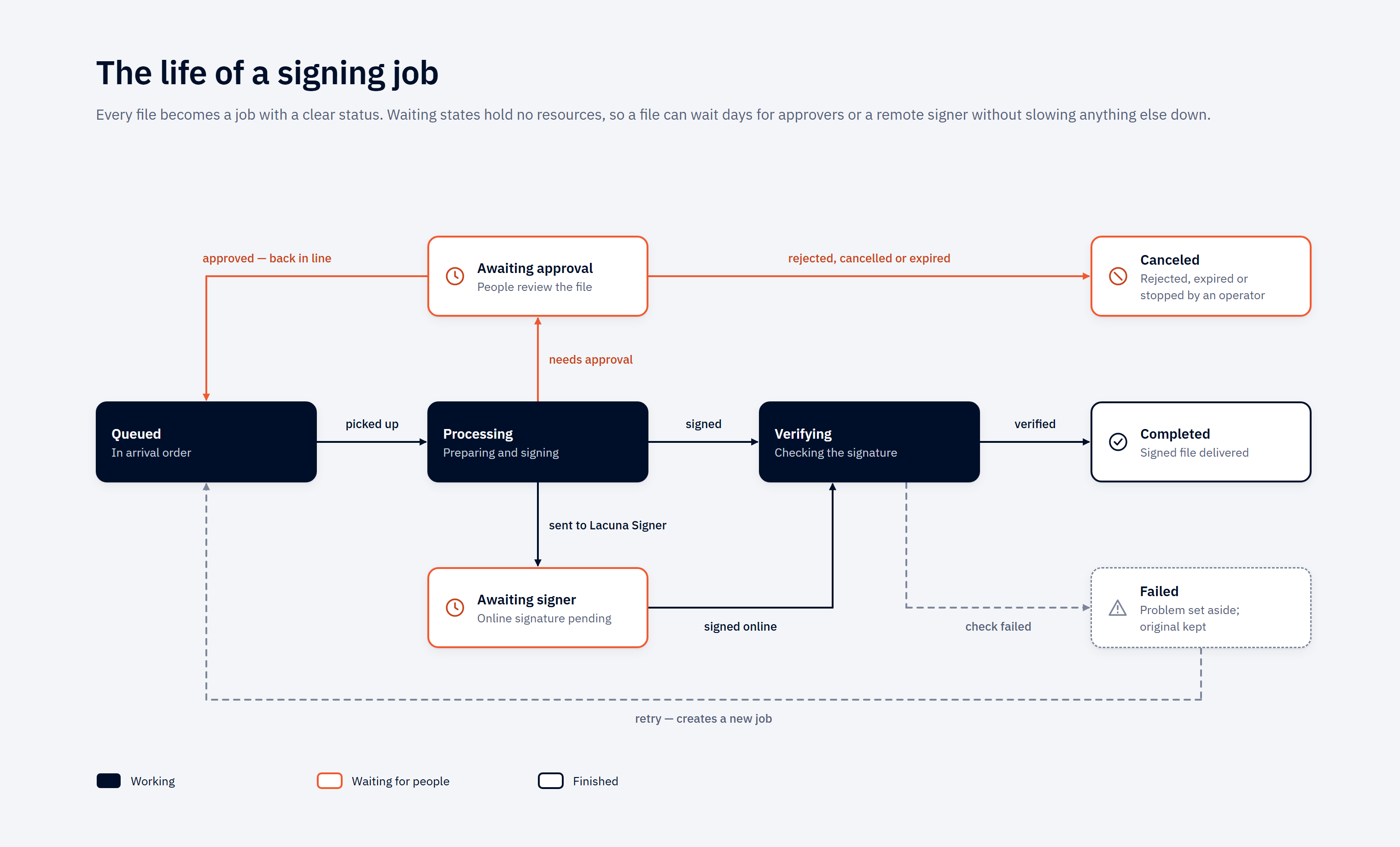
Select the diagram to open it at full size.
The picture is the plain-language version. It folds three less common transitions — cancelling a job
that is still queued, and a remote signer refusing or being cancelled — into the Canceled and Failed
cards. The full machine is below.
                  ┌─────────┐  operator cancel   ┌──────────┐
                  │ Queued  ├───────────────────▶│ Canceled │ (terminal)
                  └────┬────┘                    └──────────┘
          worker pickup│
                       ▼
                ┌────────────┐  local sign ok   ┌───────────┐  verify ok   ┌───────────┐
                │ Processing ├─────────────────▶│ Verifying ├─────────────▶│ Completed │
                └─┬────────┬─┘                  └─────┬─────┘              └───────────┘
                  │        │                          │ verify fail
   profile requires│        │dispatch to               ▼
   approval        │        │Lacuna Signer         ┌────────┐
                   ▼        ▼                      │ Failed │ (terminal)
    ┌──────────────────┐  ┌────────────────┐       └────────┘
    │ AwaitingApproval │  │ AwaitingSigner │
    └──────────────────┘  └────────────────┘
        │         │           │        │
        │         │           │        └─ refused / expired / timeout ─▶ Failed
        │         │           └─ concluded → bytes downloaded ─────────▶ Verifying
        │         └─ rejected* / operator cancel / budget expired ─────▶ Canceled
        └─ quorum met ──▶ back to Queued (re-enters the ordinary queue)

   Failed ──operator retry──▶ a NEW Queued job (ParentJobId set; the failed job stays Failed)
   Canceled ──operator retry──▶ a NEW Queued job — only for a job that signs a Lacuna Signer document

   * a rejected file is handed back to output/ as <name>.reject<ext>; a cancelled or expired
     job's staged copy goes to error/
A job that signs a Lacuna Signer document (Method = SignerFolder, 2.16.0) has one ending the diagram
does not draw: Processing → Canceled when the document moved on at Signer before this host signed it.
No file job can reach it — see
Signing in a Lacuna Signer folder.
Key rules:
AwaitingApprovalhas exactly three transitions, andFailedis deliberately not one of them. Nothing holds a parked job — no worker, no slot, no remote service — so nothing is in a position to fail it. It is released back toQueued, cancelled, or it waits. Three different things arrive on that one cancel edge: an approver's rejection, an operator's cancel, and — on a profile that setsApproval.ExpiresAfter— the wait budget running out. All three mean "this file will not be signed, deliberately"; the audit trail is what tells them apart.- A rejection is a veto, and it hands the file back. One rejection stops the job whatever the quorum
arithmetic says. The job ends
Canceled, the file is returned tooutput/as<name>.reject<ext>—folha.rembecomesfolha.reject.rem, encrypted like every other artifact where the profile encrypts — and the original is removed frominput/. The returned file is not signed: anything that readsoutput/as a folder of signatures has to look at the name. If that name is already taken inoutput/, nothing is overwritten: the staged copy goes toerror/<jobid>/and the input stays ininput/. Retry does not apply — the file is corrected and submitted again. See Rejection is a veto. - Release re-enters the ordinary queue rather than resuming in place, so a released job passes
through the same claim and the same pre-sign gates as any other — including the
payment-date staleness guard, which is exactly the check
an open-ended human delay needs re-run (unless the profile turns that guard off with
CheckCnab240PaymentDates, for a bank that processes a past-dated payment on the next business day — see CNAB240 payment files). It resumes on the copy it parked with, and the staged bytes are re-hashed immediately before the signature exists; a mismatch fails the job withapproval.content-changed. See Approvals. - A parked job can also time out, if the profile says so. With
Approval.ExpiresAfterset, a job parked past the window is canceled with the reasonApproval window expired., its staged copy moved toerror/and anApprovalExpiredoperational event recorded. The window is wall-clock: a pause does not extend it. See The wait budget. - Cancel is valid only from
Queued,AwaitingSignerorAwaitingApproval. In-flight local jobs (Processing,Verifying) cannot be canceled — they run to natural completion or failure. The cancel endpoint returns409withcode = "job.not-queued"against an in-flight local job. For LacunaSigner profiles, cancelling anAwaitingSignerjob also makes a best-effort remote-cancel call after the localCanceledtransition has committed — a remote failure does not roll back the local cancel. See Cancel semantics. Canceledis terminal. Files for canceled jobs remain ininput/; the watcher honors recent cancellations and will not auto-resurrect them. Operator-driven actions (Upload, Retry, Rescan) will re-enqueue.Failedis terminal, and its file waits the same way. A failure leaves the input where it was, and since 2.11.0 the watcher does not enqueue it again on its own — not on a polling folder's next tick, and not on the enumeration a service start runs — until an operator re-runs it through Retry, Rescan or Upload. (Before 2.11.0 a polling folder — every Azure Files folder, and a local one configured to poll — re-offered a failed file on every tick, so a failure whose cause stood produced a newFailedjob per tick; right after a Clear Jobs it looked as if the clear had not cleared.) The decision is made on the most recent job's status alone, so a corrected file dropped under the same name is picked up by those same operator actions, not by the watcher.Failed → Queuedis not a transition — it is a new job. Retry creates a fresh job withParentJobId = (the failed job).Id, copying the original input. The failed job staysFailedforever for audit purposes. A job that signs a Lacuna Signer document is retried fromCanceledas well, the same way: a new job for the same document and flow action, which re-reads the document when claimed.
When an input file changes mid-job
A producer sometimes re-sends a file under the same name while Bulk Signer is still working on the previous one — a corrected amount, a re-exported batch, an ERP retry. When that happens the correction is not ingested: the watcher sees an active job already holding that path and refuses the duplicate enqueue, which is the same rule that stops one file being enqueued twice.
What the pipeline does about it is refuse to destroy it. Before deleting the original input, the worker
compares the file against what was recorded while it was being copied into processing/ — length and
SHA-256 always, plus the storage service's entity tag where the file is on a share. If they match, the
input is deleted as always. If they do not, the file is left exactly where it is and the divergence
is recorded in three places:
- an
InputDivergedoperational event, carrying the codejob.input-diverged; - an entry in the job's own history, visible on
/jobs/{id}, carrying the same code; - the
bulksigner_inputs_diverged_total{profile}counter.
The signature is valid, the artifact is in output/, and the job completes normally — what was signed
is the file that was staged and, where an approval gate applies, approved. Nothing about the job needs
fixing.
The rewritten file is then handed back to its watched folder and signed as a job of its own. The watcher's change event fired during the job's flight and was correctly dropped, and no further event will ever arrive for a file that is simply sitting there — so the pipeline hands the path back explicitly, after the job reaches a terminal status. It re-enters through the watcher's ordinary candidate route, so the stability detector, the folder's ignore lists and its profile all apply exactly as they do to any arrival.
Two cases still need you. The hand-back is dropped, and the console says so, when:
- The job did not come from a watched folder — a REST upload has no watcher that owns its path. Re-submit the file if it should be signed.
- No watcher is running for that folder — either the process is still booting (which resolves itself moments later), or the folder's watcher stopped after repeated failures. Check the Input page; a Rescan ingests the folder's contents once the underlying problem is fixed.
What to check when you see a divergence:
- Was the correction meant to replace something already signed? The first signature covers the
superseded content, and it is valid; if a downstream consumer must not act on it, that is a business
decision to make explicitly. Note that the second artifact is named from the input file's name, so
it is named identically to the first: if you have not yet collected the first from
output/, the second job fails on promote withOutput already exists at … resolve manually before re-queueing. Move or collect the first, then retry the job. - Is the producer re-sending routinely? A count that tracks the parked-job rate means files are being re-exported during approval windows, and each one costs a duplicate signature and a second trip through the gate. The fix is on the producer's side — write each remessa under a unique name.
- Was the file merely unreadable, or held? A producer holding its own file open for write is
retried a few times and then reported as a divergence (
unreadable: …). So is a file another process has taken an exclusive hold on (held by another lease: …). In both cases nothing is forced. A hold that never clears usually means a second Bulk Signer instance is watching the same folder — a configuration to fix rather than a producer to wait for.
The window this closes is widest on the flows that put a human in the loop. An ordinary local job
stages and deletes seconds apart; a job in AwaitingApproval with no ExpiresAfter waits
indefinitely.
The two holds on an input file
Bulk Signer takes an exclusive hold on a file in your input folder twice, briefly, and never in between:
- While it stages the file. Taken when the pipeline commits to copying, released as soon as the copy is done. Under it, nothing can write to the file between the read that copies it and the reading of the identifier that will later identify it.
- While it deletes the file. A separate hold, so that on a share the comparison and the delete are a single act.
Nothing holds your file while a job waits on a human. A job parked in AwaitingApproval or
AwaitingSigner keeps an exclusive hold on its own staged copy in processing/, for as long as the
wait takes — but not on the file in your input folder, because a quorum can take days and your ERP
writes to that folder.
A hold is never broken and a file is never force-deleted. If something else holds your input file when Bulk Signer wants to stage it, the job fails with a message naming the file. If something else holds it at deletion time, the deletion is deferred, retried, and then reported as a divergence.
On an Azure Files input folder the hold is a real service-side lease: it denies writes and deletes to every other client of that share, including another Bulk Signer instance. On a local input folder it is Bulk Signer's own bookkeeping and excludes nothing outside this process — a filesystem cannot express "deny writes to everyone but admit my own delete". What protects a local input is the comparison rather than the hold, and the comparison is equally strong on both.
What changes day to day on a share
Storage:Provider = AzureFiles, or a single input folder that names it, changes four things. Pause,
cancel, retry, rescan, the download button, the job state machine, the approval gate, encryption and
what an approver is shown all behave identically — this feature moves bytes and nothing else.
1. Ingestion is on a timer, so it is no longer near-instant. A local folder is event-driven: the OS
reports a new file within milliseconds. Azure Files publishes no change notifications, so a remote
folder is enumerated on its poll interval. Worst case from a producer closing a file to a job
appearing in Queued is the poll interval (30 s by default) plus the stability window plus one round
trip — about half a minute on the defaults, and up to a full interval on a bad tick.
- It is per folder, so a payroll folder can poll every 10 s while an archive folder polls every 5 minutes.
- The floor is 5 s, and the trade is money: every tick is a listing transaction whether or not anything arrived. A folder polled at 5 s costs six times what the same folder costs at 30 s, idle or not.
- Two paths are not on the timer and stay immediate: an upload (
POST /api/files, or Upload files on the Jobs page) andPOST /api/rescan. If somebody needs a file signed now, rescan that folder rather than lowering the interval for ever.
Do not read a slow first job as a broken folder. Read the Input page: a folder that is Running with
no error and a recent scan is doing exactly this.
2. A quiet folder and an unreachable one look identical from the share, so read the surfaces
instead. A folder that cannot be listed, cannot be opened, or whose credential has been refused shows
up on the Input page, in GET /api/folders (status, lastError) and in GET /api/ready — it is
never reported as a folder that simply has nothing new. The one to alert on is /api/ready: a
degraded folder can otherwise sit unnoticed for as long as nobody opens the dashboard, and payment
files piling up unsigned is a phone call rather than a page.
3. Inspecting files means a storage client, not a shell. error/<jobid>/, processing/<jobid>/
and output/ are in the share, so wherever this documentation says "look at the file in error/" it
means Azure Storage Explorer, az storage file download, or a mount on your own workstation. A live
job's staged copy carries an infinite lease, so it refuses writes and deletes from everything including
your own tooling. logs/ and the SQLite database are not in the share and never can be.
4. The share is marked, and the mark is read at boot. See the next section.
When another instance appears to own the work share
This section applies only when Storage:Provider = AzureFiles. A local work tree is not shared
storage — two instances pointed at one host's data/ are the same instance twice. Local deployments
have no marker, no row and no warning.
With Cluster:Enabled = true the marker means something different: the share is claimed by the
cluster rather than by one instance, siblings share it deliberately, and the work share owner row
reads this cluster (one marker, shared between instances). What the marker guards under the switch is
the one catastrophe below that no database can see — two operational stores over one share — and an
instance whose store does not match the marker refuses to start. See
High availability.
A work share is shared storage, which invites the assumption that two hosts may now serve one deployment. Off cluster mode they may not — and moving the operational store to SQL Server does not change that on its own, because none of the blockers are in the store:
- the pipeline's pause flag is a singleton row read each poll iteration by the worker, so two workers read the same row and both act on it;
- the watchers are per-instance and event-driven, so both see a file arrive and both enqueue it, with the loser recording an enqueue failure against that folder;
- nothing records which instance owns a job, so a boot sweeps rows a sibling is still working.
Cluster mode is the supported answer to each of those three, and it is a deliberate opt-in rather than something inferred from the storage provider — see Azure App Service (cluster mode).
How the mark works. The instance takes an exclusive, non-expiring lease on
bulksigner-instance.json, a small file beside processing/, output/ and error/. It records the
host name, the process id and the moment of the claim. A graceful shutdown gives the lease up; the file
stays behind as the record of who ran last.
What happens when the marker is already held. Startup is never blocked. Instead:
- a
Criticalentry lands in the log naming the prior holder's host and process id; - the same line is printed to stdout, and the banner's
work share ownerrow readsCONTENDED at startup by …; - the System page shows it above the storage paths;
/api/readyreturns 503 with a redwork-share-ownercheck, whose detail on/api/ready/detailsis the same sentence;- the lease is broken, taken, and the boot carries on.
Why a warning and not a refusal. A lease lives on the storage service, not in the process that took
it — so a crash, a docker kill, a power cut or an OOM leaves the marker held by a process that no
longer exists. Refusing to start would turn every one of those into a manual recovery in the middle of
the night. This product cannot tell a dead holder from a live sibling, so it hands you the two facts
that can, and keeps signing.
What to do when you see it. Ask whether the named host and process are still running.
- It is this host, and that process is gone. Your previous instance did not shut down gracefully. Nothing is wrong now.
- It is a different host, or that process is alive. You have two instances on one work share. Stop one of them, then decide which database is authoritative.
The marker is claimed once at boot; nothing re-reads it, because there is no fresher answer to be had — this instance holds it now. So an ungraceful stop costs one red readiness cycle, and the boot after a graceful stop is green again.
What actually diverges. Two instances signing from one work share do not sign the same file twice: the per-file lease on an input file is refused rather than broken. What diverges is everything in each instance's own store:
- Approval state — a job parked at the gate exists in one instance's store only. The other knows nothing about it, its approvers, or the quorum it is waiting on. This is the one worth acting on quickly.
- Pause state —
POST /api/pipeline/pauseholds one instance. The other keeps signing. - Statistics and job history — each instance reports its own, so neither dashboard is the whole picture.
If the marker cannot be claimed at all — an unreachable share, a rotated credential — the row reads
not claimed cleanly at startup: … and readiness goes red for that reason instead. Whether another
instance holds it is then simply unknown, and unknown is not reported as the reassuring answer.
Which instances are alive (cluster mode only)
With Cluster:Enabled = true, each instance keeps one row in the operational store — who it is, when it
last beat, and which application version it is running — and every instance can read every other's.
System → Instances on the dashboard is that table.
| Column | What it tells you |
|---|---|
| Instance | The derived identity. On App Service this comes from the platform's WEBSITE_INSTANCE_ID, so it is stable for the life of the instance and distinct between siblings. |
| State | Live while the last heartbeat is inside Cluster:StaleAfterSeconds; Stopped when the process retired its row on a clean shutdown — the ordinary trace of a redeploy; Stale when it fell silent past the threshold without saying so. Stale is a presumption, not a confirmed death — see the wager. |
| Version | The application version that instance is running. Two different values here during anything but a deploy window is the mixed-version condition, and it is reported as a Critical at the newer instance's boot. |
| Last beat | Age of the most recent heartbeat. The caption under the table names the cadence (Cluster:HeartbeatSeconds, default 15) and the staleness threshold (default 60) actually in force. |
One row is badged as the instance answering your request. Because the load balancer picks per request, reloading the page moves that badge between rows — which is the cheapest confirmation available that traffic really is spread. A row whose instance displaced a live predecessor names that predecessor, and when, under the identity — see the next section.
GET /api/folders carries an instance field for the same reason: a machine client polling it needs to
tell "the folder changed" from "a different instance answered".
When a boot finds its own identity already live
Up to 2.4.x, a booting instance that found its own identity still beating refused to start (2.4.3 first waited for it, then refused). Since 2.5.0 the new boot displaces the live holder and carries on.
This is what an in-place redeploy on App Service looks like: the platform starts the new container beside the old one under the same instance id, and keeps the old one serving — and beating — until the new one passes its warm-up probe. Neither a refusal nor a wait could serve that, so:
- The new boot takes the identity at once and logs one
Warningnaming the displaced incarnation, its build and its last beat. There is no failed start. - The displaced process stands down on its next beat: one
Criticalin its log, anInstanceStoodDownoperational event, a redcluster-instancerow on its/api/ready— which does not fail the probe, since a 503 would have the platform pull the one container it is still routing to — and a banner above the Instances table on its System page. It claims no new job, runs no takeover and polls Lacuna Signer for nothing; whatever it holds runs to completion, and it keeps serving the web until the platform stops it. - It resumes on its own if the newer incarnation's row is later stopped or stale — a newcomer that
retired its row on a graceful stop, or a second host since stopped — with a
Warning, anInstanceResumedevent and a green/api/readyagain. It never takes the identity back from a holder that is still beating. - Whatever the displaced life left unfinished is left alone by the new boot's
startup recovery and taken over one
Cluster:StaleAfterSecondsafter the displacement, under the ordinary takeover policy. - A boot whose store did not answer registers on its first heartbeat that reaches the store, displacing exactly as the boot would have.
- A clean shutdown retires its row first, so a restart after a graceful stop displaces nothing — which is why stop, set, start stays the tidier deploy.
If the new container fails its warm-up after displacing the old one, App Service does not fall back
to the old container: it stops the whole site — the stood-down container included, before its
successor's row could go stale — and keeps restarting it with the new image. The resume above cannot
happen there. Point the app back at the previous image tag (az webapp config container set) and it is
ready again within about two minutes. See
Upgrades are stop-the-world.
Two hosts presenting one name are therefore not refused either: they take turns, loudly on both sides, and exactly one claims work at any moment. If you see a displacement when nobody is redeploying, read both logs and rename one host or point it at its own database. The one boot refusal left is a registration that lost every write race for its row; it names the last winner's build and last beat. Deleting the row while a holder is running removes the report rather than the condition. See Troubleshooting.
When an instance stops answering, a survivor takes its jobs over
Every surviving instance watches the heartbeat table. When a sibling goes stale, one survivor claims its in-flight rows and reconciles each one by where it had got to, not by retrying it:
| The dead instance's job was… | What the survivor does | Why |
|---|---|---|
| Claimed, but had not reached the sign call | Re-enqueued | Nothing was attempted, so nothing is being retried. |
| Past the sign call | Failed, conservatively | A signature is never re-attempted without a human deciding it. Failed is an honest terminal outcome, not "stuck" — the operator's manual retry remains the retry. |
AwaitingSigner (dispatched to Lacuna Signer) | Reassigned to the survivor, which resumes polling it | The remote side holds the work; only the poll needs a new owner. |
Signing a Lacuna Signer document, past the sign call (Processing or Verifying) | Asks Lacuna Signer, and completes, cancels or fails it on the answer | Such a job has no file, so nothing in output/ can answer. See When the run signing it ends. Before the sign call it is re-enqueued like any other. |
Each takeover writes a JobTakenOver operational event naming both instances, so the audit trail
records who lost the work and who picked it up.
POST /api/pipeline/pause holds every instance, and takeover does not run while the pipeline is paused.
That is deliberate: an operator pausing a cluster to investigate a store that has gone slow is exactly
the person who must not have every instance declare every sibling dead.
Two rows nothing will ever take over, both reported rather than adopted:
- A job with no owner at all, left by a build older than the ownership column or by a run with the
mode off. The remedy is named on every surface that meets one — boot once with
Cluster:Enabled = falseso ordinary startup recovery sweeps it, then turn the mode back on. - A job owned by a named instance that has no heartbeat row. Absence of a heartbeat is not evidence of death, so this is reported once and left rather than read as a licence to fail live work.
Both cases, and why adopting them would reintroduce the defect the feature removes, are in High availability.
Contention between instances is not a failure
Every instance watches every input folder, so on each arrival they race. That is the design, and the losing side of the race is classified as an expected outcome rather than an error:
- The losing enqueue is refused by a partial unique index over active original paths and answered
AlreadyActive. Every file becomes exactly one job. - A lease conflict on an input file is logged at the expected-outcome level, under its own event id, so "a sibling got there first" and "something else on this instance did" stay different facts.
- Neither counts against the folder's consecutive-failure budget, and an
AlreadyActiveoutcome resets that counter exactly as a successful enqueue does. A busy cluster therefore cannot trip the per-folder breaker simply by being busy.
The batch claim degrades under contention too — it falls back to claiming one row at a time and logs the lost race. That is a small, known cost rather than a fault.
The signing pipeline
input/file.pdf
      │  Watcher (or POST /api/files)
      ▼
   Queued ──▶ worker claims ──▶ move input → processing/ ──▶ Sign ──▶ Verify
                                                                       │
                                            Encryption.Enabled?  ──────┤
                                              yes → output/file.signed.pdf.enc
                                              no  → output/file.signed.pdf
                                            on failure → error/
The worker is single-instance per configured folder set and processes up to
Pipeline:MaxConcurrency jobs in parallel. Default 1 is sequential; operators opt in to N > 1
for throughput (PFX-only — see the PKCS#11 / WindowsStore caveat in Certificates).
The worker:
- Polls the queue every
Pipeline:PollIntervalSecondsseconds, gated by the configured concurrency. When all slots are busy, polling pauses until a slot frees up. - Checks the pause flag. When paused, the worker loops idle without picking work up; existing in-flight jobs drain to natural completion. The pause flag is observed each poll iteration and survives restart.
- Claims the next
Queuedjob atomically (transitionsQueued → Processing). If a racing writer (a cancel, or a peer worker) modified the row first, the worker skips to the next iteration. - For each claimed job, moves the input into
processing/<jobid>/, signs, verifies, optionally encrypts, then promotes tooutput/. Each job runs in isolation with its own processing folder. - On any failure: moves the
processing/<jobid>/content toerror/<jobid>/, marks the jobFailed, and records the exception message in the job's error field and history. - The original input is removed from
input/only after successful verification, and only when it is still the file that was staged. Verification happens before delete, never the other way around — and a file the pipeline did not process is never deleted. See When an input file changes mid-job.
Drain on pause. When an operator pauses while jobs are in flight, the worker stops claiming new ones but already-running jobs run to completion. The dashboard's "Slots busy" card counts down as they drain.
Three ways in. A file reaches the queue from a watched folder, from POST /api/files, or from the
Upload files button on the Jobs page, which sends each file through the same handler as the REST
route — the same size cap, file-name sanitising and profile checks — so the two refuse a file on
identical terms. The dialog asks for an enabled signing profile and ends with a per-file report linking
every job it created. Upload:Enabled = false turns both upload paths off at once: POST /api/files
answers 409 with upload.disabled, and the Jobs page shows no upload button. Watched folders, Rescan
and Retry are unaffected; the key is read at boot, so turning it back on is a restart. See
Configuration.
LacunaSigner profiles — separate poll worker
When a profile uses Method = LacunaSigner, the worker only dispatches the job to Lacuna Signer
(upload + create-document) and immediately transitions it to AwaitingSigner — the concurrency slot
is released as soon as dispatch succeeds. A separate poll worker walks every AwaitingSigner row on
its own cadence (Signer:PollIntervalSeconds, default 30 s), downloads the bytes when the remote
document concludes, and runs the same verify → optionally-encrypt → promote tail. See
Lacuna Signer integration.
Routing a watched folder to a signing profile
A watched folder is signed under the profile that chose it, and a profile chooses its folder from its
own page in the dashboard — one folder per profile, one profile per folder. Storage:Inputs[].Profile
is now seed input: it is read once, on the first boot against an empty profile table, and ignored
(and reported as ignored) on every boot after that. After the first boot, the settings file cannot route
a folder. See Storage:Inputs[].Profile.
Nothing else about the folder moves: its name, path, provider, credentials and poll interval stay in
Storage:Inputs[], validated at boot, and are what the Input page lists. What the profile's page decides
is which folder feeds which profile — which certificate and which approval rule the folder's files get.
From the profile's page
- Open the profile's page in the dashboard (
/profiles/{name}) and click Edit behaviour. The Input folder picker offers none, every folder this host has configured that no other profile feeds from, and the profile's own current folder. - Choose the folder and save. The folder's watcher starts watching it within a poll interval or two of
Pipeline:PollIntervalSeconds, on every instance, with no restart. Files already sitting in the folder are picked up without a rescan. - Check the Input page: the folder's card now carries the profile's chip, linking back to the profile.
A profile created from /profiles/_new chooses its folder on the same form. The audit event records the
move by the folder's name, never its path — InputFolder (none) → remessas on an edit and
Input folder: remessas. on a creation.
Two refusals, both on the save. A folder this host has not configured under Storage:Inputs[], and a
folder another profile already feeds from — the second names the owner; clear the folder there first, or
pick another. Two saves choosing one folder at the same instant leave exactly one owner, and the loser is
told who took it. Neither refusal is ever made at boot: a stored binding is not re-validated, so a folder
renamed or removed from the configuration after a profile chose it is a degraded report — on the
startup banner, as a profile-input-folder:<profile> row on /api/ready that does not fail the verdict,
and as an alert on /profiles and on the profile's own page — while the profile keeps serving uploads.
What unassigned means
A folder no profile has chosen is unassigned, and nothing is watching it. It shows as:
- a grey chip on the Input page reading
unassigned — no profile has chosen this folder; status: "Unassigned", with noprofileName, inGET /api/folders;- a green
input-folder:<name>row on/api/ready— nothing is broken, and a red row would tell an orchestrator to pull an instance for a folder nobody has asked it to watch; - one
Warningin the log, at boot and whenever a profile lets the folder go.
Files dropped into an unassigned folder wait: they are not ignored, not moved and not refused, and
they are picked up the moment a profile chooses the folder. An unassigned folder does not fall back
to default — that would put its files under a rule nobody chose. default is the fallback for an
upload that names no profile, and for a folder naming none on the seed's one read, never for a folder
left unchosen afterwards.
A folder ends up unassigned in one of three ways: the seed left it so on the first boot (a folder naming a profile the section does not declare, or a second folder naming a profile an earlier folder already took), a profile cleared it from its page, or the profile table was seeded by a version older than 2.2.0 and never bound. The remedy is the same in every case: choose the folder on a profile's page.
Moving a folder between profiles
Clear the folder on the profile that has it, then choose it on the profile that should — in that order, because the second save is refused while the first profile still owns it. In between, the folder is briefly unassigned; a file arriving in that window is picked up once the second save takes effect, so nothing is lost and nothing is signed twice. Jobs already queued from the folder keep the profile they were enqueued under, so a folder name on a job always reads as exactly one certificate and one approval rule.
Two folders that should follow one rule are two profiles with the same settings.
Disabling a profile that feeds from a folder
Turning accept new work off is refused while the form still carries a folder, naming it — the alternative is a folder whose files silently stop being signed. Clear the folder in the same save and the disable is accepted; the folder goes unassigned, says so on the Input page, and waits for another profile.
What a rescan and a retry do with the binding
- A rescan skips an unassigned folder whole and says so — see Rescan.
- A retry keeps the profile the failed job recorded, whatever profile the folder feeds today — see Retrying failed jobs. A job that should be signed under the folder's new profile is cancelled and submitted again instead.
Pause and resume
# Hold the worker (idempotent — already-paused returns 200 too)
curl -X POST http://localhost:8080/api/pipeline/pause \
  -H "X-API-Key: $BULK_SIGNER_API_KEY" \
  -H "Content-Type: application/json" \
  -d '{"reason":"Quarterly maintenance"}'

# Resume (also idempotent)
curl -X POST http://localhost:8080/api/pipeline/resume \
  -H "X-API-Key: $BULK_SIGNER_API_KEY"

# Inspect current state
curl http://localhost:8080/api/pipeline/state \
  -H "X-API-Key: $BULK_SIGNER_API_KEY"
Pause / resume are durable — the pause flag survives a service restart. A paused worker still accepts
uploads and watcher pickups (jobs go to Queued); they just do not advance. Operators see
"Pipeline: Paused" on the dashboard System page.
When a pause is in effect:
- Jobs already in
Processing/Verifyingcomplete normally. Pause stops the next pickup, not the in-flight work. - The
bulksigner_pipeline_pausedgauge flips to1. - An operational event is written with the optional
reason:"Pipeline paused by operator. Reason: Quarterly maintenance.". The same convention applies to resume. Both are readable on the dashboard's/eventspage.
A pause and a resume issued at the same moment do not silently overwrite each other: exactly one of the
two writes wins, and the loser is answered 409 with code pipeline.race-lost having recorded nothing.
Re-read GET /api/pipeline/state and retry if your intent still stands.
The SQL Server operational store was created without the pipeline-state row that the pause flag lives
in, so on those versions POST /api/pipeline/pause answered pipeline.state-missing and the pipeline ran
regardless. Since 2.4.3 a migration applied at boot adds the row, and pause and resume work on both
providers.
Canceling jobs
curl -X POST http://localhost:8080/api/jobs/$JOB_ID/cancel \
  -H "X-API-Key: $BULK_SIGNER_API_KEY"
Valid for Queued, AwaitingSigner and AwaitingApproval. The two parked states are cancelable
precisely because nothing holds them — an AwaitingSigner job waits on a remote service, an
AwaitingApproval job on a person, and either wait can turn out to be one you no longer want to finish.
The endpoint returns 409 { code: "job.not-queued" } if the job has already advanced past those states
(e.g. a local job the worker picked up between the operator's decision and the request). In-flight
local jobs are sacred — removing them mid-sign would leave orphaned processing/ content and an
unverified output.
AwaitingSigner: the localCanceledtransition commits first, then the remote Lacuna Signer document is canceled best-effort; a remote failure is logged and does not roll back the local cancel. See Cancel semantics.AwaitingApproval: after the cancel commits, the job's staged copy is moved fromprocessing/<jobid>/toerror/<jobid>/, again best-effort. The job's approval snapshot is kept — it records the rule the job was waiting on, which is what an audit asks for afterwards.
On the dashboard, the job page's Cancel asks first: a confirmation dialog names the file, says what the cancel does from the job's current status, and reminds you that a canceled job has no Retry — the file needs a rescan or an upload to be signed again. Keep job cancels nothing. The REST route is unchanged and does not ask.
After cancel:
- The job becomes
Canceled(terminal). - An audit history entry is added:
"Operator canceled: <reason>."(or"Operator canceled."if no reason was supplied). - The file stays in
input/. The watcher's recent-cancellation memory prevents auto-resurrection; operator-driven re-runs via Upload, Retry, or Rescan will re-enqueue.
Retrying failed jobs
curl -X POST http://localhost:8080/api/jobs/$JOB_ID/retry \
  -H "X-API-Key: $BULK_SIGNER_API_KEY"
Creates a new job with a fresh Id, the same FileName / OriginalPath / Format,
ParentJobId = (the failed job).Id, and initial state Queued. The failed job stays Failed; the
chain is reconstructable from ParentJobId.
The retry is signed under the profile the failed job recorded, not whichever profile its folder feeds
today: a retry is "sign it the way it was going to be signed", and following the folder's current binding
would sign under a rule the job never carried. A file that should go under the folder's new profile is
cancelled and submitted again instead. (A job from before signing profiles existed recorded no name and
retries under default.)
A job that signs a Lacuna Signer document (SignerFolder) is retried from Failed or Canceled,
and its retry starts over: the claim re-reads the document at Signer and signs only while the holder's
action is still pending — see
Retry is the only way back.
Returns 404 { code: "job.not-found" } for unknown ids, 409 { code: "job.not-failed" } for jobs
that are not Failed, 409 { code: "job.input-missing" } if the original input file is no longer on
disk, and two refusals that are decisions rather than faults — the Retry button is withheld on the job
page for both:
409 { code: "job.rejected-not-retriable" }for a job that endedFailedwithapproval.rejected, because an approver's rejection landed after a worker had claimed it. The rejected file has already been handed back tooutput/under its.rejectname and its input removed, so a retry could only fail. Correct the file and submit it again. (An ordinary rejection endsCanceled, which Retry does not apply to either.)409 { code: "file.already-processed" }for a job refused because another job already carries its file name. A retry is exempt from that rule, so retrying this one failure would sign the very file the rule refused. Delete the job that holds the name instead — see Already-processed file names.
The dashboard's Job detail page surfaces parent/child links so operators can walk a retry chain back to the root failure.
Already-processed file names
With Pipeline:RejectAlreadyProcessedFileNames on — the default — a file arriving under a name that a
Completed or still-active job already carries is never signed. Earlier versions signed it again.
Set the key to false to keep the old behaviour. See Configuration.
The comparison is host-wide and ignores case, because every watched folder, profile and upload writes
into the one output/ folder.
- Watched folder or rescan: the file becomes a job that is
Failedfrom the start withfile.already-processed, naming the job that holds the name, and its bytes are moved into the new job'serror/<jobid>/folder so the file is not offered again. The console says so per file, and aFileAlreadyProcessedoperational event is written. A rescan counts these in a separatealreadyProcessedfigure. If the file cannot be moved (something else holds it), nothing is recorded and it stays in the folder; a rescan counts that one undererrors. - Upload:
409withfile.already-processed; nothing is stored. - What does not reserve a name: a
FailedorCanceledjob. Re-dropping a file after a failure is how you try again.
To accept a name again, delete the job that holds it from /jobs — see Deleting a job.
Once it is gone, a file re-sent under that name is picked up by the watcher without a rescan. Nothing
enforces the rule in the database: two instances in a cluster can accept the same name at the same
moment, and it is the refusal to overwrite a file already in output/ that stops the second.
Deleting a job
To remove one job — for instance the one that holds a file name you want accepted again — delete it
from /jobs: one row at a time, behind a confirmation dialog with an optional reason. There is no REST
route for it.
- A job a worker is running (
Processing/Verifying) cannot be deleted. A job that has not finished (Queued,AwaitingApproval,AwaitingSigner) is canceled first, exactly as a cancel would do it — including the best-effort cancel of the remote Lacuna Signer document — and is recorded under the status it had ('<name>', Queued, canceled to delete it). - What goes: the job, its history, timings, CNAB240 detail, approval snapshot and recorded approvals;
its
processing/anderror/<jobid>/folders; the output file it recorded writing tooutput/— never a file that merely shares its name, and nothing for a job completed before 2.13.0, which recorded none; and its input, only if the job staged it and it is unchanged since. - What is kept: an input the job never staged, or one rewritten since — except an upload's own copy,
which the product named and put in the landing folder, and which is removed; an input that another
unfinished job (a retry of this one, say) still names; and one that could not be compared because
another process holds it or it cannot be read. The next scan treats each kept input as a new arrival,
and the
/jobsnotice names what was kept. - What the audit trail keeps: every existing operational event, including those that mention the
deleted job, plus one more — a
JobDeletedevent:Job <id> ('<name>', <status>) deleted by <actor>., then what was removed and what was kept, a summary of any approvals (decision, approver name, masked address, time), andReason: <reason>.when one was given.
Deleting a Signer-folder job does not make the sweep sign its document again. A job whose subject is
a Lacuna Signer document has no file to remove, and the (document, flow action) pair it signed — or
failed to — stays recorded as discovered in a record of its own, which neither deletion nor Clear Jobs
touches. A document still pending at Signer with the holder's action current is therefore found by the
next sweep and left alone. To take such a pair again, Retry a job of it before deleting that job;
once every job of the pair is gone, nothing in this product takes it again — sign or move the document
at Lacuna Signer. A document recorded Failed because it holds no action for the holder is the
exception: it is recorded again, once, by the next sweep that still finds it in the folder.
How it differs from Clear Jobs, deliberately: Clear Jobs is an order to empty the system, so it abandons in-flight jobs, deletes inputs without comparing them, and deletes the operational events. Deleting one job does none of those.
Rescan
# Every configured folder
curl -X POST http://localhost:8080/api/rescan \
  -H "X-API-Key: $BULK_SIGNER_API_KEY"

# Just one folder
curl -X POST "http://localhost:8080/api/rescan?folder=legal" \
  -H "X-API-Key: $BULK_SIGNER_API_KEY"
Re-enqueues every file currently in the configured input folder(s) that is not already an active job. Useful after a long pause or after manually placing files. The response is a per-folder breakdown plus aggregate counts. Each rescanned file is tagged with the matching folder's name.
Rescan does re-enqueue files that were recently canceled or whose last job failed (unlike the watcher's auto-pickup path, which leaves both alone).
- A folder whose signing profile is disabled contributes to
ignored, not toerrors. Disabling a profile is a request to skip its files, so a retired profile's backlog is not shown as a red figure. The log line explaining the number is written once per folder, naming the profile. Re-enable the profile and rescan again, or choose the folder on another profile's page. - A folder no profile has chosen is skipped whole, and the response says so. Its row comes back with
unassigned: trueand every count at zero,totals.unassignedcounts such folders, the Input page's notice ends… N folder(s) unassigned and skipped, and the log carries oneInformationline per folder. It is neither an error norignored— nobody has asked to sign from that folder yet. Choose the folder on a profile's page; the watcher then lists it without a further rescan. See Routing a watched folder to a signing profile. - A file whose name a completed or active job already carries is counted under
alreadyProcessed— see Already-processed file names. - A folder that cannot be read does not stop the others. Its row comes back with
errors: 1andscanned: 0, every other folder is rescanned normally, and the call is still a200. The file log carries the underlying exception.
Clear Jobs
A maintenance action that permanently deletes every job record and every file those jobs left
behind — the job rows in every status, their history, their approval evidence and CNAB240 line detail,
and on the storage tree each job's input file, its processing/<jobid>/ folder, its error/<jobid>/
folder and its signed output — together with every operational event recorded before the clear
started. What is left of the event trail is the JobsCleared event that records the clear, plus
anything a worker commits while it runs. It does not touch pipeline state, signing profiles,
configuration, logs, or the folder roots themselves — nor the record of which Lacuna Signer documents a
SignerFolder profile has already taken: a clear does not make the sweep sign any of them again, as
Deleting a job explains.
From 2.0.0 to 2.8.x, Clear Jobs deleted only finished job records and reported the unfinished ones it
skipped. Since 2.9.0 it takes every job whatever its status — a Queued file, a job parked on an
approver, a job a worker is signing at that moment and, under Cluster:Enabled, a sibling instance's job
— and deletes the files those jobs left behind; the skipped count is gone from the response. Since
2.10.0 it also deletes the operational events recorded before the clear. An operator clearing the system
from the danger zone wants an empty system, and the confirmation dialog says exactly what goes.
Once confirmed, it runs to completion whether or not you stay on the page. The files are swept before
the rows, so on a remote work share a clear with many jobs behind it takes a while, and navigating to
/jobs to watch the table empty is fine. Only the host stopping interrupts it; if that happens the
transaction rolls back with every row still present, the files already swept stay deleted, and a warning
in the log says so — re-run the clear. (Before 2.11.1, leaving the System page canceled the clear
silently, which looked like a clear that had not worked.) The result notice is the only part that needs
you on the page; the JobsCleared event and the log line are the record either way.
From the dashboard: System → Danger zone → Clear Jobs. A confirmation dialog — irreversible; every job, unfinished ones too; every file those jobs left behind; every operational event recorded so far, leaving the record of the clear — gates the action; cancelling deletes nothing. From REST:
curl -X DELETE http://localhost:8080/api/jobs \
  -H "X-API-Key: $BULK_SIGNER_API_KEY"
# → {"deleted": 1234, "filesDeleted": 2460, "foldersDeleted": 7, "eventsDeleted": 318, "itemsFailed": 0, "message": "Cleared 1234 job record(s), 2460 file(s), 7 folder(s) and 318 operational event(s)."}
What happens on confirm:
- Each job's files are deleted first — input,
processing/<jobid>/,error/<jobid>/, and the signed output at the location the job recorded (plus a rejected file's.rejecthand-back) — on whichever storage holds them. This is best-effort per item: a file something else holds a lease on, or a folder the storage refuses, is left in place, named in a warning log line and counted initemsFailed(a warning notice on the dashboard), and its job's record still goes. A storage that is unreachable fails the clear before any row is deleted. - Then every job row and its history are deleted in one transaction (retry-chain parent links are dissolved first so the self-referencing foreign key does not block the delete).
- Every operational event recorded before the clear started is deleted in the same transaction, and
then a
JobsClearedevent is written — the first row of the trail from then on — recording the actor (cookie or API-key identity), the timestamp, and the deleted job, file, folder and event counts, followed byN file(s) or folder(s) could not be deleted.when anything was refused. The same is emitted to the structured log. On a database failure the transaction rolls back, an error is logged, and the operator stays on the page — the files already swept are not restored, so re-run the clear. - A deployment-wide reset marker moves inside the same transaction, so the performance panel returns to zero on every instance. Nothing is deleted to clear the panel, and a clear that fails leaves it exactly as it was.
Caveats.
- It does not wait for anything. A job the worker is signing at that moment has its staged copy
deleted out from under it; the worker fails the job, finds no row to write the failure to, and logs
both. If a batch is mid-flight and matters, pause the pipeline and let it drain first. Under
Cluster:Enabledthe same is true of every sibling's job. - Inputs are deleted without the comparison every other path makes against the staging fingerprint — Clear Jobs is an order to empty the system, not a job finishing.
- Nothing is forced on the storage side. Check the log after any clear that reports a non-zero
itemsFailed, and remove those items by hand — typically a producer still writing into an input folder, or a hold a sibling left on a staged copy. The timestamp-suffixed twin of anerror/folder (created when one job id was relocated twice) is not derivable from the row and is left too. - A job enqueued while the clear is running was not in the sweep's snapshot: it keeps its input file and loses only its row, and the next folder scan — service start or Rescan — ingests the file again.
- The System page's last shutdown card is empty after a clear until the next shutdown — a fact about the cleared system, not a defect.
To remove a single job rather than all of them, see Deleting a job.
Collect anything you still need from output/ first — the signed files go with the jobs. Back up the
operational store if the job history or the event trail has audit value — db/bulksigner.db under
SQLite, or your DBMS regime's backup under SQL Server. See Retention.
Per-folder watcher failure isolation
Each Storage:Inputs[] entry has its own watcher with its own consecutive-enqueue-failure budget
(default 10). When the budget trips for a folder, that watcher marks itself Stopped and exits —
the process keeps running and other folders' watchers are unaffected.
A Stopped watcher does not auto-revive. The state surfaces in three places:
- The Input dashboard card for that folder shows a red "stopped" chip and the last-error text.
GET /api/foldersreturns"status": "Stopped"withlastErrorpopulated.GET /api/readyreturns503withinput-folder:<name>failing in thechecksarray.
To recover: fix the underlying cause (mount, disk, permissions) and restart the service.
A degraded folder is easy to miss if you don't watch /api/ready or the Input page. Set up an
external monitor that probes /api/ready so a single bad mount doesn't go unnoticed.
Startup recovery
A recovery sweep runs after migrations and before the worker starts. For every job still in
Processing or Verifying at startup (i.e. the previous run was killed mid-flight):
- The job is marked
Failedwith message"Service restarted while job was in flight; marked as failed during recovery.". - The matching
processing/<jobid>/directory is moved toerror/<jobid>/so the in-flight content is preserved for forensics. - The original input file (if it still exists in
input/) is left where it is — operators can re-run via Rescan or Upload.
A job signing a Lacuna Signer document has no file, so none of the above applies to it: no folder is
moved and nothing in output/ is looked at. One that never reached the key goes back to the queue; one
past it is ended on Lacuna Signer's answer — Completed, Canceled, or Failed with
signer-folder.interrupted — each read cut off after ten seconds and the whole sweep after thirty, so an
unreachable Signer delays the boot and never stops it. The table is in
Lacuna Signer integration.
AwaitingSigner rows are explicitly NOT swept. Those jobs are parked on the remote Lacuna Signer
side — the local host has no way to know whether the participant has signed yet, and sweeping them to
Failed would invalidate work the host did not perform. The poll worker picks up polling again on
its first tick after boot, exactly where it left off.
The recovery sweep is idempotent — a clean restart finds no in-flight jobs and is a no-op.
A job records the instance that claimed it, and with Cluster:Enabled = true recovery is filtered to
this instance's own identity — otherwise a boot would fail work a live sibling is still doing. A
sibling's interrupted rows are handled by
takeover instead, which follows the
owner's heartbeat rather than the boot.
The consequence is the one thing to do at the upgrade: a row left in progress by an older build carries
no owner, and nothing under the switch will ever sweep it. Boot once with Cluster:Enabled = false
before the first cluster boot and this sweep clears them all.
After a boot has displaced a live predecessor, the
sweep leaves every earlier life of the identity alone — the displaced process may still be finishing
its jobs — and takeover reaches them one Cluster:StaleAfterSeconds after the displacement.
The ready-summary banner
On every startup, after the bootstrap completes, the service prints a panel summarizing the most decision-critical state:
================================ Service ready ================================
host mode         = systemd
environment       = Production
https redirect    = off (terminate TLS at reverse proxy)
content root      = /opt/bulksigner
storage root      = /var/lib/bulksigner
operational store = SQLite (/var/lib/bulksigner/db/bulksigner.db)
pki license       = <16-hex-char SHA-256 fingerprint>
cert source       = Pkcs11 (module=/usr/lib/...)
signing policy    = ADR-Básica (PAdES + CAdES + XAdES)
encryption        = enabled (BSENC v1, salt loaded)
poll interval     = 2s
pipeline          = running
version           = 2.18.0+9a3f2c1e4b…
================================================================================
The version row carries the version in full, build metadata included — the build a deployment runs
is what a support request ends up asking for. The branded banner printed above it, at the very top of
every start, carries the short form (v2.18.0).
This is the fastest way to verify a config change took effect. A mistyped key surfaces as the default value rather than the value you intended.
A second panel — Signing profiles — lists every profile in the operational store (seeded from
Signing:Profiles[], or from the legacy certificate block as a derived default, on the first boot
against an empty profile table), one row per profile. Profiles configured with Verify=false or
ValidateCertificate=false emit additional WARN lines (to both stdout and the log file) so the
low-trust posture is captured durably. A profile that signs a simple
P7S carries policy=simple-p7s (SHA-1) beside its
format, and the ready summary's signing policy row names it after ADR-Básica. Three other states show
on that panel, and none of them stops the boot:
DEGRADED ·— the profile's certificate could not be opened. AFAILline beside it names the profile and the reason, and the same line reaches the log atCritical. The host starts and the rest of the deployment keeps signing; jobs routed to that profile fail withprofile.degraded, and/api/readycarries asigning-profile:<name>row reportingok: falsewithout failing the response. Fix the certificate and restart. A profile whose stored secrets could not be decrypted is degraded the same way, and its reason namesSigning:ProfileSecretsKey; the remedy there is entering that profile's certificate material again, then a restart. ASignerFolder-method profile is degraded on the same surfaces for causes of its own, and the reason names which: a certificate that opened but carries no CPF (remedy: an e-CPF or e-CNPJ certificate and a restart, or moving the profile off the method), a host with noSigner:*settings, and a Signer folder that no longer exists — which the sweep finds after startup, never the banner, and whose remedy is binding another folder on the profile's page, with no restart. See Troubleshooting.KEYLESS ·— the profile's signer set isApprovers, so the approvers sign and there is no key. The row readscert=none (approvers sign), nothing is opened for it at startup, and/api/readycarries asigning-profile-keyless:<name>row reportingok: true. It is not degraded and needs no remedy.- Folder warnings — on the first boot, one line per folder the seed could not bind to a profile (it
stays unassigned); on every later boot that still finds
Storage:Inputs[].Profilekeys, one line saying they are ignored; and on any boot, one line per profile bound to a folder this host has not configured. All three are remedied from the profile's page — see Routing a watched folder to a signing profile.
Foreground console runs: live dashboard
Under a foreground invocation on an interactive terminal, the streaming log is replaced by an in-place live panel showing paused state, queue length, in-flight count + per-format breakdown, completed/failed/canceled totals since boot, uptime, and the listening address. Service-host deployments (Windows Service, systemd, Docker) are unaffected. See Console dashboard.
Observability summary
| Surface | What you get |
|---|---|
journalctl -u bulksigner / Event Viewer / docker compose logs | Bootstrap, lifecycle events, fatal errors, stdout |
/var/log/bulksigner/bulksigner-yyyyMMdd.log (etc.) | The durable structured log; secrets redacted |
GET /api/metrics | Prometheus exposition — see REST API |
GET /api/ready | Per-probe readiness verdict (operational store, input folders, license, …): each check's name and ok, no detail |
GET /api/ready/details | The same probes with each check's detail; API key or operator session required |
Dashboard /events page / GET /api/events | The operational event log — pause and resume, profile edits, approval decisions, takeovers, job deletions, Clear Jobs, service shutdown — newest first, filterable by type, date range and text |
| Dashboard System page | License fingerprint, certificate source, queue length, pause state, last shutdown, and a Recent events card with the newest ten |
| Job history (in the database) | One row per state transition for every job |
Routine operator tasks
| Task | Where |
|---|---|
| Watch live ingestion | Dashboard's "Pipeline status" card or tail -f bulksigner-*.log |
| Investigate a failure | Dashboard Job detail → timeline → click the error message; or error/<jobid>/ on disk |
| Re-run a failed job | Dashboard Retry button or POST /api/jobs/{id}/retry — under the profile the job recorded, not the folder's current one |
| Route a watched folder to a signing profile, or move it | The profile's page → Edit behaviour → Input folder; never a settings file. See Routing a watched folder to a signing profile |
| Find out why a folder's files are not moving | Input page: a grey unassigned — no profile has chosen this folder chip means exactly that — choose the folder on a profile's page; a red stopped chip is a watcher failure |
| Accept a file name again | Delete the job that holds it from /jobs; see Deleting a job |
| Find out who paused the pipeline, changed a profile, decided an approval or cleared the jobs | Dashboard /events, or GET /api/events |
| Plan downtime | POST /api/pipeline/pause with a reason; wait for in-flight jobs to clear; then stop the service |
| Apply an upgrade | Back up the operational store (db/bulksigner.db under SQLite, your own database backup under SQL Server), run the install script with the new bundle, watch the bootstrap banner |
| Wipe every job and its files | Dashboard System → Danger zone → Clear Jobs (or DELETE /api/jobs); see Clear Jobs — irreversible, and unfinished jobs and the operational events go too |
See Troubleshooting for the failure-mode catalog.