Signing Lacuna Signer documents with Docker on Ubuntu 24.04
This page specifies a single-instance deployment of Bulk Signer on one Ubuntu 24.04 LTS virtual machine that signs documents created in Lacuna Signer. A user or the API creates a document in a Signer folder bound to a Bulk Signer signing profile; Bulk Signer signs it with the organization's certificate, whose private key is held in a PFX file on the virtual machine, and Signer stores the signed document. The deployment consists of:
- the Bulk Signer container image, running as one Docker container managed by Docker Compose;
- the operational store in a local SQLite database, on the virtual machine's disk;
- the signing certificate in a PFX file, mounted read-only into the container;
- a signing profile that uses the
SignerFoldermethod, declared in the configuration and imported on the first boot.
Three parts are optional and independent of the signing itself: HTTPS through nginx, which the
other two require; the Signer:WebhookSecret webhook, through which Signer notifies Bulk
Signer of new documents; and Microsoft Entra ID sign-in for operators.
The general Docker installation, for file signing, is specified in Installation. The same Lacuna Signer integration on Amazon Web Services is specified in Amazon ECS Fargate + Lacuna Signer.
The SignerFolder method and the Signer:WebhookSecret key were introduced in 2.16.0. Earlier images
refuse the configuration on this page at boot.
One Bulk Signer instance per Lacuna Signer folder. A second container, or a second virtual machine, bound to the same folder is not supported. A deployment that requires more than one instance must use Azure App Service (cluster mode).
Architecture
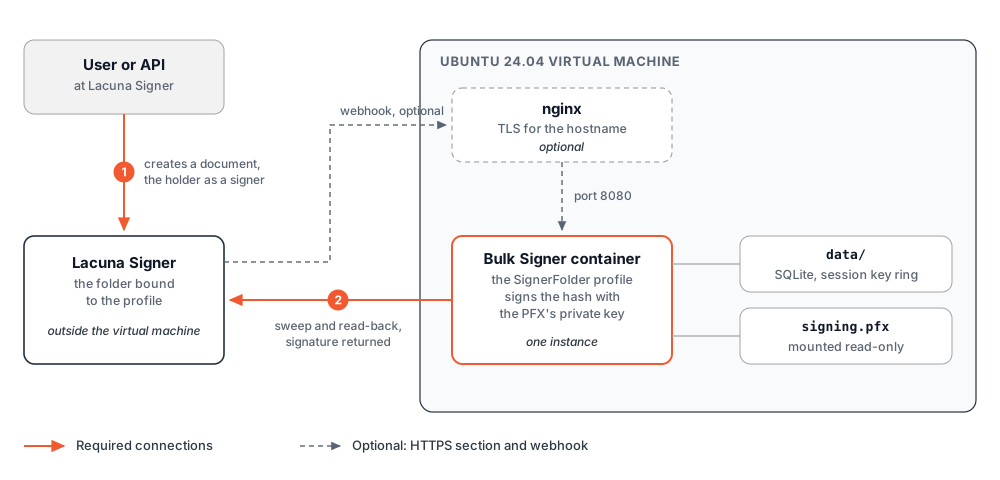
Connections
| Direction | Content | Credential |
|---|---|---|
| Container → Signer | The sweep, the read-back of each document, and the start and completion of each signature | Signer:ApiKey, sent as X-Api-Key |
| Signer → nginx → container | The webhook, when configured: POST https://<host>/api/signer/notifications | Signer:WebhookSecret, sent as Authorization: Bearer |
| Operator → nginx → container | The dashboard and the REST API | Auth:ApiKey, or a Microsoft Entra ID session |
| Virtual machine → Lacuna's registry | The image download | The registry credentials issued by Lacuna |
Every connection to Signer starts from the virtual machine, except the webhook. Without the webhook, the virtual machine needs no inbound access from the internet.
Differences from file signing
| Aspect | Behaviour with the SignerFolder method |
|---|---|
| Document content | No file passes through Bulk Signer. Signer sends the hash to sign, the container signs it with the PFX's private key, and Signer builds the signature into the document and stores it. Nothing enters a watched folder and nothing is written to output/. The signed document is downloaded from Signer. |
| Identification of the holder | Signer matches the participant of the document to the CPF contained in the profile's certificate. The certificate must therefore be an ICP-Brasil e-CPF or e-CNPJ (which contains the CPF of its responsible person). |
| Signature format | Signer selects the format: PAdES for a PDF, XAdES for XML, CAdES for any other type. The profile's own format setting is ignored. |
| Discovery | A sweep every Signer:FolderSweepIntervalSeconds (60 seconds on this page). With the webhook, within seconds. The sweep remains the delivery guarantee: a document is delayed, never lost. |
Prerequisites
| Requirement | Specification |
|---|---|
| Virtual machine | Ubuntu 24.04 LTS, 64-bit x86 (amd64), with sudo. Outbound HTTPS to download.docker.com, to Lacuna's registry and to the Lacuna Signer instance. |
| Registry credentials | The credentials Lacuna issued for the container image, and the registry host, image path and version. See Obtaining the product. |
| Licence | The PKI SDK licence. See Obtaining the PKI SDK license. |
| Lacuna Signer organization | An organization on a Lacuna Signer instance. Registering the webhook requires a user with the organization administrator role. |
| Lacuna Signer API key | An API key of that organization (step 1.2). |
| Signing material | The PFX file of an ICP-Brasil e-CPF or e-CNPJ certificate, and its password. A certificate that contains no CPF leaves the profile degraded. |
| Holder identification | The CPF contained in the certificate. Documents must name the holder as a participant with exactly that CPF. |
| HTTPS (optional) | A hostname that resolves to the virtual machine, inbound TCP 80 and 443, and write access to its DNS zone. Required by the webhook and by Entra ID. |
| Microsoft Entra ID (optional) | A tenant, and an account with the Cloud Application Administrator role or higher. |
Shell variables
All commands on this page run in one shell session on the virtual machine, initialised with the following variables:
REGISTRY=<Lacuna registry host>
REPOSITORY=<image path in the registry>
VERSION=<version>
SIGNER=https://<Lacuna Signer address>
HOST=bulksigner.example.com           # the public hostname; HTTPS section only
DIR=/opt/bulksigner
| Variable | Content |
|---|---|
REGISTRY | The registry host only, for example <name>.azurecr.io. It is the argument of docker login, which does not accept a path. |
REPOSITORY | The image's path inside the registry, for example lacuna/bulksigner. |
VERSION | The version to install, for example 2.20.1. Use an explicit version, not latest. |
SIGNER | The address of the Lacuna Signer API (step 1.1), without a trailing slash. |
HOST | The public hostname of the deployment. Used only from the HTTPS section on. |
DIR | The installation directory. Every file of the deployment is under it. |
1. Lacuna Signer preparation
1.1 API address
SIGNER is the address on which the Signer instance's API responds, which is not necessarily the address
of the product's home page. Without a key, the API returns 401:
curl -s -o /dev/null -w '%{http_code}\n' $SIGNER/api/documents # 401
1.2 API key
Create an application in the organization and generate its key, as specified in step 1 of Getting started with the Signer API.
| Property | Specification |
|---|---|
| Access to the Applications menu | Restricted to the instance's system administrator. Without that access, request a key of the organization from the administrator of the Signer instance. |
| Format | <application>|<secret>. The application part may contain spaces. |
| Display | The key is displayed once, when it is created. |
| Scope | The organization in which it was created. The container reads documents with this key. |
| Required access | A role that grants access to the folders and documents of the organization. |
Read the key into the shell from a prompt that does not echo. Step 4 writes it to the configuration:
read -rsp 'Lacuna Signer API key: ' SIGNER_API_KEY; echo
1.3 Folder
In Folders, select the organization and create a folder with the New folder icon.
| Rule | Specification |
|---|---|
| Binding | One-to-one. Two profiles cannot share a folder. |
| Scope | The folder itself. A document in one of its subfolders is not signed. |
The profile on this page is declared in the configuration, which names the folder by its ID. List the organization's folders with the API key:
curl -s -H "X-Api-Key: $SIGNER_API_KEY" $SIGNER/api/folders | jq -r '.items[] | "\(.id) \(.name)"'
Each line shows a folder's ID and its name. The response is the first page of the listing; in an organization with many folders, locate the folder by name. Keep the ID and the name:
FOLDER_ID=<the folder's ID>
FOLDER_NAME=<the folder's name>
jq is installed in step 2. Run this command after it, or read the ID from the same response without jq.
1.4 PDF signature policy
Whether a PDF signed with an ICP-Brasil certificate receives the ICP-Brasil policy (AD-RB) or a basic
PAdES signature is determined by Signer's UseBrazilianPdfSigningPolicies setting, not by Bulk Signer.
The setting belongs to the Signer instance:
| Signer instance | Where the setting is defined |
|---|---|
| On-premises | In the instance's settings. |
| Lacuna's cloud | By Lacuna. Request confirmation of the value in effect. |
Define the policy before the first document is signed.
2. Docker Engine
Install Docker Engine and the Compose plugin from Docker's apt repository, as specified in
Install Docker Engine on Ubuntu, together with jq:
sudo apt update
sudo apt install -y ca-certificates curl jq
sudo install -m 0755 -d /etc/apt/keyrings
sudo curl -fsSL https://download.docker.com/linux/ubuntu/gpg -o /etc/apt/keyrings/docker.asc
sudo chmod a+r /etc/apt/keyrings/docker.asc

sudo tee /etc/apt/sources.list.d/docker.sources > /dev/null <<EOF
Types: deb
URIs: https://download.docker.com/linux/ubuntu
Suites: $(. /etc/os-release && echo "${UBUNTU_CODENAME:-$VERSION_CODENAME}")
Components: stable
Architectures: $(dpkg --print-architecture)
Signed-By: /etc/apt/keyrings/docker.asc
EOF

sudo apt update
sudo apt install -y docker-ce docker-ce-cli containerd.io docker-buildx-plugin docker-compose-plugin
sudo systemctl enable --now docker
sudo docker compose version
Every docker command on this page runs with sudo.
A port that Docker publishes is reachable even when ufw denies it: Docker writes its own packet-filter
rules. Restrict access to port 8080 with the network or cloud firewall, or publish it on 127.0.0.1 only,
as the HTTPS section does.
3. The image
sudo docker login $REGISTRY --username <registry-username>     # prompts for the token
sudo docker pull $REGISTRY/$REPOSITORY:$VERSION
The credential is stored in /root/.docker/config.json. The repository is private: a pull without
docker login answers authentication required.
4. Configuration
Every file of the deployment is under $DIR:
| File | Content |
|---|---|
docker-compose.yml | The container, its mounts and its network. |
.env | The secrets, as environment variables. Readable by root only. |
config/appsettings.Production.json | The signing profile and the Signer connection. Contains no secret. |
config/signing.pfx | The certificate and its private key. |
data/ | The SQLite database and the session key ring. |
logs/ | The log files, one per day. |
sudo mkdir -p $DIR/config $DIR/data $DIR/logs
cd $DIR
4.1 The compose file
sudo tee docker-compose.yml > /dev/null <<EOF
services:
  bulksigner:
    image: $REGISTRY/$REPOSITORY:$VERSION
    container_name: bulksigner
    restart: unless-stopped
    ports:
      - "8080:8080"
    volumes:
      - ./data:/var/lib/bulksigner
      - ./logs:/var/log/bulksigner
      - ./config/appsettings.Production.json:/app/appsettings.Production.json:ro
      - ./config/signing.pfx:/etc/bulksigner/signing.pfx:ro
    env_file:
      - .env
    networks:
      - bulksigner

networks:
  bulksigner:
    ipam:
      config:
        - subnet: 172.30.0.0/24
EOF
| Element | Specification |
|---|---|
image | The version from VERSION. An upgrade changes this line (Operations). |
ports | Plain HTTP on 8080. The HTTPS section restricts it to 127.0.0.1. |
./data | The SQLite database (db/) and the session key ring (keys/). Without this mount, every replacement of the container loses the job history and signs every operator out. |
./config/signing.pfx | Read at every boot. It must remain at this path for as long as the profile uses it. |
networks | A fixed subnet, so that the HTTPS section can trust forwarded headers from this network only. If 172.30.0.0/24 is in use on the virtual machine, choose another private range and use it in both places. |
The image's own health check polls /api/health every 30 seconds.
4.2 The secrets
Read the values that a person types from prompts that do not echo, and generate the others:
read -rsp 'PKI SDK licence: ' LICENSE; echo
read -rsp 'PFX password: ' PFX_PASSWORD; echo

sudo install -m 600 /dev/null .env
sudo tee .env > /dev/null <<EOF
Signing__PkiSdkLicense='$LICENSE'
Signing__ProfileSecretsKey='$(openssl rand -base64 36)'
Signing__Profiles__0__Certificate__Pfx__Password='$PFX_PASSWORD'
Signer__ApiKey='$SIGNER_API_KEY'
Auth__ApiKey='$(openssl rand -hex 24)'
EOF
unset LICENSE PFX_PASSWORD
| Variable | Description |
|---|---|
Signing__PkiSdkLicense | The PKI SDK licence. |
Signing__ProfileSecretsKey | Encrypts the PFX password in the database. The profile is stored in the database (Configuration), and the import on the first boot refuses to store a password without this key. |
Signing__Profiles__0__Certificate__Pfx__Password | The PFX password, imported into the profile on the first boot. |
Signer__ApiKey | Sent as X-Api-Key on every call to Signer. |
Auth__ApiKey | The dashboard's sign-in key and the REST API's X-API-Key. At least 16 characters. |
The values are enclosed in single quotes so that Docker Compose does not interpret a $, a space or a |
in them. A value that itself contains a single quote must be edited in the file by hand.
Signing__ProfileSecretsKey outside the virtual machineCopy it to the password manager now: sudo grep ^Signing__ProfileSecretsKey= .env. Without it, the stored
PFX password cannot be decrypted, the profile is degraded, and its certificate must be configured again.
There is no recovery.
4.3 The settings
sudo tee config/appsettings.Production.json > /dev/null <<EOF
{
  "Signing": {
    "Profiles": [
      {
        "Name": "signer-folder",
        "Format": "Pades",
        "Method": "SignerFolder",
        "Verify": false,
        "ValidateCertificate": false,
        "SignerFolder": { "Id": "$FOLDER_ID", "Name": "$FOLDER_NAME" },
        "Certificate": {
          "Source": "Pfx",
          "Pfx": { "Path": "/etc/bulksigner/signing.pfx" }
        }
      }
    ]
  },
  "Signer": {
    "Endpoint": "$SIGNER",
    "FolderSweepIntervalSeconds": 60
  }
}
EOF
| Setting | Specification |
|---|---|
Signing:Profiles[0] | The seed (initial load) of the signing profile, imported on the first boot against an empty database only. From then on the profile is stored in the database and edited on its page in the dashboard; a later change to this section is reported as ignored at boot. No default profile is created. |
Name | signer-folder. It cannot be default, and it cannot be changed after the import. |
Format | Required by the configuration, ignored by the method: Signer selects the format. |
Verify, ValidateCertificate | Must be false; both default to true. Signer validates the certificate and the signature. |
SignerFolder:Id | The folder from step 1.3. Name is shown on the profile's page only. |
Signer:Endpoint | The address of the Signer API. With Signer:ApiKey, required as soon as any key under Signer: is set. |
Signer:FolderSweepIntervalSeconds | The interval between listings of the folder, from 60 to 86400 seconds; the default is 300. 60 suits a deployment without the webhook. With the webhook, the default suffices. |
The complete specification of these keys is in Configuration.
4.4 The certificate and the permissions
The PFX has to be on the virtual machine. Copy it from the workstation that holds it, for example with
scp <file>.pfx <user>@<virtual machine>:.
The container runs as the user with ID 1654, not as root:
sudo cp <path to the PFX> config/signing.pfx
sudo chown -R 1654:1654 data logs config/signing.pfx
sudo chmod 0400 config/signing.pfx
Check the password of step 4.2 against the file before the first boot:
sudo openssl pkcs12 -in config/signing.pfx -noout -legacy # prompts for the PFX password
A password that opens the file produces no output. Mac verify error: invalid password? means a wrong
password or a different file. The password in .env is imported into the database on the first boot
only; after it, correcting .env has no effect (Error reference).
5. Start and verification
sudo docker compose up -d
sudo docker compose logs -f bulksigner        # Ctrl+C stops following; the container keeps running
The first boot creates the database, imports the profile (Imported 1 signing profile into the operational store from Signing:Profiles.) and ends with the Service ready summary. The following
warnings ([WRN]) are expected and do not indicate a problem:
| Warning | When | Reason |
|---|---|---|
Watched folder 'default' is unassigned | Every boot | No profile takes files from a watched folder. |
The migration operation 'PRAGMA foreign_keys = 0;' … cannot be executed in a transaction | The first boot | Entity Framework reports a migration that cannot run in a transaction. |
No XML encryptor configured | The first boot, and whenever a new session key is created | The session key ring is written to data/keys without an encryption of its own, which Linux does not offer. |
Overriding HTTP_PORTS '8080' and HTTPS_PORTS '' | Every boot | The image sets ASPNETCORE_URLS, which takes precedence over the base image's default port. Both values are port 8080. |
The query uses the 'First'/'FirstOrDefault' operator without 'OrderBy' | Every boot, on 2.20.1 | An Entity Framework warning about an internal query. |
On later boots, the profile import is replaced by Signing:Profiles names 1 profile(s) and is being ignored (step 4.3).
KEY=$(sudo grep ^Auth__ApiKey= .env | cut -d= -f2- | tr -d "'")
curl -s http://localhost:8080/api/health
curl -s -H "X-API-Key: $KEY" http://localhost:8080/api/profiles/signer-folder | jq '{name, method, degraded}'
curl -s -H "X-API-Key: $KEY" http://localhost:8080/api/ready/details | jq '.checks[] | {name, ok, detail}'
| Check | Expected result |
|---|---|
/api/health | "status":"healthy" |
| The profile | "method": "SignerFolder", "degraded": false |
signer-folder-sweep | ok: true. The first pass runs at boot: the last pass at this instance finished without a failure at … |
signer-notifications | not accepted (Signer:WebhookSecret is not set) until the webhook is configured. |
pki-license | loaded |
The reason a profile is degraded is shown on its page in the dashboard (This profile cannot sign) and
in the signing-profile:signer-folder check of /api/ready/details. The usual reasons are a certificate
without a CPF and a folder that does not exist in Signer.
6. Signing test
In Lacuna Signer:
- Select New document, upload a PDF, and select the organization and the bound folder.
- Add the certificate holder as a participant of type Signer, with the name, the CPF contained in the certificate and the e-mail address. The holder can be the only participant or follow other participants; the container acts only when the pending action is the holder's.
- Select Send.
Within the sweep interval, or within seconds with the webhook, the dashboard's Jobs page
(http://<virtual machine>:8080/jobs) lists a job with the document's name, under the signer-folder
profile. The job passes through the following states:
| State | Meaning |
|---|---|
| Queued | The document was detected and the job was created. |
| Processing | The container read the document back, started the signature and signed the hash with the PFX's key. |
| Verifying | The signature was handed to Signer, which validates it and builds it into the document. |
| Completed | Signer accepted the signature. |
In Lacuna Signer, the holder's action is concluded and the document contains the signature. From the command line:
curl -s -H "X-API-Key: $KEY" "http://localhost:8080/api/jobs?profile=signer-folder" | jq
curl -s -H "X-API-Key: $KEY" http://localhost:8080/api/metrics | grep bulksigner_signer_folder_signatures_total
bulksigner_signer_folder_signatures_total{outcome="signed"} increases once per signature accepted by
Signer. The deployment is complete at this point; the following three sections are optional.
HTTPS through nginx (optional)
Bulk Signer listens on plain HTTP. nginx on the same virtual machine terminates TLS with a Let's Encrypt certificate and forwards to the container, which becomes reachable from the virtual machine only.
1. DNS and firewall. Create an A record for $HOST with the virtual machine's public address, and
admit inbound TCP 80 and 443 in the network or cloud firewall. Let's Encrypt validates the name on port 80.
2. Publish the container on the loopback interface and trust the proxy. nginx connects through the
published port, and the container sees the connection arrive from the gateway of the network of
step 4.1. Hosting:ForwardedHeaders makes Bulk Signer read the original scheme
and client address from nginx's headers, from that network only:
sudo sed -i 's/"8080:8080"/"127.0.0.1:8080:8080"/' docker-compose.yml
sudo tee -a .env > /dev/null <<'EOF'
Hosting__ForwardedHeaders__Enabled=true
Hosting__ForwardedHeaders__KnownNetworks__0=172.30.0.0/24
EOF
sudo docker compose up -d
| Setting | Effect |
|---|---|
127.0.0.1:8080:8080 | Port 8080 is no longer reachable from outside the virtual machine, whatever ufw says. |
Hosting__ForwardedHeaders__Enabled | Reads X-Forwarded-Proto and X-Forwarded-For. Without it, Bulk Signer sees http, and the Entra ID sign-in builds an http:// redirect URI that Microsoft refuses. |
Hosting__ForwardedHeaders__KnownNetworks__0 | Trusts forwarded headers from the network of step 4.1 only. It must equal the subnet of the compose file. |
Do not set ASPNETCORE_FORWARDEDHEADERS_ENABLED as well: setting both is refused at boot.
3. Install nginx and Certbot:
sudo apt install -y nginx certbot python3-certbot-nginx
4. The site. The dashboard keeps a WebSocket connection open, which requires the Upgrade and
Connection headers:
sudo tee /etc/nginx/sites-available/bulksigner > /dev/null <<EOF
map \$http_upgrade \$connection_upgrade {
    default upgrade;
    ''      close;
}

server {
    listen 80;
    server_name $HOST;
    client_max_body_size 10m;

    location / {
        proxy_pass         http://127.0.0.1:8080;
        proxy_http_version 1.1;
        proxy_set_header   Host              \$host;
        proxy_set_header   X-Forwarded-For   \$proxy_add_x_forwarded_for;
        proxy_set_header   X-Forwarded-Proto \$scheme;
        proxy_set_header   Upgrade           \$http_upgrade;
        proxy_set_header   Connection        \$connection_upgrade;
        proxy_read_timeout 300s;
    }
}
EOF
sudo ln -s /etc/nginx/sites-available/bulksigner /etc/nginx/sites-enabled/
sudo rm -f /etc/nginx/sites-enabled/default
sudo nginx -t && sudo systemctl reload nginx
5. The certificate. Certbot obtains it, adds the HTTPS listener and the redirect from HTTP to the site, and installs its renewal:
sudo certbot --nginx -d $HOST
6. Verification:
curl -s https://$HOST/api/health
The response is "status":"healthy". From another machine, http://<virtual machine>:8080 no longer
connects. The dashboard is at https://$HOST/.
The webhook in Lacuna Signer (optional)
Without the webhook, a document waits for the next sweep, up to Signer:FolderSweepIntervalSeconds. With
it, Signer calls POST https://$HOST/api/signer/notifications when a document is created, signed or
approved, and the document is signed within seconds. The notification identifies which document to read;
no other content of it is trusted, and the document is read back from Signer with Signer:ApiKey before a
job is created. Requires the HTTPS section.
1. The secret. At least 32 characters, without leading or trailing whitespace:
echo "Signer__WebhookSecret='$(openssl rand -hex 32)'" | sudo tee -a .env > /dev/null
sudo docker compose up -d
curl -s -o /dev/null -w '%{http_code}\n' -X POST https://$HOST/api/signer/notifications    # 401
401 means the route is enabled and requires the token. 404 means the container did not receive the
secret.
2. Registration. Display the secret to copy it, then clear the screen:
sudo grep ^Signer__WebhookSecret= .env | cut -d= -f2- | tr -d "'"
In Lacuna Signer, signed in as an administrator of the organization:
- Open Organizations and select the organization.
- In the Integration section, below the Webhooks card, select the + button. A new Webhook N panel opens. An existing webhook of another system is not affected.
- Fill in the fields as specified below, and select Save.
| Field | Value | Requirement |
|---|---|---|
| URL | https://<host>/api/signer/notifications | The scheme must be https: the HTTP listener responds with a redirect, and a redirected POST delivers no notification. |
| Authentication type | Bearer | X-Api-Key must not be used. That header is Bulk Signer's own REST credential, and a notification that presents it is refused. |
| Authentication Token | The value of Signer__WebhookSecret | Without the word Bearer. Signer adds the prefix. |
Signer delivers every event of the organization to every webhook of the organization. Bulk Signer acts on
DocumentsCreated, DocumentSigned and DocumentApproved and answers every other event 204. Signer
retries a delivery that does not receive a 2xx response (Webhooks).
3. Verification. Create a document as in step 6. It is signed within seconds, and
the signer-notifications check reports accepted; the last arrived at this instance at <time>. With the
webhook in place, Signer__FolderSweepIntervalSeconds can return to the default of 300.
Microsoft Entra ID sign-in (optional)
By default the dashboard's sign-in page asks for Auth__ApiKey. With an Auth:EntraId section it offers
Sign in with Microsoft instead, and two app roles control access: Administrator for the operator
dashboard and Approver for the approver pages
(Configuration). This deployment uses
Administrator only. Requires the HTTPS section: Microsoft accepts only an https redirect
URI for a host other than localhost.
| Effect | Specification |
|---|---|
| The API-key sign-in form | Removed from the sign-in page. |
The REST API's X-API-Key | Unchanged. Auth__ApiKey remains required. |
| Sessions created with the API key | Stop working when the container restarts with the section. |
| Sign-out | Ends the Bulk Signer session only. The Microsoft session remains. |
1. The app registration. Give the environment its own registration.
New-BulkSignerEntraApp.ps1, run from any
workstation with PowerShell 7, creates a single-tenant registration with the redirect URI
https://<host>/signin-oidc, the two app roles, the email claim, and an enterprise application with
Assignment required:
pwsh ./New-BulkSignerEntraApp.ps1 -BaseUrl https://<host> -DisplayName "Lacuna Bulk Signer"
At the end the script prints, once, the Auth__EntraId__TenantId, Auth__EntraId__ClientId and
Auth__EntraId__ClientSecret block. To create the registration by hand instead, follow
Microsoft Entra ID sign-in in Installation.
2. Assign people. In the Entra admin center, under Enterprise applications → the application → Users and groups, assign the Administrator app role to each operator. An account with no assignment cannot sign in, and an account that authenticates with neither role is refused.
3. The configuration. The client secret is read from a prompt that does not echo:
read -rsp 'Client secret: ' VALUE; echo
sudo tee -a .env > /dev/null <<EOF
Auth__EntraId__TenantId='<the Auth__EntraId__TenantId value>'
Auth__EntraId__ClientId='<the Auth__EntraId__ClientId value>'
Auth__EntraId__ClientSecret='$VALUE'
EOF
unset VALUE
sudo nano .env          # replace the two placeholders
sudo docker compose up -d
The three keys are required together: a partially filled section stops the container at boot, and the log names the missing key.
4. Verification. Follow the sign-in's first redirect without signing in:
curl -s -o /dev/null -w '%{redirect_url}\n' https://$HOST/api/auth/entra-login
The URL must point to login.microsoftonline.com/<tenant>/oauth2/v2.0/authorize, with the application ID
and redirect_uri=https%3A%2F%2F<host>%2Fsignin-oidc. The https scheme is the value to confirm: http
means the forwarded headers of the HTTPS section are not in effect.
| Item | Description |
|---|---|
| Client secret expiry | The script's default lifetime is twelve months. An expired secret fails only at sign-in, with an AADSTS error. Create a new secret in the registration, replace Auth__EntraId__ClientSecret in .env, and run sudo docker compose up -d. |
| Removal | Remove the three Auth__EntraId__ lines from .env and run sudo docker compose up -d. The API-key sign-in returns. |
Operations
Every command runs in $DIR. A change to .env or to the compose file takes effect with
sudo docker compose up -d, which recreates the container.
| Operation | Procedure | Notes |
|---|---|---|
| Upgrade | Back up, pause the pipeline (POST /api/pipeline/pause), wait until no job is Processing or Verifying, change the version on the image: line, run sudo docker compose pull && sudo docker compose up -d, and resume (POST /api/pipeline/resume). | Migrations run at boot. A container stopped during a signature requires the next boot to ask Signer how the job ended, and some of those jobs end Failed with signer-folder.interrupted (Lacuna Signer integration). The sweep runs while the pipeline is paused. |
| Backup | sudo docker compose stop, then archive data/, config/, .env and docker-compose.yml, then sudo docker compose start. | The archive holds the certificate, its encrypted password and the key that decrypts it. Store it as the certificate itself, outside the virtual machine. |
| Webhook secret rotation | Replace Signer__WebhookSecret in .env, run sudo docker compose up -d, then enter the new value in the webhook in Signer. | Between the two changes, notifications are answered 401; Signer retries them and the sweep detects the remaining documents. |
| Signer API key rotation | Create the new key in Signer, replace Signer__ApiKey in .env, run sudo docker compose up -d, and only then revoke the previous key. | With a revoked key, every sweep fails, and the signer-folder-sweep check fails after three consecutive failed passes. |
| Certificate renewal | Pause the pipeline. Replace config/signing.pfx (with the ownership and mode of step 4.4) and, if the password changed, enter it on the profile's page under Edit certificate. Restart with sudo docker compose restart and resume. | The certificate is read at boot. If the new certificate contains a different CPF, documents pending in Signer for the previous CPF have no action for the new holder; each is recorded once as Failed with signer-folder.no-holder-action. |
| Folder change | Save the new folder on the profile's page. | Takes effect without a restart. The SignerFolder section of appsettings.Production.json is not read again. |
| Removal | sudo docker compose down, remove the webhook in Signer, and sudo docker logout $REGISTRY. | data/, config/ and .env remain in $DIR until deleted. |
Error reference
| Code or message | Origin | Meaning | Resolution |
|---|---|---|---|
permission denied on /var/lib/bulksigner or /etc/bulksigner/signing.pfx | Container log, at boot | The mounted directories or the PFX are not owned by UID 1654. | Repeat step 4.4. |
authentication required on docker pull | Docker | No docker login. | Repeat step 3 with the credentials Lacuna issued. |
not found on docker pull | Docker | A REPOSITORY or VERSION that does not exist, or credentials that cannot see the repository. | Check the shell variables and the credentials Lacuna issued. |
did not open with the PKCS#12 password given (IncorrectPinException), with the profile degraded | Container log and the signing-profile:signer-folder check, at boot | The password does not open config/signing.pfx: a wrong password, or a different file. Correcting .env has no effect after the first boot, because the password has already been imported into the database. | Check with the openssl command of step 4.4. A wrong password: enter the correct one on the profile page, under Edit certificate, and run sudo docker compose restart. A wrong file: replace it as in Certificate renewal (Operations). |
A log line that names Signing:ProfileSecretsKey | Container log, first boot | The import would store the PFX password without the key. | Set Signing__ProfileSecretsKey (step 4.2). |
A log line that names Signer:Endpoint or Signer:ApiKey | Container log, at boot | A key under Signer: is set without those two. | Complete .env and appsettings.Production.json (steps 4.2 and 4.3). |
A log line that names Signer:WebhookSecret | Container log, at boot | The secret has fewer than 32 characters, or leading or trailing whitespace. | Generate it as in the webhook section. |
| A log line that names both forwarded-headers switches | Container log, at boot | ASPNETCORE_FORWARDEDHEADERS_ENABLED and Hosting__ForwardedHeaders__Enabled are both set. | Keep Hosting__ForwardedHeaders__* only. |
signer-notification.unauthorized | Notification route, 401 | The token registered in Signer differs from the secret, was entered with the word Bearer, or the authentication type is not Bearer. | Correct the webhook in Signer. |
signer-notification.not-configured | Notification route, 404 | The container did not receive Signer__WebhookSecret. | Check .env and run sudo docker compose up -d. |
signer-folder.no-holder-action | Job, Failed | The document is in the bound folder but has no signing action for the certificate's CPF. | Add the holder as a signer with the CPF. The next sweep detects the new action. Not retriable. |
signer-folder.signature-refused | Job, Failed | Signer refused the signature; its validation results are in the job history. The usual cause is the certificate (revoked, expired, or not the participant's). | Correct the cause reported by Signer, then retry the job. |
signer-folder.interrupted | Job, Failed | The container stopped during the signature. | Check the document in Signer, then retry the job. A retry ends Canceled if the holder's action is already concluded. |
AADSTS50011 | Microsoft Entra ID, at sign-in | The redirect URI sent is http://…, or it does not match the app registration. | Check the forwarded headers of the HTTPS section and the registration's https://<host>/signin-oidc URI. |
A job that ends Canceled carries no code: the document was cancelled, refused or expired in Signer, or was
already signed by the holder, before the container signed it. This is not a fault. Every signer-folder.*
code is specified in
Troubleshooting.
Symptoms
| Symptom | Cause | Resolution |
|---|---|---|
| The profile is degraded, with a reason about the certificate's CPF. | The certificate contains no CPF. | Use an ICP-Brasil e-CPF or e-CNPJ. See Troubleshooting. |
The signer-folder-sweep check fails. | Three consecutive passes failed. The usual cause is an incorrect Signer:ApiKey, or a Signer:Endpoint that is not the API address. | See Troubleshooting. |
| A document is never detected. | The document is in a subfolder, the holder was added without the certificate's CPF, or the pending action is another participant's. | Correct the document in Signer. A document whose turn has not come is detected once it does. |
signer-notifications reports that none has arrived after a document was created. | Signer does not reach https://<host>: an incorrect URL, http://, or a firewall that does not admit port 443. | Correct the URL in Signer or the firewall. |
| Documents are signed, but up to a minute after their creation. | The notification does not arrive, and documents are detected by the sweep. | See Troubleshooting. |
Limitations
| Not provided | Alternative |
|---|---|
| A signed file on the virtual machine | Signer stores the document. Download it from Signer; nothing is written to output/. |
| Verification of the result by Bulk Signer | None. Verification is disabled for this method, because Signer validates the signature when it builds it into the document. |
| More than one instance | Azure App Service (cluster mode). |
| The opposite direction: a file sent to Signer for a person to sign | The LacunaSigner method, which uses the same Signer:Endpoint and Signer:ApiKey and is selected per profile. See Lacuna Signer integration. |