Deploying on Azure App Service — cluster mode
Zero to a two-instance cluster, verified on the dashboard's Instances view.
This is the walkthrough for the one supported multi-instance topology: an Azure Web App running the Linux container image, scaled out on one App Service Plan. The mechanisms coordinate through the operational store and the work share and are host-agnostic, but the supported topology is exactly this one — two on-premises VMs against one SQL Server would run the same code and are undocumented, untested and unsupported.
High availability and its limits is the list of what this topology does not give you — stop-the-world upgrades, no deployment slots, rate budgets that multiply, metrics scraping that lands on an arbitrary instance. Every item on it is cheaper to know now than to discover in a change window.
Single-instance installs are elsewhere and unaffected: Linux systemd, Windows Service, Docker and the
foreground console are in Installation, and nothing on this page applies to
them. Cluster:Enabled defaults to false, and off is byte-for-byte the single-instance product.
The shape of it
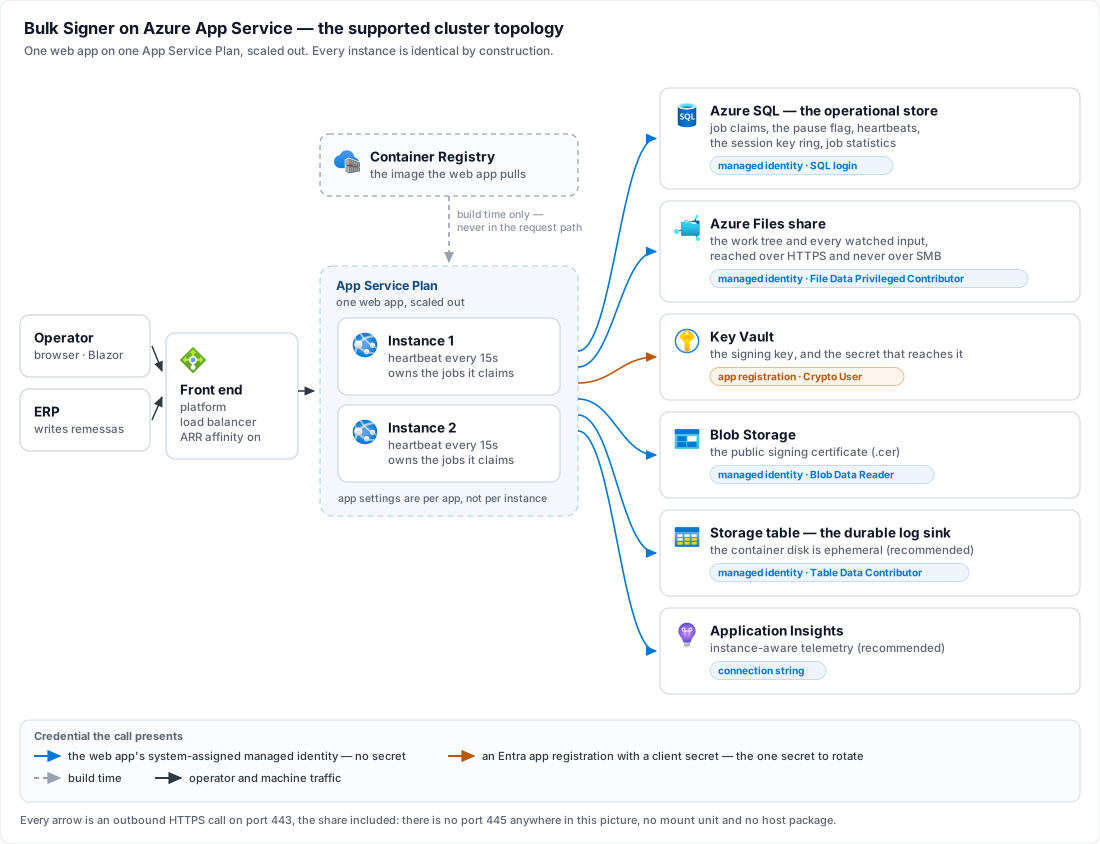
Every arrow is an outbound HTTPS call on port 443, including the share: this product reaches Azure Files through the storage SDK and never over SMB, so there is no port 445 anywhere in that picture, no mount unit and no host package.
Read the two arrows into Key Vault together, because they are the one asymmetry on the page. Six grants are held by the web app's managed identity; exactly one is held by an Entra app registration — the right to sign with the key — and it is the only credential here that is a secret somebody has to rotate. Step 3 is where that comes from and why.
Before you start
Six things must be settled before the first boot. Four of them are a boot refusal, a fatal error or a red readiness row rather than a runtime surprise; the last two are recommendations that this topology makes much stronger than they are elsewhere.
| # | What | Why cluster mode requires it |
|---|---|---|
| 1 | An Azure SQL database, plus a login in db_datareader + db_datawriter + db_ddladmin | The store is the cluster's coordination point: job claims, the pause flag, the heartbeat table and the session key ring all live there. Cluster:Enabled = true with Database:Provider anything but SqlServer is refused at boot. This service creates its tables, not its database. |
| 2 | An Azure Files share (SMB) for the work tree, with every watched input directory created inside it | Storage:Provider and every Storage:Inputs[] entry must resolve to AzureFiles, refused at boot otherwise. The local store's lease is in-process bookkeeping that excludes nothing outside its own process, and a folder local to one instance is invisible to its siblings. An NFS share is refused by name. |
| 3 | A decision between the two certificate sources that are not per-host — Pfx read from a blob, or AzureKeyVault | Pkcs11 and WindowsStore are refused at boot: a token or a machine store lives on one machine, and cluster instances are fungible. That leaves two, and neither is the obvious winner — step 3 is the choice and what it costs. Nothing has to exist yet. |
| 4 | The container image in a registry the web app can pull from | Lacuna publishes it to its private Docker image repository; step 1 copies the tag you were issued into a registry of your own, which is what makes a managed-identity pull possible. |
| 5 | An Azure Storage table for the log sink | Strongly recommended rather than required. The container's disk is ephemeral, so rolled log files are discarded on every recycle; leaving Logging:AzureTable:Enabled = false in cluster mode logs a Critical at startup and starts anyway. Nothing prunes that table — read Retention and schedule the pruning script before you turn the sink on. |
| 6 | An Application Insights resource | Also recommended rather than required, and for a reason specific to this topology: /api/metrics behind the load balancer reaches an arbitrary instance, so Prometheus scraping has no continuity here. The Application Insights distro is instance-aware natively and is the recommended cluster observability path — see Telemetry. |
Give the web app a system-assigned managed identity before you type anything else, because almost
everything here can then authenticate without a secret: Credential = ManagedIdentity for the Azure
Files share, Authentication=Active Directory Managed Identity in the SQL connection string, and the
same mode for the certificate blob and the log table. Each is a separate grant even though one
identity holds them all — see Security.
Signing:…:Certificate:AzureKeyVault requires AppId and AppSecret; the block has no
Credential key and no managed-identity mode, so under that source the right to sign is held by an
Entra app registration with a client secret. That is the one secret this topology cannot design away,
and step 3 weighs it against what the vault buys. It is worth
knowing before you choose a certificate source.
Sizing the plan and the database
Two of the prerequisites above have a size as well as an existence, and one number an operator usually knows in advance sizes both: signatures a day. The table is a starting point rather than a benchmark result — what it cannot know is your files, and those move the answer further than the volume does. A CAdES signature over a CNAB240 remessa and a PAdES signature over a 300-page scanned PDF are the same one job to this product and nothing like the same work.
| Signatures per day | App Service Plan | Azure SQL — max vCores |
|---|---|---|
| 0 – 1,000 | P0 V3 × 1 | 2 |
| 1,001 – 5,000 | P1 V3 × 1 | 4 |
| 5,001 – 20,000 | P1 V3 × 2 | 6 |
| 20,001 – 100,000 | P2 V3 × 2 | 8 |
| 100,001 – 1,000,000 | P2 V3 × 2 | 8 |
× N is the instance count — --number-of-workers on one plan, never a second plan. Whichever row
you are on, step 2 still starts you at one worker and step 7 is where you scale to
the number above: the first boot is where every refusal fires, and reading one instance's console is
easier than reading two.
The last two rows are the same hardware, and that is the table's most informative line. Somewhere
around 100,000 signatures a day the web tier stops being the constraint. A job is one signature, and
what bounds it from there is the certificate source — a Pfx already in memory, or a round trip to Key
Vault — together with the share's I/O. Ten times the volume on the same plan is therefore a statement
about where the work actually is, not headroom the plan was holding in reserve. At the top of that row,
size the vault round trip and
Pipeline:MaxConcurrency first, and grow the plan last.
A larger SKU does not sign more files at once. Pipeline:MaxConcurrency is the only thing that
does, it is per instance, and step 3 sets it to 4 — so a × 2
row is eight signatures in flight, and eight is the number the certificate source has to survive rather
than the configured four. High availability is where that same multiplication
reads as a limitation instead of a feature.
The two × 1 rows do not need this page. Cluster mode is legal at one instance — step 6 boots
exactly that way — but at one instance nothing it coordinates is doing any work, and a deployment that
stays there permanently is paying for an Azure SQL database and an Azure Files share it could have done
without. Under 5,000 signatures a day, read Installation first and come back when
the volume, or a second instance, is the reason rather than the platform.
A max vCore figure describes Azure SQL's serverless compute tier, where that number is the
ceiling the database may scale up to (--max-capacity); on the provisioned tier read the same figure as
the vCore count, since there is nothing to scale. Do not budget for auto-pause savings either way. This
product polls its store continuously, and in cluster mode every instance also writes a heartbeat every
Cluster:HeartbeatSeconds — 15 by default — so the database is never idle for anything like the hour
auto-pause requires. Size it as a database that is always up.
None of this is a throughput argument for SqlServer. The vCore column sizes a database whose
provider Before you start already made compulsory here; it is not a reason to move
a single-instance install off SQLite, whose ceiling is not this pipeline's either — that decision is in
Installation, on its own terms.
1. Import the image
Lacuna publishes the container image to its private Docker image repository and issues you a registry username and access token for it — see Obtaining the product. Nothing is built here: you copy the tag you were told to install into a container registry of your own.
az group create --name bulksigner-rg --location brazilsouth
az acr create --name <registry-name> --resource-group bulksigner-rg --sku Basic
az acr import --name <registry-name> \
  --source <lacuna-registry>/bulksigner:<version> \
  --image bulksigner:<version> \
  --username <registry-username> --password <registry-token>
az acr import is a registry-to-registry copy performed by the service: the layers never touch your
workstation and no local Docker daemon is involved. Skip either create line if the group or the
registry already exists — the import is the part that has to happen, and Basic is enough registry for
one image pulled by a handful of instances.
Import one explicit <version> tag rather than latest. The tag you name here is the tag step 2 pins
the web app to, and on this topology an upgrade is a
stop-the-world window — something you schedule, not something a
platform recycle does to you.
Why a registry of your own, rather than pointing the web app straight at Lacuna's. Two reasons, and
the first shapes the rest of this page: the app pulls with its managed identity (AcrPull, step 2),
and an identity in your tenant can only be granted a role on a registry in your tenant — a foreign
registry means a username and password in app settings, which is one more secret to rotate and the one
this design otherwise spends effort eliminating. The second is availability: App Service pulls the
image again on every instance it starts, so scale-out (step 7) and platform recycles
would otherwise depend on a registry outside your subscription answering at that moment.
2. Create the plan and the app — one instance first
az appservice plan create --name bulksigner-plan --resource-group bulksigner-rg --is-linux --sku P1V3 --number-of-workers 1
P1V3 above is the example's SKU, not a recommendation —
Sizing the plan and the database is which one your volume asks for.
Basic (B1) is the floor, because it is the first tier that scales out at all — and it caps at three instances, which also caps what Health check can do for you, since rerouting away from an unhealthy instance requires somewhere to reroute to. Premium v3 is the production answer. Start at one worker deliberately: the first boot is where every refusal fires, and reading one instance's console is easier than reading two.
az webapp create --name bulksigner --resource-group bulksigner-rg --plan bulksigner-plan --container-image-name <registry-name>.azurecr.io/bulksigner:<version>
bulksigner:<version> is the repository and tag step 1 imported into — your
registry, not Lacuna's. Pin that tag rather than latest, so an upgrade is something you do rather
than something a restart does.
az webapp identity assign --name bulksigner --resource-group bulksigner-rg
Grant that identity AcrPull on the registry, Storage File Data Privileged Contributor on the
share, a SQL login mapped to it in db_datareader + db_datawriter + db_ddladmin,
Storage Blob Data Reader on the container holding the certificate, and
Storage Table Data Contributor on the log table itself — scoped to the one table, which is all the
sink needs. Step 3 adds the sixth and last of them.
Under AzureKeyVault the vault key is reached by the Entra app registration named in AppId, never
by this identity — so get + sign granted here would be granted to the wrong principal and the boot
would still fail, with a message about the vault that says nothing about why. The one grant this
identity does take on that vault is Key Vault Secrets User, for reading the app registration's own
secret back out as an app setting.
Then tell the app to pull with that identity rather than a registry password:
az resource update --ids $(az webapp config show --name bulksigner --resource-group bulksigner-rg --query id -o tsv) --set properties.acrUseManagedIdentityCreds=True
Without that last line the pull falls back to registry credentials the app does not have, and the first symptom is a container that never starts — with nothing in the application log, because there is no application yet.
3. The signing key lives in a vault
Two sources survive the boot refusals in Before you start, and this is the step that picks between them. They are genuinely co-equal — the choice is a policy one, not a technical one, and each concedes something the other keeps.
Pfx read from a blob | AzureKeyVault | |
|---|---|---|
| Where the private key is | A .pfx in Blob Storage, read into the instance's memory at boot | Inside the vault, permanently. Each signature is a remote call and the key never leaves Azure |
| Credential | The web app's managed identity, Storage Blob Data Reader. No secret | An Entra app registration with a client secret, plus a managed-identity grant to read that secret back |
| Signing latency | None beyond local crypto | A vault round trip per job |
| If Azure is unreachable | Already signed; the pipeline keeps signing | Every job fails until the vault answers |
| Audit | This product's job history, and nothing else | Every signature is a logged Key Vault operation — an independent count to reconcile against the job history |
The honest summary is that AzureKeyVault buys a key that cannot be exfiltrated from a compromised
instance, and pays for it with the one secret this topology otherwise has none of. If a client secret
in the app settings is not acceptable to you, Pfx-as-blob is the better answer than a
software-backed vault key — a software key is FIPS 140-2 Level 1, which concedes most of the
argument for the vault while keeping all of its cost. The rest of this section assumes you chose the
vault; for Pfx, everything you need is
Certificates plus the blob upload below.
Provision the vault, the key and the app registration
az keyvault create --name bulksigner-kv --resource-group bulksigner-rg --location brazilsouth --sku premium --enable-rbac-authorization true
Premium, because the key should be HSM-backed. Standard gives you a software key, and the paragraph above is why that is the wrong end of this trade.
An ICP-Brasil certificate arrives as a PFX, so the key is imported rather than generated.
Import-PfxToKeyVault.ps1 does the whole import in one pass — writes the public
.cer, imports the private half as a key object, registers the Entra application, creates its
secret, grants it sign, and runs the same public-key pairing check the service performs at boot, so
a mismatch surfaces here rather than at first start:
pwsh Import-PfxToKeyVault.ps1 -PfxPath ./signer.pfx -VaultName bulksigner-kv -KeyName bulksigner-signing-key -AppDisplayName bulk-signer-prod -Destination HSM -GrantScope Key -SecretValidityYears 2
Key Vault will hold this PFX either way, but a certificate imported from a PFX is marked
exportable: anyone holding secrets/get can download the complete PFX from the secret backing it. A
key object never returns private material under any permission. That is why this product's source
is key-only, and why the public certificate has to be supplied separately.
The script prints the client secret once and writes it nowhere. Capture it now.
Put the certificate where an instance can read it
The script leaves the .cer on your workstation, which is no use to a container whose disk is
recycled with it. Upload it and let the managed identity read it:
az storage blob upload --account-name contosocerts --container-name certificates --name signer.cer --file ./signer.cer --auth-mode login
Grant that identity Storage Blob Data Reader on the container — the fourth of the grants step 2
listed. CerPath is still available and points at a local file, but on this topology it means baking
the certificate into the image, which couples an annual certificate renewal to an image rebuild and a
stop-the-world deploy. Use the blob.
The settings
These are app settings like any other, set here rather than in step 4 because every value in them was produced by the two commands above:
az webapp config appsettings set --name bulksigner --resource-group bulksigner-rg --settings \
  Signing__Profiles__0__Certificate__Source=AzureKeyVault \
  Signing__Profiles__0__Certificate__AzureKeyVault__Endpoint='https://bulksigner-kv.vault.azure.net/' \
  Signing__Profiles__0__Certificate__AzureKeyVault__KeyName=bulksigner-signing-key \
  Signing__Profiles__0__Certificate__AzureKeyVault__AppId=99990000-aaaa-bbbb-cccc-ddddeeeeffff \
  Signing__Profiles__0__Certificate__AzureKeyVault__AppSecret='@Microsoft.KeyVault(VaultName=bulksigner-kv;SecretName=bulksigner-app-secret)' \
  Signing__Profiles__0__Certificate__AzureKeyVault__Blob__Url='https://contosocerts.blob.core.windows.net/certificates/signer.cer' \
  Signing__Profiles__0__Certificate__AzureKeyVault__Blob__Credential=ManagedIdentity \
  Signing__ProfileSecretsKey='@Microsoft.KeyVault(VaultName=bulksigner-kv;SecretName=bulksigner-profile-secrets-key)' \
  Pipeline__MaxConcurrency=4
The 0 is the profile's index in Signing:Profiles[] and it is positional — reordering that array
silently repoints these settings at a different profile. Endpoint must be an absolute https://
URL; a bare DNS name is refused at boot naming the key.
The Signing__Profiles__0__* settings are a one-time seed. On the first boot against an empty
profile table they are imported into the operational store as the profile's row; after that they are
ignored — the boot log says so every time it finds them — and the profile, its certificate included, is
edited from the dashboard's Signing profiles page. Keep them until the first boot has run, then
delete them. See Configuration.
Signing__ProfileSecretsKey is what the import encrypts AppSecret under, because the store never
holds a secret in the clear, and the import refuses without it. Create it once as a vault secret — any
long random value, openssl rand -base64 32 for instance — read through the same kind of Key Vault
reference, and treat losing it as losing every stored profile secret: there is no recovery path. See
Configuration.
Under Pfx-as-blob the PFX password is such a secret too; only a passwordless PFX read with
ManagedIdentity would need no key.
Blob and CerPath are exclusive — both is refused at boot, and so is neitherThat refusal is deliberate rather than fussy: two valid certificates for one vault key would both
pass the pairing check, so resolving a conflict by precedence would make which certificate signed
depend on network weather, unauditably. Note also that Blob inherits nothing from the vault block
above it, even though both name Azure — the vault credential grants use of a key, the blob
credential grants read of one object, and they are configured separately on purpose.
One vault, two objects, two credentials
AppSecret above is an App Service Key Vault reference, which is the one place on this page where
Key Vault appears in both of its roles at once. It looks circular and is not:
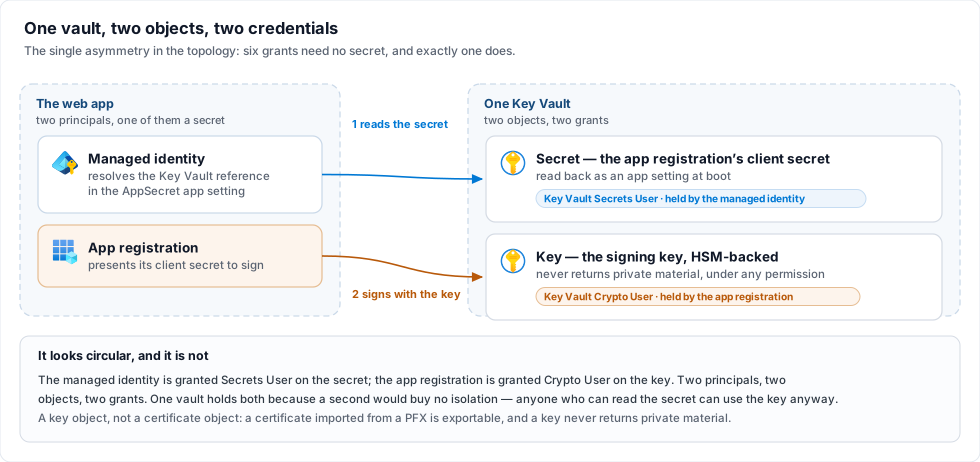
- The web app's managed identity resolves the reference and gets the secret back — a
Key Vault Secrets Usergrant, on the secret. - That secret is then what the PKI connector presents to reach the key — a
Key Vault Crypto Usergrant held by the app registration, on the key, scoped by-GrantScope Keyabove.
Two principals, two objects, two grants. The same vault holds both because a second one would buy no isolation — anyone who can read the secret can use the key regardless — and would only add a resource. Step 4's note that secrets belong in Key Vault references is about this mechanism; the key itself is never an app setting.
Latency is the constraint here, not throttling
Certificates warns that sustained concurrency draws HTTP 429s, which arrive as failed jobs rather than hangs. Worth knowing, and worth the scale: Key Vault allows 2,000 transactions per 10 seconds against an HSM RSA-2048 key — roughly 200 signatures a second, against a product that performs one signature per job. You will meet the round-trip latency long before the ceiling.
The cluster-specific point is the inversion of this page's usual theme. Elsewhere on this topology
rate budgets multiply with instances, in the attacker's favour; here the budget is per vault and
fixed while the consumers multiply. Pipeline__MaxConcurrency=4 is per instance, so two instances is
eight signatures in flight against one vault. AzureKeyVault is treated as concurrency-safe and is
exempt from the startup warning that covers Pkcs11 and WindowsStore.
Renewal and rotation are change windows
Three things here are read once, at boot, and nothing polls any of them: the certificate bytes in
the blob, the vault key named by KeyName, and the app registration's client secret. Changing any one
therefore takes a restart — and a restart on this topology is
step 8's stop-the-world, not a rolling one and not a slot swap. Plan
an ICP-Brasil renewal, and the -SecretValidityYears 2 expiry, as scheduled outages rather than as
maintenance you can do at any time.
After the first boot, the client secret lives on the stored profile, not in the app setting. The
seed copied it into the operational store, encrypted, and the …__AppSecret Key Vault reference is not
read again. Rotating it is therefore: create the new secret on the app registration, enter it on the
profile's page (Edit certificate, typing the new value — a blank field keeps the stored one), then
restart. The same form is where a renewed .cer or a new KeyName is pointed at; the save marks the
profile as waiting for a restart, and the restart is when it takes effect.
A new certificate against the old KeyName, or a new key against the old .cer, fails the pairing
check. The host still starts, but that profile comes up degraded and every job routed to it fails
with profile.degraded — on a single-profile deployment, the change window ends with nothing signing.
Re-run the import script against the new PFX so both artifacts move together, and read the profile
row in step 6 before you call the window closed.
What this step assumes about the network
Every command above reaches its service over a public endpoint with a credential, which is true of SQL, Azure Files and the certificate blob on this page as well. Restricting any of them means VNet integration and private endpoints, which is step 9 and is optional.
4. App settings
App Service app settings are per app, not per instance — which is the fact the whole design leans
on: every instance is identical by construction, so the cross-instance config-divergence hazards (an
encryption password differing between hosts, a profile one instance never heard of) cannot occur here.
Set them as environment variables, in the double-underscore form; there is no
appsettings.Production.json to mount.
az webapp config appsettings set --name bulksigner --resource-group bulksigner-rg --settings \
  WEBSITES_PORT=8080 \
  Cluster__Enabled=true \
  Database__Provider=SqlServer \
  ConnectionStrings__Default='Server=tcp:sqlsrv01.database.windows.net,1433;Initial Catalog=BulkSigner;Authentication=Active Directory Managed Identity;Encrypt=True;' \
  Storage__Provider=AzureFiles \
  Storage__AzureFiles__AccountName=contosofiles \
  Storage__AzureFiles__ShareName=bulksigner \
  Storage__AzureFiles__Directory=prod \
  Storage__AzureFiles__Credential=ManagedIdentity \
  Storage__Inputs__0__Name=remessas \
  Storage__Inputs__0__Path=entrada/remessas \
  Storage__Inputs__0__PollIntervalSeconds=30 \
  Hosting__ForwardedHeaders__Enabled=true \
  Hosting__ForwardedHeaders__TrustAnyProxy=true \
  Logging__AzureTable__Enabled=true \
  Telemetry__Enabled=true
That block is the topology, not the whole configuration. It deliberately omits everything that is
the same here as on any other target — the PKI licence, the API key, the signing profiles, the
approval pools. The one exception is a profile's certificate, which is emphatically not the same
here as on any other target and was set in step 3 a step ago.
Take the rest from the appsettings.Example.Azure.json.sample file in the deployment package, which
is one worked shape filled in end to end, and translate each key to its double-underscore form
(Signing:Profiles[0].Certificate.Source → Signing__Profiles__0__Certificate__Source). Every
Signing__Profiles__* and Storage__Inputs__*__Profile setting is seed input, read on the first
boot only; once the profiles are in the store they — pool, quorum, input folder and certificate
included — are edited from the dashboard, identically for every instance. A profile whose certificate
cannot be resolved does not stop the boot: it comes up degraded, named on the banner and on
/api/ready, and every other profile keeps signing.
Secrets — Signing__PkiSdkLicense, Auth__ApiKey, Signing__ProfileSecretsKey,
ApproverPortal__LinkSecret, CloudHub__ApiKey, any AppSecret — belong in Key Vault references rather than literal app settings, resolved by the web app's managed
identity holding Key Vault Secrets User. Step 3 uses exactly this mechanism for the vault's own
client secret, and explains there why that is not circular. Every key this product accepts, with its
type, default and environment-variable form, is in Configuration.
Five of the settings above are the cluster-specific ones, and each is there for a reason worth knowing:
Cluster__Enabled=trueis the whole switch. Nothing is inferred from the environment: a deployment that happens to run SQL Server and an Azure Files share does not silently change behaviour on upgrade.Cluster__HeartbeatSeconds/Cluster__StaleAfterSecondsare absent above because the defaults (15 and 60) are the right starting point — four cadences, so three beats have to go missing before an instance is presumed dead. A threshold worth under three cadences is refused at boot naming both keys. RaiseStaleAfterSecondsif you meet false deaths; see the wager.Hosting__ForwardedHeaders__*is what makes the rate limiter and the address recorded on an approval read the real client rather than the load balancer.TrustAnyProxy=trueis the intended setting here — App Service's front door has no stable address to list — and only here: on a reverse-proxy deployment it means anybody who can reach Kestrel directly can name themselves any client address. An empty trust set is refused at boot rather than read as the wide answer, and setting the framework's ownASPNETCORE_FORWARDEDHEADERS_ENABLEDbeside it is refused too.WEBSITES_PORT=8080matches the image'sEXPOSE. App Service auto-detects 80 and 8080, so this is belt and braces — and one setting is cheaper than the diagnosis when a later image changes port.- Leave
Hosting__RequireHttpsunset. Terminate TLS at the platform withhttpsOnlybelow. An in-process redirect answers the health-check ping with a 307, which App Service reads as a failure — see the health-check note below.
App Service sets no environment name, so the app runs as Production — under which
Signing:TrustLacunaTestRoot
is refused at boot. A homologation app that wants the Turing / Fermat test certificates sets
Signing__TrustLacunaTestRoot=true and ASPNETCORE_ENVIRONMENT=Staging in the same command. Never
set the first on an app that signs anything real.
5. Platform settings
az webapp update --name bulksigner --resource-group bulksigner-rg --set clientAffinityEnabled=true httpsOnly=true
az webapp config set --name bulksigner --resource-group bulksigner-rg --always-on true --generic-configurations '{"healthCheckPath": "/api/ready"}'
ARR affinity stays on. It is on by default and it is a requirement rather than a preference: the dashboard is Blazor Server, and its circuit is a stateful SignalR connection that has to keep landing on the instance that owns it. This is documented rather than engineered around. Note what it does not do — the session cookie itself is shared, because in cluster mode the Data Protection key ring moves into the operational store, so a cookie minted by one instance validates on every other. Sticky sessions are for the circuit; the key ring is for the cookie. Without the key ring, affinity alone would still sign people out intermittently.
Always On stays on. The signing pipeline is a hosted worker, not a request handler. An app the platform unloads while idle is an app that stops picking up files, and nothing about that reads as an error anywhere.
The health check reads the readiness endpoint
/api/ready is anonymous, per-instance, and returns 503 when any of its probes fail — which is
precisely the question App Service is asking. Point Health check at it and the platform stops routing
to an instance that cannot serve, and eventually replaces one that stays that way.
It is anonymous because of this consumer: Health check cannot carry the API key (Microsoft documents
that the path must allow anonymous access when the app runs its own authentication), so
Readiness:RequireApiKey stays at its default false here. Turning it on would have the platform read
a 401 on every instance as "unhealthy" at once — none is removed from rotation, the platform starts
replacing them one an hour, and the Health check metric stays red for as long as the gate is on. What
the anonymous body carries is each check's name and verdict and nothing else; the diagnosis — server and
catalogue, share URLs, an SDK's failure sentence — is on /api/ready/details, behind the API key.
Three consequences to accept knowingly:
- Leave
WEBSITE_HEALTHCHECK_MAXPINGFAILURESat its default (10). The endpoint is strict — a single missing input folder fails the whole response — so a tight threshold turns a blip into an eviction. - A shared dependency failing takes every instance down together. A share that stops answering or a store that was unreachable at boot is not one instance's problem, and the platform's rule is that when all instances are unhealthy none are removed from the load balancer — but replacement still happens, at most one per hour and three per day per plan. The app stays reachable; the instances get recycled underneath you while the real fault is elsewhere. Read Troubleshooting before concluding the platform is at fault.
- Health check does not follow redirects. This is why
Hosting:RequireHttpsstays off: with it on and platformhttpsOnlyoff, the ping gets a 307 and the instance is marked unhealthy for a reason that has nothing to do with its health.
6. First boot, on one instance
Start the app and read the console — App Service log streaming is where the boot narration lands:
az webapp log tail --name bulksigner --resource-group bulksigner-rg
What to look for in the Service ready panel:
| Row | What it should say |
|---|---|
operational store | SQL Server (sqlsrv01/BulkSigner) — the provider, server and catalogue, never the connection string. A READ_COMMITTED_SNAPSHOT is off warning matters: Azure SQL has it on by default. |
storage provider | AzureFiles |
work share owner | this cluster (one marker, shared between instances) — the wording that tells you the mode is actually on. Off the switch this row names one instance. |
azure shares | reachable. An unreachable share does not stop the host, but it fails /api/ready and ingests nothing until it answers. |
forwarded headers | the trust set by name, not just on. |
logs | the table sink among the destinations. If it is absent you will also have seen the Critical about rolled log files on an ephemeral disk. |
profile | the certificate that actually loaded — cades · cert=AzureKeyVault · blob=contosocerts/certificates/signer.cer · verify=on · …. Both halves are evidence: cert=AzureKeyVault means the vault answered and the key was found, blob=… means the .cer was read and paired against it. A row prefixed DEGRADED · means the certificate did not resolve, with the reason beside it. This is the line to read after any certificate renewal — it is the only confirmation that both artifacts moved together. |
Then GET /api/ready/details with the API key and confirm every check is green, open Signing
profiles to confirm the seed imported what you meant, and open System → Instances on the
dashboard: one row, badged as the instance you are reading it on, with a Live chip.
Boot once with Cluster:Enabled = false and let recovery run before you turn the mode on. A row
left in progress by an older build carries no owner, and under cluster mode nothing will ever sweep it
— this boot's subject is its own previous life, a sibling's is theirs, and takeover follows an owner's
heartbeat, of which there is none. The same applies to a job dispatched to Lacuna Signer by such a
build. Both surfaces say so when they meet one and name this same remedy. It is a one-time concern at
the upgrade: the owner is recorded on every claim whether or not the mode is on, and only read under
it.
7. Scale to two
az appservice plan update --name bulksigner-plan --resource-group bulksigner-rg --number-of-workers 2
Give it a minute — App Service pings the health-check path to confirm the new instance is ready before routing to it — then reload System → Instances.
What done looks like: two rows, each with a distinct derived identity (the platform's
WEBSITE_INSTANCE_ID, which App Service sets on every instance), each Live, both on the same
application version, one badged as the instance answering your request. The caption names the cadence
and the staleness threshold in force. Refresh a few times: the badge moves between the two rows,
because each reload may land on either instance — which is the load balancer doing its job, and the
first thing on this page you can see rather than infer.
Then confirm the cluster actually cooperates
The Instances view proves both instances are alive. It does not prove they share the work.
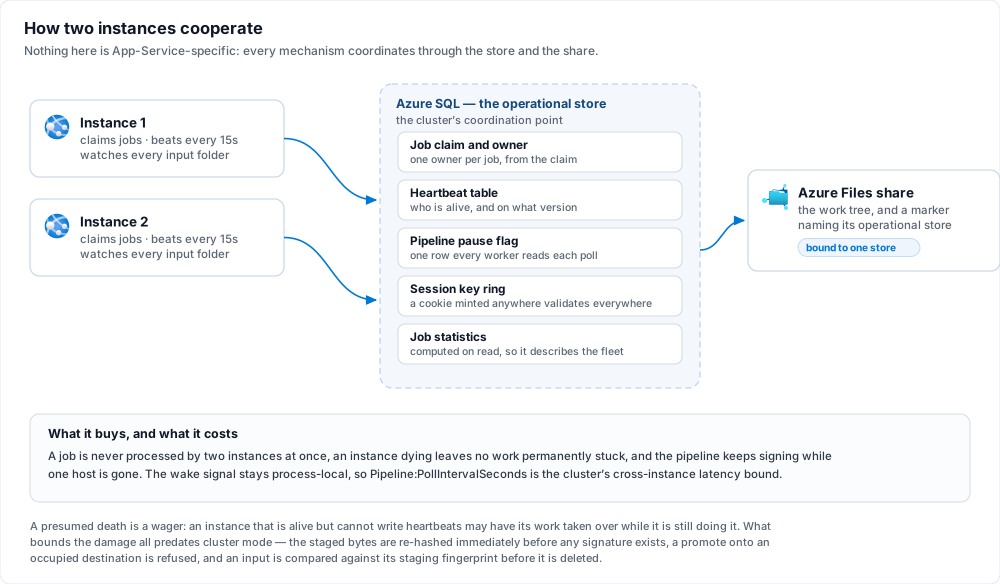
Drop several files into a watched folder at once and read /jobs:
- Every file becomes exactly one job. Both instances watch every folder, so they race on each
arrival; the losing enqueue is refused by the partial unique index over active original paths and
answered as
AlreadyActive, and a lease conflict on an input is classified expected — not counted against the folder's consecutive-failure breaker, not recorded as an error. Contention here is the system working, not a fault. - The jobs are owned by both instances.
/api/folderscarries aninstancefield naming which one answered; the job timeline on/jobs/{id}carries the rest. - Stop one instance (scale back to one) and its in-flight work is reconciled by the survivor rather
than stranded: a job that never reached the sign call is re-enqueued, one past it fails
conservatively, an
AwaitingSignerjob is reassigned. Each takeover writes aJobTakenOveroperational event naming both instances. The policy in full, including why "failed" is an honest outcome and not "stuck", is in Operations.
8. Upgrades are stop-the-world
Stop the app, deploy the new image, start it — with one step ahead of those three, because the image comes from Lacuna's registry rather than from a build:
az acr import --name <registry-name> \
  --source <lacuna-registry>/bulksigner:<new-version> \
  --image bulksigner:<new-version> \
  --username <registry-username> --password <registry-token>

az webapp stop --name bulksigner --resource-group bulksigner-rg
az webapp config container set --name bulksigner --resource-group bulksigner-rg \
  --container-image-name <registry-name>.azurecr.io/bulksigner:<new-version>
az webapp start --name bulksigner --resource-group bulksigner-rg
Not a rolling restart, and not a deployment-slot swap — a staging slot carrying production's connection string is a second set of instances joining the cluster on a different application version, which is the one shape this design does not support.
The stop is the tidier deploy rather than a requirement. Changing the image on a running app
starts the new container beside the old one on the same instance; both derive one identity from
WEBSITE_INSTANCE_ID, and the platform keeps the old one running until the new one is warm. Since 2.5.0
the new container displaces the old one at once and the old one stands down — it claims nothing
new and finishes what it holds — so an in-place container set works, at the cost of one warning naming
the displaced incarnation, and with the old container's unfinished jobs taken over
Cluster:StaleAfterSeconds later if the platform kills it first. Stopped first, nothing overlaps: the
old container retires its heartbeat row on the way down and the new one has nothing to displace. (Up to
2.4.x an in-place change cost at least one refused start.)
Two things to know about an in-place roll:
- If the new container fails its warm-up, set the previous tag back. App Service stops the whole
site — the stood-down container included — and keeps restarting it with the new image; the old
container does not get to resume there. The recovery is
az webapp config container set … --container-image-name <registry-name>.azurecr.io/bulksigner:<previous-version>. - A few seconds after the platform removes the old container, the first store command on each
connection the new one opened during its warm-up may fail once with a 35-second
Execution Timeout Expired. That is a connection cut along with the old container, not the store: one failure per such connection, and then the pool heals itself. A stop-first deploy does not produce it.
The heartbeat's version stamp is the tripwire rather than the guard: a booting instance that sees live heartbeats from a different version logs a Critical and continues. It is deliberately not a refusal — refusing would block instances from coming up for as long as a dead old-version heartbeat took to go stale, which is exactly when an operator needs them up.
The full argument, and the rest of what this topology does not offer, is in High availability and its limits.
9. Hardening the network (optional)
Everything above is a working cluster reached over public endpoints with credentials. This section is what you add once it works, and it is genuinely optional — but one item on it is not defence in general, it is a documented limitation of this topology turning into a solved problem.
The rate budgets stop multiplying. High availability lists it as a cost of scaling out: every instance enforces its own per-client rate budget, so two instances hand an attacker twice the budget on the approval route, and N instances N times. A Front Door WAF rate limit sits before the load balancer, which makes it the one place in this architecture where a per-client budget is enforced once rather than per instance. Nothing else on this page closes that.
The reason to decline: this section adds four billable resources and a tier upgrade on top of an already-Premium plan and vault. No figures here — Azure pricing dates faster than any document.
Inbound is a choice between two shapes, and only one of them can be true at a time. Either the app stays on the internet behind a Front Door — the rest of this step — or it leaves the internet entirely and is reached over a VPN, which is step 10 and carries consequences that run past the network. The outbound half below is the same work either way. Read both before building either — the second is the stronger answer to the anonymous approval route and the weaker one to everything a WAF does, and which of those matters more is not a question this page can answer for you.
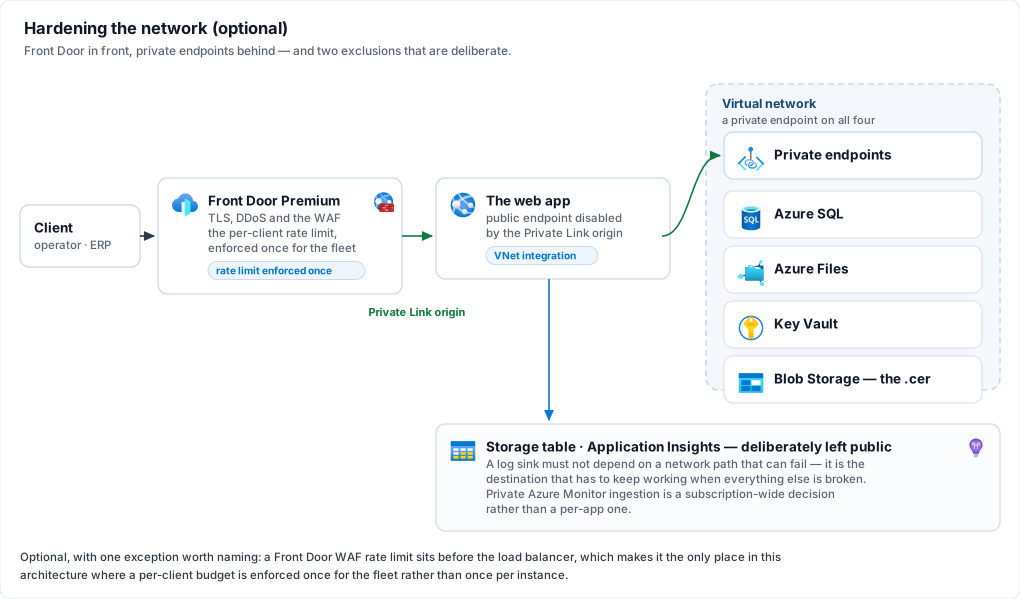
Inbound — Front Door in front of the app
Front Door Premium with a Private Link origin is the recommendation, because App Service automatically disables its public internet endpoint when the origin is reached over Private Link — which on this product buys something specific, two paragraphs below.
The cheaper alternative is Front Door Standard plus an App Service access restriction:
az webapp config access-restriction add --name bulksigner --resource-group bulksigner-rg --rule-name frontdoor --priority 100 --service-tag AzureFrontDoor.Backend --http-header x-azure-fdid=<front-door-id>
Both halves of that rule are required and the header is the load-bearing one. Microsoft is explicit
that IP filtering alone is not sufficient, because other Azure customers' Front Door instances use
the same address ranges — the AzureFrontDoor.Backend service tag proves the traffic came through a
Front Door, and only X-Azure-FDID proves it came through yours. Never hard-code the address
ranges instead of using the tag; that space changes regularly.
This is what finally makes step 4's TrustAnyProxy=true true rather than merely intended. That
setting is justified there by App Service's front end having no stable address to list, with a warning
that on a reverse-proxy deployment it lets anyone who can reach Kestrel directly name themselves any
client address. On this product that address is not cosmetic: it is recorded on every approval as one
of the compensating controls for the anonymous approval route, and it is what the rate limiter counts
against. Front Door without origin locking would widen that hazard while looking like protection.
With Private Link the hazard closes completely, because there is no public endpoint left to reach;
with the Standard rule it closes only as far as that access restriction holds, which is a weaker claim
and worth holding as one.
Keep TrustAnyProxy=true under both tiers. Do not move to
Hosting__ForwardedHeaders__KnownNetworks — it takes literal CIDRs, Front Door's ranges change, and a
stale list fails by silently discarding the real client address rather than by refusing anything. The
product refuses TrustAnyProxy and a named list together, so this is a real either/or and the
wide-plus-locked-origin answer is the correct one here.
Three settings interactions to get right:
- Leave Front Door's own session affinity on. The dashboard is a Blazor Server circuit and needs pinning end to end; Front Door's affinity is what keeps a client on the origin whose ARR cookie it is holding. The two layers cooperate — Front Door picks the origin, ARR picks the instance.
- Do not point Front Door's health probe at
/api/ready. There is exactly one origin here, so a probe failure has nowhere to fail over to and simply withdraws the whole application. App Service's own Health check is already watching that endpoint and can act on it, by rerouting between instances. Give Front Door a cheap path or leave its probe at the default. - Custom domain and managed TLS move to Front Door. App Service
httpsOnly=truestays exactly as step 5 set it, andHosting:RequireHttpsstays unset for the reason step 5 gives.
Front Door here is a WAF, a TLS terminator and a DDoS front, not a global load balancer for this application. A second region would be a second set of instances over one work share, and the share's marker gate refuses that by design — see High availability.
Outbound — VNet integration and private endpoints
Integrate the web app into a subnet and give all four data-plane services a private endpoint: Azure SQL, the Azure Files share, the vault and the certificate blob. All four, not three — a private endpoint on most of them leaves the remaining one as the reason the virtual network exists, and nobody notices until an audit does.
Two exclusions, both deliberate:
- The log table stays public. It is the destination that has to keep working when everything else is broken; a network path that can fail is exactly what a log sink must not depend on, since a sink that cannot report its own failure is the outage that hides itself.
- Application Insights stays public. Private ingestion requires an Azure Monitor Private Link Scope, a separate construct with its own DNS consequences across every resource sharing it — a larger decision than this section, and one that should be made for a whole subscription rather than for one web app.
10. No public endpoint at all (optional)
The two inbound options are exclusive, and this is the second one: if you built step 9's Front Door, you are not building this. Rather than putting a Front Door in front of a public app, give the app a private endpoint and then take its public endpoint away, so that the only route to it is from your own network: a site-to-site or point-to-site VPN, or ExpressRoute private peering. Outbound is shared by both shapes and applies here unchanged — it is the inbound half that step 9's picture describes and this step replaces. The rate-budget argument in step 9's opening is Front Door's alone; this shape answers it differently rather than not at all, and What this shape does not close below is where.
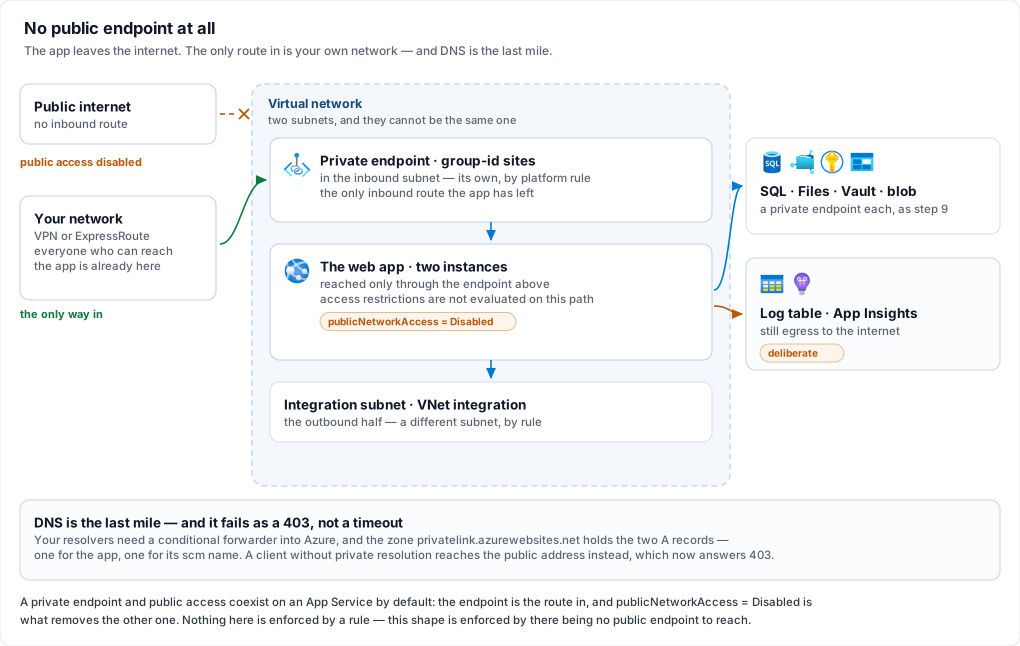
Choose this one when the requirement is that nobody outside your network reaches this service at all, and Front Door when the service has to be reachable from the internet and the only question is how safely.
The anonymous approval route stops being internet-reachable, and that is the largest thing on this
page. /approve/{jobId} and POST /api/approvals/{id} take no credential by design — a decision
compensated rather than hidden, with a recorded identification method, the approver's address and user
agent, their own rate-limit budget and deliberately coarse refusals (Approvals). Every
one of those controls was designed for a page anybody could load. Take the public endpoint away and the
population that can reach the route at all is the population already admitted to your network, which is
a stronger compensation than anything the product itself can ship. If that unauthenticated route is why
you are reading this section, this shape is the answer to it and Front Door is not.
Stated the other way round, that is also the cost: an approver who is not on the network cannot approve. The portal link is a derived HMAC that works from any device, and this shape makes reachable the binding constraint instead. Count the approver population before committing — a director approving a payroll from a phone, an external auditor, anybody at a client — because for each of them the answer becomes a VPN client on that device, and that is much cheaper to know now than after the first payroll parks over a weekend.
What this shape does not close. There is no WAF here, so the ×N rate budget stays ×N; what changes
is who can spend it, not the arithmetic. /api/metrics still lands on an arbitrary instance, and
upgrades are still stop-the-world. If you need a WAF and no public exposure, the answer is an
internal Application Gateway rather than Front Door — which always has a public front end of its own —
and that is a third deployment shape, not documented here.
Keep Hosting__ForwardedHeaders__* exactly as step 4 set it, and the address it
records gets better. Private Link forwards the real client address to the app, so what lands on an
approval record is the approver's own address rather than a proxy hop. TrustAnyProxy=true also stops
carrying the caveat step 4 attaches to it, for the same reason the Private Link origin option does: with
public access disabled there is no path to Kestrel from outside the network left to abuse.
Provisioning the private endpoint
The private endpoint needs a subnet of its own — not the one VNet integration uses, which is a platform restriction rather than a preference and the most common way this gets built twice:
az network private-endpoint create --resource-group bulksigner-rg --name bulksigner-pe --vnet-name bulksigner-vnet --subnet inbound --group-id sites --connection-name bulksigner-sites --private-connection-resource-id $(az webapp show --name bulksigner --resource-group bulksigner-rg --query id -o tsv)
az network private-dns zone create --resource-group bulksigner-rg --name privatelink.azurewebsites.net
az network private-dns link vnet create --resource-group bulksigner-rg --zone-name privatelink.azurewebsites.net --name bulksigner-vnet-link --virtual-network bulksigner-vnet --registration-enabled false
az network private-endpoint dns-zone-group create --resource-group bulksigner-rg --endpoint-name bulksigner-pe --name default --private-dns-zone privatelink.azurewebsites.net --zone-name azurewebsites
az resource update --ids $(az webapp show --name bulksigner --resource-group bulksigner-rg --query id -o tsv) --set properties.publicNetworkAccess=Disabled
That last command is the one that does the work, and the private endpoint does not imply it. A
private endpoint and public access coexist on an App Service by default: build the endpoint, connect
over the VPN, watch it work — and the app is still on the internet exactly as it was. Note also that the
app's access-restriction rules are not evaluated for traffic arriving through the private endpoint, so
the x-azure-fdid rule from the Front Door option is inert here. This shape is enforced by there being
no public endpoint, never by a rule.
403 rather than a timeoutThe app's public name keeps resolving after the endpoint exists — to a public address that now refuses
you. A client that has not been given private resolution therefore gets a 403 from the platform,
which reads like a permissions problem and is not one. Two A records are needed in
privatelink.azurewebsites.net, one for the app and one for its scm name; the DNS zone group above
creates both, which is why it is worth using rather than hand-writing records. VPN clients resolve
through your own DNS, so the last mile is a conditional forwarder from your resolvers into Azure — an
Azure DNS Private Resolver
inbound endpoint is the maintained way to do that. Keep using the default *.azurewebsites.net host
name: the platform certificate is issued for it, and a custom domain here means bringing your own.
Two things you were told to do earlier move inside the network.
Step 6 reads the boot narration with az webapp log tail, which reaches
the app's SCM site — private now, so run it from a VPN-connected workstation, or read the boot from the
table log sink instead. And if you put a private endpoint on the container registry too, the image pull
has to be routed through the network explicitly, by setting properties.vnetImagePullEnabled the same
way step 2 sets acrUseManagedIdentityCreds; a registry left public needs nothing. What does not
change is anything the platform does to itself —
Health check still pings /api/ready and ARR affinity
still pins the Blazor circuit, both internal to App Service and both indifferent to all of this.
The app keeps its outbound path to the internet, and the two deliberate exclusions in Outbound above depend on it: the Azure table log sink and Application Insights. If your requirement covers egress as well, those two are the whole conversation — Application Insights needs an Azure Monitor Private Link Scope, and the log table needs a private endpoint on its storage account, which collides with the reason that exclusion exists: a log sink is the one destination that has to keep working when the network is what broke. Read that argument before closing it, and note that simply turning the sink off is not the cheap way out — in cluster mode it logs a Critical at startup, because a container's rolled log files go away with the container (Before you start, item 5).
When something refuses
Every cluster failure mode, with its exact message and its fix, is in Troubleshooting. The ones you are most likely to meet on a first deployment:
| Symptom | Cause |
|---|---|
Cluster mode refused to start, naming keys | One of the boot refusals in Before you start. The message names every failing key at once rather than one per attempt. |
| The container never starts | Either the image pull failed (acrUseManagedIdentityCreds never set — step 2), or a boot refusal fired. The log stream tells them apart — a pull failure leaves it empty because there is no application yet, while a refusal names the key before exiting. The first boot's import refuses, for instance, when a profile carries a secret and Signing__ProfileSecretsKey is not set (step 3). Read the stream before assuming the registry. |
The app starts but the profile is DEGRADED and every job fails with profile.degraded | The profile could not resolve its certificate: an unreachable vault, an expired client secret, or a .cer that does not pair with KeyName (step 3). The reason is on the banner's profile row and on /api/ready/details. Fix it on the profile's page (Edit certificate) or at the vault, then restart. |
Boot warns displaced the previous incarnation … which was still live | An in-place redeploy (step 8): the new container took the identity and the old one stood down — expected on every in-place roll. If this host is not mid-redeploy, two hosts are presenting one identity and will take turns: read both logs and rename one or point it at its own database. |
Boot refused saying the identity could not be registered in 3 attempts | Every write of the heartbeat row lost a race to another incarnation: two hosts presenting one name booting at the same moment against one database, or a store fault. Find the other host on the Instances view of an instance that is running. |
| Boot refused naming two operational stores | The work share's marker says it belongs to a different store. Two clusters over one work share is mutual data destruction that no database can see, which is what that gate exists to catch. |
| Operators bounced to sign-in intermittently | The instances are not sharing one key ring — usually one host whose Cluster:Enabled is false, or instances pointed at different stores. |
Related: High availability and its limits · Installation · Certificates · Configuration · Operations · Troubleshooting