Signing Lacuna Signer documents on Amazon ECS Fargate
This page specifies a single-instance deployment of Bulk Signer on Amazon Web Services that signs documents created in Lacuna Signer. A person creates a document in a Signer folder bound to a Bulk Signer signing profile; Bulk Signer signs it with the organization's certificate, whose private key is held in AWS KMS, and Signer stores the signed document. The deployment consists of:
- the Bulk Signer container image, running as one Amazon ECS task on AWS Fargate behind an Application Load Balancer;
- the operational store in Amazon RDS for SQL Server;
- the work share and the signing certificate in one Amazon S3 bucket;
- the signing key in AWS KMS;
- a signing profile that uses the
SignerFoldermethod; - the
Signer:WebhookSecretwebhook, through which Signer notifies Bulk Signer of new documents.
The infrastructure is the one specified in Amazon ECS Fargate. This page repeats that procedure
in full, so that it can be executed on an empty AWS account, and adds the Lacuna Signer integration. In an
environment already deployed from that page, only the following steps apply: step 1,
the two Lacuna Signer secrets in step 7, the Signer settings in
step 9, a new deployment, and steps 11 to 13.
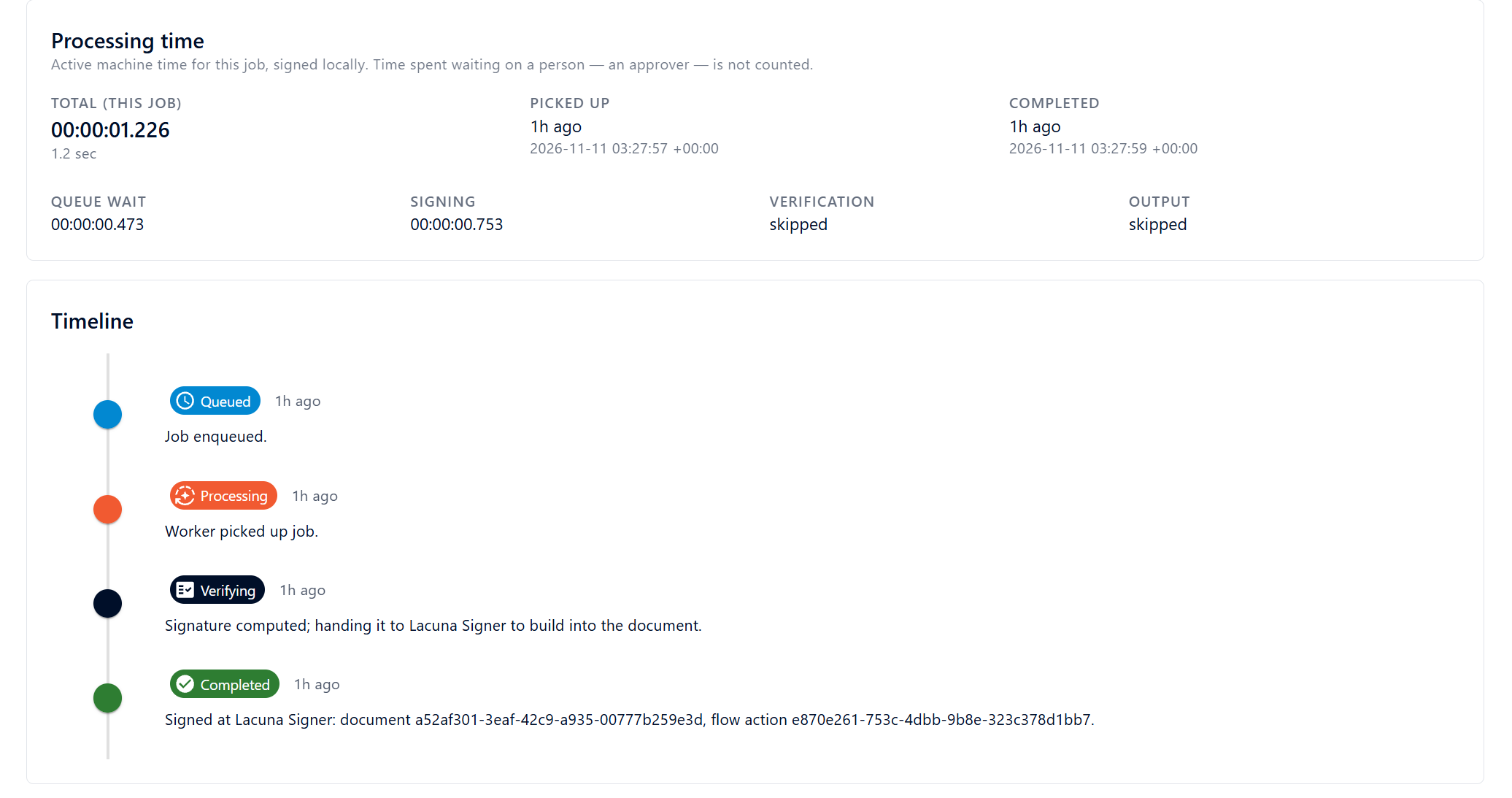
The procedure was validated in a homologation environment: a PDF created in Lacuna Signer was signed by the Fargate task with an e-CNPJ certificate whose key was held in AWS KMS, in a job with a total processing time of 1.2 seconds.
The SignerFolder method and the Signer:WebhookSecret key were introduced in 2.16.0. The
S3 storage provider, the
AwsKms certificate source and the
Auth:SessionKeyRing:Placement
key were introduced in 2.20.0. Earlier images refuse the configuration on this page at boot.
Cluster mode is supported on Azure App Service only, and an S3 work share is
refused when Cluster:Enabled is set. The ECS service in step 9 is configured so that two tasks never
run concurrently, including during a deployment. Deployments that require more than one instance must
use Azure App Service (cluster mode).
Architecture
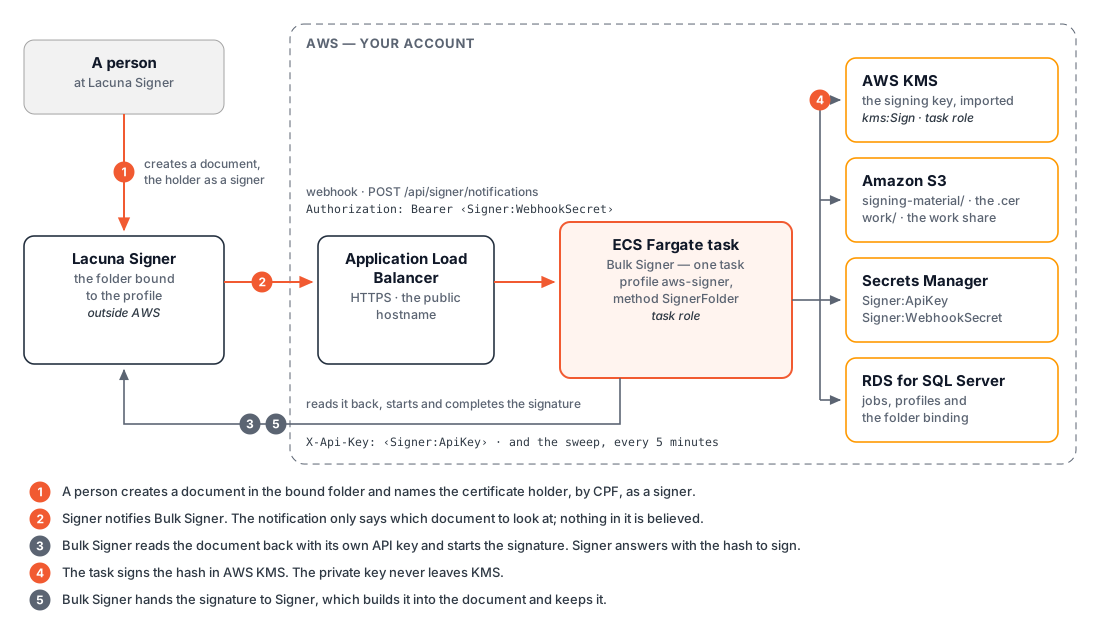
Connections
Compared with a deployment that signs files only, three connections are added. None of them is an AWS resource.
| Direction | Content | Credential |
|---|---|---|
| Signer → load balancer → task | The webhook: POST https://<host>/api/signer/notifications | Signer:WebhookSecret, sent as Authorization: Bearer |
| Task → Signer | The sweep, the read-back of each document, and the start and completion of each signature | Signer:ApiKey, sent as X-Api-Key |
| Task → KMS | kms:Sign, one call per signed document | The task role |
Differences from file signing
| Aspect | Behaviour with the SignerFolder method |
|---|---|
| Document content | No file passes through Bulk Signer. Signer sends the hash to sign, the task signs it in KMS, and Signer builds the signature into the document and stores it. Nothing enters a watched folder and nothing is written to work/output/. The signed document is downloaded from Signer. |
| Identification of the holder | Signer matches the participant of the document to the CPF contained in the profile's certificate. The certificate must therefore be an ICP-Brasil e-CPF or e-CNPJ (which contains the CPF of its responsible person). |
| Signature format | Signer selects the format: PAdES for a PDF, XAdES for XML, CAdES for any other type. The profile's own format setting is ignored. |
Function of Signer:WebhookSecret in performance
Discovery mechanisms
Bulk Signer has two mechanisms for detecting a document that awaits its signature:
| Mechanism | Operation | Availability |
|---|---|---|
| Sweep | Every Signer:FolderSweepIntervalSeconds (default: 300 seconds), the task lists the pending documents of every bound folder and reads each one back from Signer. | Always active. Requires only Signer:ApiKey. |
| Notification | Signer calls POST /api/signer/notifications when a document is created, signed or approved. The task queues a check for the document named in the call, responds immediately, and reads that document back. | Only when Signer:WebhookSecret is set. Without it, the route returns 404. |
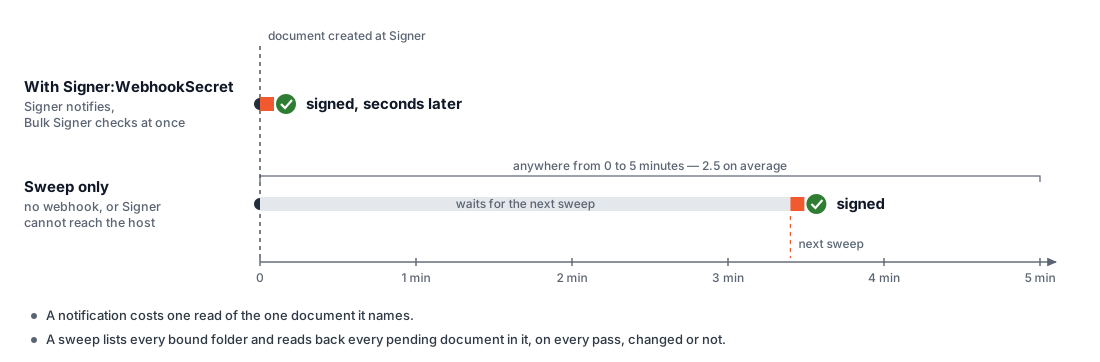
Effect of the setting
| Aspect | Sweep only | With Signer:WebhookSecret |
|---|---|---|
| Time until a document is detected | Up to the sweep interval: 0 to 5 minutes by default, 2.5 minutes on average. | Seconds. |
| Calls to the Signer API | On every pass, one listing per bound folder plus one read per pending document in it, regardless of whether anything changed. | One read per notified document. |
| Flows with several participants | Each hand-over to the holder waits for a sweep. | The notification of the step preceding the holder's is the event through which the holder's turn is detected, in seconds. |
The detection time can also be reduced, without the webhook, by lowering
Signer:FolderSweepIntervalSeconds. Its minimum is 60 seconds, and every pass repeats the same listing
and the same reads. At the minimum, the number of calls to Signer is five times that of the default, and
a document still waits up to one minute. With the webhook, the number of calls is proportional to the
number of events, and the sweep interval can remain at the default or be increased.
Scope
| Property | Specification |
|---|---|
| Signature duration | Not affected. The setting changes the time until a document is detected, not the time required to sign it. In the homologation environment, a job took 1.2 seconds, queue wait included. Throughput is determined by Pipeline:MaxConcurrency and by the KMS quota. |
| Delivery guarantee | Provided by the sweep, not by the notification. If Signer cannot reach the load balancer, or a delivery is lost, the document is signed at the next sweep. A document is delayed, never lost. |
| Trust in the notification | None. A notification identifies which document to read; no other content of it is used. The document is read back from Signer with Signer:ApiKey before a job is created. |
Security properties
The route is public, and the secret is the only element that distinguishes a call from Signer from any other call.
| Property | Specification |
|---|---|
| Minimum length | 32 characters. Leading or trailing whitespace is refused at boot. |
| Comparison | In fixed time. |
| Call without the secret | 401. |
| Effect of a forged call that presents the secret | At most, the task reads one document from Signer. |
Prerequisites
| Requirement | Specification |
|---|---|
| Tools | AWS CLI v2, authenticated (aws sts get-caller-identity must succeed), Docker to copy the image, and jq. For the key import in step 3: PowerShell 7 and OpenSSL 3.x (included with Git for Windows). |
| IAM permissions | Permission to create resources in ECR, ECS, IAM (iam:CreateRole, iam:PutRolePolicy, iam:PassRole), KMS, RDS, S3, Secrets Manager, Elastic Load Balancing, ACM, EC2 security groups and CloudWatch Logs. The PowerUserAccess policy alone is insufficient: it is denied iam:CreateRole. |
| Registry credentials | The credentials Lacuna issued for the container image. See Obtaining the product. |
| Licence | The PKI SDK licence. |
| DNS | A hostname that Signer can reach over the internet, and write access to the DNS zone that is authoritative for it. Confirm the delegation with dig +short NS example.com: a domain can have a Route 53 hosted zone in the account while being delegated to another provider. |
| Lacuna Signer organization | An organization on a Lacuna Signer instance, and a user with the organization administrator role. That role is required to register the webhook. |
| Lacuna Signer API key | An API key of that organization (step 1.2). |
| Signing material | The PFX file of an ICP-Brasil e-CPF or e-CNPJ certificate, with an RSA 2048, 3072 or 4096 key, and its password. A certificate that contains no CPF is refused when the profile is created. |
| Holder identification | The CPF contained in the certificate and an e-mail address of the holder. Documents must name the holder as a participant with exactly that CPF. |
Shell variables
All commands on this page run in one shell session, initialised with the following variables:
REGION=sa-east-1
ACCOUNT=$(aws sts get-caller-identity --query Account --output text)
NAME=bulksigner                       # prefix for every resource
BUCKET=$NAME-$ACCOUNT                 # bucket names are global
HOST=bulksigner.example.com           # the public hostname
SIGNER=https://<Lacuna Signer address>
PROFILE=aws-signer                    # the profile that signs in the Signer folder
VPC=$(aws ec2 describe-vpcs --region $REGION --filters Name=is-default,Values=true --query 'Vpcs[0].VpcId' --output text)
SUBNETS=$(aws ec2 describe-subnets --region $REGION --filters Name=vpc-id,Values=$VPC --query 'Subnets[].SubnetId' --output text | tr '\t' ',')
VPC_CIDR=$(aws ec2 describe-vpcs --region $REGION --vpc-ids $VPC --query 'Vpcs[0].CidrBlock' --output text)
| Variable | Content |
|---|---|
REGION | The AWS Region of every resource. |
ACCOUNT | The AWS account ID of the authenticated identity. |
NAME | The prefix of every resource name. |
BUCKET | The bucket name. It includes the account ID because S3 bucket names are globally unique. |
HOST | The public hostname of the deployment. Signer calls it. |
SIGNER | The address of the Lacuna Signer API (step 1.1). |
PROFILE | The name of the signing profile bound to the Signer folder. It must not be default. |
VPC, SUBNETS, VPC_CIDR | The default VPC, its subnet IDs (comma-separated) and its CIDR block. |
Network placement
The procedure uses the default VPC and its public subnets. The task receives a public IP address for its outbound calls (ECR, KMS, S3, Secrets Manager, Lacuna Signer), and its security group admits inbound traffic from the load balancer only. In private subnets, the task requires a NAT gateway: Lacuna Signer is not an AWS service and cannot be reached through a VPC endpoint.
1. Lacuna Signer preparation
The following four items are defined in Lacuna Signer before any AWS resource is created.
1.1 API address
SIGNER is the address on which the Signer instance's API responds, which is not necessarily the address
of the product's home page. Without a key, the API returns 401:
curl -s -o /dev/null -w '%{http_code}\n' $SIGNER/api/documents # 401
1.2 API key
Create an application in the organization and generate its key, as specified in step 1 of Getting started with the Signer API.
| Property | Specification |
|---|---|
| Access to the Applications menu | Restricted to the instance's system administrator. Without that access, request a key of the organization from the administrator of the Signer instance. |
| Format | <application>|<secret>. The application part may contain spaces. |
| Display | The key is displayed once, when it is created. |
| Scope | The organization in which it was created. The folder selector in step 11 lists only that organization's folders, and the task reads documents with this key. |
| Required access | A role that grants access to the folders and documents of the organization. |
1.3 Folder
In Folders, select the organization and create a folder with the New folder icon.
| Rule | Specification |
|---|---|
| Binding | One-to-one. Two profiles cannot share a folder. |
| Scope | The folder itself. A document in one of its subfolders is not signed. |
The screenshots on this page use a folder named AWSTest.
1.4 PDF signature policy
Whether a PDF signed with an ICP-Brasil certificate receives the ICP-Brasil policy (AD-RB) or a basic
PAdES signature is determined by Signer's UseBrazilianPdfSigningPolicies setting, not by Bulk Signer.
The setting belongs to the Signer instance:
| Signer instance | Where the setting is defined |
|---|---|
| On-premises | In the instance's settings. |
| Lacuna's cloud | By Lacuna. Request confirmation of the value in effect. |
Define the policy before the first document is signed.
2. The bucket
Create the bucket, block all public access, abort incomplete multipart uploads after one day, and create the watched folder:
aws s3api create-bucket --bucket $BUCKET --region $REGION --create-bucket-configuration LocationConstraint=$REGION
aws s3api put-public-access-block --bucket $BUCKET --public-access-block-configuration \
  BlockPublicAcls=true,IgnorePublicAcls=true,BlockPublicPolicy=true,RestrictPublicBuckets=true
aws s3api put-bucket-lifecycle-configuration --bucket $BUCKET --lifecycle-configuration \
  '{"Rules":[{"ID":"abort-incomplete-multipart","Status":"Enabled","Filter":{"Prefix":""},"AbortIncompleteMultipartUpload":{"DaysAfterInitiation":1}}]}'
aws s3api put-object --bucket $BUCKET --key inputs/default/
The bucket uses three prefixes, which must not nest:
| Prefix | Content | Created by | Used by the Signer folder |
|---|---|---|---|
signing-material/ | The signing certificate (.cer) | The import, in step 3 | Yes. Read when the profile is opened. |
work/ | The work share | Bulk Signer, at boot | No. Bulk Signer nevertheless does not start without a work share. |
inputs/default/ | A watched folder, for files signed by the default profile | The operator, before the first boot (the last command above) | No. |
Bulk Signer never creates a watched folder. On S3, a folder is a zero-length marker object.
Versioning and Object Lock must remain disabled. The behavioural differences of an S3 work share are documented in Configuration.
3. The signing key and the certificate
A PFX file contains two items with different destinations:
| Item | Destination | Property |
|---|---|---|
| Private key | AWS KMS | KMS never returns it. |
| Certificate | The S3 bucket, as a .cer object | Public material. |
When the profile is opened, Bulk Signer reads both and refuses the pair if the public keys differ.
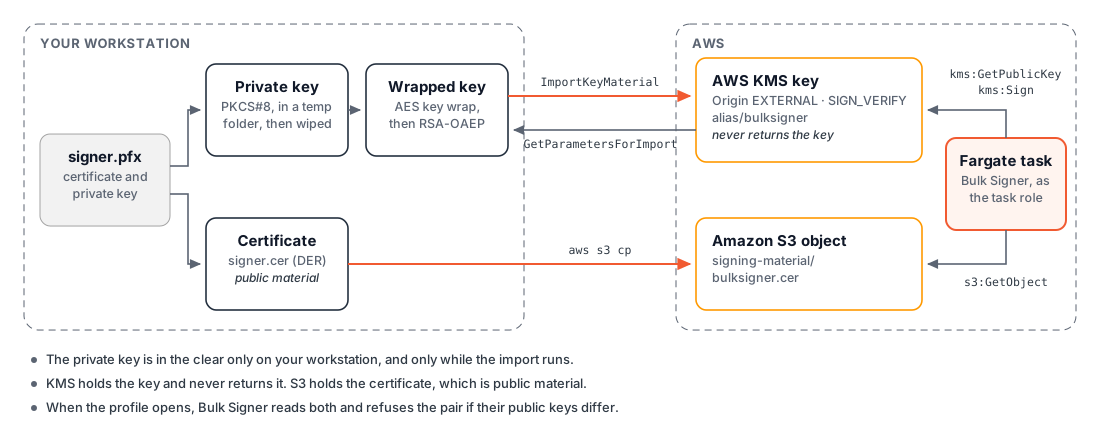
3.1 Import with the script
Import-PfxToKms.ps1 performs the complete import and
prompts for the PFX password:
pwsh ./Import-PfxToKms.ps1 -PfxPath ./signer.pfx -Region $REGION -Alias $NAME \
  -S3Bucket $BUCKET -S3Key signing-material/$NAME.cer \
  -SignerPrincipalArn arn:aws:iam::$ACCOUNT:role/$NAME-task
| Parameter | Value | Description |
|---|---|---|
-PfxPath | ./signer.pfx | The PFX file holding the key and the certificate. |
-Region | $REGION | The AWS Region in which the key is created. |
-Alias | $NAME | The KMS alias. Steps 9 and 11 reference it as alias/<name>. The script stops if the alias already exists. |
-S3Bucket | $BUCKET | The bucket that receives the certificate. |
-S3Key | signing-material/$NAME.cer | The object key of the certificate. |
-SignerPrincipalArn | The task role ARN | The principal exempted from the key policy's kms:Sign deny. The role is created in step 7; an ARN can be referenced before the role exists. |
Key policy. The key is created with the default KMS key policy plus an explicit deny of kms:Sign
to every other principal. An account administrator therefore cannot sign as the certificate holder
without first changing the key policy, and CloudTrail records that change.
3.2 Manual import
The following procedure is equivalent to the script and exposes each call. Run it in an empty directory, on a machine trusted to hold the PFX.
Import with the AWS CLI and OpenSSL
1. Extract the certificate and the private key. Each command prompts for the PFX password. A PFX
protected with legacy algorithms requires -legacy on both commands.
openssl pkcs12 -in signer.pfx -clcerts -nokeys | openssl x509 -outform DER -out signer.cer
openssl pkcs12 -in signer.pfx -nocerts -nodes | openssl pkcs8 -topk8 -nocrypt -outform DER -out private-key.der
openssl x509 -inform DER -in signer.cer -noout -text | grep 'Public-Key'       # 2048, 3072 or 4096
signer.cer is public material. private-key.der is the private key in plaintext and exists until
item 7.
2. Create a KMS key without key material. --origin EXTERNAL creates a key that awaits an import.
The key spec must match the size reported in item 1. The policy is the default KMS key policy plus the
deny that reserves kms:Sign for the task role:
cat > key-policy.json <<EOF
{
  "Version": "2012-10-17",
  "Statement": [
    { "Sid": "EnableIamUserPermissions", "Effect": "Allow",
      "Principal": { "AWS": "arn:aws:iam::$ACCOUNT:root" }, "Action": "kms:*", "Resource": "*" },
    { "Sid": "OnlyNamedPrincipalsMaySign", "Effect": "Deny",
      "Principal": "*", "Action": "kms:Sign", "Resource": "*",
      "Condition": { "StringNotEquals": { "aws:PrincipalArn": ["arn:aws:iam::$ACCOUNT:role/$NAME-task"] } } }
  ]
}
EOF
KEY_ID=$(aws kms create-key --region $REGION --origin EXTERNAL --key-spec RSA_2048 --key-usage SIGN_VERIFY \
  --description "Bulk Signer signing key" --policy file://key-policy.json --query KeyMetadata.KeyId --output text)
aws kms create-alias --region $REGION --alias-name alias/$NAME --target-key-id $KEY_ID
3. Obtain the import parameters. KMS returns a single-use RSA public key (the wrapping key) and an import token, both valid for 24 hours:
aws kms get-parameters-for-import --region $REGION --key-id $KEY_ID \
  --wrapping-algorithm RSA_AES_KEY_WRAP_SHA_256 --wrapping-key-spec RSA_4096 > import-params.json
jq -r .PublicKey   import-params.json | base64 -d > wrapping-public-key.der
jq -r .ImportToken import-params.json | base64 -d > import-token.bin
4. Wrap the private key. An RSA private key exceeds the size that can be encrypted directly under the
wrapping key, so KMS requires a hybrid algorithm, RSA_AES_KEY_WRAP_SHA_256. The private key is wrapped
under a random AES-256 key, the AES key is encrypted under the wrapping key, and the import file is the
concatenation of the two, with the encrypted AES key first.
openssl rand -out aes-key.bin 32
openssl enc -id-aes256-wrap-pad -K "$(xxd -p -c 64 aes-key.bin)" -iv A65959A6 \
  -in private-key.der -out key-material-wrapped.bin
openssl pkeyutl -encrypt -in aes-key.bin -out aes-key-wrapped.bin -inkey wrapping-public-key.der -keyform DER -pubin \
  -pkeyopt rsa_padding_mode:oaep -pkeyopt rsa_oaep_md:sha256 -pkeyopt rsa_mgf1_md:sha256
cat aes-key-wrapped.bin key-material-wrapped.bin > encrypted-key-material.bin
5. Import the key material.
aws kms import-key-material --region $REGION --key-id $KEY_ID \
  --encrypted-key-material fileb://encrypted-key-material.bin --import-token fileb://import-token.bin \
  --expiration-model KEY_MATERIAL_DOES_NOT_EXPIRE
6. Compare the key with the certificate. The two output lines must be identical. This is the comparison Bulk Signer performs when the profile is opened:
aws kms get-public-key --region $REGION --key-id $KEY_ID --query PublicKey --output text | base64 -d \
  | openssl rsa -pubin -inform DER -noout -modulus
openssl x509 -inform DER -in signer.cer -noout -modulus
7. Upload the certificate and remove the private key.
aws s3 cp signer.cer s3://$BUCKET/signing-material/$NAME.cer --region $REGION
rm -f private-key.der aes-key.bin key-material-wrapped.bin aes-key-wrapped.bin encrypted-key-material.bin import-token.bin
rm removes the directory entries only. The script overwrites each file with zeros before deleting it.
3.3 Verification
aws kms describe-key --region $REGION --key-id alias/$NAME \
  --query 'KeyMetadata.{State:KeyState,Usage:KeyUsage,Spec:KeySpec,Origin:Origin}'
aws s3 ls s3://$BUCKET/signing-material/
| Item | Expected value |
|---|---|
State | Enabled |
Usage | SIGN_VERIFY |
Spec | RSA_2048, RSA_3072 or RSA_4096, according to the key |
Origin | EXTERNAL |
| S3 listing | Contains $NAME.cer |
KMS never returns the private key, but the key existed outside an HSM before the import. Retain exactly one copy of the PFX in offline backup, which is the only means of importing the key again, and delete all other copies. For an ICP-Brasil A3 certificate, whose key is required to remain in certified hardware, resolve the compliance question before proceeding.
Key generated in KMS. A key created inside KMS instead requires a CSR signed by KMS and a certificate issued for it. That procedure is documented in Certificates.
4. The image
Copy the tag Lacuna specified for installation into an ECR repository in the account:
aws ecr create-repository --repository-name bulksigner --region $REGION \
  --image-tag-mutability IMMUTABLE --image-scanning-configuration scanOnPush=true
IMAGE=$ACCOUNT.dkr.ecr.$REGION.amazonaws.com/bulksigner:<version>

docker login <lacuna-registry> --username <registry-username>     # prompts for the token
docker pull --platform linux/amd64 <lacuna-registry>/bulksigner:<version>
docker tag <lacuna-registry>/bulksigner:<version> $IMAGE

aws ecr get-login-password --region $REGION \
  | docker login --username AWS --password-stdin $ACCOUNT.dkr.ecr.$REGION.amazonaws.com
docker push $IMAGE
Copy an explicit version, not latest. The requirements of this step, and the workaround for the
docker login failure The stub received bad data on Docker Desktop for Windows, are specified in
step 3 of Amazon ECS Fargate.
5. Security groups
Create three security groups, each admitting inbound traffic from the preceding one only:
| Group | Inbound rule | Source |
|---|---|---|
$NAME-alb | TCP 443 and TCP 80 | 0.0.0.0/0 |
$NAME-task | TCP 8080 | $NAME-alb |
$NAME-db | TCP 1433 | $NAME-task |
SG_ALB=$(aws ec2 create-security-group --region $REGION --vpc-id $VPC --group-name $NAME-alb \
  --description "Public HTTPS into the load balancer" --query GroupId --output text)
SG_TASK=$(aws ec2 create-security-group --region $REGION --vpc-id $VPC --group-name $NAME-task \
  --description "Bulk Signer, reachable only from the load balancer" --query GroupId --output text)
SG_DB=$(aws ec2 create-security-group --region $REGION --vpc-id $VPC --group-name $NAME-db \
  --description "RDS, reachable only from Bulk Signer" --query GroupId --output text)

aws ec2 authorize-security-group-ingress --region $REGION --group-id $SG_ALB --ip-permissions \
  'IpProtocol=tcp,FromPort=443,ToPort=443,IpRanges=[{CidrIp=0.0.0.0/0}]' \
  'IpProtocol=tcp,FromPort=80,ToPort=80,IpRanges=[{CidrIp=0.0.0.0/0}]'
aws ec2 authorize-security-group-ingress --region $REGION --group-id $SG_TASK \
  --ip-permissions "IpProtocol=tcp,FromPort=8080,ToPort=8080,UserIdGroupPairs=[{GroupId=$SG_ALB}]"
aws ec2 authorize-security-group-ingress --region $REGION --group-id $SG_DB \
  --ip-permissions "IpProtocol=tcp,FromPort=1433,ToPort=1433,UserIdGroupPairs=[{GroupId=$SG_TASK}]"
The webhook is a call from Signer to the load balancer. If the $NAME-alb group is restricted to
specific source addresses, the addresses from which the Signer instance calls must also be admitted;
obtain them from the operator of the instance. If Signer cannot be admitted, omit the webhook. The sweep
alone signs every document, with the delay specified in
Function of Signer:WebhookSecret in performance.
6. The database
6.1 Instance
aws rds describe-db-engine-versions --region $REGION --engine sqlserver-ex \
  --query "DBEngineVersions[?starts_with(EngineVersion,'16.')].EngineVersion" --output text

aws rds create-db-instance --region $REGION --db-instance-identifier $NAME \
  --engine sqlserver-ex --engine-version <a 16.00 version> --license-model license-included \
  --db-instance-class db.t3.small --storage-type gp3 --allocated-storage 20 \
  --master-username bsadmin --manage-master-user-password \
  --vpc-security-group-ids $SG_DB --no-publicly-accessible \
  --backup-retention-period 7 --storage-encrypted
aws rds wait db-instance-available --region $REGION --db-instance-identifier $NAME
DB_HOST=$(aws rds describe-db-instances --region $REGION --db-instance-identifier $NAME \
  --query 'DBInstances[0].Endpoint.Address' --output text)
Engine versions 16.00 are SQL Server 2022. Express edition is sufficient for a homologation environment;
production environments require sqlserver-web or sqlserver-se.
6.2 Application login secret
Generate the application login's password directly into a secret that also holds the complete connection string:
APP_PW=$(aws secretsmanager get-random-password --region $REGION --password-length 40 \
  --exclude-punctuation --require-each-included-type --query RandomPassword --output text)
CS="Server=tcp:$DB_HOST,1433;Initial Catalog=BulkSigner;User ID=bulksigner;Password=$APP_PW;Encrypt=True;TrustServerCertificate=True;"
aws secretsmanager create-secret --region $REGION --name $NAME/sql-app \
  --secret-string "$(jq -n --arg p "$APP_PW" --arg c "$CS" '{username:"bulksigner",password:$p,connectionString:$c}')"
unset APP_PW CS
6.3 Database creation
Bulk Signer creates its tables but never its database, and the instance is private. Run the setup as a
one-off Fargate task in the same VPC, using sqlcmd from the mcr.microsoft.com/mssql-tools image, with
the following script:
#!/bin/sh
set -e
SQL=/opt/mssql-tools/bin/sqlcmd
run() { "$SQL" -S "tcp:$DB_HOST,1433" -U "$MASTER_USER" -P "$MASTER_PASSWORD" -N -C -b "$@"; }
run -d master -Q "IF DB_ID('BulkSigner') IS NULL CREATE DATABASE [BulkSigner];"
run -d master -Q "ALTER DATABASE [BulkSigner] SET READ_COMMITTED_SNAPSHOT ON WITH ROLLBACK IMMEDIATE;"
run -d master -Q "IF SUSER_ID('bulksigner') IS NULL CREATE LOGIN [bulksigner] WITH PASSWORD = '$APP_PASSWORD', CHECK_POLICY = ON;"
run -d BulkSigner -Q "IF USER_ID('bulksigner') IS NULL CREATE USER [bulksigner] FOR LOGIN [bulksigner]; ALTER ROLE db_datareader ADD MEMBER [bulksigner]; ALTER ROLE db_datawriter ADD MEMBER [bulksigner]; ALTER ROLE db_ddladmin ADD MEMBER [bulksigner];"
The definition of the setup task, the structure of the $NAME/sql-app secret, the
TrustServerCertificate=True limitation and the conditions confirmed by exit code 0 are specified in
step 5 of Amazon ECS Fargate.
7. Secrets and roles
7.1 Secrets
| Secret | Content | Created | Injected as |
|---|---|---|---|
$NAME/sql-app | JSON with username, password and connectionString | Step 6.2 | ConnectionStrings__Default (key connectionString) |
$NAME/auth-api-key | A random 48-character key: the REST API's X-API-Key and the dashboard's sign-in key | Below, generated | Auth__ApiKey |
$NAME/pki-sdk-license | The PKI SDK licence | Manually | Signing__PkiSdkLicense |
$NAME/signer-api-key | The Lacuna Signer API key from step 1.2, in the format <application>|<secret> | Manually | Signer__ApiKey |
$NAME/signer-webhook-secret | The token Signer presents on a notification | Below, generated | Signer__WebhookSecret |
The last two secrets are specific to the Lacuna Signer integration.
Generate the two random values directly into Secrets Manager, so that they are neither displayed nor recorded in shell history:
aws secretsmanager create-secret --region $REGION --name $NAME/auth-api-key --secret-string \
  "$(aws secretsmanager get-random-password --region $REGION --password-length 48 --exclude-punctuation --query RandomPassword --output text)"
aws secretsmanager create-secret --region $REGION --name $NAME/signer-webhook-secret --secret-string \
  "$(aws secretsmanager get-random-password --region $REGION --password-length 48 --exclude-punctuation --require-each-included-type --query RandomPassword --output text)"
| Requirement on the webhook secret | Reason |
|---|---|
| At least 32 characters | A shorter value is refused at boot. |
| No leading or trailing whitespace | Refused at boot. |
| No punctuation | Not required by Bulk Signer. It prevents transcription errors in Signer's token field. |
Enter the two values issued externally (the PKI SDK licence and the Signer API key) manually, either in the console (Other type of secret → Plaintext, containing the bare value only) or from a prompt that does not echo input. Store the Signer API key exactly as Signer displayed it, including any spaces in the application part.
7.2 Roles
Both roles use the following trust policy, which restricts ecs-tasks.amazonaws.com to the account:
{
  "Version": "2012-10-17",
  "Statement": [{
    "Effect": "Allow",
    "Principal": { "Service": "ecs-tasks.amazonaws.com" },
    "Action": "sts:AssumeRole",
    "Condition": {
      "StringEquals": { "aws:SourceAccount": "<account>" },
      "ArnLike": { "aws:SourceArn": "arn:aws:ecs:<region>:<account>:*" }
    }
  }]
}
| Role | Permissions |
|---|---|
$NAME-exec | The AWS managed policy AmazonECSTaskExecutionRolePolicy, plus secretsmanager:GetSecretValue on secret:$NAME/* and on the RDS-managed master secret (the latter for the setup task only). This role reads the Signer API key and the webhook secret into the container. |
$NAME-task | The inline policy below. |
{
  "Version": "2012-10-17",
  "Statement": [
    { "Effect": "Allow", "Action": ["kms:DescribeKey", "kms:GetPublicKey", "kms:Sign"],
      "Resource": "arn:aws:kms:<region>:<account>:key/<key id>" },
    { "Effect": "Allow", "Action": "s3:ListBucket", "Resource": "arn:aws:s3:::<bucket>" },
    { "Effect": "Allow", "Action": ["s3:GetObject", "s3:PutObject", "s3:DeleteObject", "s3:AbortMultipartUpload"],
      "Resource": "arn:aws:s3:::<bucket>/*" }
  ]
}
The Lacuna Signer integration requires no additional IAM permission. Signer is reached over the
internet with the API key, and the signature uses the same kms:Sign action as a file signature.
8. HTTPS
8.1 Certificate
CERT=$(aws acm request-certificate --region $REGION --domain-name $HOST --validation-method DNS \
  --query CertificateArn --output text)
aws acm describe-certificate --region $REGION --certificate-arn $CERT \
  --query 'Certificate.DomainValidationOptions[0].ResourceRecord'
Create the returned CNAME record in the authoritative zone and wait for validation:
aws acm wait certificate-validated --region $REGION --certificate-arn $CERT
8.2 Load balancer, target group and listeners
LB=$(aws elbv2 create-load-balancer --region $REGION --name $NAME --type application --scheme internet-facing \
  --subnets ${SUBNETS//,/ } --security-groups $SG_ALB --query 'LoadBalancers[0].LoadBalancerArn' --output text)
aws elbv2 modify-load-balancer-attributes --region $REGION --load-balancer-arn $LB \
  --attributes Key=idle_timeout.timeout_seconds,Value=300 Key=routing.http.drop_invalid_header_fields.enabled,Value=true
TG=$(aws elbv2 create-target-group --region $REGION --name $NAME --protocol HTTP --port 8080 --vpc-id $VPC \
  --target-type ip --health-check-path /api/ready --health-check-interval-seconds 30 \
  --healthy-threshold-count 2 --unhealthy-threshold-count 3 --matcher HttpCode=200 \
  --query 'TargetGroups[0].TargetGroupArn' --output text)
aws elbv2 modify-target-group-attributes --region $REGION --target-group-arn $TG \
  --attributes Key=deregistration_delay.timeout_seconds,Value=30
aws elbv2 create-listener --region $REGION --load-balancer-arn $LB --protocol HTTPS --port 443 \
  --certificates CertificateArn=$CERT --ssl-policy ELBSecurityPolicy-TLS13-1-2-2021-06 \
  --default-actions Type=forward,TargetGroupArn=$TG
aws elbv2 create-listener --region $REGION --load-balancer-arn $LB --protocol HTTP --port 80 \
  --default-actions 'Type=redirect,RedirectConfig={Protocol=HTTPS,Port=443,StatusCode=HTTP_301}'
The purpose of each setting is specified in step 7 of Amazon ECS Fargate.
8.3 DNS
Point the hostname at the load balancer's DNS name, with a CNAME record or, if the zone is hosted in Route 53, an alias record. Signer calls this hostname and validates its certificate; the ACM certificate satisfies that requirement.
9. The service
9.1 Log group and cluster
aws logs create-log-group --region $REGION --log-group-name /ecs/$NAME
aws logs put-retention-policy --region $REGION --log-group-name /ecs/$NAME --retention-in-days 30
aws ecs create-cluster --region $REGION --cluster-name $NAME --capacity-providers FARGATE
9.2 Task definition
| Parameter | Value |
|---|---|
cpu | 1024 |
memory | 2048 |
networkMode | awsvpc |
runtimePlatform.cpuArchitecture | X86_64 |
executionRoleArn | $NAME-exec |
taskRoleArn | $NAME-task |
| Container name | bulksigner |
| Container image | $IMAGE (step 4) |
| Container port | 8080 |
stopTimeout | 60 |
| Log driver | awslogs, group /ecs/$NAME |
The container definition carries the following environment and secrets:
"environment": [
  { "name": "ASPNETCORE_ENVIRONMENT", "value": "Production" },
  { "name": "Database__Provider", "value": "SqlServer" },
  { "name": "Auth__SessionKeyRing__Placement", "value": "OperationalStore" },
  { "name": "Hosting__ForwardedHeaders__Enabled", "value": "true" },
  { "name": "Hosting__ForwardedHeaders__KnownNetworks__0", "value": "<the VPC CIDR>" },
  { "name": "Storage__Provider", "value": "S3" },
  { "name": "Storage__S3__BucketName", "value": "<bucket>" },
  { "name": "Storage__S3__Prefix", "value": "work" },
  { "name": "Storage__S3__Region", "value": "<region>" },
  { "name": "Storage__S3__Credential", "value": "InstanceRole" },
  { "name": "Storage__Inputs__0__Name", "value": "default" },
  { "name": "Storage__Inputs__0__Path", "value": "inputs/default" },
  { "name": "Storage__Inputs__0__PollIntervalSeconds", "value": "30" },
  { "name": "Signing__Certificate__Source", "value": "AwsKms" },
  { "name": "Signing__Certificate__AwsKms__Region", "value": "<region>" },
  { "name": "Signing__Certificate__AwsKms__KeyId", "value": "alias/<name>" },
  { "name": "Signing__Certificate__AwsKms__Credential", "value": "InstanceRole" },
  { "name": "Signing__Certificate__AwsKms__S3__Bucket", "value": "<bucket>" },
  { "name": "Signing__Certificate__AwsKms__S3__Key", "value": "signing-material/<name>.cer" },
  { "name": "Signing__Certificate__AwsKms__S3__Region", "value": "<region>" },
  { "name": "Signing__Certificate__AwsKms__S3__Credential", "value": "InstanceRole" },
  { "name": "Signer__Endpoint", "value": "https://<Lacuna Signer address>" },
  { "name": "Signer__FolderSweepIntervalSeconds", "value": "300" }
],
"secrets": [
  { "name": "ConnectionStrings__Default", "valueFrom": "<$NAME/sql-app ARN>:connectionString::" },
  { "name": "Auth__ApiKey",               "valueFrom": "<$NAME/auth-api-key ARN>" },
  { "name": "Signing__PkiSdkLicense",     "valueFrom": "<$NAME/pki-sdk-license ARN>" },
  { "name": "Signer__ApiKey",             "valueFrom": "<$NAME/signer-api-key ARN>" },
  { "name": "Signer__WebhookSecret",      "valueFrom": "<$NAME/signer-webhook-secret ARN>" }
]
9.3 Bulk Signer configuration
A __ in an environment variable name corresponds to : in the configuration key.
Lacuna Signer connection. One host connects to one Signer organization, and every profile that uses
the SignerFolder method uses these settings
(Configuration).
| Environment variable | Value in this deployment | Required | Description |
|---|---|---|---|
Signer__Endpoint | The address from step 1.1 | Yes | The address of the Signer API. |
Signer__ApiKey | Secret $NAME/signer-api-key | Yes | Sent as X-Api-Key on every call to Signer: the sweep, the read-back of each document, and the start and completion of each signature. It also determines the organization whose folders the profile form lists. |
Signer__WebhookSecret | Secret $NAME/signer-webhook-secret | No | Enables POST /api/signer/notifications and is the Bearer token Signer must present on it. Without it, the route returns 404 and documents are detected by the sweep only (see Function of Signer:WebhookSecret in performance). |
Signer__FolderSweepIntervalSeconds | 300 (the default) | No | The interval between listings of every bound folder, from 60 to 86400 seconds. |
The following rules apply to the Signer keys:
- Joint requirement. Setting any key under
Signer:, including the webhook secret alone, makesSigner:EndpointandSigner:ApiKeymandatory at boot. - Keys not used by this method.
Signer:PollIntervalSeconds,Signer:TimeoutHoursandSigner:MaxConsecutiveApiFailuresapply to theLacunaSignermethod only.
Other settings. The remaining keys are those of the base deployment and are specified in the Configuration reference of Amazon ECS Fargate. The following points are specific to this deployment:
| Setting | Relevance to the Lacuna Signer integration |
|---|---|
Signing:Certificate:* | The seed (initial load) of the default signing profile, applied on the first boot against an empty database only. The default profile cannot use the SignerFolder method; the profile created in step 11 references the same key and the same .cer. Every credential is InstanceRole, so no profile stores a secret. |
Hosting:ForwardedHeaders:* | With forwarded headers applied, the task observes Signer's address instead of the load balancer's. The rate limit of the notification route (RateLimiting:SignerNotification, 600 calls per minute) is counted per caller address; without forwarded headers, all callers share one budget (Configuration). |
Storage:Inputs:0:* | The watched folder for files. These three keys can be omitted in a deployment that signs Signer documents only. |
ASPNETCORE_ENVIRONMENT, Signing:TrustLacunaTestRoot | For a homologation environment that signs with Lacuna's test certificates, set Staging and add Signing__TrustLacunaTestRoot=true (Configuration). |
9.4 Service
aws ecs create-service --region $REGION --cluster $NAME --service-name bulksigner --task-definition $NAME \
  --desired-count 1 --launch-type FARGATE \
  --deployment-configuration 'minimumHealthyPercent=0,maximumPercent=100,deploymentCircuitBreaker={enable=true,rollback=false}' \
  --network-configuration "awsvpcConfiguration={subnets=[$SUBNETS],securityGroups=[$SG_TASK],assignPublicIp=ENABLED}" \
  --load-balancers targetGroupArn=$TG,containerName=bulksigner,containerPort=8080 \
  --health-check-grace-period-seconds 300
| Parameter | Value | Requirement |
|---|---|---|
minimumHealthyPercent, maximumPercent | 0, 100 | Every deployment stops the running task before starting the new one. |
--desired-count | 1 | Must not be increased. Auto scaling must not be attached. |
deploymentCircuitBreaker | enable=true, rollback=false | A failed deployment stops instead of rolling back, which would start a second task. |
10. Verification
curl -s https://$HOST/api/ready
KEY=$(aws secretsmanager get-secret-value --region $REGION --secret-id $NAME/auth-api-key --query SecretString --output text)
curl -s -H "X-API-Key: $KEY" https://$HOST/api/ready/details | jq '.checks[] | {name, ok, detail}'
In addition to the checks specified in step 9 of Amazon ECS Fargate (database,
storage-bucket:…, work-share-owner, pki-license), /api/ready/details reports two checks for the
Lacuna Signer integration:
| Check | Expected result at this point |
|---|---|
signer-notifications | accepted; none has arrived at this instance since it started |
signer-folder-sweep | ok: true. After the first pass: the last pass at this instance finished without a failure at … |
If signer-notifications reports not accepted (Signer:WebhookSecret is not set), the secret did not
reach the task. Check the task definition revision the service is running.
The notification route can be tested without a credential:
curl -s -o /dev/null -w '%{http_code}\n' -X POST https://$HOST/api/signer/notifications
| Response | Meaning |
|---|---|
401 (signer-notification.unauthorized) | Expected. The route is enabled and requires the Bearer token. |
404 (signer-notification.not-configured) | No webhook secret is set. |
11. The signing profile
The default profile receives uploads that name no profile and watched folders that are bound to no
profile, and the SignerFolder method accepts no files. The Signer folder therefore requires a
dedicated profile.
11.1 Creation
Open the dashboard at https://<host>/, sign in with the key stored in $NAME/auth-api-key, and open
Signing profiles → New profile (/profiles/_new).
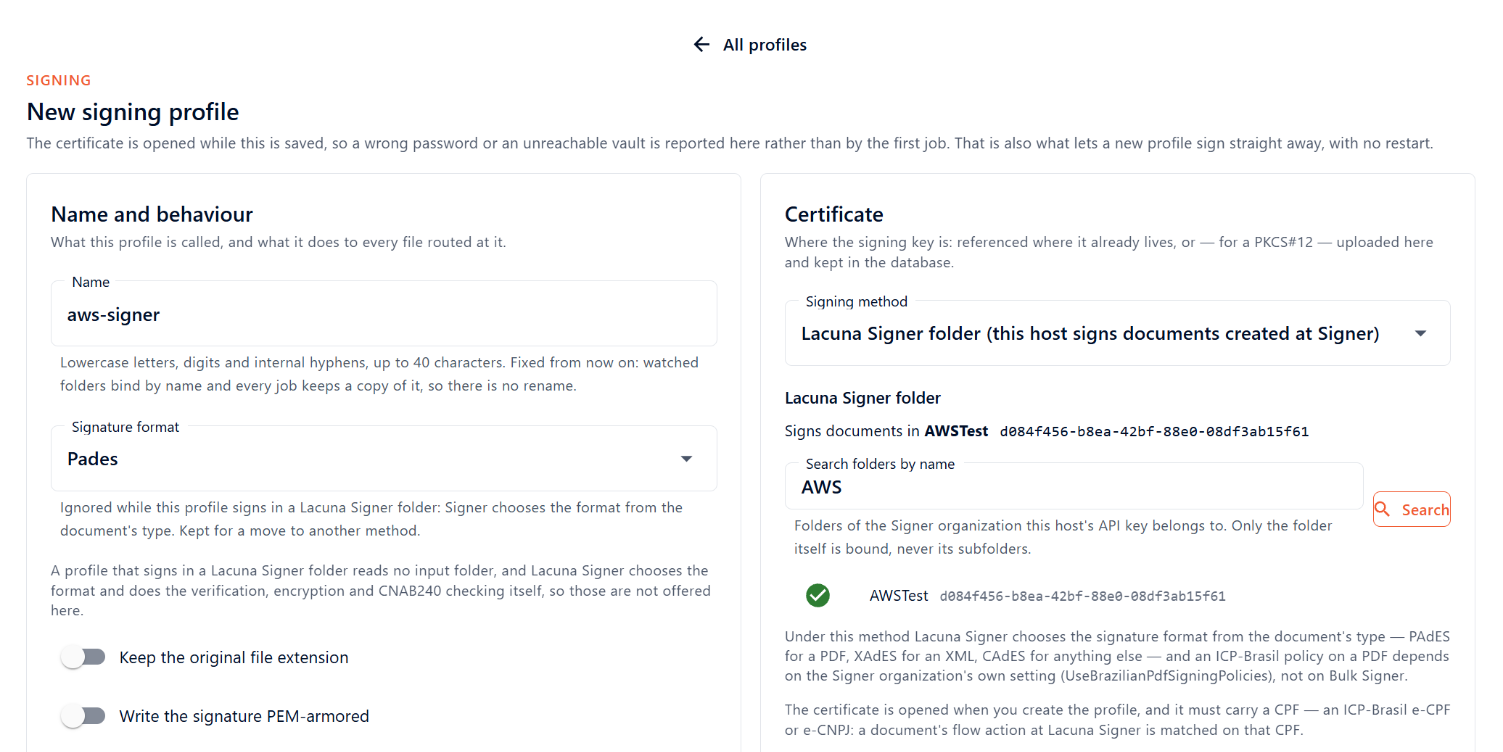
| Field | Value |
|---|---|
| Name | aws-signer (the value of $PROFILE). The name cannot be changed after creation. |
| Signing method | Lacuna Signer folder (this host signs documents created at Signer) |
| Lacuna Signer folder | The folder from step 1.3, located with the name search. The selector lists the folders of the organization to which the API key belongs and stores the folder's ID. |
| Signature format | Ignored by this method. Signer selects the format. |
| Certificate source | AwsKms |
| Where is the file? | In an Amazon S3 object |
| AWS region, KMS key, AWS credential mode | $REGION, alias/$NAME, InstanceRole |
| S3 bucket, S3 object key, S3 region, S3 credential mode | $BUCKET, signing-material/$NAME.cer, $REGION, InstanceRole |
When the method is selected, the form hides the settings Signer determines (the input folder, verification, encryption and the CNAB240 check) and saves them as disabled.
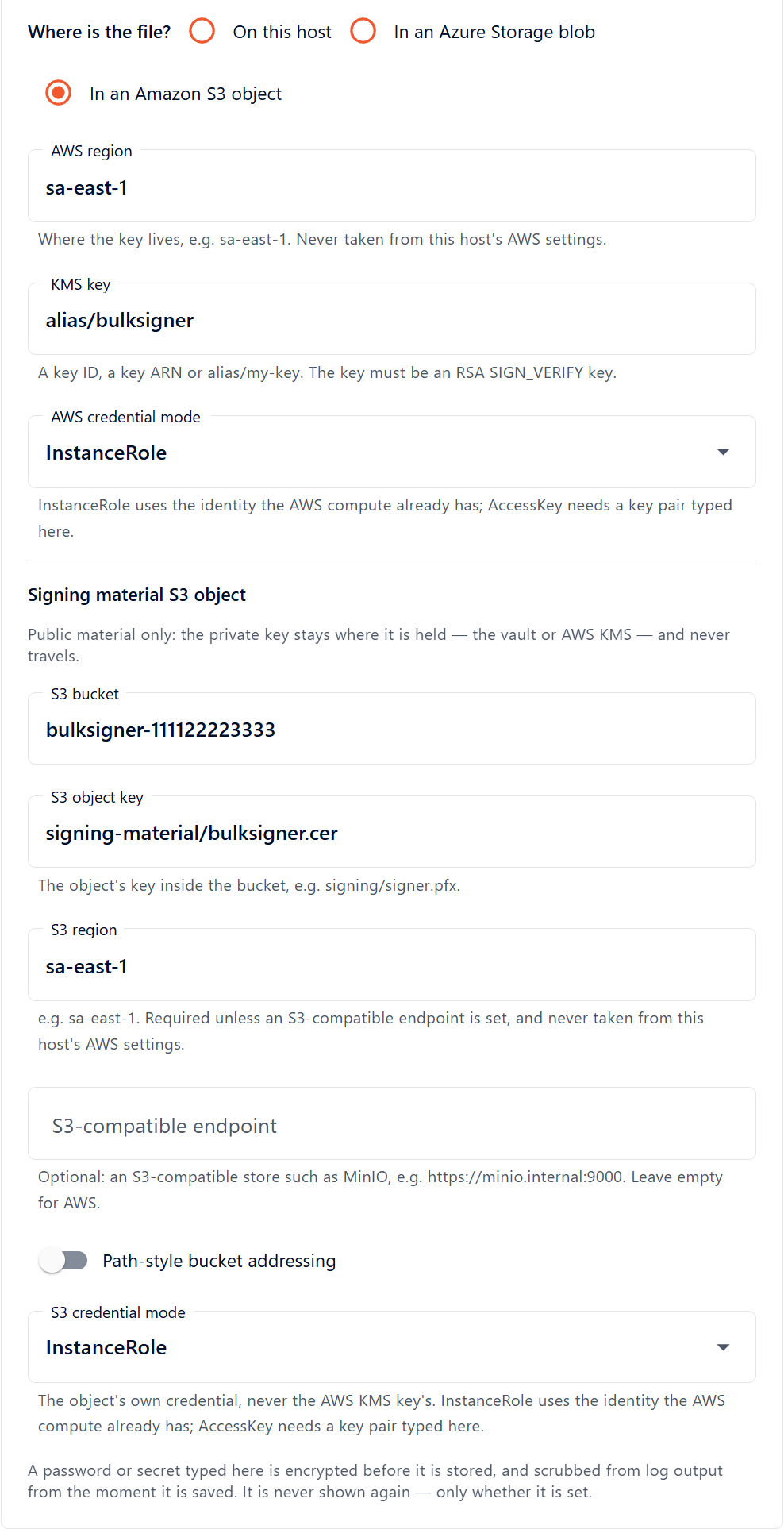
Select Create profile. The certificate is opened during the save: the task reads the .cer from
S3, requests the public key from KMS and compares the two. The save is refused, and no profile is created,
in the following cases:
| Condition | Cause |
|---|---|
| KMS key not accessible | An incorrect alias, or a task role without kms:GetPublicKey on the key. |
| Certificate without a CPF | The certificate is not an e-CPF or e-CNPJ. |
| Folder already bound | Another profile signs in the selected folder. |
A saved profile takes effect immediately. No restart is required.
11.2 Verification
curl -s -H "X-API-Key: $KEY" https://$HOST/api/profiles/$PROFILE | jq
The response must report the SignerFolder method and degraded = false. On the Signing profiles
page, the profile's state is ready.
11.3 Separate certificate for the profile
To use a certificate other than that of the default profile, repeat step 3 with a different alias and a
different object key. Add the new key's ARN to the kms: statement of the task role before creating
the profile; otherwise the save is refused at kms:GetPublicKey.
12. The webhook in Lacuna Signer
12.1 Registration
Copy the secret to the clipboard, so that it is not displayed. The clipboard command is clip on
Windows, pbcopy on macOS and xclip -selection clipboard on Linux:
aws secretsmanager get-secret-value --region $REGION --secret-id $NAME/signer-webhook-secret \
  --query SecretString --output text | tr -d '\r\n' | clip
In Lacuna Signer, signed in as an administrator of the organization:
- Open Organizations and select the organization.
- In the Integration section, below the Webhooks card, select the + button. A new Webhook N panel opens. An organization can have several webhooks; an existing webhook of another system is not affected.
- Fill in the fields as specified below.
- Select Save, which remains disabled until the token is entered.
- Clear the clipboard.
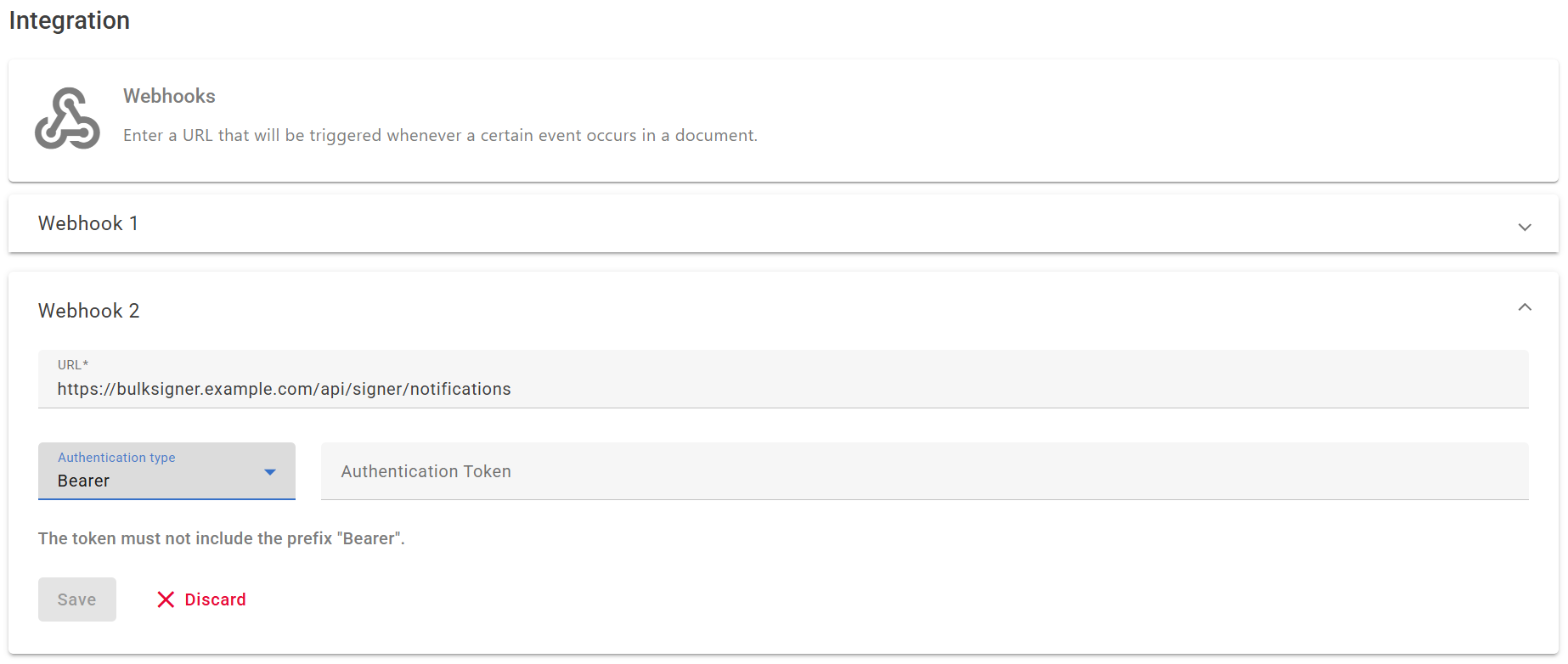
| Field | Value | Requirement |
|---|---|---|
| URL | https://<host>/api/signer/notifications | The public hostname from step 8, not the load balancer's AWS DNS name. The scheme must be https: the port-80 listener responds with a redirect, and HTTP clients commonly resend a redirected POST as a GET, which delivers no notification. |
| Authentication type | Bearer | X-Api-Key must not be used. That header is Bulk Signer's own REST credential, and a notification that presents it is refused. |
| Authentication Token | The value of $NAME/signer-webhook-secret | Without the word Bearer. Signer adds the prefix. |
The content Signer sends, and its authentication and retry behaviour, are specified in Webhooks.
12.2 Correspondence between Lacuna Signer and Bulk Signer
The complete configuration on the Signer side (steps 1 and 12):
| Item in Lacuna Signer | Location | Corresponding item in Bulk Signer |
|---|---|---|
| The application and its API key | The instance's Applications | Signer:ApiKey |
| The folder | Folders, in the organization | The profile's Lacuna Signer folder |
| The webhook URL | Organizations → Integration | The public hostname, followed by /api/signer/notifications |
| The webhook token, of type Bearer | Organizations → Integration | Signer:WebhookSecret |
UseBrazilianPdfSigningPolicies | The instance's settings | None. The setting alone determines the policy of PDF signatures. |
12.3 Delivery behaviour
| Behaviour | Specification |
|---|---|
| Event selection | Not available. Signer delivers every event of the organization to every webhook of the organization. |
| Events processed by Bulk Signer | DocumentsCreated, DocumentSigned and DocumentApproved. Every other event is answered 204, so that Signer does not retry it. |
| Retries | Signer retries a delivery that does not receive a 2xx response, up to ten times over several hours (Retries). |
| Effect of an incorrect token | Each delivery is answered 401, and the unauthorized outcome of bulksigner_signer_notifications_total increases. |
13. Signing test
13.1 Document creation
In Lacuna Signer:
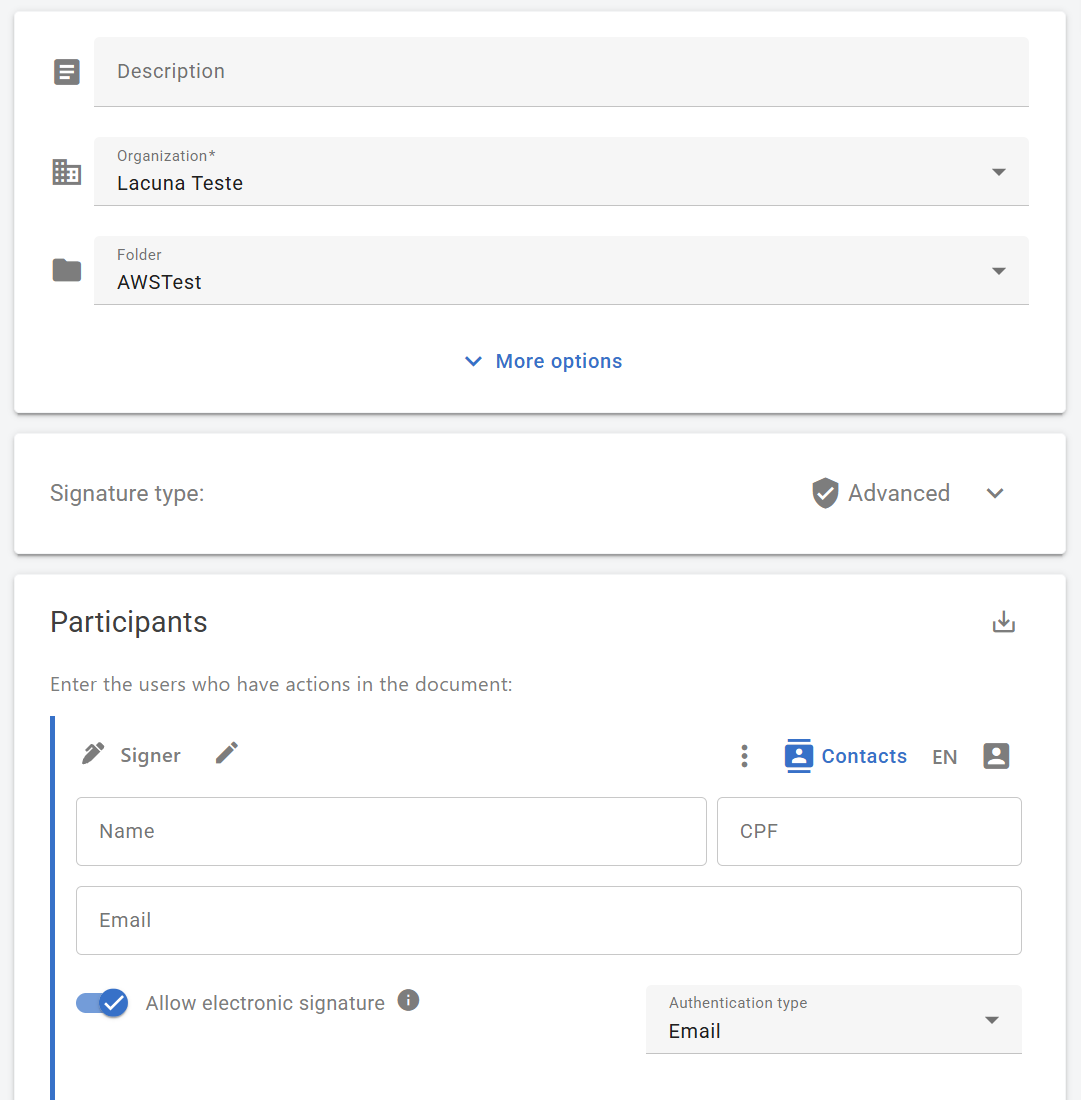
- Select New document, upload a PDF, and select the organization and the bound folder.
- Add the certificate holder as a participant of type Signer, with the name, the CPF contained in the certificate and the e-mail address. The holder can be the only participant or follow other participants; the task acts only when the pending action is the holder's.
- Select Send.
13.2 Expected result
Within seconds, the dashboard's Jobs page lists a job with the document's name, marked Lacuna
Signer, under the aws-signer profile:
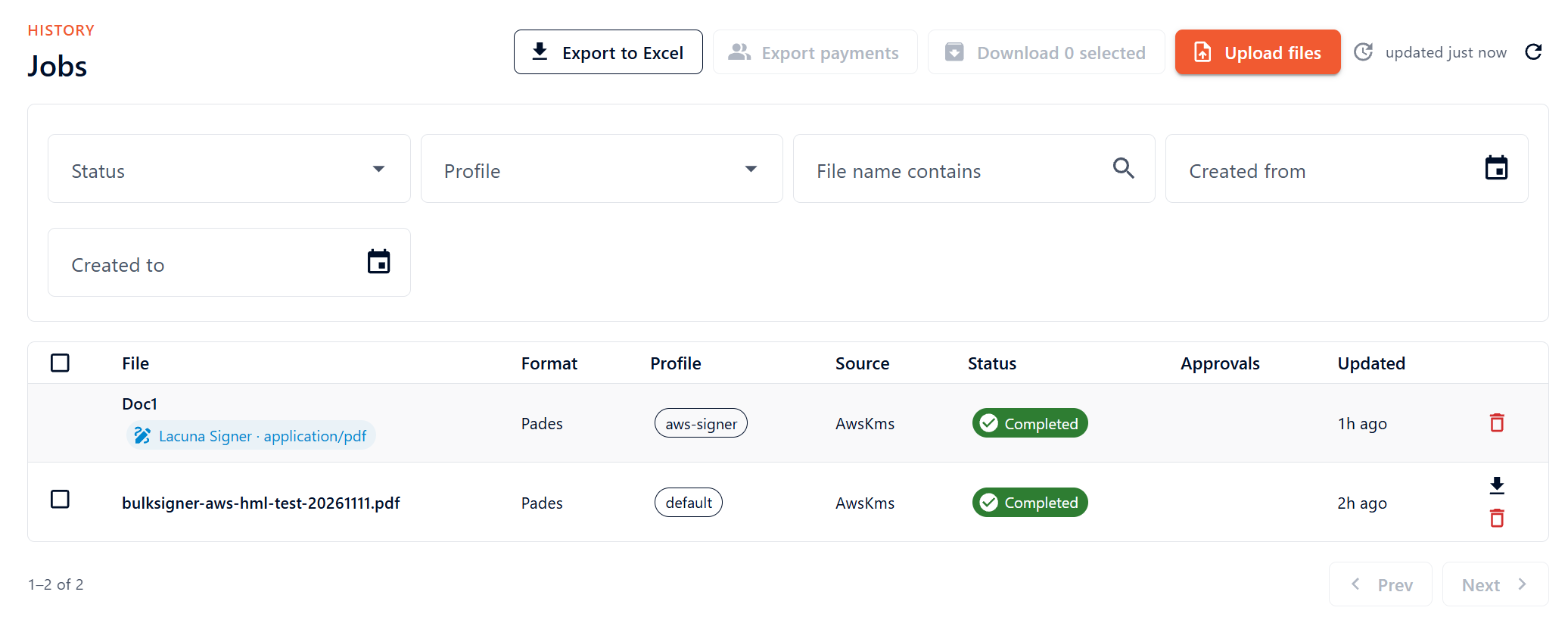
The job passes through the following states:
| State | Meaning |
|---|---|
| Queued | The document was detected and the job was created. |
| Processing | The task read the document back, started the signature and signed the hash in KMS. |
| Verifying | The signature was handed to Signer, which validates it and builds it into the document. |
| Completed | Signer accepted the signature. |
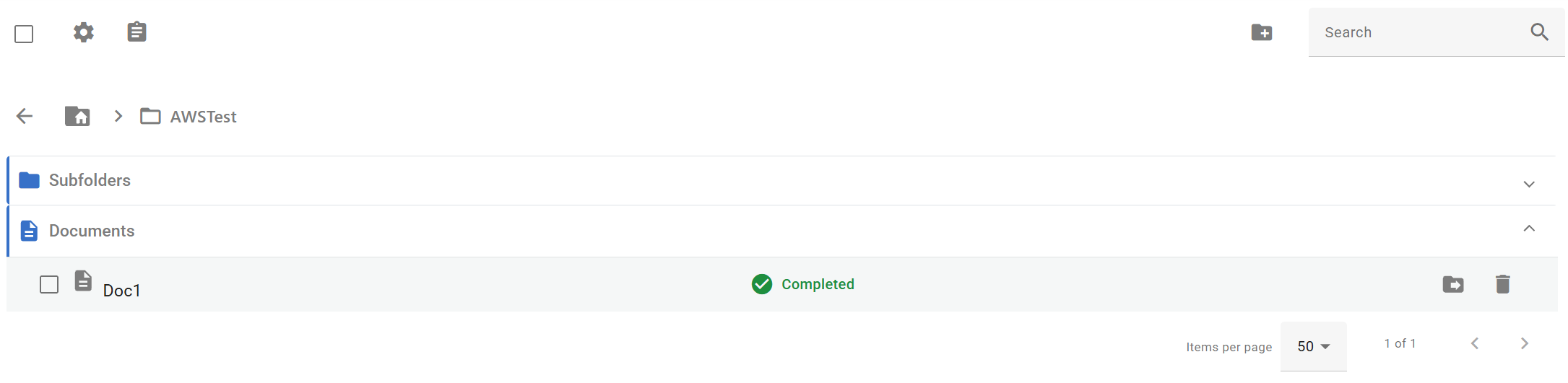
In Lacuna Signer, the holder's action is concluded and the document contains the signature. If the holder was the last participant, the document's status in the folder is Completed:
The CloudTrail event history shows the task role's Sign call on the key within a few minutes.
13.3 Verification from the command line
curl -s -H "X-API-Key: $KEY" "https://$HOST/api/jobs?profile=$PROFILE" | jq
curl -s -H "X-API-Key: $KEY" https://$HOST/api/ready/details | jq -r '.checks[] | select(.name=="signer-notifications") | .detail'
curl -s -H "X-API-Key: $KEY" https://$HOST/api/metrics \
  | grep -E 'bulksigner_signer_(notifications_total|folder_signatures_total|folder_jobs_enqueued_total)'
| Evidence | Expected value |
|---|---|
signer-notifications check | accepted; the last arrived at this instance at <time> |
bulksigner_signer_folder_signatures_total{outcome="signed"} | Incremented once per signature accepted by Signer. |
bulksigner_signer_notifications_total | Counts deliveries, by outcome. |
A document that is signed only minutes after its creation was detected by the sweep, which indicates that
the notification did not arrive. In that case, the signer-notifications check still reports that none
has arrived, or the unauthorized outcome is increasing. See Symptoms.
Operations
The operations of the base deployment are specified in step 11 of Amazon ECS Fargate. The following operations are specific to the Lacuna Signer integration:
| Operation | Procedure | Notes |
|---|---|---|
| Deployment (upgrade or secret rotation) | Pause the pipeline (POST /api/pipeline/pause), wait until no job is Processing or Verifying, update the service, and resume (POST /api/pipeline/resume). | A task stopped during a signature requires the next boot to ask Signer how the job ended, and some of those jobs end Failed with signer-folder.interrupted (Lacuna Signer integration). The sweep runs while the pipeline is paused: new documents become jobs and wait in the queue. |
| Webhook secret rotation | Store a new random value in $NAME/signer-webhook-secret, force a new deployment, then enter the new value in the webhook in Signer. | The same value exists on both sides. Between the two changes, notifications are answered 401; Signer retries them and the sweep detects the remaining documents. No document is lost. |
| Signer API key rotation | Create the new key in Signer, store it in $NAME/signer-api-key, force a new deployment, and only then revoke the previous key. | With a revoked key, every sweep fails, and the signer-folder-sweep check fails after three consecutive failed passes. The check does not affect /api/ready, so the load balancer keeps the task. |
| Certificate renewal | Import the new PFX with a new alias (step 3), add the key to the task role, set the new key and .cer on the profile's page (Edit certificate), and restart. | If the new certificate contains a different CPF, documents pending in Signer for the previous CPF have no action for the new holder. Each is recorded once as Failed with signer-folder.no-holder-action. Notify the users who create documents before the change. |
| Folder change | Save the new folder on the profile's Certificate panel. | Takes effect without a restart. Documents remaining in the previous folder are no longer signed by the profile. |
| Deactivation | Remove the webhook in Signer, then disable the profile on its page or change its method. | Removing the Signer__* variables while a profile still uses the method does not prevent the boot. The profile becomes degraded, and its reason names the two missing keys. |
Interface contracts
Notification endpoint
POST /api/signer/notifications is called by Lacuna Signer and authenticated with
Authorization: Bearer <Signer:WebhookSecret>. The complete contract is specified in
REST API.
| Response | Code | Condition |
|---|---|---|
202 | — | A document in a bound folder was queued for a check, or was already queued. |
204 | — | Any other authenticated delivery: an event that cannot make a document await a signature, a folder that is not bound, the folder of a disabled profile, or a body that cannot be read. |
401 | signer-notification.unauthorized | The Bearer token is absent or incorrect, or another scheme was used. |
404 | signer-notification.not-configured | Signer:WebhookSecret is not set. |
429 | — | The rate limit of the route (RateLimiting:SignerNotification) was exceeded. Signer retries the delivery. |
503 | signer-notification.unavailable | The operational store is unusable on the instance, or too many checks are queued. Signer retries the delivery. |
Queued checks are held in memory. A restart discards those not yet performed, and the next sweep detects the corresponding documents.
Other endpoints used on this page
Authenticated requests send X-API-Key: <Auth:ApiKey>.
| Method | Route | Authentication | Used by |
|---|---|---|---|
GET | /api/ready, /api/ready/details | Anonymous; API key for the details | Verification (steps 10 and 13). |
GET | /api/profiles/{name} | API key | Profile verification (step 11). |
GET | /api/jobs?profile={name} | API key | Signing test (step 13). |
GET | /api/metrics | API key | Signing test (step 13). |
POST | /api/pipeline/pause, /api/pipeline/resume | API key | Deployment (Operations). |
GET | <Signer__Endpoint>/api/documents | None | Confirms the Signer API address: 401 without a key (step 1.1). |
AWS calls made by the task for the profile
| Service | Action | Resource | When called |
|---|---|---|---|
| Amazon S3 | s3:GetObject | signing-material/<name>.cer | When the profile is opened: during the save in step 11, and at each boot. |
| AWS KMS | kms:DescribeKey, kms:GetPublicKey | The signing key | When the profile is opened. |
| AWS KMS | kms:Sign | The signing key | Once per signed document. |
Error reference
Error codes
| Code | Origin | Meaning | Resolution |
|---|---|---|---|
signer-notification.unauthorized | Notification route, 401 | The token registered in Signer differs from the secret, was entered with the word Bearer, or the authentication type is not Bearer. | Correct the webhook in Signer (step 12). |
signer-notification.not-configured | Notification route, 404 | The webhook secret did not reach the task. | Check the task definition revision the service runs, and that the execution role can read the secret. |
signer-folder.no-holder-action | Job, Failed | The document is in the bound folder but has no signing action for the certificate's CPF: the holder is absent, was added as an approver only, or was added without the CPF. | Add the holder as a signer with the CPF. The next sweep detects the new action. Not retriable. |
signer-folder.signature-refused | Job, Failed | Signer refused the signature. Its validation results are recorded in the job history; the usual cause is the certificate (revoked, expired, or not the participant's). | Correct the cause reported by Signer, then retry the job. |
signer-folder.interrupted | Job, Failed | The task stopped during the signature. | Check the document in Signer, then retry the job. A retry ends Canceled if the holder's action is already concluded. |
ThrottlingException, KeyUnavailableException | AWS KMS, recorded on the job | The KMS request quota, which is shared by every caller in the account and Region, was exceeded, or the key was unavailable. | See Troubleshooting. |
A job that ends Canceled carries no code: the document was cancelled, refused or expired in Signer, or
was already signed by the holder, before the task signed it. This is not a fault. Every signer-folder.*
code is specified in
Troubleshooting.
Symptoms
| Symptom | Cause | Resolution |
|---|---|---|
The task stops at boot and its log names Signer:Endpoint or Signer:ApiKey. | A key under Signer: is set without those two. Setting Signer__WebhookSecret alone is sufficient to require both. | Set both keys (step 9). |
The task stops at boot and its log names Signer:WebhookSecret. | The secret has fewer than 32 characters, or has leading or trailing whitespace, usually a trailing line break in the secret's value. | Regenerate the secret (step 7.1). |
signer-notifications reports accepted; none has arrived… after a document was created. | Signer does not reach the load balancer: the URL registered in Signer is incorrect or uses http://, or the $NAME-alb security group does not admit Signer's addresses. | Correct the URL (step 12) or the security group (step 5). |
| Documents are signed, but minutes after their creation. | The notification does not arrive, and documents are detected by the sweep. | See Troubleshooting. |
| The folder selector reports that Signer cannot be reached, or lists the folders of another organization. | Signer__Endpoint is not the address of the Signer API, or Signer__ApiKey belongs to another organization. | Correct the setting (steps 1 and 9). |
| Create profile is refused with a message about the certificate's CPF. | The certificate contains no CPF. | Use an ICP-Brasil e-CPF or e-CNPJ. See Troubleshooting. |
| Create profile is refused with a message about KMS or S3. | The task role lacks kms:GetPublicKey on the key or s3:GetObject on the .cer, the task role's ARN is not exempted from the key policy's deny, or the .cer does not match the key. | Correct the role or the key policy (steps 3 and 7). See Troubleshooting. |
The signer-folder-sweep check fails. | Three consecutive passes failed. The usual cause is a revoked or incorrect Signer:ApiKey. | See Troubleshooting. |
Errors of the base deployment that do not involve Lacuna Signer are specified in the Error reference of Amazon ECS Fargate.
Limitations
| Not provided | Alternative |
|---|---|
| A signed file in S3 | Signer stores the document. Download it from Signer; nothing is written to work/output/. |
| Verification of the result by Bulk Signer | None. Verification is disabled for this method, because Signer validates the signature when it builds it into the document. |
| The opposite direction: a file sent to Signer for a person to sign | The LacunaSigner method, which uses the same Signer:Endpoint and Signer:ApiKey, requires no further AWS change and is selected per profile. See Lacuna Signer integration. |
| More than one instance, verification of the database server certificate, metrics in CloudWatch, backups made by Bulk Signer | The limitations of Amazon ECS Fargate apply unchanged. |