Lacuna Bulk Signer
Lacuna Bulk Signer is an on-premises bulk digital-signing service for ICP-Brasil-compatible scenarios. It receives files from automated sources (watched folders or a REST upload) and from operators (an upload on the dashboard), processes them through a controlled signing pipeline — with an optional human approval step, in which the approvers can co-sign with their own certificates — and produces verified signed outputs, with a full operational history and event log, an operator dashboard, and automatic recovery on restart.
Bulk Signer is designed to run inside your own infrastructure: a single service that watches folders (or accepts uploads), signs, verifies, and promotes the results to an output folder. There is no auto-update, and a default install makes no outbound connections — remote signing, Azure Key Vault, cloud certificates for approvers, and telemetry are each opt-in.
This documentation describes version 2.18.0. The main additions since 2.0:
- Signing profiles live in the operational store and are created, edited, re-certified and retired from the dashboard; each profile chooses the watched folder it feeds from (2.1–2.2).
- Approvers can sign: an approval rule can require the approvers' own certificates, from the browser or — through Lacuna CloudHub — from a cloud provider, one file or a whole selection at a time; a profile can even be keyless, signed by its approvers alone (2.1, 2.7, 2.14).
- Uploads from the dashboard, which a host can turn off (2.4, 2.10); a file name that was already signed is refused rather than signed twice (2.13).
- The operational event log is readable on the dashboard and over REST, and a single job can be deleted from the Jobs page (2.13); the Jobs page also exports to Excel and downloads many signed files as one ZIP (2.7, 2.11).
- Clear Jobs empties the system: every job, its files and the operational events (2.9–2.10).
- Cluster redeploys on App Service displace the old container instead of failing to start (2.5).
- The CNAB240 payment-date guard can be turned off per profile (2.15).
- Signing in a Lacuna Signer folder: a profile bound to a Signer folder signs, with its own certificate, the documents people create there for the certificate's holder — found by a sweep and, optionally, within seconds through a Signer webhook (2.16).
- A simple P7S instead of ADR-Básica: a CAdES profile can sign a plain CMS under SHA-1, with no signature policy, for a recipient whose system reads nothing newer — its approvers' signatures included, where they sign (2.17–2.18).
Features
- Signature formats. CAdES (
.p7m), PAdES (PDF), and XAdES (XML) — all under the ICP-Brasil ADR-Básica policy by default; a CAdES profile can sign a simple P7S (SHA-1, no signature policy) instead, for a recipient that reads nothing newer. Per-profile output naming keeps the original extension (remessa.signed.rem) or writes PEM-armored CAdES where a downstream system requires it. - Certificate sources. PKCS#12 files (
.pfx/.p12), PKCS#11 HSMs and smart cards, the Windows certificate store, and Azure Key Vault (the key stays in the vault and signs remotely). The.pfxor.cercan be read from Azure Blob Storage instead of local disk, or a PKCS#12 can be uploaded through the dashboard, which keeps it encrypted in the operational store. - Signing profiles, managed in the dashboard. A named profile bundles format, certificate source,
verification, encryption, output naming, CNAB240 checking and the approval rule. Profiles are rows in
the operational store: create, edit, re-certify and retire them from the dashboard — a behaviour change
reaches the next job with no restart — and each profile chooses the one watched folder it feeds from.
Signing:Profiles[]in configuration is a one-time seed for the first boot. - Three ingestion paths. Watched input folders (with a stability detector so half-written files
are not picked up early), a
POST /api/filesendpoint for programmatic clients, and an Upload files button on the dashboard's Jobs page.Upload:Enabled = falseturns both upload paths off. A file arriving under a name that a completed or active job already carries is refused, not signed twice. - CNAB240 payment files. Opt-in per profile: parse a Banco do Brasil remessa, refuse to sign one that is not compliant or whose payment dates have passed — unless the profile turns that date guard off for a bank that processes past-dated payments — and show an operator the total, the payer and every individual payment.
- Approval gate. Park a payment file on a quorum of named approvers before any signature exists.
One rejection is a veto, and the rejected file is handed back to the output folder marked
.reject; approvals are bound to the file's bytes, and the rule is frozen onto the job so editing a profile can never release a parked file. Approvers get their own queue, with batch approval and an Excel export — and an optional TOTP second factor that asks an approver to prove they are present before a decision. - Approvers who sign. An approval rule can require the approvers to approve by co-signing the file with their own ICP-Brasil certificate — alongside the profile's key, or instead of it, for a keyless profile signed by its approvers alone. The certificate can be in the approver's browser (Lacuna Web PKI) or held by a cloud provider through Lacuna CloudHub, and a whole selection can be approved and signed in one go.
- Recoverable pipeline. Jobs flow through a durable queue with pause/resume that survives a restart. If the service is stopped mid-flight, a startup recovery sweep moves any interrupted job aside so nothing is silently lost.
- Optional post-signing encryption (BSENC v1). AES-256-GCM-encrypts signed artifacts at rest when enabled. Ships with reference Python and PowerShell decryption scripts.
- Lacuna Signer integration (per profile). Route a folder to Lacuna Signer for human signing instead of signing with a host-held certificate — or, the other way round, bind a profile to a Lacuna Signer folder and sign, with its own certificate, the documents people create there for the certificate's holder.
- Authentication, two ways. A single API key backs both the operator dashboard (via a session
cookie) and programmatic clients (via the
X-API-Keyheader) — or turn on optional Microsoft Entra ID sign-in withAdministratorandApproverapp roles, leaving the REST API key untouched. - Operator dashboard, in English or Brazilian Portuguese. A web console with live status, job history, retry/cancel/rescan and single-job delete actions, uploads, an Excel export of the job list, a ZIP download of many signed files, the signing-profile pages, a recent-exception viewer, and the operational event log (who paused the pipeline, changed a profile, decided an approval, cleared the jobs). The sign-in and approver pages can carry the customer's logo. The language is the reader's per-browser choice, not a server setting.
- Storage and store, local or in Azure. The work tree can stay on local disk or live in an Azure Files share; the operational store can stay in SQLite or move to SQL Server / Azure SQL under your own backup and DR regime. The two choices are independent.
- Scale-out on Azure App Service (opt-in).
Cluster:Enabledruns more than one active instance over one operational store and one work share: a job is never processed twice, a dying instance's work is taken over rather than stranded, and the pipeline keeps signing while a host is gone. Off by default, and off is byte-for-byte the single-instance product. See Azure App Service and, first, its limits. - Database backup (SQLite deployments). Scheduled or on-demand backups of the operational store to a local path, an S3-compatible bucket or an Azure Blob container, with a retention count.
- Performance visibility. A per-stage timing panel (queue wait, signing, verification, output) with throughput and a Local vs Remote split — held in the operational store, so it survives restarts and describes a whole cluster — plus optional Azure Application Insights export.
- Observability. Structured logs with automatic secret redaction and an optional Azure Table
sink for hosts whose disk does not survive a restart, a Prometheus metrics endpoint, a readiness probe
whose anonymous answer is a verdict only (the detail sits behind the API key), and an RFC 9457
ProblemDetailserror envelope with stable machine-readable codes. - Per-IP rate limiting. Configurable fixed-window limits on the upload, action, approval and export endpoints, with optional forwarded-header support so the real client is counted behind a proxy or load balancer.
- Multi-target deployment. The same service runs as a Linux systemd unit, a Windows Service, a Docker container, an Azure Web App, or a foreground console process.
How it works
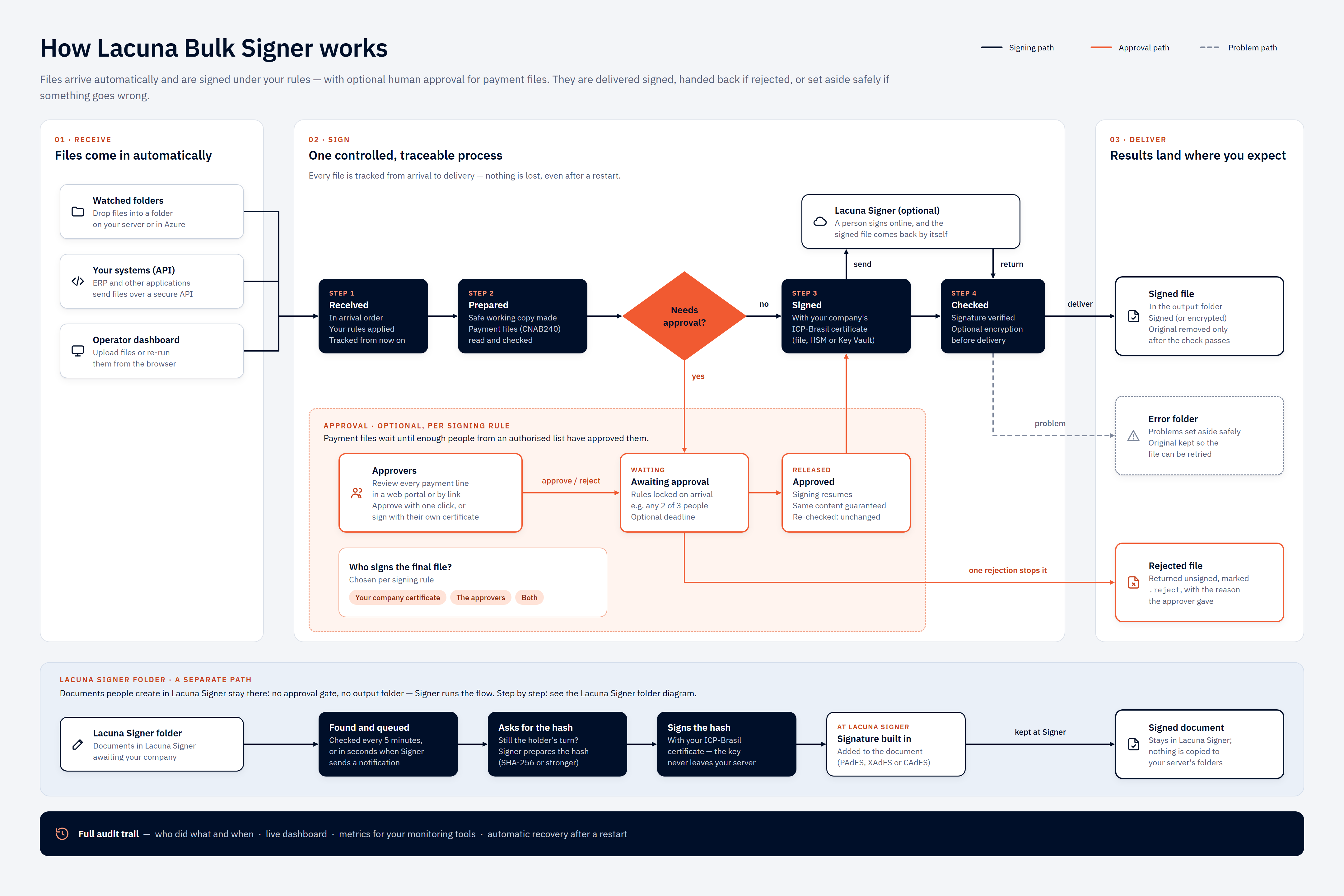
Select the diagram to open it at full size.
The same pipeline, with the stages as the service names them:
  input/ folder ────┐
  POST /api/files ──┼──▶ Queue ──▶ Claim ──▶ [gates] ──▶ Sign ──▶ Verify ──┬──▶ output/
  dashboard upload ─┘                                                      │    (output/*.enc
                                                              on failure   │     when encryption
                                                                           └──▶ error/    is on)

  [gates], both opt-in per signing profile and skipped entirely when unconfigured:
      CNAB240 parse   — refuse a non-compliant remessa, or one whose payment dates have passed
      Approval gate   — park in AwaitingApproval until a quorum of named people approves
                        (and, where the rule says so, co-signs with their own certificates)
Every step is recorded in the operational store (job history + operational events) and in the structured log file; the events are readable on the dashboard's Events page. The dashboard and the REST API read the same data and trigger the same actions.
Quickstart — Docker
Using the deployment package provided by Lacuna Software, plus the image from Lacuna's private Docker image repository — see Obtaining the product:
cd deploy/docker

docker login <lacuna-registry> --username <registry-username>   # the compose file names the repository

cp .env.sample .env
mkdir -p data logs config
cp ../appsettings.Production.json.sample config/appsettings.Production.json

# Edit config/appsettings.Production.json and .env — at minimum:
#   - Signing__PkiSdkLicense       (base64 license string from Lacuna Software)
#   - Auth__ApiKey                 (>= 16 characters; use a random value)
#   - Signing:Certificate:Pfx:Path (and a sibling .pfx file in config/) — or pick another source

sudo chown -R 1654:1654 data logs   # the container runs as UID 1654 on Linux hosts
docker compose up -d
curl http://localhost:8080/api/health
Sign in to the dashboard at http://localhost:8080/ using the configured Auth:ApiKey.
For Linux systemd, Windows Service, and foreground installs, see Installation.
Documentation
| Topic | Page |
|---|---|
| Install the service on any supported target | Installation |
| Scale out on Azure App Service, step by step | Azure App Service (cluster mode) |
| What running more than one instance does not give you | High availability and its limits |
Every appsettings.json key (type, default, environment override) | Configuration |
| Picking and configuring a certificate source (PFX / PKCS#11 / Windows store / Azure Key Vault) | Certificates |
| Secret handling, API-key rotation, file ACLs, log redaction | Security |
| Day-2 operations and the job lifecycle | Operations |
| The Blazor operator console | Dashboard |
| Reading the per-stage timing panel | Job statistics |
| Optional Azure Application Insights export | Telemetry |
The REST surface and the code-tagged error envelope | REST API |
| Post-signing encryption (BSENC v1) | Encryption |
| Routing a folder through Lacuna Signer for human signing | Lacuna Signer integration |
| Parsing and validating Banco do Brasil payment files | CNAB240 payment files |
| Parking a payment file on a quorum of approvers | Approvals |
| Retention defaults and what is (and is not) auto-pruned today | Retention |
| Failure modes and diagnosis | Troubleshooting |
| Reference scripts — decrypt, Key Vault provisioning, Entra app registration | Samples |
When the service is running, a live OpenAPI reference is served at /scalar/v1.
Reading order
| If you are… | Start at |
|---|---|
| Installing the service for the first time | Installation → Configuration → Certificates |
| Wiring an automated system to the REST API | REST API → Security → Troubleshooting |
| Operating an existing install | Operations → Dashboard → Troubleshooting |
| Routing a watched folder to a signing profile, or finding out why a folder's files are not moving | Operations → Dashboard → Configuration |
| Finding out who paused the pipeline, changed a profile, decided an approval or cleared the jobs | Dashboard → REST API → Retention |
| Clearing jobs, or deleting one | Operations → Retention |
| Diagnosing slow throughput | Job statistics → Certificates → Telemetry |
| Keeping the signing key off the host | Certificates → Samples → Security |
| Enabling encryption | Encryption → Security → Samples |
| Routing a folder through Lacuna Signer (human signing) | Lacuna Signer integration → Configuration → Operations |
| Signing bank payment files | CNAB240 payment files → Approvals → Security |
| Putting an approval step in front of the signer | Approvals → Configuration → Security |
| Signing in with organizational accounts | Installation → Configuration → Security |
| Running with no durable local disk | Configuration → Installation → Certificates |
| Running more than one instance | High availability and its limits → Azure App Service → Configuration |
| Keeping the log stream when the host's disk does not survive | Configuration → Retention |
| Asking approvers for a second factor | Approvals → Configuration → Security |
| Backing up the operational store | Retention → Configuration |