Amplia
Amplia is a platform for creating and managing Certification Authorities (CAs) or entire Public Key Infrastructures (PKIs).
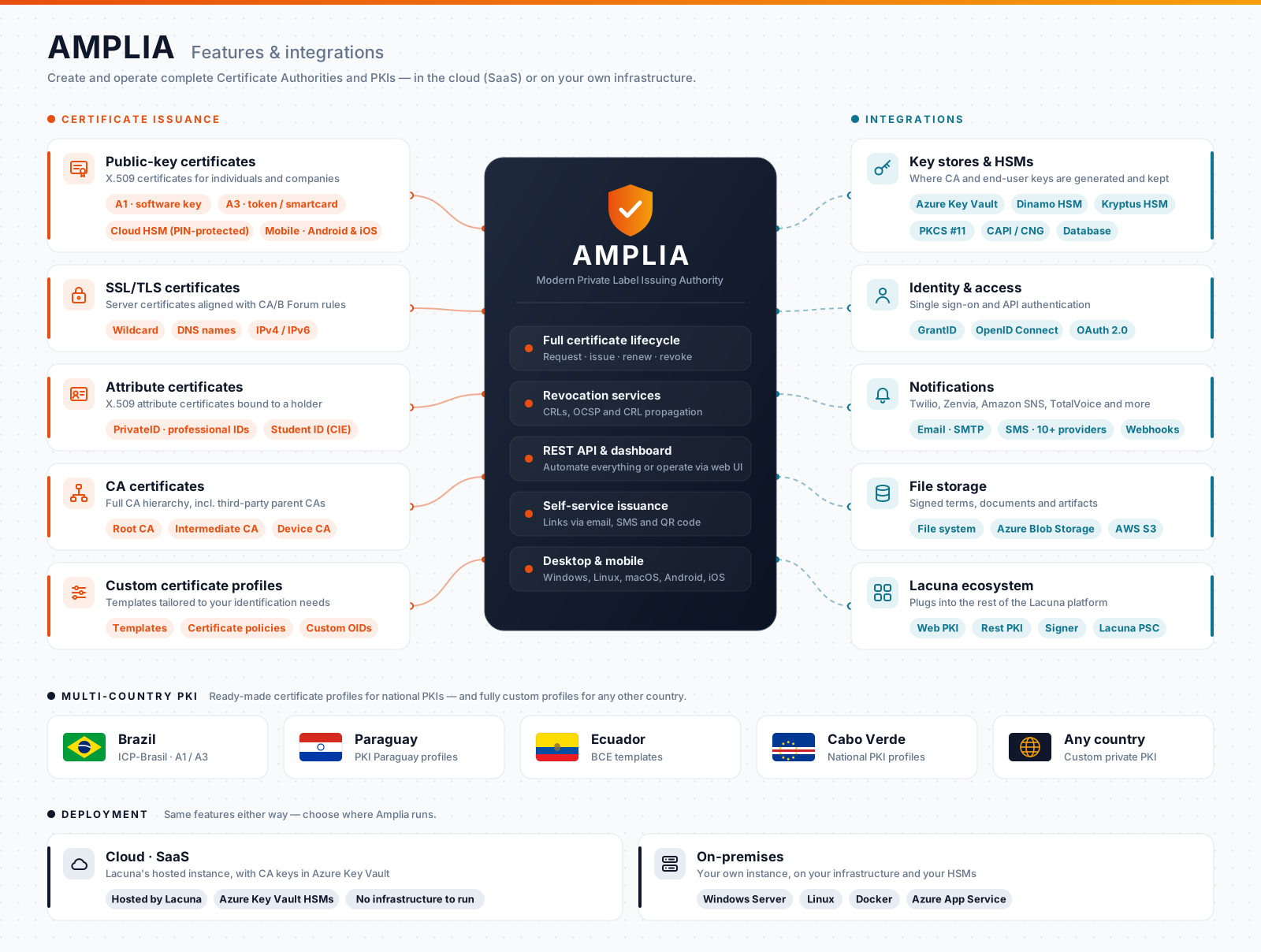
Features
Certificate types
- Public-key certificates: X.509 certificates for individuals and companies. The holder's key can be generated in software (A1), on a token or smartcard (A3), or kept by Amplia itself under PIN protection, as a cloud certificate (see cloud certificate management).
- SSL/TLS certificates: server certificates that follow the CA/Browser Forum guidelines, accepting wildcard names and IP addresses in addition to regular DNS names.
- Attribute certificates: instead of binding a key to its holder, they attest a characteristic of the holder, such as a professional ID (PrivateID) or a Brazilian student ID card (CIE).
- CA certificates: build the hierarchy itself, with root, intermediate and device CAs, or place your CAs under a parent CA run by a third party. See the Operation Guide.
- Custom profiles: templates define the fields, certificate policies and extensions of each kind of certificate, so that issued certificates fit your identification needs.
Issuance and operation
- Orders and self-service issuance: an operator or your system creates a certificate order, and the holder receives an issue link by email or SMS, or scans a QR code, to issue the certificate on their own. A code sent by SMS confirms the holder's identity.
- Desktop and mobile: holders issue on Windows, Linux or macOS, with the key in software or on a crypto device, or on Android and iOS phones.
- Renewal: certificates can be renewed, so the holder gets a new certificate in place of the one that is expiring.
- Revocation: Amplia publishes CRLs on the access domains you choose, can answer OCSP requests and can copy CRLs and CA certificates to external storage.
- Dashboard and REST API: operators manage CAs, templates and orders on a web dashboard, while your systems can create orders and issue certificates through the REST API.
Country profiles
Amplia ships with certificate profiles for the national PKIs of Brazil (ICP-Brasil), Paraguay, Ecuador and Cabo Verde. For any other country, or for a private PKI, you define the profiles yourself.
Integrations
- Key stores and HSMs: CA keys, and the keys of cloud certificates, can be kept on Azure Key Vault, on Dinamo or Kryptus HSMs, on any PKCS #11 device, on Windows CAPI/CNG providers or, encrypted, on the database. Where to keep them is one of the main decisions when planning a CA. See Key stores.
- Sign-in: users sign in through GrantID, Lacuna's OpenID Connect identity provider, which can require a digital certificate to log in. See Configure OpenID Connect.
- Notifications: issue links and confirmation codes reach holders by email and by SMS, through providers such as Twilio, Zenvia, Amazon SNS and TotalVoice. A webhook can notify your system whenever a certificate is issued.
- File storage: signed terms and other files are kept on the local file system, on Azure Blob Storage or on Amazon S3 (or an S3-compatible service). See Blob storage configuration.
- Lacuna products: Web PKI lets holders generate their key on their own computer during desktop issuance, Lacuna PSC relies on Amplia to host cloud certificates, and Amplia Reg adds a Registration Authority (RA) on top of it. Certificates issued by Amplia can be used right away to sign with Rest PKI and Signer.
Deployment
Choose where Amplia runs:
- Cloud (SaaS): use Lacuna's hosted instance, with nothing to install or maintain. CA keys are stored on Azure Key Vault HSMs.
- On-premises: run your own instance on Windows Server, Linux, Docker or Azure App Service, with the keys on the HSMs of your choice. Start with Amplia on-premises, which covers the decisions to make before installing.
Why the name?
AMPLIA is a recursive acronym for "AMPLIA is a Modern Private Label Issuing Authority".
See also
- Integration guide, to create orders and issue certificates through the API
- Operation Guide
- Amplia on-premises
- Changelog